
1. Introduction
Thank you for choosing the NUCARTURE Genial T81 Forehead Digital Infrared Thermometer. This device is designed for accurate and non-contact measurement of human body temperature. It provides quick and reliable readings, making it suitable for use with adults, children, and infants. Please read this manual thoroughly before use to ensure safe and proper operation.
2. Safety Information and Precautions
- Do not immerse the thermometer in water or other liquids.
- Keep the device away from direct sunlight, dust, and extreme temperatures.
- Avoid dropping the thermometer or subjecting it to strong impacts.
- Do not attempt to disassemble or repair the device yourself. Contact customer support if needed.
- This thermometer is intended for household use and should not replace professional medical advice. Consult a doctor if you have concerns about your temperature.
- Keep out of reach of children.
- Ensure the measurement area (forehead) is clean and dry for accurate readings.
3. Product Features
- Non-Contact Measurement: Measures temperature from the forehead without physical contact.
- Quick Response: Provides temperature readings in approximately 1 second.
- LCD Display: Clear digital display for easy reading.
- Fever Alarm: Visual and/or audible indication for elevated temperatures.
- Memory Function: Stores previous temperature readings.
- Unit Conversion: Easily switch between Celsius (°C) and Fahrenheit (°F).
- Automatic Shut-off: Powers off automatically after 60 seconds of inactivity to conserve battery.

Image 1: The NUCARTURE Genial T81 thermometer held by a hand, with an infant's face in the background. Icons above highlight key features: 60 seconds auto-off, forehead measurement, memory function, Celsius/Fahrenheit exchange, and a three-color LED backlight. The display shows a temperature of 37.1°C with a green backlight, indicating normal temperature. Below, examples of the display colors for different temperature ranges are shown: green for normal (e.g., 98.6°F), blue for slightly elevated (e.g., 99.4°F), and red for fever (e.g., 101.8°F).
4. Components and Parts Identification
Familiarize yourself with the main components of your thermometer:
- Measurement Sensor: Located at the front, used to detect infrared heat.
- LCD Display: Shows temperature readings, mode, and other indicators.
- Scan/Measurement Button: Initiates temperature measurement.
- Mode Button: Switches between body and object modes (if applicable) or accesses settings.
- Memory Button: Recalls previous temperature readings.
- Battery Compartment: Located at the handle, for battery installation.
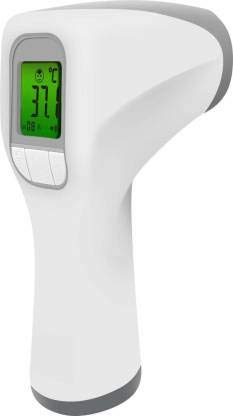
Image 2: A side view of the NUCARTURE Genial T81 thermometer, highlighting its ergonomic grip and the clear LCD display. The measurement button is visible on the handle.
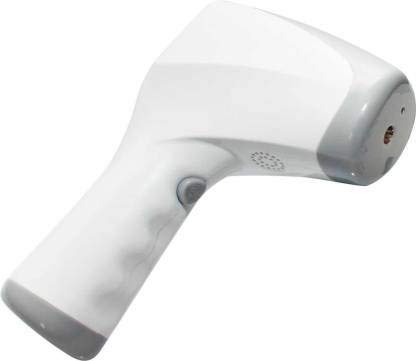
Image 3: An angled view of the NUCARTURE Genial T81 thermometer, clearly showing the infrared sensor at the front of the device, which is used for non-contact temperature measurement.
5. Setup
5.1 Battery Installation
- Open the battery compartment cover located at the bottom of the handle.
- Insert two AAA batteries, ensuring the correct polarity (+ and -) as indicated inside the compartment.
- Close the battery compartment cover securely.
5.2 Initial Power On
After installing batteries, press the Scan/Measurement button to turn on the thermometer. The device will perform a self-test, and the display will show all segments briefly before entering standby mode, ready for measurement.
6. Operating Instructions
6.1 Measuring Body Temperature
- Ensure the thermometer is in Body Temperature mode (usually indicated by a body icon on the display). If not, press the Mode button to switch.
- Hold the thermometer approximately 1-5 cm (0.4-2 inches) from the center of the forehead.
- Press the Scan/Measurement button once.
- The temperature reading will appear on the LCD display within 1 second, accompanied by a beep.
- The backlight color will indicate the temperature status:
- Green: Normal temperature.
- Blue: Slightly elevated temperature.
- Red: Fever (temperature above the set fever alarm threshold).

Image 4: The NUCARTURE Genial T81 thermometer showing a temperature reading of 36.8°C with a green backlight, illustrating its "Quick Response" feature, which provides a beep alarm and measurement in 1 second.
6.2 Switching Between Celsius (°C) and Fahrenheit (°F)
With the thermometer powered on and in standby mode, press and hold the Mode button for a few seconds until the unit changes from °C to °F or vice versa. Release the button when the desired unit is displayed.
6.3 Memory Function
To recall previous temperature readings, press the Memory button. Each press will cycle through stored measurements. The thermometer typically stores the last several readings.
6.4 Fever Alarm
The thermometer is equipped with a fever alarm feature. If the measured body temperature exceeds a predefined threshold (e.g., 37.4°C or 99.3°F), the display backlight will turn red, and an audible alarm may sound, indicating a potential fever.

Image 5: This image illustrates the visual fever alarm system of the NUCARTURE Genial T81 thermometer. Three thermometer displays are shown: one with a green backlight for normal temperature (36.7°C), one with a yellow/orange backlight for danger of fever (37.4°C), and a family portrait in the background. This visually communicates the different temperature statuses.
7. Maintenance
7.1 Cleaning
- Use a soft, dry cloth to clean the thermometer body.
- For the sensor lens, gently wipe with a cotton swab slightly moistened with alcohol. Do not use abrasive cleaners or immerse the device.
- Ensure the thermometer is completely dry before storage or next use.
7.2 Storage
- Store the thermometer in a cool, dry place, away from direct sunlight and extreme temperatures.
- If the thermometer will not be used for an extended period, remove the batteries to prevent leakage.
7.3 Battery Replacement
When the low battery indicator appears on the display, replace the batteries as described in Section 5.1. Always use new AAA batteries of the same type.
8. Troubleshooting
| Problem | Possible Cause | Solution |
|---|---|---|
| No power / Display blank | Batteries incorrectly installed or depleted. | Check battery polarity, replace with new batteries. |
| Inaccurate readings |
|
|
| "Lo" or "Hi" displayed | Temperature is outside the measurable range. | Ensure measurement is within the specified operating range. |
9. Specifications
| Feature | Detail |
|---|---|
| Model | T81 |
| Measurement Method | Non-contact infrared |
| Measurement Range (Body) | 90°F to 109.2°F (32°C to 43°C) |
| Accuracy | ±0.2°C (±0.4°F) for 35°C-42°C (95°F-107.6°F) |
| Measurement Distance | 1-5 cm (0.4-2 inches) |
| Measurement Time | Approximately 1 second |
| Display Unit | Celsius (°C) / Fahrenheit (°F) |
| Memory Storage | Last several readings |
| Automatic Shut-off | 60 seconds |
| Power Supply | DC 3V (2 x AAA batteries) |
| Item Weight | 200 g |
| Package Dimensions | 20 x 20 x 20 cm |
10. Warranty and Support
NUCARTURE products are manufactured to high-quality standards. For warranty information, technical support, or service inquiries, please refer to the warranty card included with your product or contact NUCARTURE customer service through their official website or the retailer where the product was purchased. Please retain your proof of purchase for warranty claims.