JENSEN JEP-650 Portable Digital AM/FM Weather Radio User Manual
Model: JEP-650
Introduction
The JENSEN JEP-650 Self-Powered AM/FM Weather Band Radio and Flashlight is a valuable tool designed to keep you informed and out of harm’s way when there’s an emergency situation. This versatile device combines essential communication and utility features for preparedness in various conditions.

Front view of the JENSEN JEP-650 Portable Digital AM/FM Weather Radio, showcasing its display, controls, and integrated flashlight.
Key Features
- Receives instant 24-hour weather, marine forecast, and weather alert Information broadcast by NOAA on all 7 weather band frequencies.
- Instantly switches to weather broadcast when alert signal is received.
- AM/FM frequency synthesized digital tuner.
- Rotary telescopic FM antenna.
- AM antenna is internal.
- Built-in flashlight for illumination.
- Integrated siren for emergency signaling.
- Multiple power options: internal rechargeable Lithium-Ion battery, solar panel, dynamo hand crank, and 3 x 'AA' batteries (not included).
- USB emergency charging port for external devices.
- Backlit, easy-to-read LCD display.
- Metal carabiner for convenient attachment.
- Handy carrying strap with storage compartment.
Product Overview
A visual guide to the JEP-650's key components and features.
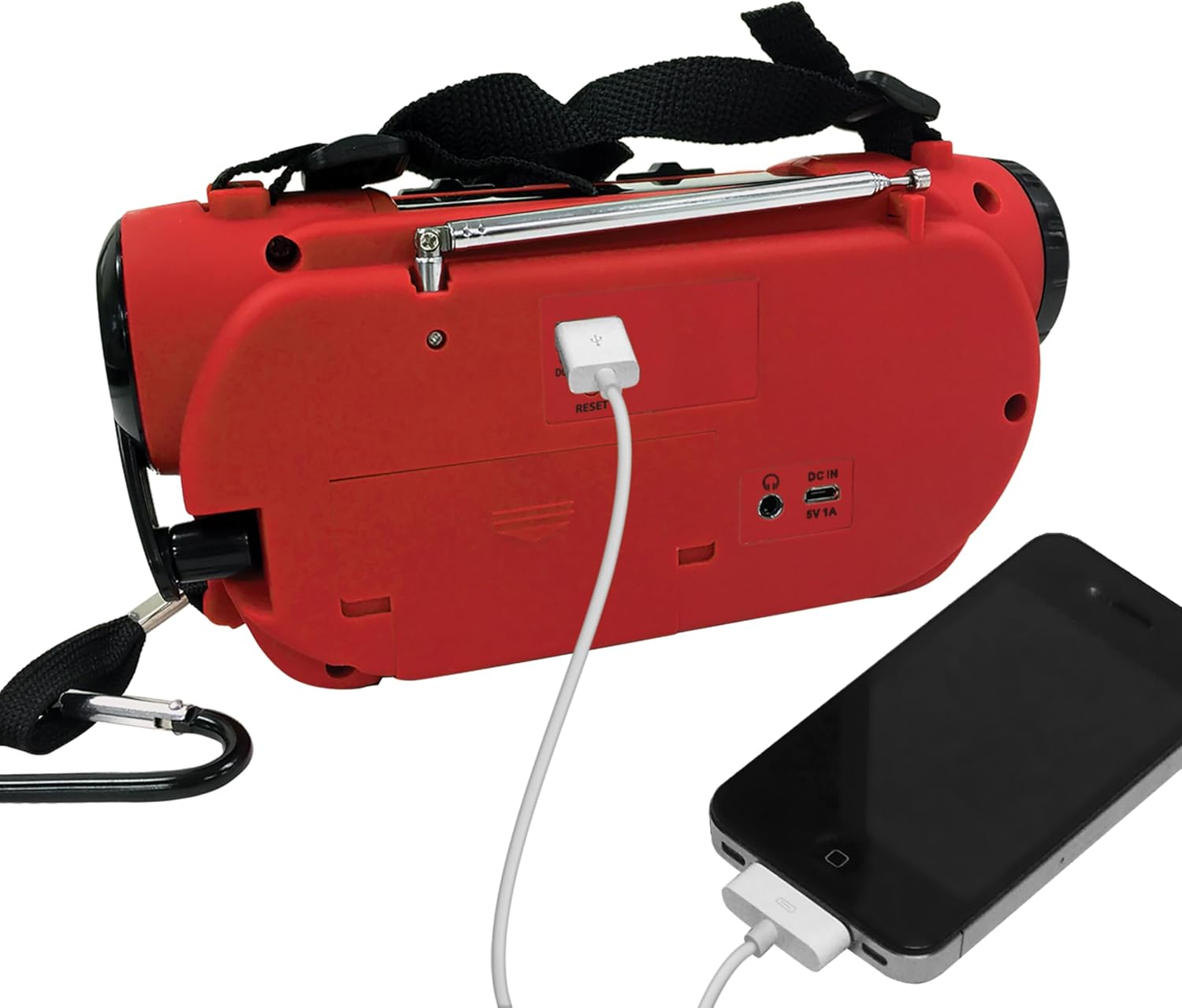
Rear view of the JEP-650, highlighting the USB emergency charging port and DC IN port.

Detailed view of the dynamo hand crank, used for manual power generation.

Close-up of the powerful multi-LED flashlight, essential for low-light conditions.

The JEP-650 in an emergency scenario, illustrating its weather alert capabilities.
Setup
Powering the Unit
The JEP-650 offers multiple power options to ensure continuous operation:
- Internal Rechargeable Lithium-Ion Battery: This built-in battery can be charged using the top-mounted solar panel or the side-mounted dynamo hand crank.
- 'AA' Batteries: For extended use or as a backup, the unit can also operate on three 'AA' size batteries (not included). Ensure correct polarity when inserting.
Initial Charge
Before first use, it is recommended to fully charge the internal Lithium-Ion battery using either the solar panel (place in direct sunlight) or the hand crank (rotate for several minutes). This ensures optimal performance and battery longevity.
Operating Instructions
Radio Operation
- AM/FM Tuning: Use the 'TUNE+' and 'TUNE-' buttons to adjust the frequency. The digital display will show the current station. Extend the telescopic antenna for better FM reception.
- NOAA Weather Band: Switch to the Weather Band (WB) mode to access all 7 NOAA weather channels. The unit will automatically switch to a weather broadcast when an alert signal is received, providing critical information during severe weather or civil emergencies.
- Volume Control: Use the 'VOL+' and 'VOL-' buttons to adjust the audio volume.
Flashlight
To activate the built-in flashlight, locate the 'LIGHT' switch on the top of the unit and slide it to the 'ON' position. Slide it back to 'OFF' to turn off the flashlight.
Siren
For emergency signaling, slide the 'SIREN' switch on the top of the unit to the 'ON' position. The siren will emit a loud alert sound. Slide it back to 'OFF' to deactivate the siren.
USB Emergency Charging
Connect your compatible mobile device to the USB output port on the back of the JEP-650 using your device's charging cable. The internal rechargeable battery will provide emergency power to charge your device. Note that the charging speed may vary depending on the radio's charge level and the device being charged.
Maintenance
- Cleaning: Use a soft, dry cloth to clean the exterior of the unit. Do not use abrasive cleaners or solvents.
- Storage: Store the radio in a cool, dry place away from direct sunlight and extreme temperatures when not in use.
- Battery Care: To maintain the health of the internal rechargeable battery, it is recommended to fully charge it at least once every three months, even if the unit is not being used regularly.
Troubleshooting
| Problem | Solution |
|---|---|
| No Power / Unit Not Turning On | Ensure the internal rechargeable battery is charged using the solar panel or hand crank. If using 'AA' batteries, check if they are inserted correctly and are not depleted. |
| Poor Radio Reception | Fully extend the telescopic FM antenna. Try repositioning the unit to a location with better signal reception. For AM, rotate the unit for optimal signal. |
| USB Charging Not Working | Verify that the JEP-650's internal battery has sufficient charge. Ensure your device's charging cable is securely connected to both the radio and your device. Some devices may require more power than the emergency charger can provide. |
| Weather Alert Not Activating | Ensure the unit is set to the correct NOAA weather band frequency for your area. Check for local NOAA broadcast availability. |
Specifications
- Model: JEP-650
- Product Dimensions: 8 x 4.02 x 2.76 inches (20.32 x 10.21 x 7.01 cm)
- Item Weight: 1 pound (0.45 kg)
- Power Source: Corded Electric, Solar Powered, Battery Powered (Internal Lithium Ion, 3 x 'AA' not included)
- Tuner Technology: FM, AM
- Radio Bands Supported: FM, AM, NOAA Weather Band (7 channels)
- Special Feature: Built-In Flashlight, Siren, USB Emergency Charging
- Connectivity Technology: USB
- Display Technology: LCD (Backlit)
- Color: Red
- Manufacturer: SPECTRA MERCHANDISING

Dimensions of the JEP-650 unit.
Warranty and Support
For detailed warranty information, product registration, and technical support, please visit the official Jensen website or contact their customer service department. Keep your purchase receipt for warranty claims.
Proposition 65 Warning: This product contains chemicals known to the State of California to cause cancer and birth defects or other reproductive harm.


