
1. Introduction
Thank you for choosing the Brightech Saturn Floor Lamp. This contemporary floor lamp features a unique design with three circular LED lights, offering versatile illumination for your living room, bedroom, or office. Its energy-efficient LED technology and durable construction ensure long-lasting performance. This manual provides essential information for safe setup, operation, and maintenance of your new lamp.

Image 1.1: The Brightech Saturn Floor Lamp in a modern setting.
2. Safety Information
- Electrical Safety: Always unplug the lamp from the power outlet before cleaning or performing any maintenance. Do not operate the lamp with a damaged cord or plug.
- Indoor Use Only: This lamp is designed for indoor use. Do not expose it to water or high humidity.
- Stable Placement: Ensure the lamp is placed on a stable, level surface to prevent tipping. The weighted base provides stability.
- LED Lights: The integrated LED lights do not generate significant heat, reducing the risk of accidental burns compared to traditional bulbs. However, avoid direct prolonged eye exposure to the light.
- Children and Pets: Keep the lamp out of reach of small children and pets to prevent accidental damage or injury.
3. Package Contents
Carefully unpack your Brightech Saturn Floor Lamp and ensure all components are present:
- Lamp Pole with integrated arms
- Weighted Base
- 3 x LED Light Rings (pre-attached or to be attached during assembly)
- Power Cord with Foot Pedal Switch

Image 3.1: Unpacked components of the Saturn Floor Lamp.
4. Setup Instructions
Follow these steps to assemble your Brightech Saturn Floor Lamp:
- Attach the Base: Carefully screw the lamp pole into the weighted base until secure. Ensure the power cord passes through the designated opening in the base.
- Attach LED Rings: The three LED light rings are designed to attach to the arms extending from the lamp pole. Gently push each ring onto its respective arm until it clicks securely into place. Ensure the electrical contacts align for proper illumination.
- Position the Lamp: Place the assembled lamp in your desired location, ensuring the power cord can reach an outlet without being strained or creating a tripping hazard.
- Plug In: Plug the power cord into a standard electrical outlet.

Image 4.1: Attaching an LED light ring to the lamp arm.
5. Operating Instructions
Your Brightech Saturn Floor Lamp is designed for simple operation:
- Power On/Off: The lamp is controlled by an on/off foot pedal switch located on the power cord. Step on the pedal once to turn the lamp on.
- Adjust Brightness: The foot pedal switch also cycles through three brightness settings. Step on the pedal repeatedly to adjust the light intensity from low to medium to high, and then off.
- Touch Control: The lamp also features touch control. Gently tap the metal pole or the base to cycle through the brightness settings and turn the lamp on/off.

Image 5.1: The convenient foot pedal switch for operation.
Video 5.2: An overview of the Saturn Floor Lamp, demonstrating its features and operation.
6. Maintenance
To keep your Brightech Saturn Floor Lamp in optimal condition:
- Cleaning: Ensure the lamp is unplugged before cleaning. Wipe the lamp pole and LED rings with a soft, dry microfiber cloth. Avoid using abrasive cleaners or solvents, as these may damage the finish or LED components.
- LED Lifespan: The integrated LED lights are designed for a long lifespan (approximately 3000 hours). They are not user-replaceable.
7. Troubleshooting
If you encounter issues with your lamp, refer to the following common solutions:
- Lamp Not Turning On:
- Check if the power cord is securely plugged into a working outlet.
- Ensure the foot pedal switch is fully pressed.
- Verify that all LED rings are properly attached to their respective arms, ensuring good electrical contact.
- Lights Flickering or Dimming Unexpectedly:
- Check for loose connections at the LED rings or the power cord.
- Ensure the lamp is not connected to a dimmer switch other than its integrated one, as this can cause compatibility issues.
- One LED Ring Not Lighting Up:
- Gently re-seat the affected LED ring onto its arm to ensure proper contact.
- If the issue persists, contact customer support for assistance.
8. Specifications
| Feature | Detail |
|---|---|
| Model Number | FL-SATRN-BRS |
| Product Dimensions | 1.18"D x 1.97"W x 66"H |
| Item Weight | 6.5 Pounds |
| Finish Type | Gold/Brass |
| Base Material | Brass |
| Light Source Type | LED |
| Number of Light Sources | 3 |
| Wattage | 14 Watts |
| Brightness | 1150 Lumens |
| Light Color | Warm White |
| Control Method | Foot Pedal Switch, Touch |
| Power Source | Corded Electric |
| Room Type | Living Room, Bedroom, Office |
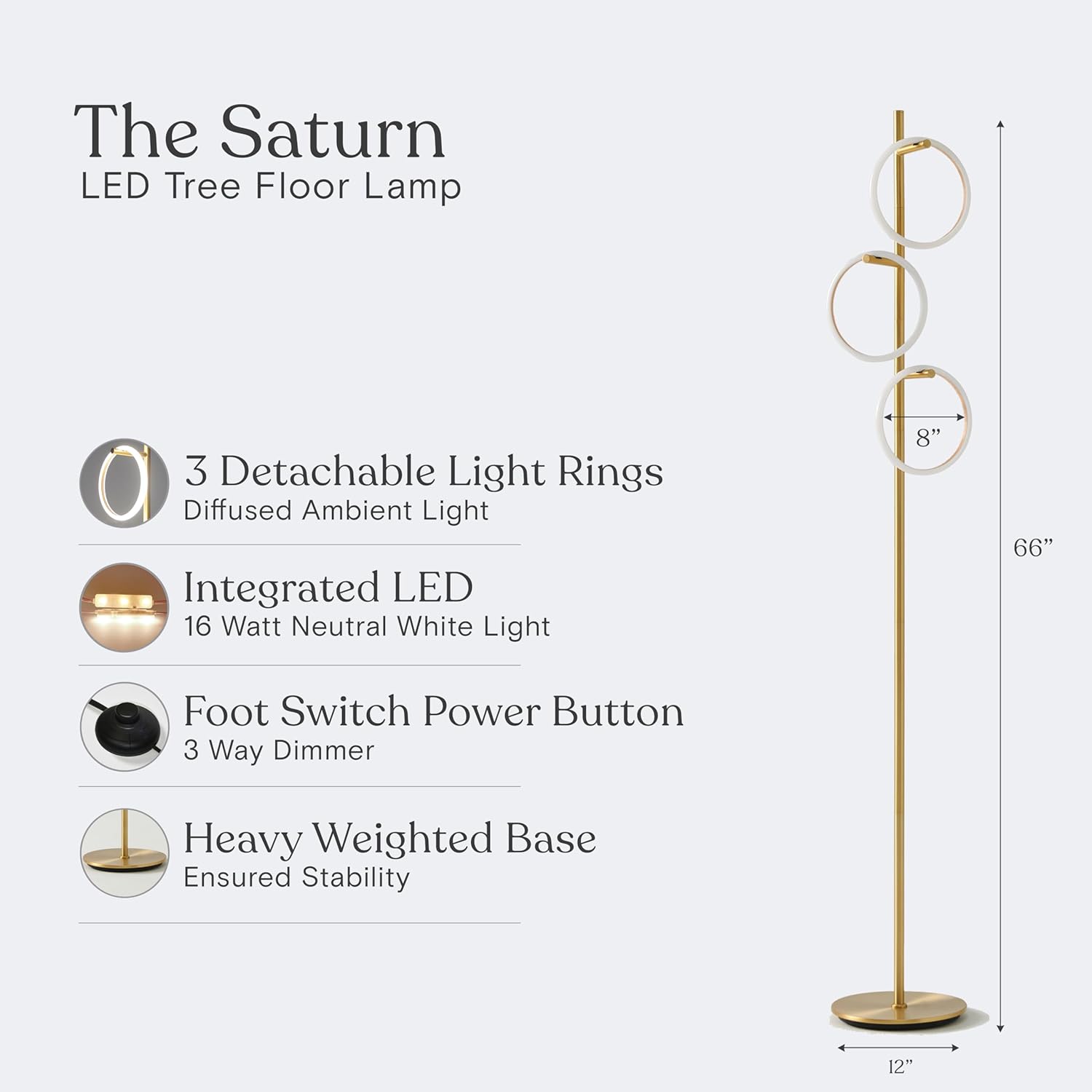
Image 8.1: Product dimensions and key features.

Image 8.2: Lighting Facts and estimated yearly energy cost.
9. Warranty & Support
Brightech USA stands behind the quality of its products. The Brightech Saturn Floor Lamp comes with an industry-leading 3-year warranty covering defects, malfunctions, or sudden failures when purchased through Brightech. For any questions, troubleshooting assistance, or warranty claims, please contact our friendly USA-based support team.
For more information and to explore other Brightech products, visit the Brightech Store.


