
Introduction
This manual provides comprehensive instructions for the installation, operation, and maintenance of your ClimaTek T6 Pro Programmable Thermostat. This device is designed as an upgraded replacement for Honeywell/Resideo T6 Pro models, offering precise temperature control for 3 Heat / 2 Cool HVAC systems. Please read this manual thoroughly before installation and operation to ensure proper functionality and safety.
Setup and Installation
The ClimaTek T6 Pro Thermostat is designed for wall-mount installation and operates on a 24 Volts (AC) hardwired electric system with battery backup. Due to the nature of HVAC systems and electrical connections, professional installation is highly recommended to ensure safety and correct wiring.
Before beginning installation, ensure the power to your HVAC system is turned off at the circuit breaker to prevent electrical shock. Refer to the wiring diagram provided with your specific unit or consult a qualified HVAC technician for detailed installation steps.
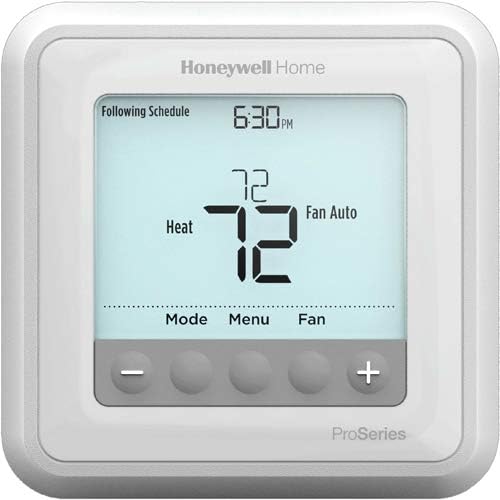
Figure 1: Front view of the ClimaTek T6 Pro Programmable Thermostat. The LCD screen displays the current temperature (72 degrees), operating mode (Heat), and fan setting (Fan Auto). Below the screen are touch buttons for Mode, Menu, Fan, and temperature adjustment (+ and -).
Mounting
- Ensure the mounting location is away from direct sunlight, drafts, or heat sources that could affect temperature readings.
- Mount the thermostat on an interior wall, approximately 5 feet (1.5 meters) above the floor.
- Secure the mounting plate to the wall using appropriate screws.
- Connect the wiring according to the system's requirements and the thermostat's wiring diagram.
- Attach the thermostat body to the mounting plate.
Operating Instructions
The ClimaTek T6 Pro features a clear LCD display and touch controls for easy operation. It is a programmable thermostat, allowing you to set schedules for energy efficiency and comfort.
Basic Controls
- Display: The LCD screen shows the current temperature, time, operating mode, and fan status. It also features a backlight for visibility in low light conditions.
- Mode Button: Press to cycle through operating modes such as Heat, Cool, Auto, Off, or Em Heat (Emergency Heat), depending on your system configuration.
- Menu Button: Accesses advanced settings, programming options, and system information.
- Fan Button: Controls the fan operation, typically cycling between Auto (fan runs only when heating/cooling) and On (fan runs continuously).
- Temperature Adjustment Buttons (+/-): Use these buttons to increase or decrease the desired temperature setting.
Programming Schedules
Detailed instructions for setting up daily or weekly programs are available through the Menu button. This allows you to define different temperature settings for various times of the day to optimize comfort and energy savings. Consult the on-screen prompts or a more detailed programming guide for specific steps.
Maintenance
The ClimaTek T6 Pro Thermostat requires minimal maintenance to ensure optimal performance.
- Cleaning: Periodically wipe the thermostat's exterior with a soft, damp cloth. Do not use abrasive cleaners or solvents, as they may damage the finish or screen.
- Battery Replacement: The thermostat includes a battery backup feature. If the display indicates low battery or loses settings during a power outage, replace the batteries as instructed in the unit's specific battery compartment.
Troubleshooting
If you encounter issues with your ClimaTek T6 Pro Thermostat, consider the following common troubleshooting steps:
| Problem | Possible Cause | Solution |
|---|---|---|
| Thermostat display is blank or unresponsive. | No power, dead batteries (if applicable), or wiring issue. | Check circuit breaker for HVAC system. Replace batteries. Verify wiring connections (consult professional if unsure). |
| HVAC system not responding to thermostat settings. | Incorrect mode selected, wiring issue, or system malfunction. | Ensure correct mode (Heat/Cool/Auto) is selected. Check wiring. Consult an HVAC technician. |
| Temperature readings seem inaccurate. | Thermostat exposed to drafts, direct sunlight, or heat sources. | Ensure thermostat is not in an area affected by external temperature influences. |
If these steps do not resolve the issue, it is recommended to contact a qualified HVAC technician or the product support for further assistance.
Specifications
| Feature | Detail |
|---|---|
| Brand | ClimaTek |
| Model Number | ClimaTek Rplm for HYWL # TH6320U2008 |
| Controller Type | Touch |
| Special Feature | Programmable |
| Color | White |
| Temperature Control Type | Programmable |
| Power Source | Hardwired Electric with Battery Backup |
| Voltage | 24 Volts (AC) |
| Display Type | LCD |
| Control Method | Touch |
| Mounting Type | Wall Mount |
| Backlight | Yes |
| Product Dimensions | 2 x 6 x 5 inches |
| Item Weight | 13.4 ounces |
Warranty Information
Specific warranty details for the ClimaTek T6 Pro Programmable Thermostat are typically provided with the product packaging or can be obtained directly from the manufacturer, ClimaTek, or your authorized seller. It is recommended to retain your proof of purchase for warranty claims.
Extended protection plans may also be available for purchase, offering additional coverage beyond the standard manufacturer's warranty. Please refer to the terms and conditions of any such plans for full details.
Customer Support
For technical assistance, troubleshooting beyond this manual, or warranty inquiries, please contact ClimaTek customer support. You may also reach out to the seller from whom you purchased the product, such as North America HVAC, for assistance.
For general inquiries or to explore other products, visit the official ClimaTek Store on Amazon.