Introduction
This manual provides instructions for the VINABTY replacement remote control, compatible with various Sharp TV models. This remote is designed to function without programming, offering a direct replacement experience for your original Sharp TV remote.
Compatible Models Include:
- GB058WJSA, GA983WJSA, GA902WJSA, GB005WJSA
- GA903WJSA, BDAMS20, BD-AMS20
- LC-60C7450, LC-60C7450U, LC-60C8470U
- LC-60LE655U, LC-60LE657U, LC-60LE745, LC-60LE745U, LC-60LE755U, LC-60LE757U, LC-60LE845U, LC-60LE847, LC-60LE847U, LC-60LE857U
- LC-70C7450U, LC-70LE652U, LC-70LE755U, LC-70C8470U, LC-70LE655U, LC-70LE657U, LC-70LE745, LC-70LE745U, LC-70LE757U, LC-70LE845U, LC-70LE847, LC-70LE847U, LC-70LE857U
- LC-80LE657U, LC-80LE757U, LC-80LE844, LC-80LE844U, LC-80LE844UB, LC-80LE857U
- LC-90LE657U, LC-90LE745, LC-90LE745U
- LC-40LE830, LC-46LE830, LC-52LE830, LC-60LE830, LC-40LE732ENET
Setup
Battery Installation
The remote control requires two AAA batteries (not included) for operation. Follow these steps to install the batteries:
- Locate the battery compartment on the back of the remote control.
- Press down on the latch and slide the battery cover downwards to open it.
- Insert two AAA batteries, ensuring the positive (+) and negative (-) terminals align correctly with the markings inside the compartment.
- Slide the battery cover back into place until it clicks securely.

Image: Rear view of the remote control with the battery cover open, illustrating the correct placement of AAA batteries.
Note: No programming or setup is required. Once batteries are installed, the remote is ready for use with compatible Sharp TV models.
Operating Instructions
This remote control is designed for intuitive use. Below is a general overview of its functions.
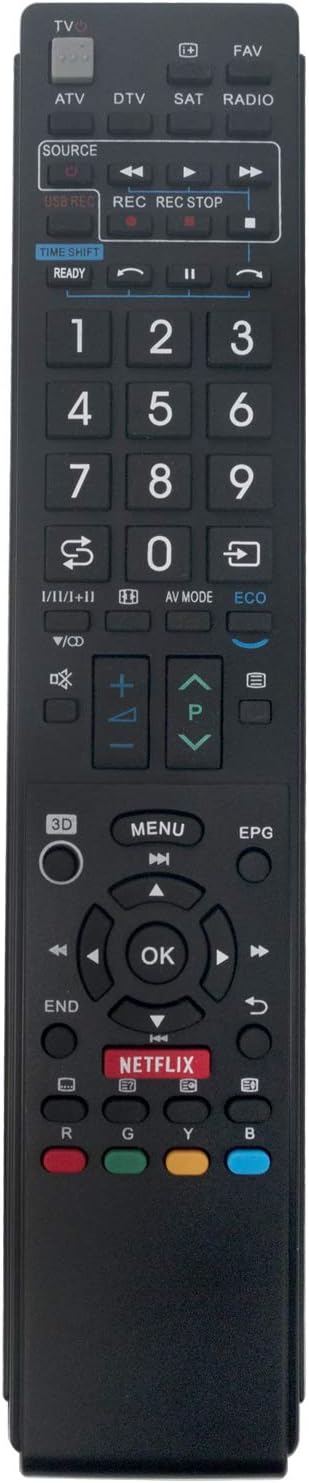
Image: Front view of the VINABTY remote control, displaying all buttons and their respective functions.
Key Functions
- TV Power (TV button): Turns the television on or off.
- Source: Selects the input source (e.g., HDMI 1, HDMI 2, AV).
- Number Buttons (0-9): Directly selects channels.
- Volume Up/Down (+/-): Adjusts the volume level.
- Channel Up/Down (P +/-): Changes the television channel.
- Mute: Mutes or unmutes the television audio.
- Navigation Buttons (Up, Down, Left, Right, OK): Used to navigate menus and confirm selections.
- Menu: Opens the TV's main menu.
- Exit/End: Exits the current menu or function.
- Netflix: Direct access button for the Netflix application.
- Color Buttons (Red, Green, Yellow, Blue): Used for specific functions within certain TV applications or menus, as indicated on screen.
- Playback Controls (Play, Pause, Stop, Rewind, Fast Forward): Controls media playback.
Maintenance
To ensure the longevity and proper functioning of your remote control, follow these maintenance guidelines:
- Cleaning: Wipe the remote control with a soft, dry cloth. For stubborn dirt, lightly dampen the cloth with water or a mild cleaning solution. Avoid using harsh chemicals or abrasive cleaners.
- Battery Replacement: Replace batteries when the remote's response becomes sluggish or stops working. Always replace both batteries at the same time with new ones of the same type (AAA).
- Storage: Store the remote in a cool, dry place away from direct sunlight and extreme temperatures. If the remote will not be used for an extended period, remove the batteries to prevent leakage.
- Avoid Drops: Protect the remote from physical impact, as drops can damage internal components.
Troubleshooting
If you encounter issues with your remote control, refer to the following common problems and solutions:
| Problem | Possible Cause | Solution |
|---|---|---|
| Remote not working | Dead or incorrectly inserted batteries. | Replace batteries with new AAA batteries, ensuring correct polarity (+/-). |
| Remote works intermittently | Weak batteries or obstruction between remote and TV. | Replace batteries. Ensure a clear line of sight to the TV's IR receiver. |
| Specific buttons not responding | Dirt or debris under the button, or internal damage. | Clean the remote surface. If the issue persists, the remote may be damaged. |
| TV not responding to any remote command | TV's IR receiver is blocked or faulty. | Check for obstructions in front of the TV's IR receiver. Test with another remote if available. Power cycle the TV. |
Specifications
- Brand: VINABTY
- Model: GB058WJSA-983WJSA-902WJSA-005WJSA
- Compatible Devices: Sharp Televisions
- Special Feature: Ergonomic design
- Connector Type: Infrared
- Power Source: 2 x AAA Alkaline Batteries (not included)
- Product Dimensions: 24 x 5 x 1.5 cm
- Product Weight: 92 g
- Color: Black
Warranty and Support
For warranty information or technical support, please refer to the retailer or the VINABTY official website. Keep your purchase receipt as proof of purchase.
