
1. Introduction
Thank you for choosing the Massive Audio TX44 Bluetooth Marine Amplifier. This compact Class D amplifier is designed to deliver clean, full-range audio in challenging environments such as boats, UTVs, ATVs, and other outdoor vehicles. This manual provides essential information for proper installation, operation, and maintenance of your amplifier.
2. Safety Information
Please read all instructions carefully before installing and operating the amplifier. Failure to follow these guidelines may result in damage to the amplifier, vehicle, or personal injury.
- Always disconnect the vehicle's battery negative terminal before beginning any installation.
- Ensure proper grounding to prevent electrical hazards.
- Use appropriate gauge wiring for power and speaker connections as specified.
- Mount the amplifier securely in a location that allows for adequate ventilation and is protected from direct exposure to extreme elements, although the unit is waterproof.
- Avoid installing the amplifier in areas where it may interfere with vehicle safety systems or operation.
- Do not operate the amplifier if it is damaged or malfunctioning. Refer to the troubleshooting section or contact support.
- This product is designed for 12-volt DC negative ground systems only.
3. Product Features
The Massive Audio TX44 amplifier offers the following key features:
- 120W RMS Full-Range Power: Compact Class D amplifier delivering clean audio.
- Wireless Bluetooth Streaming: Seamless audio control from smartphones or tablets.
- Waterproof Marine Design: Sealed chassis, corrosion-resistant hardware, and conformal-coated PCB for harsh environments.
- Compact & Efficient: Small footprint for tight spaces, maintaining cool operation.
- Easy Installation & Control: Wide voltage support and flexible inputs for various audio systems.
4. Setup and Installation
Proper installation is crucial for optimal performance and longevity of your amplifier. If you are unsure about any step, consult a professional installer.
4.1 Mounting the Amplifier
Choose a mounting location that is secure, allows for adequate air circulation, and is accessible for wiring. The TX44's compact design allows for installation in various tight spaces. Ensure the mounting surface is flat and stable.

Figure 4.1: Dimensions of the Massive Audio TX44 amplifier. The unit measures approximately 216 mm (8.5 inches) in length, 108 mm (4.3 inches) in width, and 45 mm (1.8 inches) in height. These dimensions are crucial for planning the installation space.
- Place the amplifier in the desired mounting location and mark the positions for the mounting screws.
- Drill pilot holes if necessary, ensuring not to damage any vehicle components behind the mounting surface.
- Secure the amplifier using appropriate screws and washers.
4.2 Wiring Connections
All wiring should be done with the vehicle's battery disconnected. Use high-quality marine-grade wiring for all connections.
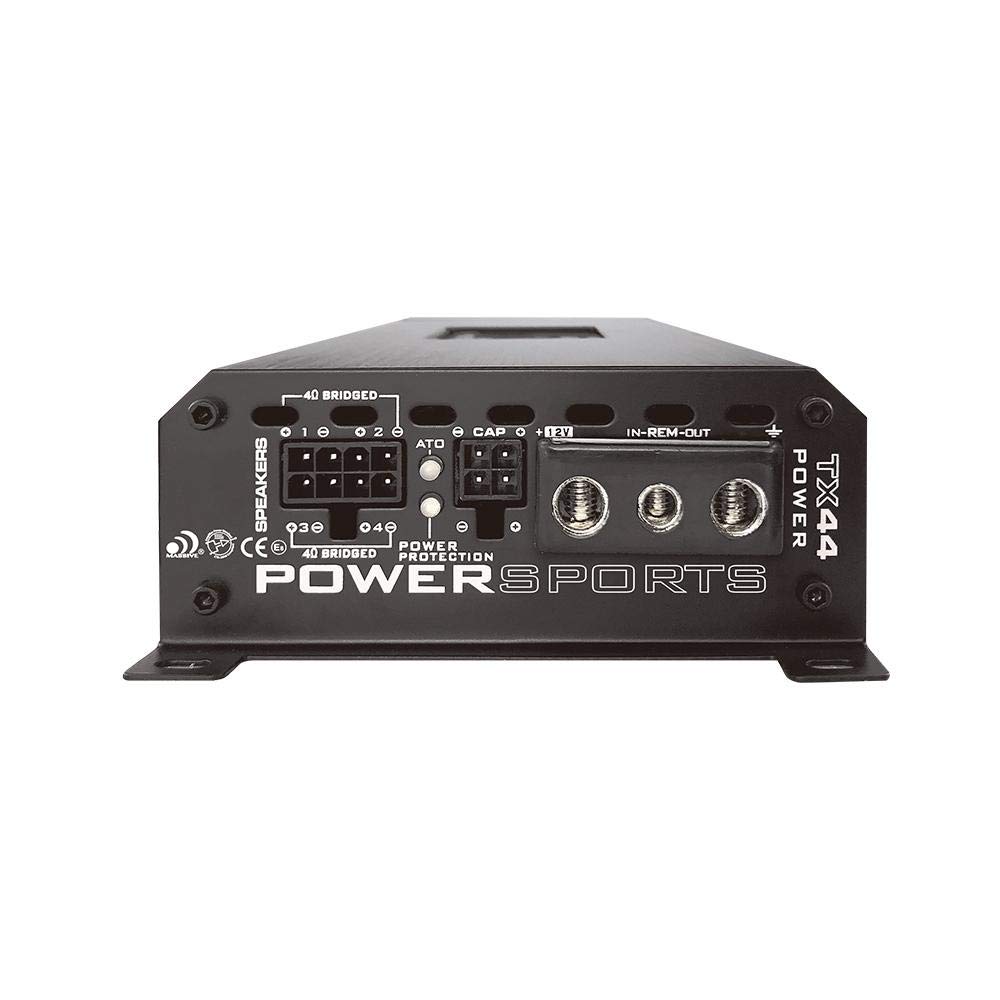
Figure 4.2: Rear view of the Massive Audio TX44 amplifier showing the power, ground, remote, and speaker output terminals. The power input requires a 12V connection, while the speaker outputs are clearly labeled for channel 1, 2, 3, and 4.
4.2.1 Power Connections
- Power (BAT+): Connect a fused power cable (minimum 8 AWG recommended) directly from the positive terminal of the vehicle's battery to the "12V" terminal on the amplifier. Install a fuse holder within 18 inches (45 cm) of the battery.
- Ground (GND): Connect a ground cable (same gauge as power) from the "GND" terminal on the amplifier to a clean, unpainted metal surface of the vehicle chassis. Ensure a solid, low-resistance connection.
- Remote (REM): Connect a remote turn-on wire from your head unit's remote output to the "IN-REM-OUT" terminal. This wire signals the amplifier to turn on and off with your audio system.
4.2.2 Speaker Connections
Connect your speakers to the "SPEAKERS" terminals. The TX44 is a 4-channel amplifier. Ensure correct polarity (+ to + and - to -) for all speakers.
- Connect Front Left speaker to Channel 1.
- Connect Front Right speaker to Channel 2.
- Connect Rear Left speaker to Channel 3.
- Connect Rear Right speaker to Channel 4.
- The amplifier supports 4 Ohm speaker loads per channel. Refer to the specifications for bridged mode wiring if applicable.
4.2.3 Input Connections
The TX44 offers both RCA (Line In) and Bluetooth inputs.

Figure 4.3: Top view of the Massive Audio TX44 amplifier showing the input connections (RCA) and control knobs for Level, HPF, LPF, and Crossover settings for both Front and Rear channels. The Bluetooth pairing button is also visible.
- RCA Inputs: Connect RCA cables from your head unit's pre-amp outputs to the "FRONT" and "REAR" RCA input jacks on the amplifier.
- Automatic Hi-Level Inputs: If your head unit does not have RCA outputs, you can use the automatic hi-level inputs. Connect speaker-level outputs from your head unit directly to the designated hi-level input terminals. The amplifier will automatically detect the signal and turn on.
4.3 Bluetooth Pairing
To stream audio wirelessly, you need to pair your device with the TX44 amplifier.
- Ensure the amplifier is powered on.
- Press and hold the Bluetooth button on the amplifier's control panel until the Bluetooth indicator light begins to flash, indicating pairing mode.
- On your smartphone or tablet, go to Bluetooth settings and search for available devices.
- Select "Massive Audio TX44" (or similar name) from the list.
- Once paired, the Bluetooth indicator light will become solid. You can now stream audio.
5. Operation
Once installed and powered, you can begin operating your TX44 amplifier.
5.1 Power On/Off
The amplifier will automatically turn on when it receives a remote turn-on signal from your head unit or detects an audio signal via the hi-level inputs. It will turn off when the signal is removed.
5.2 Adjusting Input Level (Gain)
The "LEVEL" controls (Front and Rear) adjust the input sensitivity of the amplifier. This should be set to match the output voltage of your head unit. Incorrect gain settings can lead to distortion or reduced dynamic range.
- Start with the head unit volume at about 75% of its maximum.
- Set the amplifier's "LEVEL" controls to minimum (fully counter-clockwise).
- Slowly increase the "LEVEL" control until you hear slight distortion, then back it off slightly.
- Repeat for both Front and Rear channels.
5.3 Crossover Settings
The TX44 features adjustable High-Pass Filter (HPF) and Low-Pass Filter (LPF) for precise sound tuning. These controls allow you to direct specific frequency ranges to your speakers.
- HPF (High-Pass Filter): Allows frequencies above the set point to pass through. Useful for full-range speakers to prevent them from playing low bass, which can cause distortion.
- LPF (Low-Pass Filter): Allows frequencies below the set point to pass through. Typically used for subwoofers.
- FULL: Bypasses the crossover, allowing all frequencies to pass.
Adjust the "CROSSOVER" switch to select HPF, LPF, or FULL mode for the respective channels, then use the corresponding knob to set the desired frequency.
6. Maintenance
The Massive Audio TX44 is designed for durability in harsh environments. Regular, simple maintenance can help ensure its long-term performance.
- Cleaning: Periodically wipe the amplifier's exterior with a soft, damp cloth to remove dust, dirt, and salt residue. Avoid using harsh chemicals or abrasive cleaners.
- Connections: Occasionally check all power, ground, and speaker connections to ensure they are secure and free from corrosion. Loose connections can lead to poor performance or damage.
- Ventilation: Ensure that the amplifier's cooling fins are not obstructed by debris or other objects to maintain proper heat dissipation.
- Waterproofing: While the unit is waterproof, avoid submerging it or directing high-pressure water jets directly at the connections.
7. Troubleshooting
If you experience issues with your TX44 amplifier, refer to the following common problems and solutions before contacting support.
| Problem | Possible Cause | Solution |
|---|---|---|
| No Power / Amplifier does not turn on |
|
|
| No Sound Output |
|
|
| Distorted Sound |
|
|
| Bluetooth Connection Issues |
|
|
8. Specifications
Technical specifications for the Massive Audio TX44 Bluetooth Marine Amplifier:
| Feature | Detail |
|---|---|
| Model | TX44 (MA-TX44) |
| Channels | 4-Channel |
| RMS Power (4Ω) | 120 Watts x 4 |
| Total Output Power | 960 Watts (Peak) |
| Voltage | 12 Volts DC |
| Minimum Supply Voltage | 0.2 Volts |
| Item Dimensions (L x W x H) | 9.76 x 4.25 x 1.6 inches (248 x 108 x 41 mm) |
| Item Weight | 4 Pounds (1.81 kg) |
| Material Type | Aluminum |
| Mounting Type | Surface Mount |
| Operating Temperature | Up to 320°F (160°C) - Note: This value seems unusually high for an operating temperature and might refer to a component's maximum tolerance. Normal operating temperatures for amplifiers are much lower. |
| Included Components | Massive Audio TX44 Car Amplifier |
| GTIN / UPC | 623169631573 |
9. Warranty & Support
9.1 Manufacturer's Warranty
This Massive Audio TX44 amplifier is covered by a manufacturer's warranty. Please refer to the warranty card included with your product or visit the official Massive Audio website for detailed terms and conditions regarding coverage, duration, and claim procedures. Keep your proof of purchase for warranty claims.
9.2 Customer Support
For technical assistance, troubleshooting beyond this manual, or warranty inquiries, please contact Massive Audio customer support. You can typically find contact information on the official Massive Audio website or through your authorized dealer.
Website: www.massiveaudio.com (Example, please verify official website)