
Kryptonite Kryptonite KryptoFlex 1018 10mm Combo Cable Bicycle Lock
Kryptonite KryptoFlex Bike Lock Cable User Manual
Model: Kryptonite KryptoFlex 1018 10mm Combo Cable Bicycle Lock
1. Introduction
Thank you for choosing the Kryptonite KryptoFlex Bike Lock Cable. This heavy-duty braided steel cable lock is designed to provide reliable anti-theft security for your bicycle and other outdoor equipment. This manual provides essential information for the proper setup, operation, and maintenance of your lock.
2. Key Features
- Cable Length: 6 feet (183 cm)
- Cable Width: 10mm thick braided steel
- Lock Type: Resettable 4-digit combination lock
- Locking Mechanism: Easy click locking, no key required for locking
- Portability: Coiled and compact design for easy transportation
- Combo Safe Program: Register your combination online at KryptoniteLock.com for retrieval if forgotten.
- Material: Durable Alloy Steel construction
- Warranty: Limited Lifetime Warranty
3. Setup and Initial Use
3.1 Setting Your Combination
Your KryptoFlex lock comes with a preset combination (usually 0000). To set your personal combination:
- Ensure the lock is open and set to the current combination (factory default is 0000).
- Locate the reset button or mechanism. This is typically a small knob or lever on the side of the lock body.
- Using a pen or small pointed object, press and hold the reset button.
- While holding the reset button, rotate the dials to your desired 4-digit combination. Choose a memorable number.
- Release the reset button. Your new combination is now set.
- Scramble the dials to lock the mechanism. Test your new combination to ensure it opens the lock before securing your property.

Figure 1: Close-up view of the combination dials and reset mechanism on the KryptoFlex lock. The image highlights the resettable 4-digit combination feature.

Figure 2: A detailed view of the combination lock, illustrating how a custom 4-digit code (e.g., 0005) is set on the dials.
Important: Remember your combination. Kryptonite offers a Combo Safe Program where you can register your combination to retrieve it if forgotten. It is highly recommended to utilize this service.
4. Operating Your Lock
4.1 Locking Your Bicycle
- Position your bicycle next to a secure, fixed object such as a bike rack, lamppost, or sturdy fence.
- Thread the KryptoFlex cable through the frame of your bicycle and around the fixed object. If possible, also include one or both wheels.
- Insert the free end of the cable into the locking mechanism until it clicks securely into place. No need to enter the combination to lock.
- Scramble the dials to a random set of numbers to secure the lock.

Figure 3: The Kryptonite KryptoFlex cable lock in its coiled state, ready for use or transport. This image displays the full length of the cable and the combination lock mechanism.
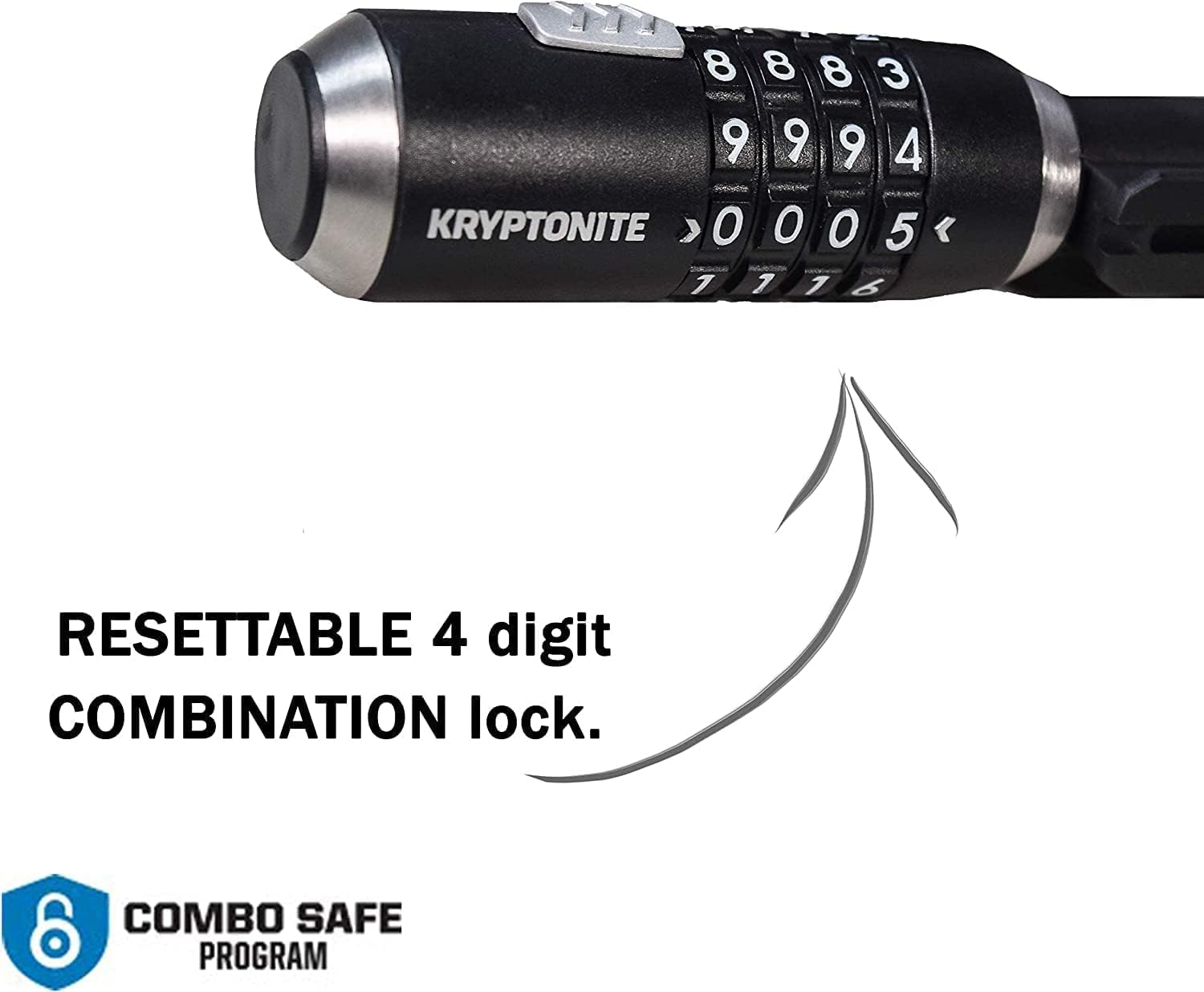
Figure 4: A bicycle is shown securely locked to a bike rack using the KryptoFlex cable. The cable passes through the bike frame and around the rack, illustrating effective theft deterrence.
4.2 Unlocking Your Bicycle
- Align the dials to your personal 4-digit combination.
- Pull the cable end out of the locking mechanism.
- Unthread the cable from your bicycle and the fixed object.
5. Maintenance
To ensure the longevity and smooth operation of your Kryptonite KryptoFlex lock, follow these maintenance tips:
- Lubrication: Periodically apply a small amount of graphite-based lubricant or a silicone spray to the locking mechanism and combination dials. This helps prevent corrosion and ensures smooth operation, especially in wet or dusty environments.
- Cleaning: Wipe down the cable and lock body with a damp cloth to remove dirt and grime. Avoid harsh chemicals that could damage the protective coating.
- Storage: When not in use, store the lock in a dry place to prevent rust and extend its lifespan.
6. Troubleshooting
| Problem | Possible Cause | Solution |
|---|---|---|
| Dials are stiff or hard to turn. | Dirt, grime, or lack of lubrication. | Clean the dials and apply a graphite-based lubricant or silicone spray. Work the dials back and forth to distribute the lubricant. |
| Lock won't open with the correct combination. | Combination was reset accidentally, or dials are not perfectly aligned. | Double-check that each number is precisely aligned with the indicator marks. If you registered your combination with the Combo Safe Program, retrieve it from there. Otherwise, try combinations close to your intended one. |
| Cable end does not insert or remove smoothly. | Debris in the locking mechanism or minor misalignment. | Inspect the opening for any obstructions. Apply lubricant to the insertion point. Ensure the cable end is straight when inserting. |
7. Product Specifications
- Model Name: Kryptonite KryptoFlex 1018 10mm Combo Cable Bicycle Lock
- Model Number: 5216
- UPC: 720018005216
- Cable Dimensions: 6 feet (183 cm) length, 10mm thickness
- Lock Type: 4-Digit Resettable Combination
- Material: Alloy Steel
- Color: Black
- Item Weight: Approximately 8 ounces (0.23 kg)
- Item Dimensions (LxWxH): 7.87 x 5.51 x 2.17 inches (coiled)
8. Warranty and Support
The Kryptonite KryptoFlex Bike Lock Cable is backed by a Limited Lifetime Warranty. For detailed warranty information, claims, or technical support, please visit the official Kryptonite website or contact their customer service directly.
Kryptonite Official Website: www.kryptonitelock.com
Combo Safe Program Registration: Register your combination here
Related documentsKryptonite KryptoFlex 1018 10mm Combo Cable Bicycle Lock


Ask a question about this manual
Ask about setup, troubleshooting, compatibility, parts, safety, or missing instructions. Manuals+ will review the question and use this page’s manual context to help answer it.