
Retekess EUF9482A
Retekess TD158 Wireless Pager System User Manual
Model: EUF9482A
1. Introduction
Thank you for choosing the Retekess TD158 Wireless Pager System. This system is designed to enhance efficiency and customer service in various environments such as restaurants, hospitals, food courts, and mobile takeaway services. It provides a reliable and convenient way to notify customers when their service is ready, reducing queues and improving overall operational flow.

This image displays the complete Retekess TD158 Wireless Pager System, featuring the white numeric keypad on the left and a stack of ten red pagers on the right. One pager is shown separately in the foreground, highlighting its illuminated number display and indicator lights.
2. Safety Information
- Do not expose the device to extreme temperatures or direct sunlight.
- Keep the device away from water and other liquids, except for the waterproof keypad surface.
- Use only the provided power adapters for charging.
- Do not attempt to disassemble or repair the device yourself. Contact authorized service personnel.
- Ensure proper ventilation when charging.
3. Package Contents
Please check the package contents upon unboxing to ensure all components are present:
- 1 x TD158 Keypad Transmitter
- 10 x TD158 Pagers (Rechargeable)
- 2 x Power Adapters
- 1 x User Manual

This image displays the typical contents of the Retekess TD158 Wireless Pager System package, which includes the main keypad, multiple pagers, a user manual, and two power adapters for charging.
4. Product Overview
4.1 Key Features
- 4 Customizable Alert Modes: Choose from vibration + buzzer + light, vibration + light, buzzer + light, or light only.
- Comfortable Touch Keypad: Sensitive and durable, designed for quiet operation.
- Waterproof and Oil-Resistant Material: Ensures normal operation even in humid environments like kitchens or hospitals.
- Adjustable Reminder Duration: Easily change call duration from 1s to 250s.
- Long Range Transmission: Stable AM technology transmits up to 100-300 meters (300m in open area, 150-200m indoors).
- Rechargeable Lithium Battery: 300 mAh built-in battery provides approximately 10 hours of operation for pagers.
4.2 Components
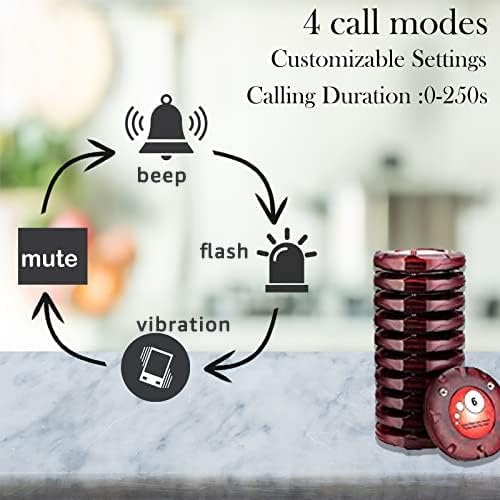
A visual representation of the four customizable alert modes available on the Retekess TD158 pagers: audible beep, visual flash, tactile vibration, and a mute option for silent alerts. The diagram illustrates how these modes can be combined or used individually.

This image provides a detailed view of the Retekess TD158 keypad, emphasizing its waterproof touch surface. Key functions such as 'set', 'up', 'down', 'back', 'call', and 'confirm' are clearly labeled, indicating the intuitive operation of the device.
5. Setup
5.1 Initial Charging
Before first use, fully charge all pagers and the keypad transmitter. Place the pagers on the charging base. The pager lights will indicate charging status (flashing while charging, solid when fully charged).
5.2 Pairing Pagers with Keypad
The pagers are typically pre-paired. If re-pairing is needed or for new pagers:
- Press the SETTING button (gear icon) on the keypad to enter setting mode.
- Enter the desired pager number (1-999) using the numeric keypad.
- Pick up the pager from the charging base and press the 'v' (confirm) button on the keypad within 3 seconds. The pager will vibrate/flash to confirm successful pairing.

This graphic demonstrates the straightforward pairing process for the Retekess TD158 system. It shows three steps: pressing the SETTING button, entering the pager number on the keypad, and confirming by picking up the pager from the charging base. Examples of use in a restaurant, hospital, and industrial setting are also depicted.
6. Operating Instructions
6.1 Calling a Pager
- Ensure the pager is powered on and within range.
- Enter the pager number (1-999) on the keypad.
- Press the CALL button (bell icon) to send the alert. The corresponding pager will activate according to its set alert mode.

This four-step diagram illustrates the typical customer flow in a restaurant using the Retekess TD158 system: 1. Customer places order, receives pager. 2. Waiter calls pager when food is ready. 3. Customer's pager alerts (vibrate/flash). 4. Customer returns pager and collects food.
6.2 Setting Alert Duration
The duration of the pager alert can be adjusted from 1 to 250 seconds via the keypad settings.
6.3 Muting Pagers
To mute all pagers, simply press 0 + CALL on the keypad. This will close all active pager alerts without needing to turn off each pager individually.
6.4 Pager Status Indicators
The pagers use light indicators to communicate their status:
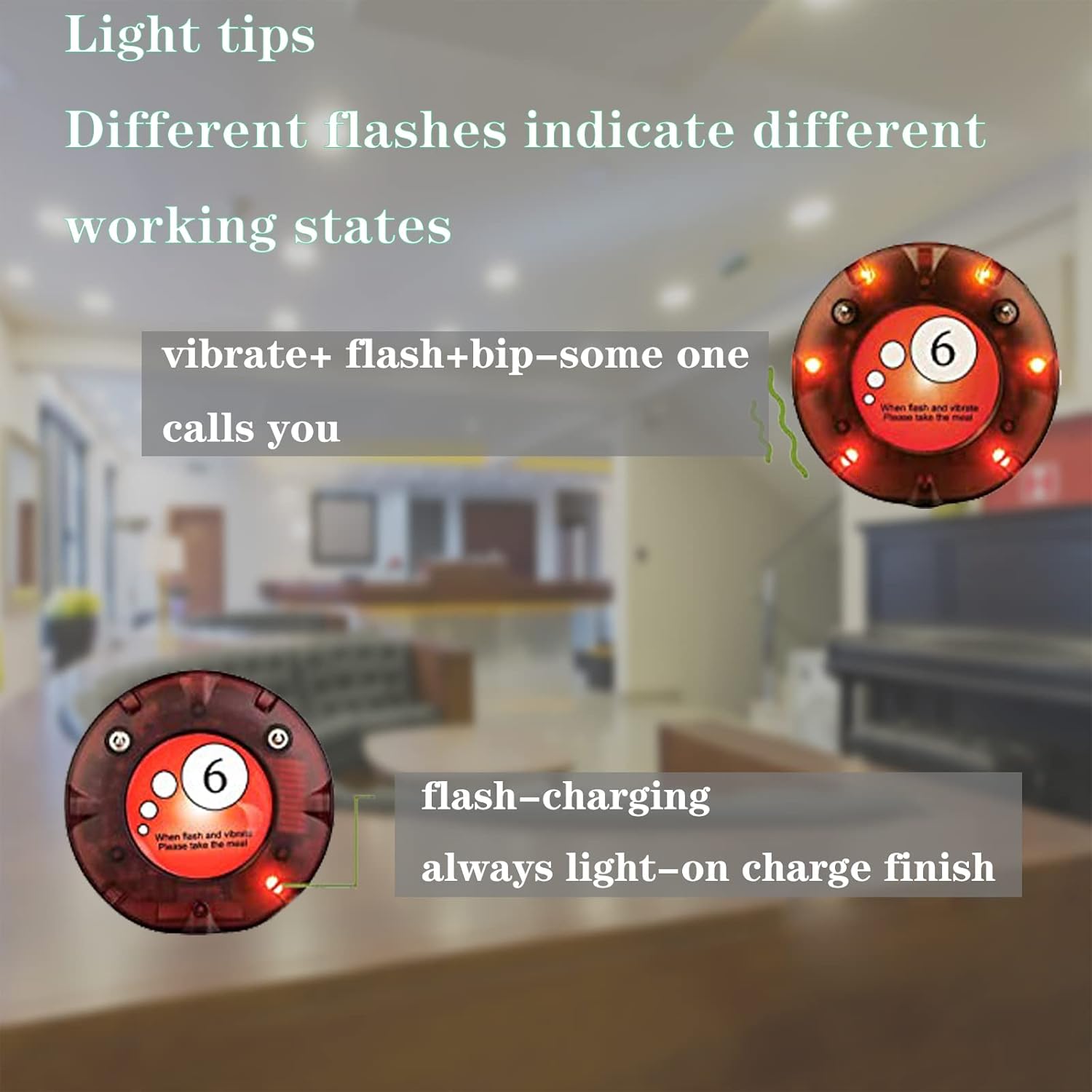
- Vibrate + Flash + Beep: Indicates an incoming call.
- Flashing Light: Pager is currently charging.
- Solid Light: Pager charging is complete.

This image explains the meaning of the pager's light indicators. It shows that a combination of vibrate, flash, and beep indicates a call, while a flashing light signifies charging, and a constantly lit light means charging is complete.
6.5 Range and Signal Penetration
The system offers a significant operating range, allowing customers to wait comfortably without missing their call.
An illustration highlighting the extended range of the Retekess TD158 system, capable of transmitting signals up to 150-200 meters indoors and 300 meters in open areas. The diagram visually confirms that the signal can penetrate walls, making it suitable for use within buildings.
7. Maintenance
- Cleaning: Wipe the keypad and pagers with a soft, damp cloth. Avoid abrasive cleaners or solvents.
- Battery Care: To prolong battery life, avoid fully discharging the pagers frequently. Charge them regularly.
- Storage: When not in use for extended periods, store the system in a cool, dry place.
8. Troubleshooting
| Problem | Possible Cause | Solution |
|---|---|---|
| Pager not responding to call. | Out of range, low battery, not paired, or incorrect pager number entered. | Move pager closer to keypad, charge pager, re-pair pager, verify pager number. |
| Pagers not charging. | Improper placement on charging base, faulty adapter, or dirty charging contacts. | Ensure proper contact, check adapter connection, clean charging contacts. |
| System suddenly stops working/synchronizing. | Interference, system reset, or pairing issue. | Try re-pairing all pagers. Ensure no strong interference sources nearby. If problem persists, contact support. |
| Short operating range. | Obstructions (walls, metal structures), or environmental interference. | Relocate keypad to a more central position, minimize obstructions. |
9. Specifications
| Feature | Specification |
|---|---|
| Model Number | EUF9482A |
| Brand | Retekess |
| Color | Multicolor (Red/White) |
| Special Features | Call Alert, Waterproof Touch Keypad |
| Compatible Devices | Other transmitters and receivers of the same system with the same ID |
| Battery Composition | Lithium-ion |
| Rechargeable Battery | Yes (10 Lithium-ion batteries included) |
| Number of Channels | 8 |
| Frequency Range | 136-174 MHz |
| Maximum Range | 500 Meters (theoretical, actual range 100-300m) |
| Tuning Technology | VHF |
| Voltage | 3.7 Volts |
| Water Resistance Level | Waterproof (keypad) |
| Product Dimensions | 2P x 7.6W x 12H centimeters |
10. Warranty and Support
Retekess offers a 2-year warranty and a 30-day no-reason return policy for this product. Beyond the warranty period, maintenance services are still available, with buyers responsible for associated costs.
For any questions, technical assistance, or warranty claims, please contact Retekess customer support via Amazon. We aim to respond within 12 hours.
Related Documents - EUF9482A
 |
Retekess TD157 Restaurant Pager System: Frequently Asked Questions Get answers to common questions about the Retekess TD157 Restaurant Pager System, covering working distance, capacity, battery life, and more. |
 |
Retekess TD158 Queue Wireless Calling System User Manual User manual for the Retekess TD158 Queue Wireless Calling System, detailing product introduction, technical specifications, operating instructions, precautions, and warranty information. |
 |
Retekess Wireless Calling Systems - Product Catalog and Specifications Explore the comprehensive range of Retekess wireless calling and paging systems, including models like T111, T112, TD156, TD157, TD161, TD162, TD163, TD164, TD167F, TD169, TD173, TD174, TD175, TD177, and TD183. Discover features, parameters, and advantages for various industries such as restaurants, cafes, hospitals, and more. |
 |
Retekess TD165 Pager System FAQ Frequently asked questions about the Retekess TD165 fast food pager system, covering purchasing options, operating range, paging capabilities, and cleaning instructions. |
 |
Retekess TD164 Pager System: Features, Specifications, and Package Details Explore the Retekess TD164 pager system, a long-range wireless calling solution with key features like keyboard mute, multiple prompt modes, and a one-to-many paging function. Includes detailed product specifications and package contents. |
 |
Retekess T118 Restaurant Pager System FAQ Frequently Asked Questions about the Retekess T118 Restaurant Pager System, covering purchasing, operating range, paging all devices, and cleaning instructions. |
Ask a question about this manual
Ask about setup, troubleshooting, compatibility, parts, safety, or missing instructions. Manuals+ will review the question and use this page’s manual context to help answer it.