
1. Introduction
The VOLTCRAFT V-Charge 600 Duo is an advanced, microprocessor-controlled dual-channel battery charger designed for a wide range of battery types. It offers versatile charging capabilities, including a 10W wireless charging function for compatible smartphones, and integrated motor and servo testing features. This manual provides essential information for the safe and efficient operation of your charger.
2. Safety Instructions
Please read all safety instructions carefully before using the charger. Failure to do so may result in injury or damage to the product or property.
- Always operate the charger in a well-ventilated area, away from flammable materials.
- Do not charge batteries unattended.
- Ensure correct battery type and cell count settings before initiating a charge cycle. Incorrect settings can lead to battery damage or fire.
- Use only the provided power cable and appropriate charging cables.
- Keep the charger away from moisture, dust, and direct sunlight.
- Do not attempt to disassemble or modify the charger. Refer all servicing to qualified personnel.
- Always disconnect the charger from the power source when not in use.
3. Package Contents
Verify that all items are present in your package:
- VOLTCRAFT V-Charge 600 Duo Charger Unit
- AC Power Cable
- User Manual (this document)
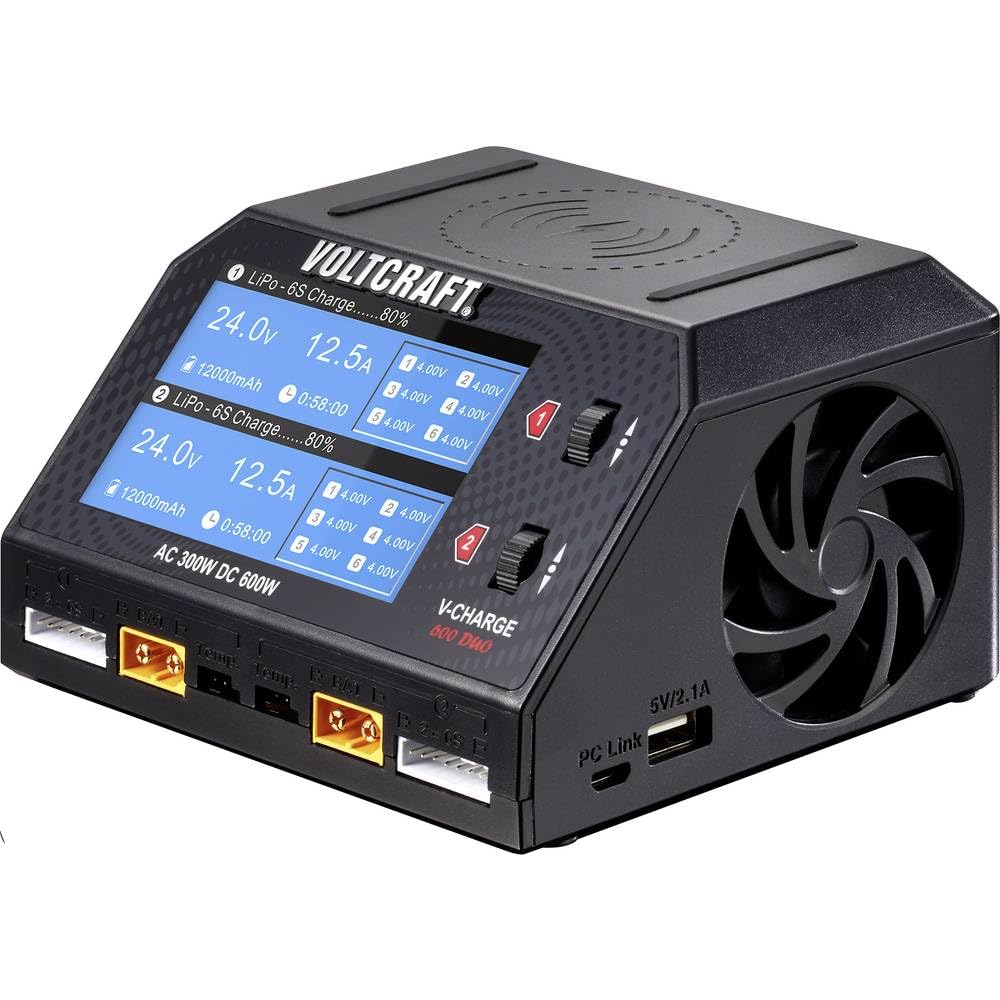
Image 1: VOLTCRAFT V-Charge 600 Duo charger unit and included AC power cable.
4. Product Features
The V-Charge 600 Duo offers a comprehensive set of features for model enthusiasts and professionals:
- Dual Charging Channels: Independently charge two different battery types simultaneously.
- High Power Output: Total charging power of 300W (AC input, 2x 150W) or 600W (DC input, 2x 300W).
- Versatile Battery Compatibility: Supports LiPo, LiHV, Li-Ion, LiFePO, NiMH, NiCd, and Lead-Acid batteries.
- High Charge Current: Up to 16A maximum charge current per channel.
- 10W Wireless Charging: Integrated wireless charging pad for compatible smartphones.
- Motor and Servo Test Functions: Built-in capabilities for testing motors and servos.
- External Discharge Function: Supports external discharge up to 200W.
- Intuitive Display: Clear display for monitoring charging parameters and status.

Image 2: Angled view of the V-Charge 600 Duo, showing the display and controls.
5. Setup
5.1 Connecting Power
- Ensure the charger is placed on a stable, non-flammable surface.
- Connect the AC power cable to the charger's AC input port.
- Plug the other end of the AC power cable into a suitable wall outlet (100-240V AC).
- Alternatively, for DC input, connect a DC power source (e.g., a car battery or power supply) to the DC input ports. Ensure correct polarity.
5.2 Connecting Batteries
- Identify the correct charging port (Channel 1 or Channel 2) for your battery.
- Connect the main power lead of your battery to the corresponding XT60 or similar connector on the charger.
- For LiPo, LiHV, Li-Ion, and LiFePO batteries, also connect the balance lead to the appropriate balance port (2-6S) next to the main power port.
- Ensure all connections are secure and correct before proceeding.

Image 3: Top-down view of the V-Charge 600 Duo, highlighting the charging ports and balance ports.
6. Operating Instructions
6.1 Powering On and Initial Screen
Once connected to power, the charger will display the VOLTCRAFT logo and then the main menu. The screen shows information for both Channel 1 and Channel 2.
6.2 Navigating the Menu
Use the scroll wheels and buttons next to each channel to navigate menus and adjust parameters. Press the wheel to confirm selections.
6.3 Charging a Battery
- Select the desired channel (1 or 2).
- Choose the battery type (e.g., LiPo, NiMH) from the menu.
- Set the cell count (for Lithium batteries) or voltage (for Lead-Acid).
- Adjust the charge current (Amps) according to your battery's specifications. Do not exceed the battery's maximum charge rate.
- Confirm settings and start the charging process. The screen will display real-time charging data.
- To stop charging, press the appropriate button or navigate to the stop option.
6.4 Wireless Charging
Place your compatible smartphone or device on the wireless charging pad located on top of the charger. Ensure the device is centered for optimal charging. The charger will automatically detect and begin charging if the device supports 10W wireless charging.

Image 4: Example of a smartphone utilizing wireless charging.
6.5 Motor and Servo Testing
Connect your motor or servo to the designated ports on the side of the charger. Access the motor/servo test function through the menu to verify functionality and adjust parameters as needed. Refer to the on-screen instructions for specific testing procedures.
7. Maintenance
- Cleaning: Use a soft, dry cloth to clean the charger's exterior. Do not use liquid cleaners or solvents.
- Storage: Store the charger in a cool, dry place, away from direct sunlight and extreme temperatures.
- Ventilation: Ensure the cooling vents are clear of obstructions to prevent overheating.
8. Troubleshooting
| Problem | Possible Cause | Solution |
|---|---|---|
| Charger does not power on. | No power supply or loose connection. | Check AC/DC power connections. Ensure power outlet is functional. |
| Battery not charging. | Incorrect battery settings, poor connection, or damaged battery. | Verify battery type, cell count, and charge current settings. Check all cable connections. Inspect battery for damage. |
| Wireless charging not working. | Device not compatible, not centered, or foreign object interference. | Ensure device supports 10W wireless charging. Reposition device on the pad. Remove any metal objects between device and pad. |
| Charger displays an error message. | Over-voltage, over-current, reverse polarity, or internal fault. | Refer to the specific error code on the screen for detailed information. Disconnect power and battery, then reconnect carefully. If error persists, contact support. |
9. Specifications
| Feature | Specification |
|---|---|
| Model Number | VC-10897480 |
| Brand | VOLTCRAFT |
| Input Voltage (AC) | 100-240V AC |
| Input Voltage (DC) | Not specified (typically 10-30V DC for similar chargers) |
| Max Charge Power (AC) | 300W (2 x 150W) |
| Max Charge Power (DC) | 600W (2 x 300W) |
| Charge Current Range | 0.1 - 16.0A per channel |
| Max Discharge Power | 200W (external discharge) |
| Battery Types Supported | LiPo, LiHV, Li-Ion, LiFePO (1-6S), NiMH, NiCd (1-15S), Lead-Acid (2-24V) |
| Wireless Charging Output | Max 10W |
| Number of Ports | 2 (charging channels) |
| Color | Black |
| Item Weight | 800 Grams |
| Compatible Devices | Smartphone (for wireless charging) |
10. Warranty and Support
VOLTCRAFT products are designed for reliability and performance. This product comes with a standard manufacturer's warranty. Please refer to the warranty card included in your package or visit the official VOLTCRAFT website for detailed warranty terms and conditions.
For technical support, troubleshooting assistance, or spare parts inquiries, please contact VOLTCRAFT customer service. Contact information can typically be found on the VOLTCRAFT website or in your product packaging.
Online Resources: For additional information, FAQs, and software updates (if applicable), please visit the official VOLTCRAFT support page.