1. Introduction
This manual provides essential information for the proper use and maintenance of your GEN KXTGFA61B KX-TGFA61 Link2Cell Additional Expansion Handset. Please read this manual thoroughly before using the handset to ensure safe and optimal performance. This handset is designed to expand an existing compatible Link2Cell phone system, such as the KX-TGF670 or KX-TG885 series.
2. Package Contents
Verify that all items listed below are included in your package. If any items are missing or damaged, please contact your seller.
- 1 x KXTGFA61B Handset
- 1 x Charging Cradle
- 1 x AC Power Adapter for Charging Cradle
- 2 x AAA Rechargeable Batteries

This image displays all components included with your KXTGFA61B expansion handset: the cordless handset, its charging cradle, the AC power adapter for the cradle, and two AAA rechargeable batteries.
3. Setup
3.1 Battery Installation
- Locate the battery compartment cover on the back of the handset.
- Slide the cover downwards and remove it.
- Insert the two AAA rechargeable batteries, observing the correct polarity (+ and -) as indicated inside the compartment.
- Replace the battery compartment cover by sliding it upwards until it clicks into place.

The back of the KXTGFA61B handset, as it sits in the cradle, reveals the design of the battery compartment cover and the overall ergonomic shape of the device.
3.2 Connecting the Charging Cradle
- Connect the AC power adapter to the DC IN jack on the back of the charging cradle.
- Plug the AC power adapter into a standard electrical outlet.
- Place the handset in the charging cradle. Ensure the charge indicator on the handset illuminates, confirming proper connection.

This side view illustrates the slim design of the KXTGFA61B handset while docked in its charging cradle. The connected AC power adapter is also visible, indicating the charging setup.
3.3 Initial Charging
For optimal battery performance, charge the handset for at least 7 hours before initial use. The charge indicator on the handset will typically turn off or change color once fully charged.
3.4 Registering the Handset
This expansion handset must be registered to your existing compatible Link2Cell base unit (e.g., KX-TGF670, KX-TG885) before it can be used. Refer to your main base unit's user manual for specific registration instructions. Generally, the process involves:
- Placing the handset in the base unit's charging cradle.
- Pressing and holding the LOCATOR/INTERCOM button on the base unit for a few seconds until a registration tone sounds.
- Pressing the OK or MENU button on the handset, then following the on-screen prompts to complete registration.
4. Operating the Handset
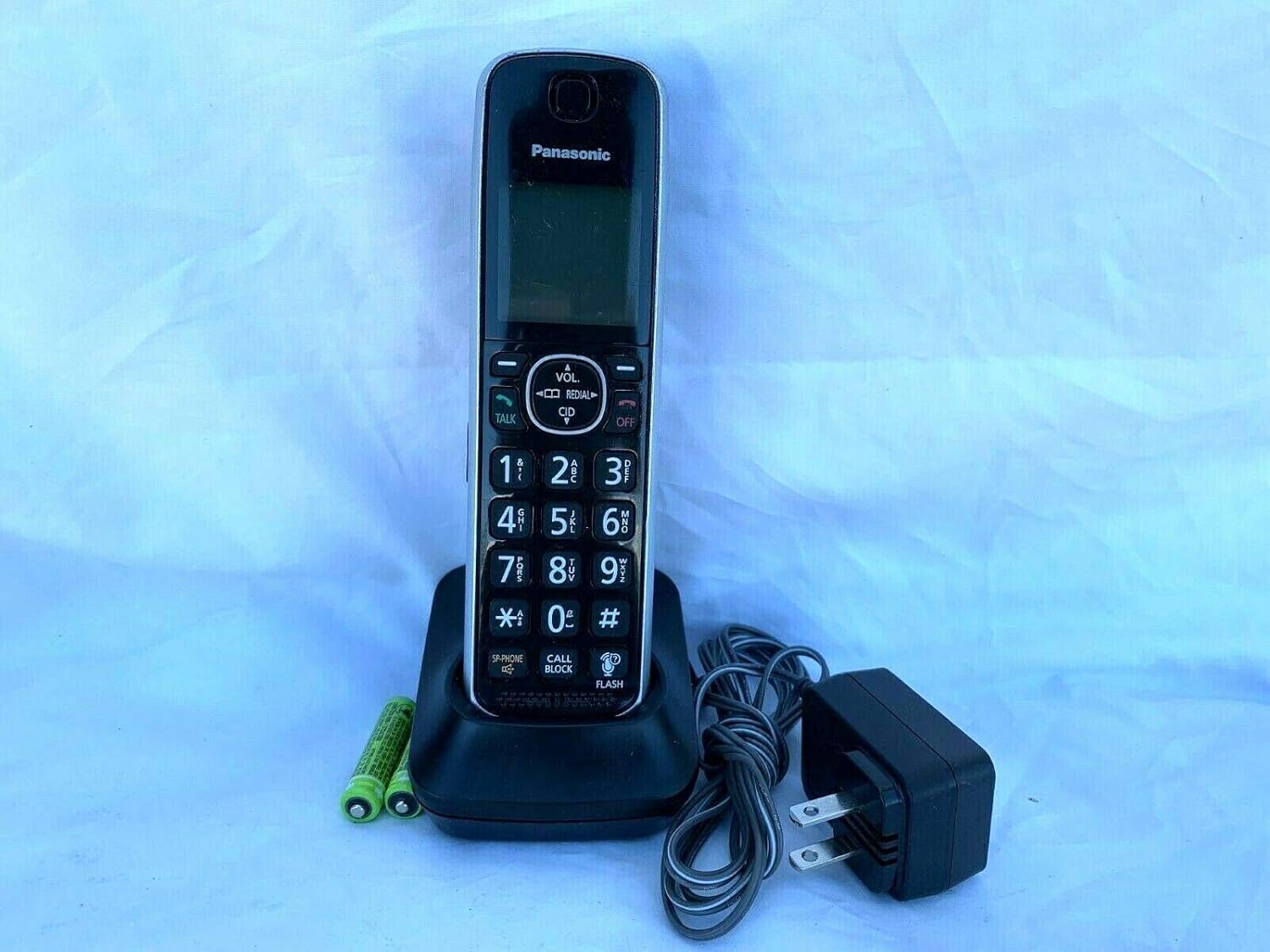
The KXTGFA61B cordless handset rests in its charging cradle. The handset features a digital display, a full numeric keypad, and dedicated buttons for Talk, Off, Volume, Redial, CID, Speakerphone, Call Block, and Flash.

A detailed view of the handset's keypad, highlighting the large, easy-to-read numbers and key function buttons such as 'TALK', 'OFF', 'VOL', 'REDIAL', 'CID', 'SP-PHONE', 'CALL BLOCK', and 'FLASH'.
4.1 Making a Call
- Press the TALK button.
- Dial the phone number using the numeric keypad.
- To end the call, press the OFF button or place the handset back in the charging cradle.
4.2 Answering a Call
When the phone rings, press the TALK button to answer the call.
4.3 Adjusting Volume
During a call, press the VOL. (Volume) up or down arrow buttons to adjust the earpiece volume.
4.4 Using Speakerphone
During a call, press the SP-PHONE button to switch to speakerphone mode. Press it again to switch back to the earpiece.
4.5 Caller ID
When a call comes in, the caller's information (name and number, if available) will be displayed on the handset screen. Press the CID (Caller ID) button to review recent calls.
4.6 Call Block
Press the CALL BLOCK button to block unwanted numbers. Refer to your main base unit's manual for detailed instructions on setting up and managing the call block list.
4.7 Redial
Press the REDIAL button to view a list of recently dialed numbers. Press TALK to call a selected number from the list.
5. Maintenance
5.1 Cleaning
Wipe the handset and charging cradle with a soft, damp cloth. Do not use abrasive cleaners, waxes, or solvents. Avoid spraying cleaning liquids directly onto the unit.
5.2 Battery Care
- Always use the provided rechargeable AAA batteries.
- If the handset will not be used for an extended period, remove the batteries to prevent leakage.
- Battery life may vary and is not guaranteed. Replace batteries when performance degrades significantly.
5.3 Storage
Store the handset and cradle in a cool, dry place away from direct sunlight and extreme temperatures.
6. Troubleshooting
If you experience issues with your handset, try the following troubleshooting steps. For more complex issues, refer to the user manual of your main base unit.
| Problem | Solution |
|---|---|
| Handset does not turn on or has no dial tone. |
|
| Cannot make or receive calls. |
|
| Poor sound quality. |
|
7. Specifications
- Model: KXTGFA61B / KX-TGFA61
- Brand: GEN
- Color: Black
- Power Source: Battery Powered, Corded Electric (for cradle)
- Dialer Type: Single Keypad
- Answering System Type: Digital (functionality depends on base unit)
- Caller Identification: Yes (requires subscription to Caller ID service)
- Item Weight: Approximately 8.7 ounces (247 grams)
- Package Dimensions: Approximately 8.11 x 4.96 x 1.5 inches (20.6 x 12.6 x 3.8 cm)
8. Warranty and Support
For information regarding warranty coverage, technical support, or service, please refer to the documentation provided with your original phone system or contact the manufacturer/seller directly. Keep your purchase receipt as proof of purchase for warranty claims.


