Important Safety Information
Please read all instructions carefully before using the JOYROOM 226-G1 Magnetic Car Phone Holder. Keep this manual for future reference.
- Ensure the phone holder is securely installed and does not obstruct your view of the road or interfere with vehicle controls (e.g., airbags, dashboard instruments).
- Always check local laws and regulations regarding the use of car phone holders while driving.
- Do not attempt to adjust the phone holder or your phone while driving. Make all adjustments before starting your journey.
- The magnetic plates may interfere with wireless charging functionality if placed directly over the charging coil. Refer to the 'Important Note for Wireless Charging' section.
Package Contents
Verify that all items are present in your package:
- 1 x JOYROOM Magnetic Car Phone Holder (Model 226-G1)
- 2 x Metal Plates (Round and Rectangular)
- 2 x Protective Films

Components of the JOYROOM 226-G1 Magnetic Car Phone Holder, including the main mount, metal plates, and protective films.
Product Overview
The JOYROOM 226-G1 Magnetic Car Phone Holder is designed to provide a secure and convenient mounting solution for your smartphone in various vehicle types.
Key Features:
- All-Terrain Compatibility: Features an upgraded three-jaw base for adjustable angles, suitable for flat, curved, or folded surfaces. Metal vent hooks support both horizontal and vertical air vent bars.
- Secure Phone Lock: The silicone clip with a built-in metal plate ensures a firm grip on the air vent, preventing accidental detachment.
- 360° Adjustable Viewing: Allows for full 360-degree rotation and tilt, enabling optimal viewing angles without obstructing the driver's view or air vents.
- Universal Smartphone Compatibility: Designed to work with a wide range of smartphones, regardless of size, when used with the provided metal plates.
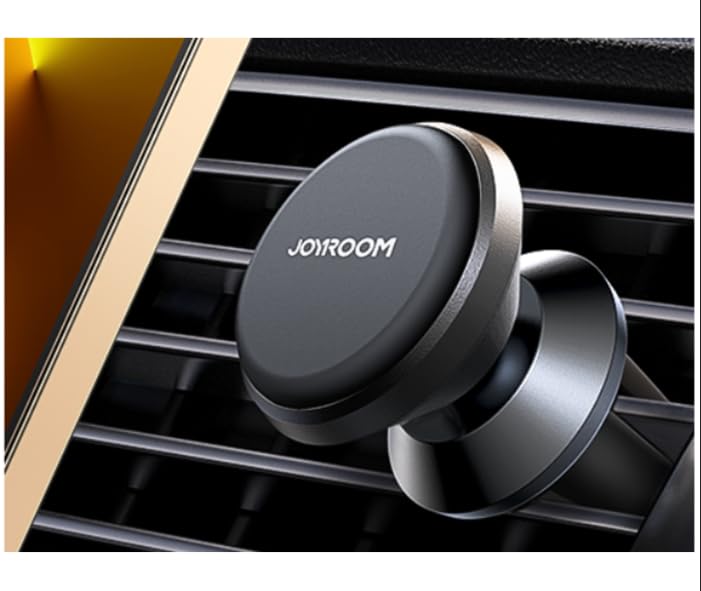
The JOYROOM 226-G1 Magnetic Car Phone Holder.

The magnetic head and vent clip design of the holder.

The ball joint mechanism allowing for flexible angle adjustments.
Installation Guide
Step 1: Prepare Your Phone
To enable magnetic attachment, a metal plate must be affixed to your smartphone or its case.
- Clean the back of your phone or phone case thoroughly.
- Peel off the backing from one of the protective films and apply it to the desired location on your phone or case. This film protects your device from adhesive residue.
- Peel off the backing from one of the metal plates and firmly press it onto the protective film. Ensure it is centered for optimal magnetic connection.

Methods for attaching the metal plate to your phone or phone case.
Step 2: Mount to Air Vent
The phone holder is designed for quick and easy installation into most car air vents.
- Gently push the silicone-tipped vent clip of the holder into an appropriate air vent slat in your vehicle.
- Ensure the clip is firmly seated and stable within the vent. The steel core within the clip provides a tight grip.
- Once installed, you can attach your phone by simply placing the metal plate on your phone against the magnetic surface of the holder.

Quick installation into the air vent and immediate use with a smartphone.
Official product video demonstrating the installation and functionality of the Joyroom Magnetic Car Phone Mount.
Important Note for Wireless Charging
For smartphones that support wireless charging (e.g., iPhone 12 & 13 series), ensure the metal plate is placed in a location that does not interfere with the wireless charging coil. Placing the metal plate directly over the coil will prevent wireless charging.

Guidance on metal plate placement to avoid interference with wireless charging.
Operating Instructions
Attaching Your Phone
Once the metal plate is attached to your phone/case and the holder is installed in the vent, simply bring your phone close to the magnetic surface of the holder. The strong magnets will automatically secure your phone in place.
Adjusting Viewing Angle
The holder features a ball joint that allows for 360-degree rotation. Gently rotate or tilt your phone to achieve your desired viewing angle. Ensure the angle is stable before driving.

The phone holder provides stability for navigation and hands-free use.

Smartphone mounted in a car, showing a navigation application.
Maintenance
To ensure the longevity and optimal performance of your JOYROOM Magnetic Car Phone Holder, follow these maintenance guidelines:
- Cleaning: Wipe the holder with a soft, damp cloth to remove dust and grime. Avoid using harsh chemicals or abrasive cleaners.
- Check Security: Periodically check that the holder is securely fastened to the air vent and that the metal plate on your phone/case is still firmly attached.
- Storage: When not in use for extended periods, store the holder in a cool, dry place away from direct sunlight.
Troubleshooting
If you encounter issues with your JOYROOM Magnetic Car Phone Holder, refer to the following common problems and solutions:
| Problem | Possible Cause | Solution |
|---|---|---|
| Phone does not hold securely to the mount. | Metal plate not properly attached or positioned; phone too heavy for plate; thick phone case. | Ensure the metal plate is firmly attached to your phone or case and is centered. Try a thinner phone case or attach the metal plate directly to the phone. |
| Mount is loose in the air vent. | Vent clip not fully inserted or compatible with vent type. | Push the vent clip firmly into the air vent until it is secure. Ensure your car's air vent slats are compatible with the clip design (horizontal or vertical bars). |
| Wireless charging is not working. | Metal plate is obstructing the wireless charging coil. | Reposition the metal plate on your phone or case to avoid the wireless charging area. Refer to the 'Important Note for Wireless Charging' section. |
Product Specifications
| Feature | Detail |
|---|---|
| Model Number | 226-G1 |
| Product Dimensions | 1.33 x 1.33 x 2.09 inches |
| Item Weight | 2.89 ounces |
| Mounting Type | Vent |
| Special Features | Adjustable, Magnetic |
| Compatible Devices | Smartphones (Universal compatibility with metal plate) |
| Manufacturer | JOYROOM |
Warranty and Support
JOYROOM products are manufactured with high-quality standards. For warranty information, technical support, or any inquiries regarding your JOYROOM 226-G1 Magnetic Car Phone Holder, please contact JOYROOM customer service through their official website or the retailer where the product was purchased.
Please retain your proof of purchase for warranty claims.


