1. Introduction
This manual provides essential information for the safe and efficient operation of your ARKABAKA 24V Charger, Model LKC-240050E. Please read these instructions thoroughly before using the product to ensure proper function and longevity.
2. Safety Instructions
- Compatibility: This charger is specifically designed for 24V lead-acid batteries only used in ride-on toys. It is not compatible with other battery types (e.g., lithium-ion) or electric scooters. Using it with incompatible devices may cause damage or safety hazards.
- Environment: Do not use the charger in extreme heat, wet conditions, or near flammable materials. Ensure adequate ventilation during use.
- Connection Sequence: Always connect the charger to the battery first, then plug the charger into a power outlet. When disconnecting, unplug from the power outlet first, then disconnect from the battery.
- Polarity and Connector: Verify that the connector type (5.5mm x 2.1mm barrel connector, center positive) and polarity match your device's requirements before use. Incorrect connection can damage the battery or charger.
- Overcharging Prevention: Once the battery is fully charged (indicated by a green light), disconnect the charger from the power source immediately to prevent overcharging, which can reduce battery life.
- Supervision: Keep the charger out of reach of children. Adult supervision is recommended when charging children's ride-on toys.
- Damage: Do not use the charger if the cord, plug, or casing is damaged. Contact customer support for assistance.
3. Product Overview
The ARKABAKA 24V Charger (Model LKC-240050E) is a reliable power supply designed for 24V lead-acid battery ride-on toys. It features a clear LED indicator for charging status and a standard barrel connector.

Image 3.1: The ARKABAKA 24V Charger, showing the main unit with an integrated power cord and a barrel connector. A green LED light is visible on the charger unit, indicating its status.
LED Indicator Status:
- Red Light: Indicates that the battery is currently charging.
- Green Light: Indicates that the battery is fully charged or that the charger is not connected to a battery.

Image 3.2: Two ARKABAKA 24V Chargers side-by-side. The left charger displays a red LED, signifying "Charging," while the right charger displays a green LED, signifying "Charged."
Connector Type:
The charger uses a common 5.5mm x 2.1mm barrel connector with a center-positive configuration. It is crucial to confirm that your device's charging port matches these dimensions and polarity.
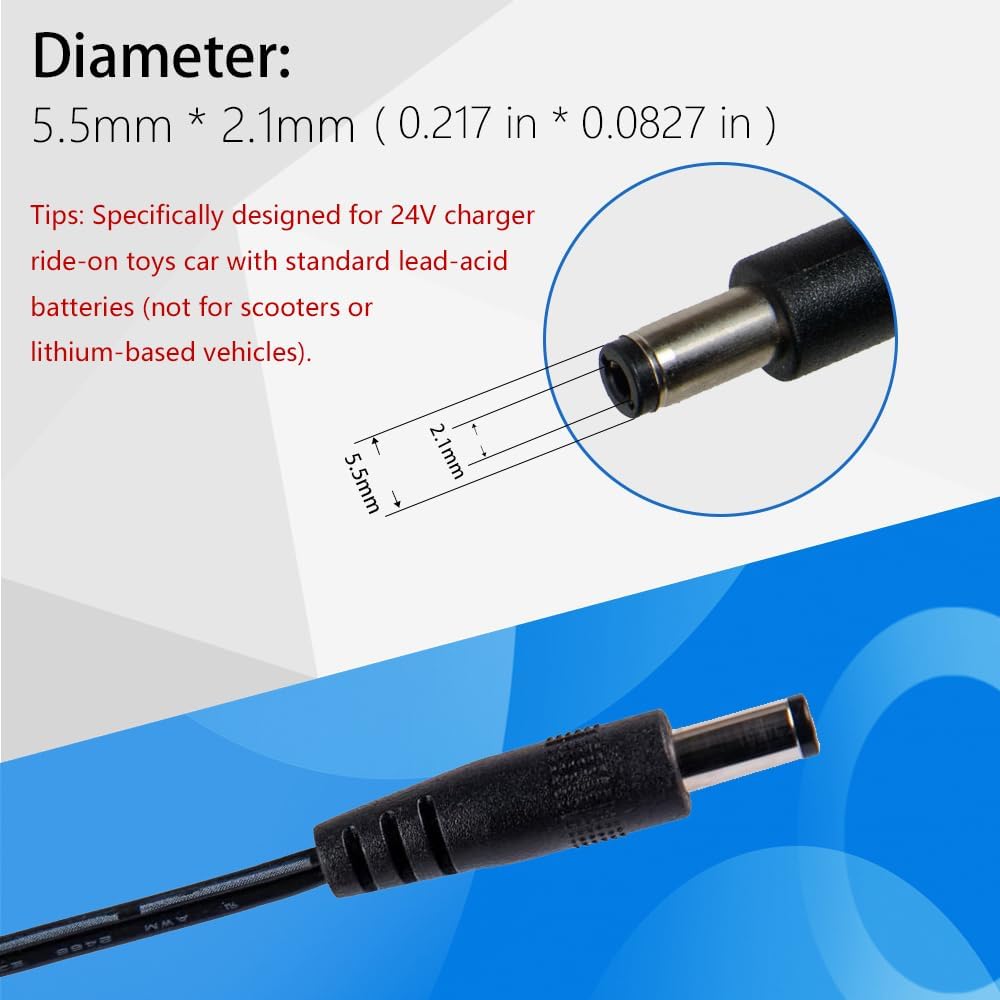
Image 3.3: A close-up diagram illustrating the dimensions of the barrel connector, specifically 5.5mm outer diameter and 2.1mm inner diameter. Text confirms its specific design for 24V ride-on toy chargers with standard lead-acid batteries.
4. Specifications
| Feature | Detail |
|---|---|
| Model Number | LKC-240050E |
| Input Voltage | 100-240V AC, 50/60Hz |
| Output Voltage | 24V DC |
| Output Current | 0.5A |
| Wattage | 12 Watts |
| Connector Type | 5.5mm x 2.1mm Barrel Connector (Center Positive) |
| Compatibility | 24V Lead-Acid Batteries for Ride-On Toys |
| Special Feature | LED Charging Indicator |
| Package Dimensions | 3.5 x 2.72 x 2.24 inches |
| Item Weight | 4.2 ounces |
5. Setup and Compatibility
Before connecting the charger, ensure your ride-on toy uses a 24V lead-acid battery and has a compatible charging port (5.5mm x 2.1mm barrel connector, center positive).

Image 5.1: A visual guide demonstrating product compatibility. On the left, several images of 24V ride-on cars are shown with a green checkmark, indicating compatibility. On the right, images of a go-kart, an electric scooter, and a hoverboard are shown with a red 'X', indicating incompatibility. This charger is specifically designed for 24V ride-on toys with standard lead-acid batteries and is not suitable for other battery types or electric scooters.
6. Operating Instructions
- Connect to Battery: Insert the barrel connector of the charger into the charging port of your 24V ride-on toy.
- Plug into Power: Plug the charger's AC plug into a standard 100-240V wall outlet.
- Monitor Charging: The LED indicator on the charger will illuminate red, signifying that charging is in progress.
- Full Charge Indication: Once the battery is fully charged, the LED indicator will turn green.
- Disconnect: Immediately unplug the charger from the wall outlet, then disconnect the barrel connector from the ride-on toy. This prevents overcharging and prolongs battery life.
7. Maintenance
- Cleaning: Wipe the charger with a dry, soft cloth. Do not use liquid cleaners or solvents.
- Storage: Store the charger in a cool, dry place away from direct sunlight and moisture when not in use.
- Cable Care: Avoid bending or kinking the power cord excessively. Do not place heavy objects on the cord.
8. Troubleshooting
| Problem | Possible Cause | Solution |
|---|---|---|
| Charger LED remains green when connected to battery. | Battery is already fully charged, or charger is not making proper contact. | Verify the battery's charge level. Ensure the connector is firmly seated in the charging port. Check if the battery itself is faulty. |
| Charger LED does not light up. | No power from the outlet, faulty charger, or damaged cable. | Test the outlet with another device. Inspect the charger cable and unit for visible damage. If damaged, discontinue use and replace. |
| Battery does not charge or charges slowly. | Battery issue, incorrect charger, or charger malfunction. | Ensure the charger is compatible with your battery (24V lead-acid). Check the battery's health; it might need replacement. Contact customer support if the charger is suspected to be faulty. |
9. Customer Support
For further assistance or inquiries regarding your ARKABAKA 24V Charger, please refer to the seller's contact information on the purchase platform or visit the official ARKABAKA store page.


