
1. Introduction
1.1 Product Overview
The Autel MaxiSYS MS908S PRO II is a professional automotive diagnostic and programming tool designed for comprehensive vehicle system analysis and maintenance. This device features enhanced hardware, including an Android 10 operating system, an octa-core processor, 4GB RAM, 128GB ROM, a 16MP camera, and a high-resolution 2048x1536 display. It supports dual-band Wi-Fi (2.4GHz & 5GHz) for efficient updates and connectivity.
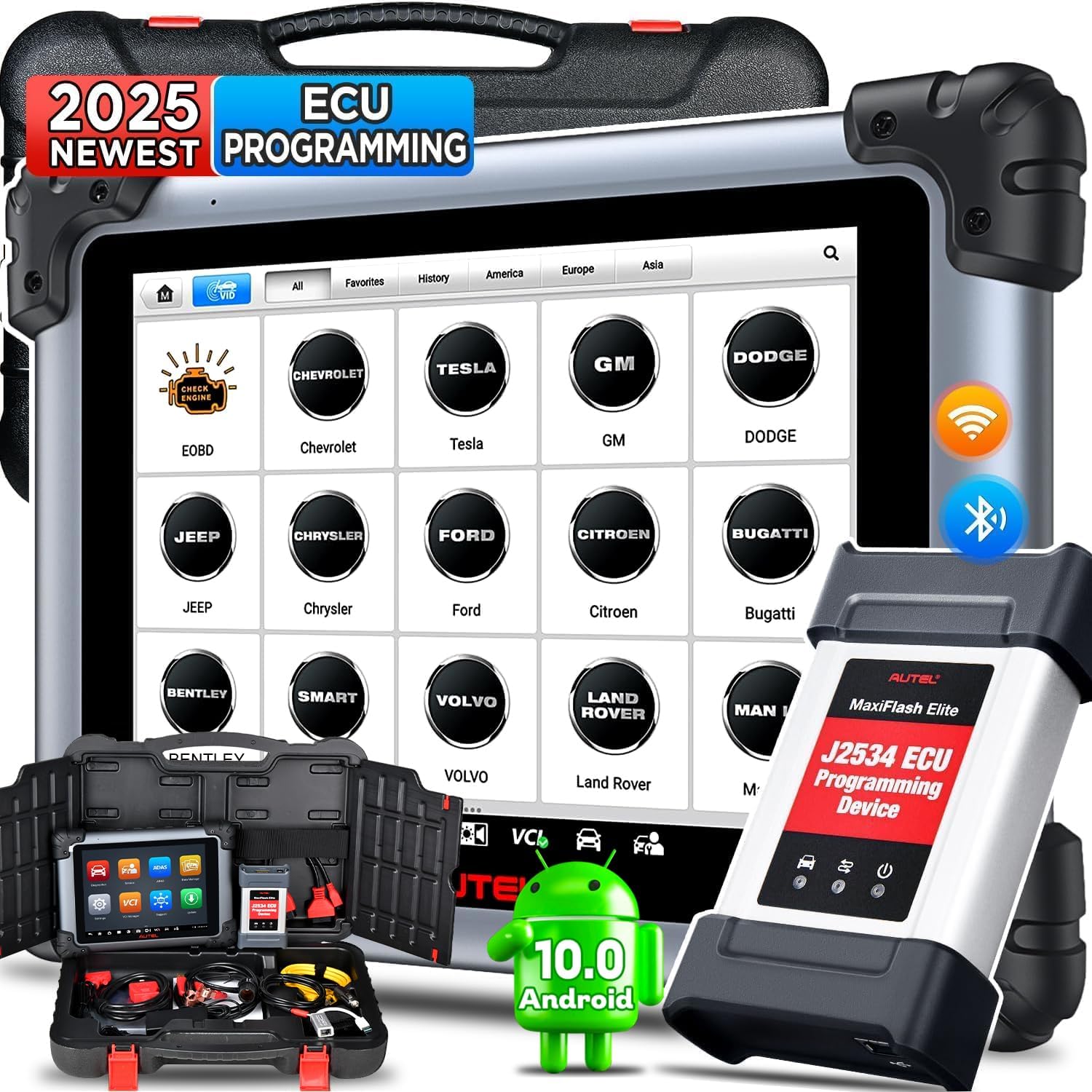
Figure 1: Autel MaxiSYS MS908S PRO II main unit and J2534 programming device.
1.2 Key Features
- Enhanced Hardware: Android 10, Octa-core processor, 4GB RAM + 128GB ROM, 2048x1536 display, 16MP camera, 5G & 2.4GHz Dual Wi-Fi.
- Ultra-fast Auto Scan 2.0: Provides 3X faster vehicle scanning.
- ECU Programming: Supports J2534 device for BENZ & BMW ECU programming, online coding, and adaptation.
- Advanced ECU Coding: Customize vehicle settings, disable unneeded OEM features, and activate hidden functions.
- 38+ Maintenance Services: Comprehensive range of reset, relearn, and adaptation functions.
- Full Bi-directional Control (Active Test): Perform functional tests on vehicle components.
- OE-Level All Module Diagnostics: Access all available vehicle modules for reading/clearing codes, live data, and ECU information.
- Guided Functions: Step-by-step guidance for complex operations on VAG vehicles.
- Vehicle Coverage: Supports over 150 brands, including McLaren and Tesla diagnostics.
- Additional Features: Pre & Post-Scan reports, Pro Battery Test (BT506 required), Online Account, Autel Cloud Report, Wi-Fi Printing, FCA & RENAULT SGW support.
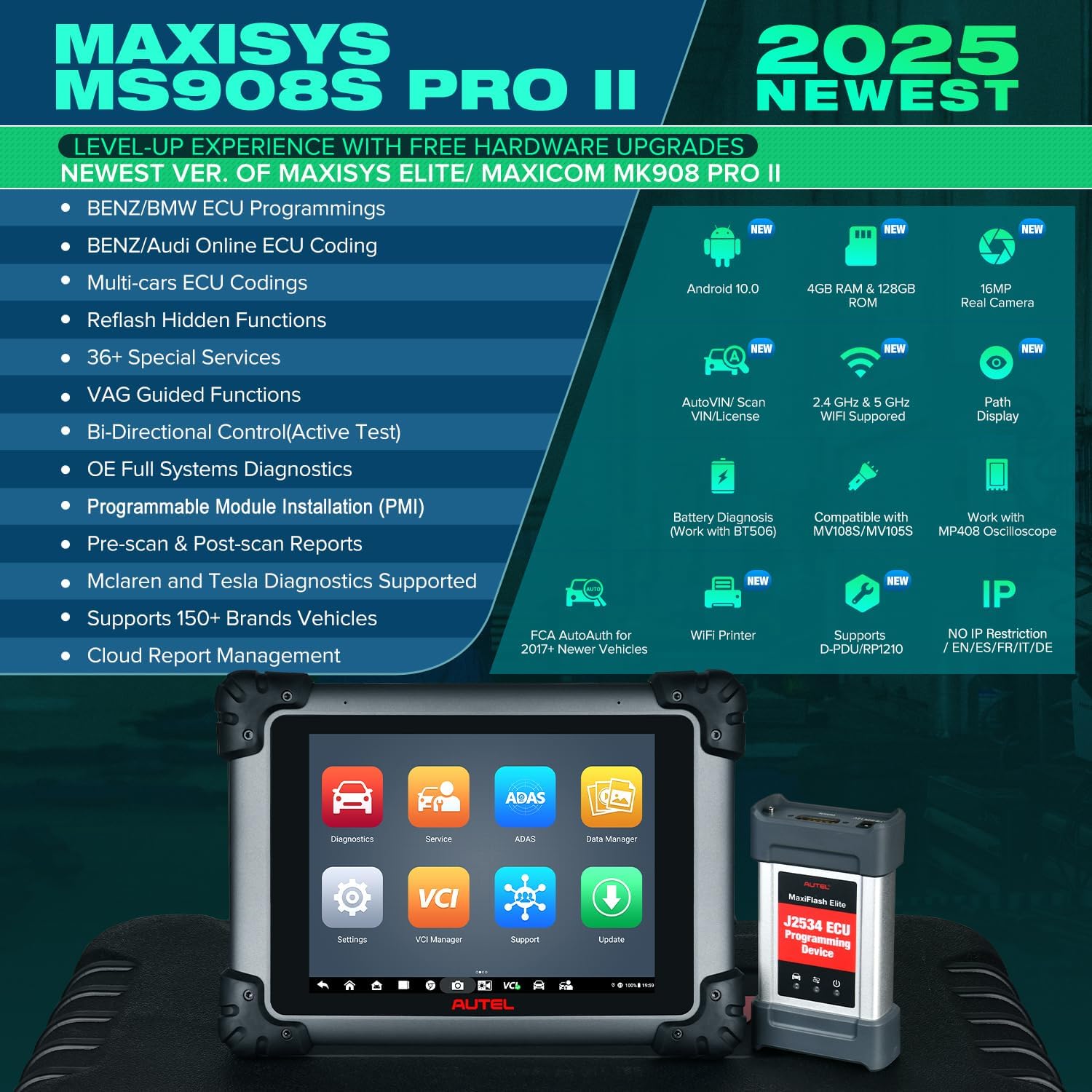
Figure 2: Feature comparison highlighting the advancements of the MS908S PRO II.
2. Setup and Initial Use
2.1 Unboxing and Component Identification
Carefully unpack all components from the carrying case. Verify that all items listed in the 'Accessories Included' section (Section 7) are present. Familiarize yourself with the main unit, the J2534 ECU Programming Device (MaxiFlash Elite), and various cables.
2.2 Powering On and Initial Configuration
Connect the main unit to a power source using the provided AC/DC adapter. Press the power button to turn on the device. Follow the on-screen prompts to complete the initial setup, including language selection, time zone, and Wi-Fi network connection.
2.3 Software Registration and Updates
To access full functionality and receive software updates, register your device on the official Autel website. This typically involves creating an account and entering the device's serial number. Ensure a stable internet connection for downloading and installing the latest software updates. Regular updates provide new features, vehicle coverage, and performance improvements.
3. Operation
3.1 Navigating the User Interface
The MaxiSYS MS908S PRO II operates on an Android 10 interface. The main screen provides access to various functions such as Diagnostics, Service, ADAS, Data Manager, VCI Manager, Support, and Update. Use the touchscreen to navigate through menus and select desired operations.
3.2 Vehicle Diagnostics
Connect the MaxiSYS MS908S PRO II to the vehicle's OBD-II port using the main cable. The device can identify the vehicle via AutoVIN, manual input, or VIN/License scan using the integrated camera.

Figure 3: Overview of OE-Level All Available Modules Diagnostics.
3.2.1 Auto Scan 2.0
The Auto Scan 2.0 feature performs a rapid and comprehensive scan of all available vehicle systems, identifying diagnostic trouble codes (DTCs) and providing a quick overview of vehicle health.
3.2.2 OE-Level All Module Diagnostics
Access all available electronic control modules (ECMs) such as PCM, ECM, TCM, BCM, and SCCM. This allows for reading and clearing diagnostic codes, viewing live data streams, and retrieving ECU information.
3.2.3 Pre-Scan & Post-Scan Reports
Generate pre-scan reports to document initial vehicle conditions and post-scan reports to confirm that all identified issues have been resolved after repairs. These reports are customizable with shop and vehicle information.

Figure 4: Example of Pre-Scan and Post-Scan report interface.
3.3 ECU Programming
The MaxiSYS MS908S PRO II, equipped with the J2534 ECU Programming Device (MaxiFlash Elite), supports ECU programming for BENZ and BMW vehicles. This function allows for replacing existing software/firmware in ECUs, programming new ECUs, adapting existing ECUs and components, and reprogramming adaptive data after vehicle modifications. The J2534 device can also be used independently with PC OE software for programming other vehicle brands like Ford, GM, and Honda (OE software purchased separately).

Figure 5: J2534 ECU Programming Device for BENZ and BMW.
3.4 ECU Coding
Advanced ECU Coding allows for customization of vehicle settings. This includes disabling unneeded OEM features (e.g., auto start-stop, chimes) or activating hidden features pre-programmed into the car's computer (e.g., US-style daytime running lights). This function is compatible with brands such as BENZ, BMW, VW, Audi, and Skoda.

Figure 6: ECU Coding interface for vehicle customization.
3.5 Special Maintenance Services
The device offers over 38 special maintenance services for a wide range of vehicles. These services perform various component adaptations, recalibrations, and resets. Examples include:
- Oil Reset
- EPB (Electronic Parking Brake) Reset
- SAS (Steering Angle Sensor) Calibration
- BMS (Battery Management System) Reset
- Throttle Adaptation
- Injector Coding
- ABS Brake Bleed
- Suspension Calibration
- Headlamp Adjustment
- Airbag Reset
- TPMS (Tire Pressure Monitoring System) Functions
- Crankshaft Relearn
- Power Balance

Figure 7: Visual representation of various special services.
3.6 Bi-directional Control (Active Test)
The bi-directional control feature allows the diagnostic tool to send commands to vehicle actuators and monitor their operation. This helps in quickly identifying issues with components such as windows, mirrors, sunroof, wipers, and other actuators without manual intervention.
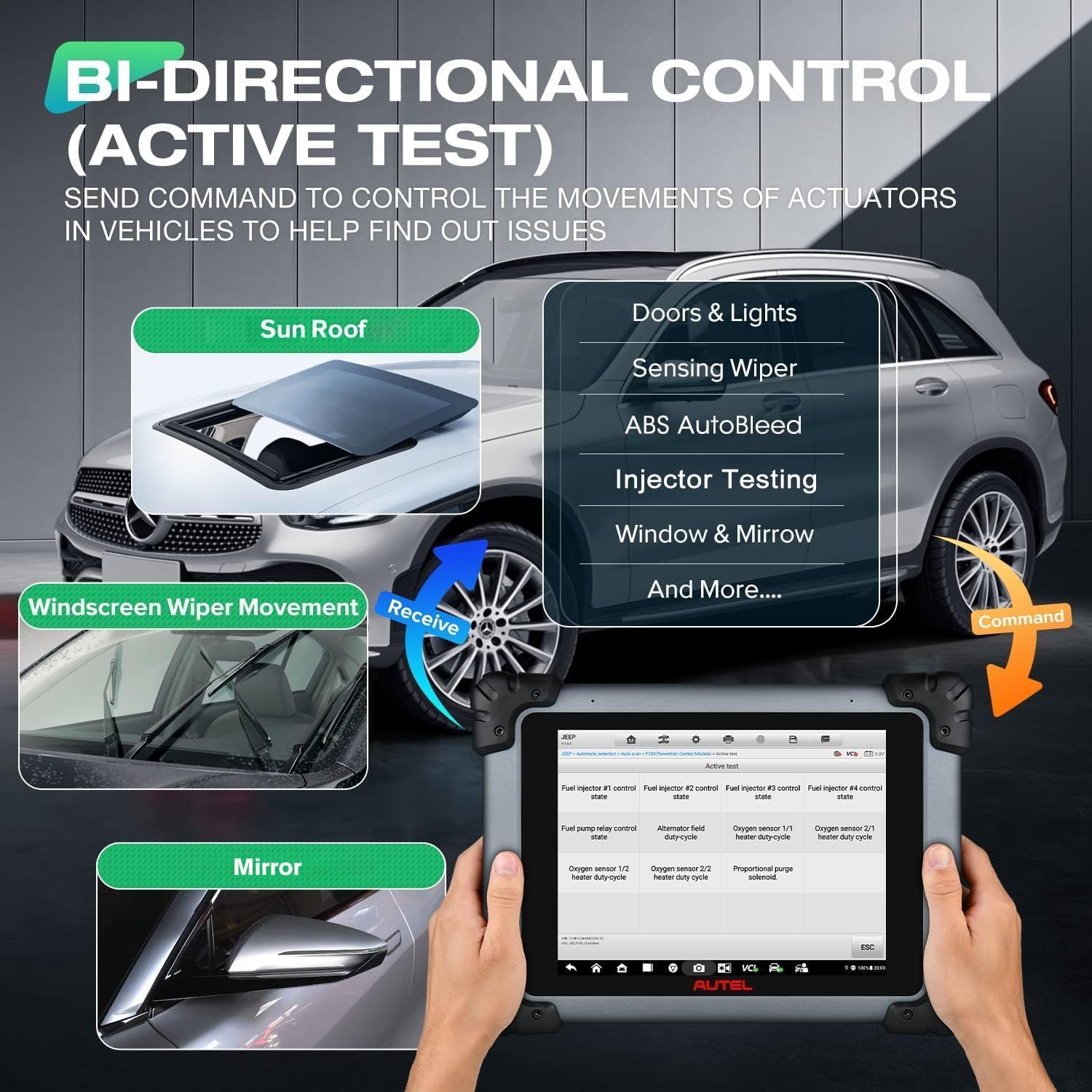
Figure 8: Bi-directional control functionality for testing actuators.
3.7 Guided Functions (VAG Vehicles)
For VAG group vehicles (Bentley, VW, Audi, Skoda, Seat), the Guided Functions provide step-by-step instructions to complete complex service operations, ensuring correct procedures are followed.
3.8 Extended Functions
The MaxiSYS MS908S PRO II can connect with optional Autel accessories for extended diagnostic capabilities:
- BT506 Battery Tester: For comprehensive battery health analysis.
- MV108/MV105 Inspection Camera: To inspect hard-to-reach areas.
- MP408 4-Channel Automotive Oscilloscope: For detailed measurement and testing of electrical and electronic components.

Figure 9: Extended functions with optional accessories.
3.9 FCA AutoAuth
The device supports FCA AutoAuth, allowing access to 2017 and newer FCA vehicles for advanced ECU Coding, bi-directional control, and other services. Registration on the official AutoAuth website is required.

Figure 10: FCA AutoAuth interface for secure vehicle access.
3.10 Cloud Report Management
Diagnostic reports can be uploaded to the Autel Cloud. This feature allows for easy sharing of reports with customers via QR code, email, or text message, and provides access to reports anytime, anywhere.

Figure 11: Cloud Report Management system.
4. Maintenance
4.1 Software Updates
Regularly check for and install software updates to ensure optimal performance, expanded vehicle coverage, and access to the latest features. Updates are typically available via Wi-Fi through the 'Update' application on the device.
4.2 Device Care
Keep the device clean and free from dust and moisture. Store it in its protective carrying case when not in use. Avoid extreme temperatures and direct sunlight. Use a soft cloth for cleaning the screen and exterior.
5. Troubleshooting
5.1 Common Issues and Solutions
- Device Not Powering On: Ensure the device is fully charged or connected to a power source. Check the power adapter and cable for damage.
- Connectivity Issues with VCI/J2534 Device: Verify that the VCI/J2534 device is properly connected to the vehicle's OBD-II port and securely paired with the main unit via Bluetooth or USB. Restart both the main unit and the VCI/J2534 device.
- Software Update Failures: Ensure a stable and strong Wi-Fi connection. Free up storage space if necessary. Try updating during off-peak hours.
- Vehicle Communication Errors: Check the vehicle's ignition status (should be ON). Verify the OBD-II cable connection. Ensure the vehicle's battery has sufficient voltage. Confirm the correct vehicle make, model, and year are selected in the software.
- Slow Performance: Close unnecessary applications running in the background. Clear cache and temporary files. Ensure sufficient storage space is available.
6. Product Specifications
| Specification | Detail |
|---|---|
| Brand | Autel |
| Model | MaxiSys MS908S PRO II |
| Operating System | Android 10.0 |
| Processor | Octa-core |
| Memory | 4GB RAM, 128GB ROM |
| Display | 9.7-inch, 2048x1536 HD |
| Camera | 16MP Rear |
| Wi-Fi | 2.4GHz & 5GHz Dual-band |
| Dimensions (L x W x H) | 8.66" x 1.97" x 11.81" |
| Item Weight | 3.12 pounds |
| Battery | 1 Lithium Polymer (included) |
| UPC | 706597653796 |
7. Accessories Included
The Autel MaxiSYS MS908S PRO II package includes the following components:
- MS908S PRO II Main Tool
- J2534 ECU Programming Device (MaxiFlash Elite)
- OBD2 Cable
- AC/DC Adapter (12V)
- Cigarette Lighter Cable
- Clipper Cable
- USB Ethernet Adapter
- USB Cable
- Mini USB Cable
- Ethernet Serial Cable
- Light Fuse (2 pcs)
- Soft Cloth
- Plastic Carrying Case

Figure 12: Overview of included accessories.
8. Warranty and Support
The Autel MaxiSYS MS908S PRO II comes with a 1-year brand warranty. It includes 1-year of free software updates upon registration. After the update period expires, installed software can still be used normally. Lifetime technical support is available. For assistance, contact Autel support.


