
1. Introduction
Thank you for choosing the K&F CONCEPT K255A4+BH-28L Aluminum Travel Tripod. This manual provides detailed instructions for the proper setup, operation, and maintenance of your tripod to ensure optimal performance and longevity. Please read this manual thoroughly before using the product.

Image 1.1: The K&F CONCEPT K255A4+BH-28L Aluminum Travel Tripod.
2. Product Overview and Features
The K&F CONCEPT K255A4+BH-28L is a versatile and robust aluminum tripod designed for photographers requiring stability and portability. It features a detachable monopod and a 360-degree ball head for flexible shooting angles.
Key Features:
- Stable & Durable: Constructed from high-quality aluminum alloy with a 25mm tube diameter, providing stable support for your camera. Includes a spring hook for adding extra weight for enhanced stability.
- Lightweight & Portable: Weighs only 1.5kg (including ball head) and folds down to a compact 43cm, making it ideal for travel.
- Adjustable Height: Features 5-section legs, allowing quick height adjustments from 53cm to 175cm.
- 360° Panoramic Ball Head: The 28mm metal ball head supports 360-degree rotation for panoramic photography and precise angle adjustments. It has a maximum load capacity of 10kg.
- Detachable Monopod: One of the tripod legs can be detached and converted into a monopod with a working height of up to 181cm, suitable for sports photography or situations where a full tripod is not feasible.
- Versatile Shooting: The center column can be inverted for macro photography and low-angle shots.

Image 2.1: Omni Series O255A4+BH-28L Tripod with key specifications: 5 leg sections, 2.5cm max tube diameter, 175cm max height, 43cm folded length, 10kg load capacity, 1.5kg weight.

Image 2.2: The tripod's compact folded length of 43cm (16.9 inches) for easy transport.
3. Components
Your K&F CONCEPT K255A4+BH-28L tripod consists of the following main components:
- Tripod Legs: Five-section aluminum legs with twist locks for height adjustment.
- Center Column: Extendable column for additional height, reversible for low-angle shooting.
- Ball Head (BH-28L): A metal ball head with a quick-release plate, 360-degree panoramic scale, and independent locking knobs for pan and tilt.
- Quick Release Plate: For quick attachment and detachment of your camera.
- Monopod Leg: One of the tripod legs is detachable to function as a monopod.
- Spring Hook: Located at the bottom of the center column for hanging additional weight.
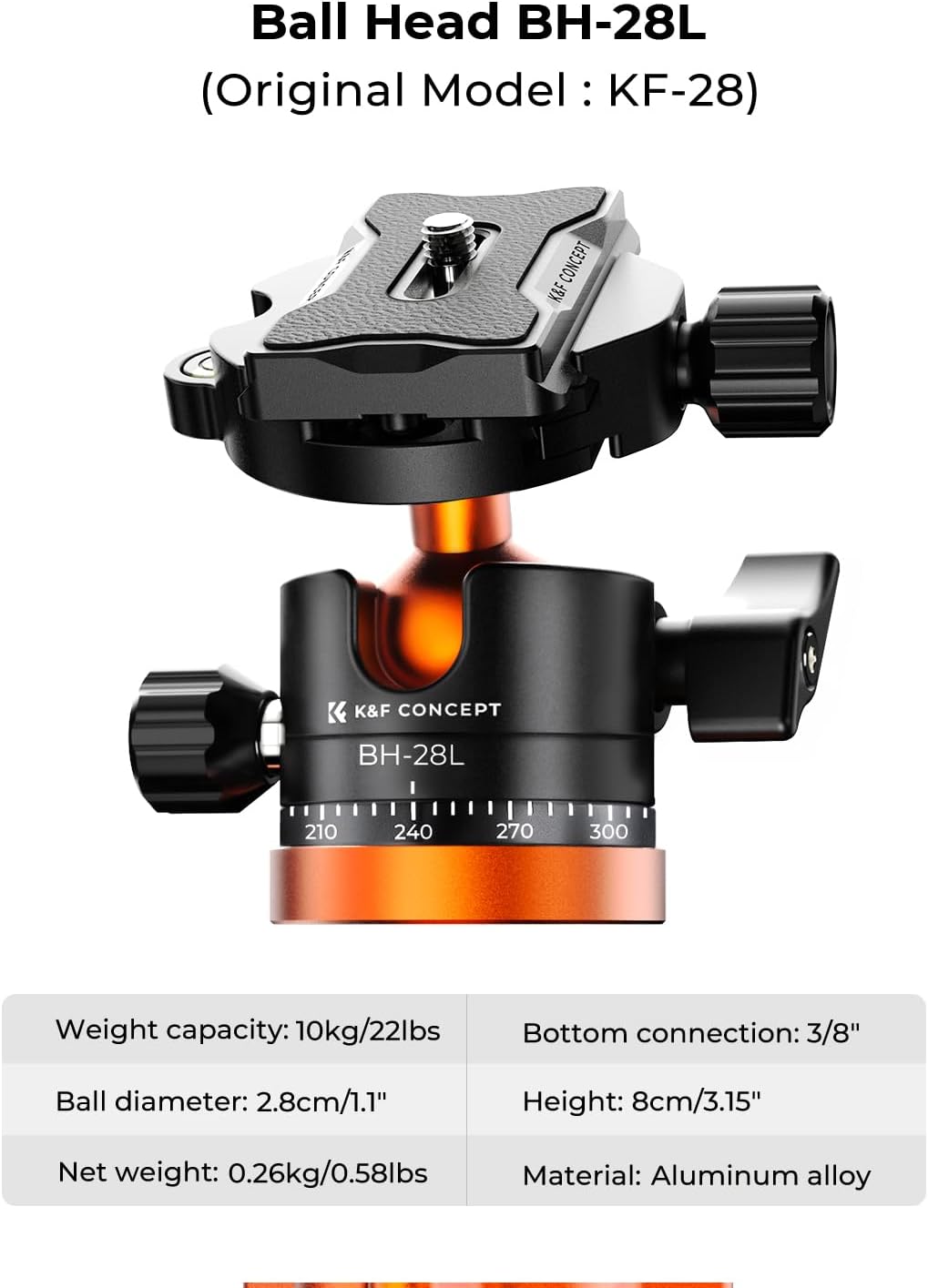
Image 3.1: Detailed view of the BH-28L Ball Head, showing its weight capacity (10kg/22lbs), ball diameter (2.8cm/1.1"), net weight (0.26kg/0.58lbs), bottom connection (3/8"), height (8cm/3.15"), and aluminum alloy material.
4. Setup Instructions
- Unpack the Tripod: Carefully remove all components from the packaging. Ensure all parts listed in the "What's in the Box" section are present.
- Extend the Legs: Release the leg angle adjustment locks at the top of each leg. Extend the legs to your desired spread. The legs can be set at 3 adjustable angles. Secure the leg angle locks.
- Adjust Leg Height: Twist the leg section locks counter-clockwise to loosen, extend each leg section to the desired length, and then twist clockwise to tighten and secure. Repeat for all leg sections on each leg.
- Attach Camera to Quick Release Plate: Unscrew the quick release plate from the ball head. Attach the quick release plate to the bottom of your camera by screwing the 1/4"-20 camera screw into the camera's tripod socket. Ensure it is securely tightened.
- Mount Camera to Ball Head: Slide the quick release plate with your camera into the clamp on the ball head. Tighten the quick release plate locking knob to secure the camera.
- Adjust Center Column (Optional): To extend the center column, loosen the center column locking knob, pull the column up to the desired height, and then tighten the knob. For low-angle or macro photography, the center column can be inverted.

Image 4.1: Tripod legs showing the 3 adjustable angle positions and a multifunctional accessory extension point.
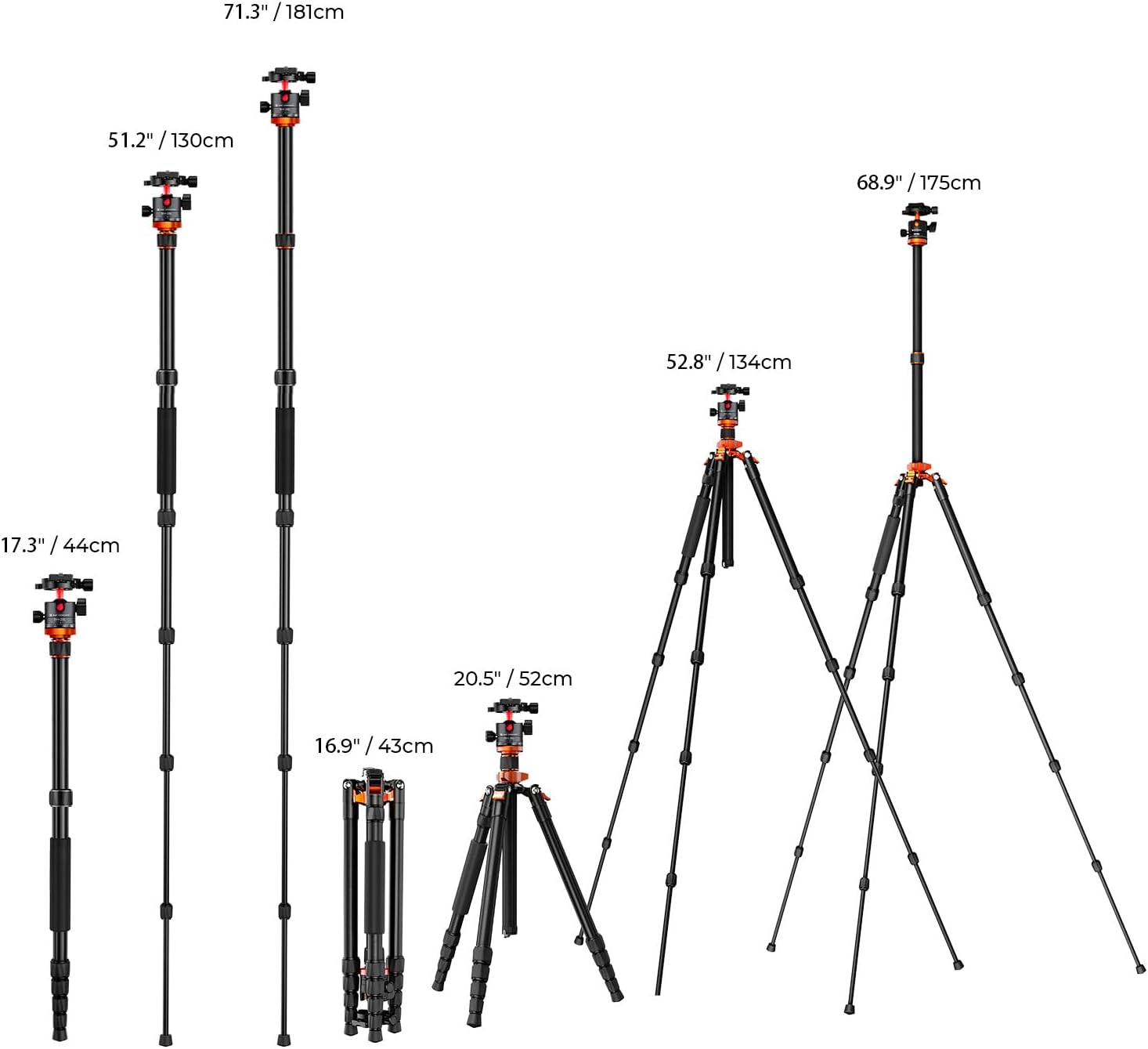
Image 4.2: Illustration of the tripod's various height configurations, including folded (43cm/16.9"), minimum height (52cm/20.5"), and maximum height (175cm/68.9"), as well as monopod height (181cm/71.3").
5. Operating Instructions
5.1 Using the Ball Head
- Adjusting Camera Angle: Loosen the main locking knob on the ball head to adjust the camera's tilt and swivel. Once the desired angle is achieved, tighten the knob firmly.
- Panoramic Rotation: Loosen the panoramic base locking knob to rotate the camera 360 degrees horizontally. Use the degree markings on the base for precise panoramic shots. Tighten the knob to lock the position.

Image 5.1: The ball head with 360° panoramic rotation markings for precise adjustments.
5.2 Converting to Monopod
To convert one of the tripod legs into a monopod:
- Identify the leg with the foam grip. This is the detachable monopod leg.
- Unscrew this leg from the tripod chassis by twisting it counter-clockwise.
- Remove the center column from the tripod.
- Screw the ball head (with or without your camera attached) onto the top of the detached leg.
- Extend the monopod to your desired height using the twist locks.

Image 5.2: Illustration of the tripod transforming into a detachable monopod.
5.3 Macro and Low-Angle Photography
For extreme low-angle or macro photography, the center column can be inverted:
- Remove the ball head from the top of the center column.
- Loosen the center column locking knob and pull the center column completely out.
- Reinsert the center column upside down into the tripod chassis.
- Reattach the ball head to the inverted center column. Your camera can now be positioned very close to the ground.

Image 5.3: Tripod configured for macro photography.

Image 5.4: Tripod configured for a low-angle creative shot.
6. Maintenance
- Cleaning: After use, especially in dusty or sandy environments, wipe down the tripod with a soft, dry cloth. For stubborn dirt, use a slightly damp cloth and mild soap, then dry thoroughly. Avoid harsh chemicals.
- Lubrication: Periodically check the leg locks and ball head mechanisms. If they feel stiff, apply a small amount of silicone-based lubricant. Do not over-lubricate.
- Storage: Store the tripod in its carrying bag in a cool, dry place away from direct sunlight and extreme temperatures.
- Inspection: Regularly inspect all screws, knobs, and moving parts for any signs of wear or damage. Tighten any loose components.
7. Troubleshooting
- Tripod is unstable: Ensure all leg locks are fully tightened and the leg angles are evenly spread. For added stability, hang a weight from the spring hook on the center column.
- Ball head movement is not smooth: Check for any dirt or debris in the ball head mechanism. Clean as per maintenance instructions. Ensure the locking knobs are not overtightened or too loose.
- Leg sections stick or are hard to extend/retract: Clean the leg sections and apply a small amount of silicone lubricant if necessary. Ensure no sand or grit is trapped inside.
- Camera not securely attached: Ensure the quick release plate is properly seated in the ball head clamp and the locking knob is fully tightened. Verify the camera screw on the quick release plate is tight.
8. Specifications
| Feature | Specification |
|---|---|
| Model Name | K255A4+BH-28L (KF09.083V2) |
| Material | Aluminum Alloy |
| Maximum Height | 175 cm (68.9 inches) |
| Minimum Height | 52 cm (20.5 inches) |
| Folded Length | 43 cm (16.9 inches) |
| Weight | 1.5 kg (3.3 lbs) |
| Maximum Load Capacity | 10 kg (22 lbs) |
| Leg Sections | 5 |
| Maximum Tube Diameter | 25 mm |
| Ball Head Type | BH-28L Ball Head |
| Ball Head Diameter | 28 mm (1.1 inches) |
| Monopod Height | Up to 181 cm (71.3 inches) |
| Special Features | Convertible to Monopod, Quick Release Plate, 360-degree Ball Head |

Image 8.1: The tripod highlighting its 10kg (22 lbs) maximum load capacity.
9. What's in the Box
The standard package includes:
- K&F CONCEPT K255A4+BH-28L Tripod with Ball Head
- Carrying Bag

Image 9.1: The packing list, including the tripod, its retail box, and a carrying bag.
10. Warranty and Support
This K&F CONCEPT product comes with a limited warranty. For specific warranty terms and conditions, please refer to the official K&F CONCEPT website or contact their customer service.
For technical support, troubleshooting assistance, or any inquiries regarding your product, please visit the official K&F CONCEPT website or contact their customer support team directly.
Official Website: www.kentfaith.com