
Introduction
Thank you for choosing the K&F Concept 68-inch / 175cm Camera Tripod. This versatile and compact tripod is designed for photographers seeking stability, flexibility, and portability. It features a detachable monopod, a 360° panoramic ball head, and multi-angle shooting capabilities. Please read this manual carefully to ensure proper setup, operation, and maintenance of your tripod.
Product Features
- Compact & Portable: Constructed from military magnesium aluminum alloy, weighing only 3.30 lbs (1.5kg). It can be 180° reflexed and folded to 16.9 inches (43cm) for easy transport.
- 360° Panorama Ball Head: The 28mm large metal ball head offers a 10kg (22lbs) load capacity and 360-degree rotation for panoramic shooting.
- Detachable Monopod: One leg can be detached and converted into a lightweight monopod or walking stick.
- Easy Setup: Features 5-section tube legs with spiral-type locking knobs for quick height adjustment. Maximum height is 68.8 inches (175cm) with the center column extended.
- Multi-Angle Shooting: Spring self-locking foot tube angle adjustment buttons allow for quick changes to leg angles, enabling low-angle shooting, macro photography, and inverted central axis shots.
Setup Instructions
- Unfolding the Tripod:
Release the leg angle adjustment locks on each leg. Extend the legs outwards until they are stable. The legs can be set at various angles by pressing the angle adjustment buttons.

Image: The K&F Concept tripod, model O255A4+BH-28L, shown fully extended with a camera, highlighting its stability and specifications like 5 leg sections, 2.5cm max tube, 175cm max height, 43cm folded length, 10kg load capacity, and 1.5kg weight.
- Adjusting Leg Height:
Twist the spiral locking knobs on each leg section counter-clockwise to loosen, extend the leg to the desired height, and then twist clockwise to secure. Repeat for all leg sections.
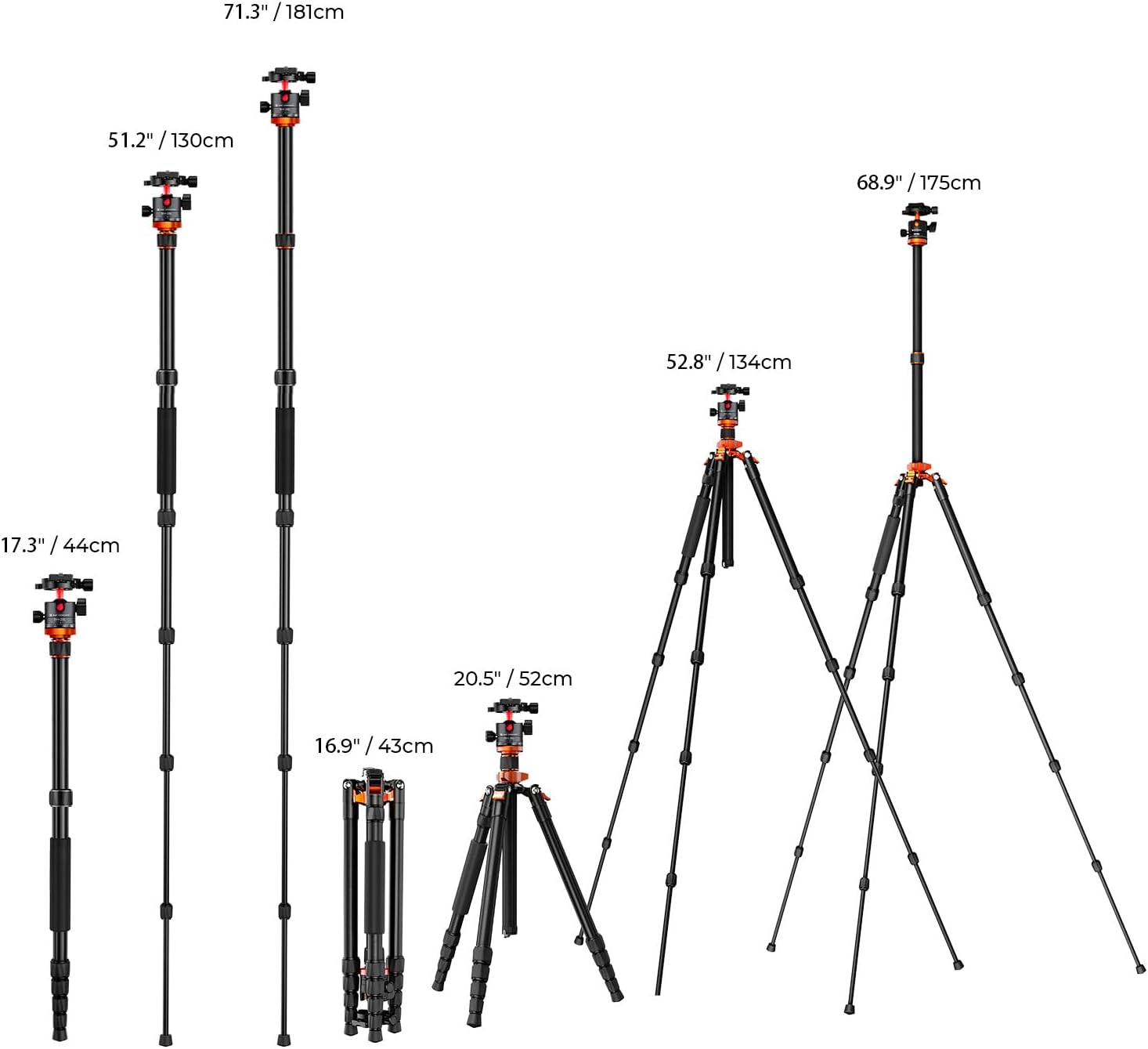
Image: A visual guide illustrating the different height adjustments and configurations of the K&F Concept tripod, from its compact folded state (16.9 inches) to its maximum extended height (68.9 inches/175cm), including monopod and low-angle setups.
- Extending the Center Column:
Loosen the center column locking knob. Pull the center column upwards to extend it. Tighten the knob to secure the column at the desired height. For maximum stability, extend the legs fully before extending the center column.
- Attaching Your Camera:
Ensure the quick shoe plate is securely attached to your camera's tripod mount. Align the quick shoe plate with the ball head's receiver and slide it in until it clicks into place. Tighten any additional locking mechanisms on the ball head to secure the camera.
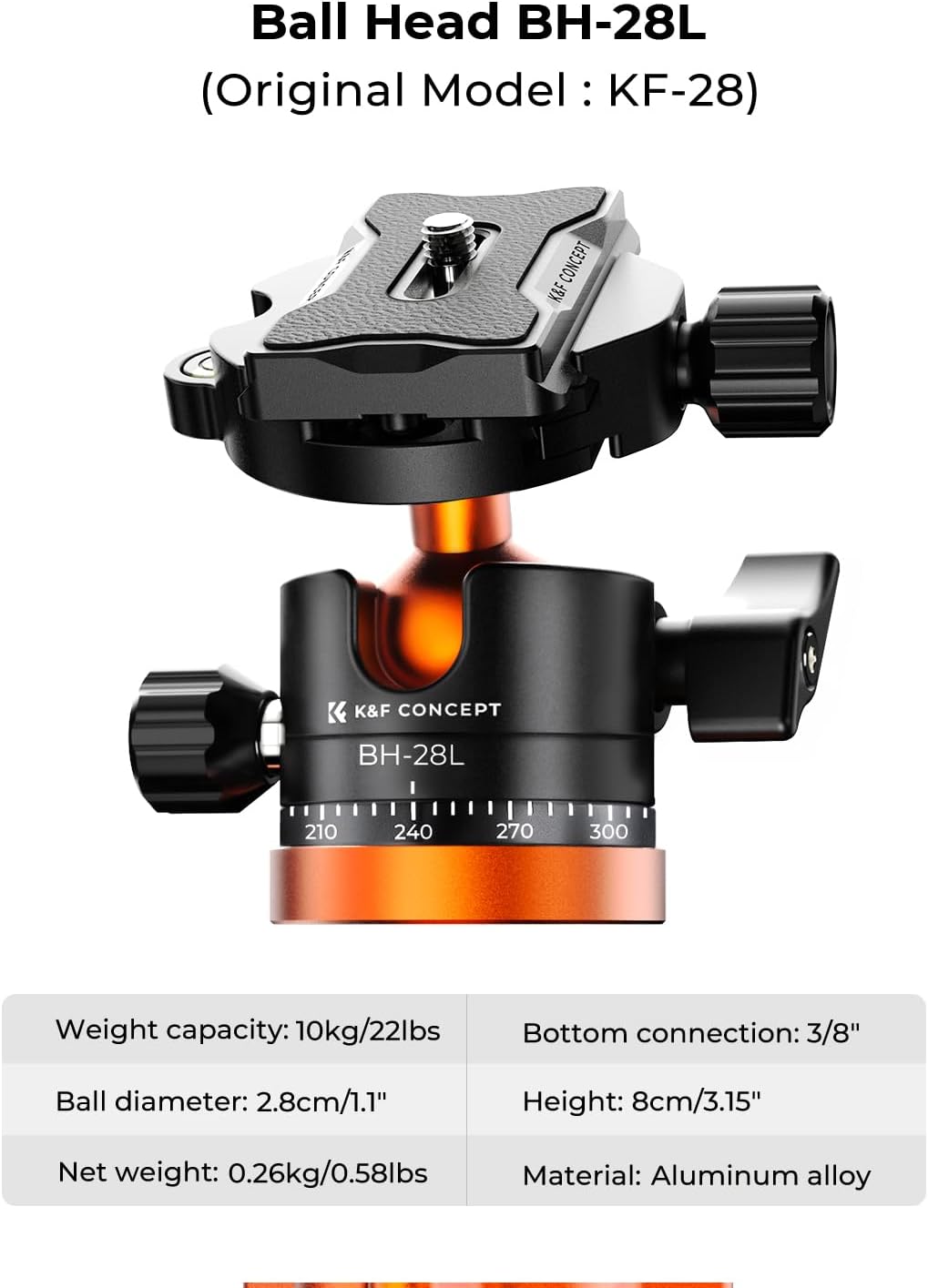
Image: A detailed view of the BH-28L ball head, highlighting its quick shoe plate, 1.1-inch ball diameter, 10kg/22lbs weight capacity, 3/8" bottom connection, 8cm/3.15" height, and aluminum alloy material.
Operating Instructions
- Adjusting the Ball Head:
The main locking knob on the ball head controls the movement of the ball. Loosen it to adjust your camera's angle freely (tilt, pan, portrait orientation). Tighten it to lock the camera in position.
- Panoramic Shooting:
The ball head features a separate panoramic base with a locking knob. Loosen this knob to rotate the camera 360 degrees horizontally for panoramic shots without affecting the tilt angle. Ensure the tripod is level using the built-in bubble level for best results.

Image: The tripod demonstrating its 360° panoramic shooting capability, with a camera capturing a wide landscape view, indicated by a circular degree scale.
Monopod Conversion
To convert your tripod into a monopod:
- Identify the leg with the foam grip.
- Unscrew this leg from the tripod chassis.
- Unscrew the ball head from the center column.
- Screw the ball head onto the top of the detached leg.
- Extend the monopod to your desired height using the spiral locking knobs.

Image: A visual representation of the detachable monopod feature, showing one leg separated from the tripod and used independently, with a person hiking and using it as a monopod.
Multi-Angle Shooting
- Adjustable Leg Angles: Press the spring self-locking buttons at the top of each leg to adjust the leg angle. There are typically three locking positions for varied stability and height.
- Low-Angle Shooting: Set the legs to their widest angle for extremely low-to-the-ground shots.
- Inverted Center Column: For macro photography or unique perspectives, the center column can be inverted. To do this, fully extend the center column, remove the hook at the bottom, and then pull the column out. Reinsert it upside down and secure it with the locking knob.

Image: The tripod configured for low-angle creative shooting, capturing a dynamic shot of a dolphin jumping out of the water, demonstrating its flexibility.

Image: The tripod set up for an inverted shot, with the camera positioned below the tripod's base, ideal for macro photography or unique ground-level perspectives.
Maintenance
- Regularly clean the tripod legs and locking mechanisms to prevent dust and debris buildup.
- Use a soft, dry cloth to wipe down the aluminum surfaces.
- Avoid using harsh chemicals or abrasive materials that could damage the finish.
- Ensure all screws and connections are tight before each use.
- Store the tripod in its carrying bag in a dry, cool place when not in use.
Troubleshooting
- Tripod Instability: Ensure all leg sections are fully extended and their locking knobs are tightened. Check that the leg angle adjustment locks are engaged.
- Ball Head Movement Issues: If the ball head is not moving smoothly or is too loose/tight, adjust the main locking knob. If the panoramic base is stiff, ensure its dedicated locking knob is loosened.
- Leg Sections Sticking: Clean the leg sections thoroughly to remove any dirt or sand. If necessary, apply a small amount of silicone-based lubricant to the inner tubes.
Specifications
| Feature | Specification |
|---|---|
| Model Name | K255A4+BH-28L (TM2515M1) |
| Material | Aluminum Magnesium Alloy |
| Max Height | 68.8 inches (175 cm) |
| Folded Length | 16.9 inches (43 cm) |
| Load Capacity | 22 lbs (10 kg) |
| Item Weight | 3.3 lbs (1.5 kg) |
| Leg Sections | 5 |
| Ball Head Diameter | 28mm (1.1 inches) |
| Tripod Head Type | Ball Head (BH-28L) |
Package Contents
The K&F Concept 68-inch / 175cm Camera Tripod package typically includes:
- K&F Concept K255A4+BH-28L Tripod with Ball Head
- Carrying Bag
- Quick Release Plate
- Hex Wrench (for adjustments)
- Instruction Manual (this document)

Image: The K&F Concept tripod, its dedicated carrying bag, and the product box, illustrating the complete package contents.
Warranty and Support
K&F Concept products are designed for durability and performance. For warranty information, technical support, or service inquiries, please refer to the official K&F Concept website or contact their customer service directly. Keep your purchase receipt as proof of purchase for warranty claims.
For further assistance, visit the K&F CONCEPT Store.
Official Product Video
Watch the official product video for a visual guide on the K&F Concept TM2515M1 tripod's features and usage:
Video: An official K&F Concept video demonstrating the features and functionality of the TM2515M1 67-inch Compact Lightweight Tripod, including its setup, adjustments, and portability.