
1. Product Overview
The AstroAI 15L Portable Car Refrigerator and Freezer is a versatile cooling solution designed for various applications, including car, RV, truck, van, boat, camping, travel, and home use. It functions as both a refrigerator and a freezer, capable of maintaining temperatures from -4°F (-20°C) to 68°F (20°C). Its robust design and efficient compressor ensure fast cooling and reliable performance, making it ideal for keeping food, drinks, and other perishables chilled or frozen on the go.

Image: The AstroAI 15L Portable Car Refrigerator, a compact black and gray unit with a digital display, shown in an outdoor setting with various items inside.
2. Safety Instructions
- Read all instructions before operating the appliance.
- Do not operate the appliance if the power cord is damaged.
- Ensure proper ventilation around the unit. Do not block air vents.
- Avoid placing the appliance in direct sunlight or near heat sources.
- Do not immerse the appliance in water or expose it to heavy rain.
- Always disconnect power before cleaning or maintenance.
- Keep the appliance upright for at least 12 hours after transport before initial use to allow the compressor fluid to settle.
- Use only the provided power adapters.
3. Package Contents
- 1 x AstroAI 15L Portable Car Refrigerator
- 1 x 12V/24V DC Power Cord
- 1 x 100V-240V AC Adapter
- 1 x User Manual
4. Product Features
- High Capacity: 15L (16 Quarts) interior, dimensions 13.8"L x 9.6"W x 7.1"H.
- Fast Cooling: Powerful compressor cools to 32°F (0°C) in 15 minutes and -4°F (-20°C) in about an hour (when empty).
- Dual Power Options: Includes 12V/24V DC adapter for vehicles and 100V-240V AC adapter for home use.
- MAX/ECO Modes: Switch between MAX mode for rapid cooling and ECO mode for energy-saving.
- Battery Saving Modes: Three selectable levels (low, medium, high) to protect your vehicle's battery from excessive discharge.
- Functional Design: LED display for easy operation, USB port for phone charging, UL-listed cords with replaceable fuses.
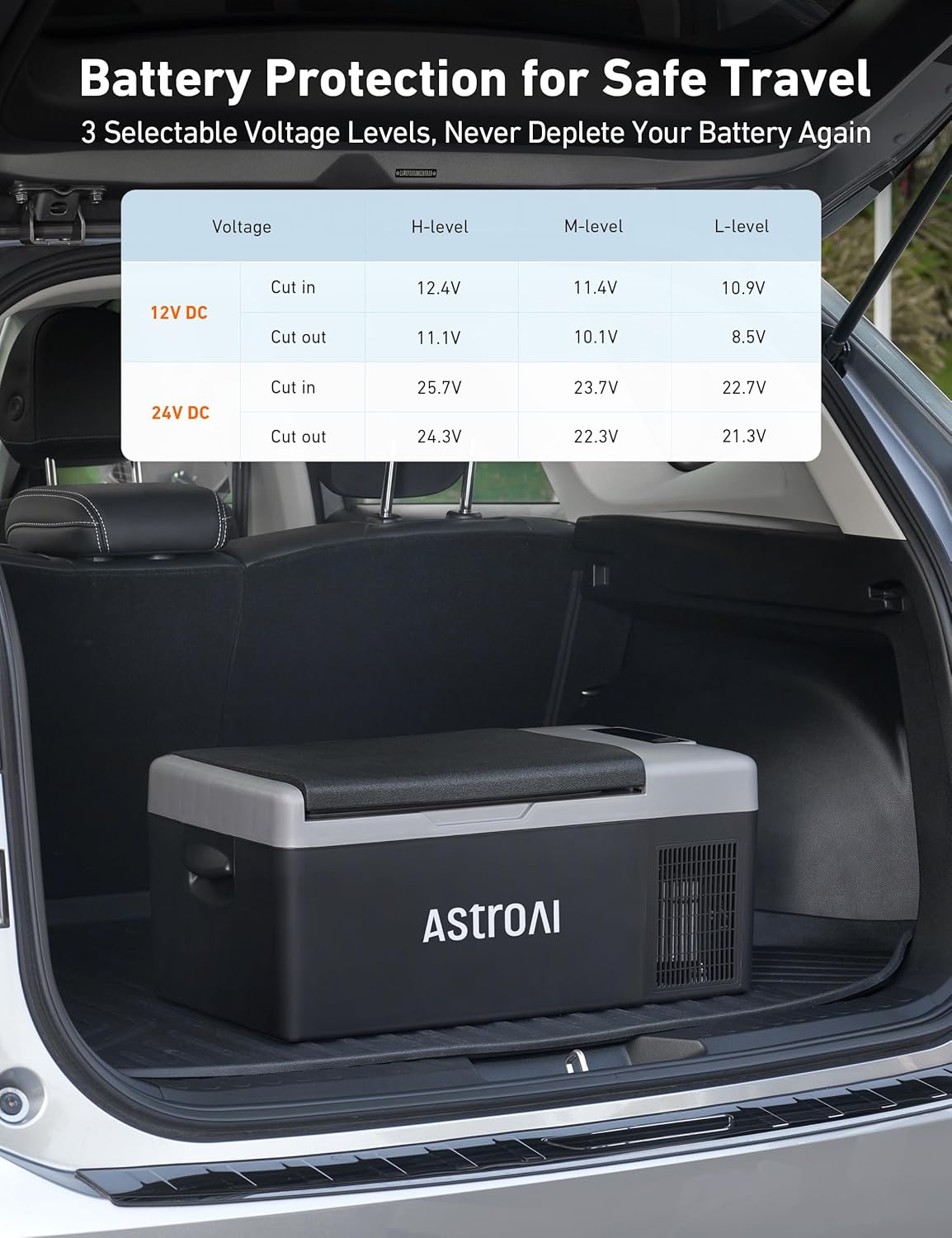
Image: The interior of the AstroAI 15L Portable Car Refrigerator, showcasing its ample storage space for various items like drinks, fruits, and vegetables.
5. Setup
- Unpacking: Carefully remove the refrigerator and all accessories from the packaging.
- Initial Placement: Place the refrigerator upright on a flat, stable surface. Allow it to stand for at least 12 hours before plugging it in to ensure the compressor fluid settles.
- Power Connection:
- For vehicle use: Connect the 12V/24V DC power cord to the refrigerator's DC input port and then to your vehicle's cigarette lighter socket.
- For home/AC use: Connect the 100V-240V AC adapter to the refrigerator's AC input port and then to a standard wall outlet.
- Ventilation: Ensure there is adequate space (at least 6 inches) around all sides of the refrigerator for proper ventilation.

Image: The AstroAI 15L Portable Car Refrigerator demonstrating its versatility with both AC power for indoor use and DC power for vehicle use.
6. Operating Instructions
- Power On/Off: Press and hold the Power Button (
 ) for 3 seconds to turn the unit ON or OFF.
 - Temperature Adjustment: Use the "+" and "-" buttons to increase or decrease the desired temperature. The display will show the current internal temperature.
- MAX/ECO Mode Switch: Press the Settings Button (
 ) to toggle between MAX (fast cooling) and ECO (energy-saving) modes.
 - Battery Protection Mode: Press and hold the Settings Button () for 3 seconds to cycle through Low (L), Medium (M), and High (H) battery protection settings.
- Fahrenheit/Celsius Switch: Press and hold the "+" and "-" buttons simultaneously for 3 seconds to switch between Fahrenheit (°F) and Celsius (°C).
Video: A demonstration of the AstroAI 15L Portable Freezer's control panel, showing how to power it on/off, adjust temperature, and switch between MAX/ECO modes. The video highlights the quiet operation of the unit.
7. Temperature Settings
The AstroAI 15L Portable Car Refrigerator offers a wide temperature range from -4°F (-20°C) to 68°F (20°C), allowing it to function as both a freezer and a refrigerator. The unit can cool to 32°F (0°C) in approximately 15 minutes when empty, and reach its lowest temperature of -4°F (-20°C) within about an hour.
| Food Type | Temperature (°F) | Temperature (°C) |
|---|---|---|
| Meat | 0°F | -18°C |
| Frozen Food | 0°F | -18°C |
| Seafood | 26°F | -3°C |
| Vegetables | 37-50°F | 3-10°C |
| Cooked Food | 39°F | 4°C |
| Water | 41°F | 5°C |
| Canned Drinks | 41°F | 5°C |
| Fruits | 41-46°F | 5-8°C |
| Soft Drinks | 46-50°F | 8-10°C |
| Alcoholic Drinks | 55°F | 13°C |

Image: Visual representation of the AstroAI 15L Portable Car Refrigerator's adjustable temperature range, showing optimal temperatures for freezing and refrigerating various food and drink items.
8. Power Modes (MAX/ECO)
The refrigerator features two operating modes to optimize performance based on your needs:
- MAX Mode: Provides maximum cooling power for the fastest temperature drop. Ideal for initial cooling or when rapid chilling is required.
- ECO Mode: Optimizes energy consumption for extended use, especially when powered by a battery. This mode reduces power draw while maintaining the set temperature efficiently.

Image: An illustration detailing the power consumption and cooling performance of the AstroAI 15L Portable Car Refrigerator in both MAX and ECO modes.
9. Battery Protection System
To prevent your vehicle's battery from being fully discharged, the AstroAI refrigerator includes a three-level battery protection system. This system monitors the input voltage and will automatically shut off the compressor if the voltage drops below the selected level. The compressor will restart once the voltage returns to a safe level.
- High (H) Mode: Provides maximum protection for your vehicle's battery. The compressor will cut off at a higher voltage.
- Medium (M) Mode: A balanced setting for battery protection and extended operation.
- Low (L) Mode: Allows the refrigerator to use more of the battery energy before cutting off. Use this mode if you have a dedicated auxiliary battery or a robust power bank.
| Voltage | High Mode | Medium Mode | Low Mode | |
|---|---|---|---|---|
| 12V DC | Cut out | 11.3V | 10.1V | 9.6V |
| Cut in | 12.5V | 11.4V | 10.9V | |
| 24V DC | Cut out | 24.6V | 22.3V | 21.3V |
| Cut in | 26.0V | 23.7V | 22.7V |
Note: "Cut-out" is the input voltage at which the fridge/freezer will turn off. "Cut-in" is the input voltage at which the fridge/freezer will turn on.

Image: A table illustrating the voltage cut-out and cut-in levels for the AstroAI 15L Portable Car Refrigerator's three battery protection modes (High, Medium, Low) for both 12V and 24V DC inputs.


