
1. Introduction
This document serves as an instruction manual for the XVEFAT replacement remote control, designed for use with various Element LCD LED TV models. This remote control is a direct replacement and requires no programming or pairing. Simply insert batteries to begin operation.
Compatible Element TV Models:
- ELEFQ391J
- ELDFT395J
- ELEFJ391
- ELEFC401
- ELDFQ501J
- ELEFC461
2. Setup
To begin using your XVEFAT remote control, follow these simple steps:
- Open the Battery Compartment: Locate the battery compartment cover on the back of the remote control. Slide or press the latch to open it.
- Insert Batteries: Insert two (2) 1.5V AAA Alkaline batteries, ensuring the positive (+) and negative (-) terminals align correctly with the markings inside the compartment.
- Close the Battery Compartment: Replace the battery compartment cover until it clicks securely into place.
- Ready for Use: The remote control is now ready for immediate use with your compatible Element TV. No programming or pairing is required.
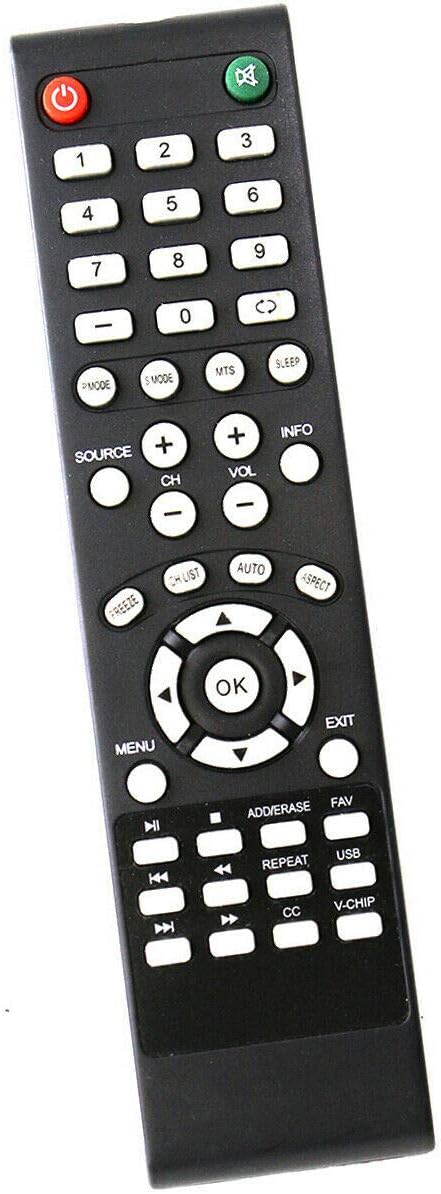
Image 1: Front view of the XVEFAT replacement remote control. It is black with various gray and red buttons, including number keys, navigation, volume, channel, and power buttons. The layout is standard for a television remote.
3. Operating Instructions
The XVEFAT remote control features a standard layout for easy operation of your Element TV. Refer to the image above for button identification.
- Power Button (⏻): Turns the TV on or off.
- Number Buttons (0-9): Directly select channels.
- Volume Up/Down (VOL +/-): Adjusts the sound volume.
- Channel Up/Down (CH +/-): Changes the television channel.
- Mute Button (🔇): Mutes or unmutes the TV sound.
- Source Button: Selects input sources (e.g., HDMI, AV).
- Menu Button: Accesses the TV's main menu.
- Navigation Buttons (Up, Down, Left, Right, OK): Used to navigate menus and confirm selections.
- Exit Button: Exits the current menu or screen.
- Info Button: Displays information about the current program or input.
- Sleep Button: Sets a sleep timer for the TV.
For specific functions not listed, please refer to your Element TV's original user manual.
4. Maintenance
- Battery Replacement: Replace batteries when the remote's performance degrades or it stops responding. Always replace both batteries simultaneously with new 1.5V AAA Alkaline batteries.
- Cleaning: To clean the remote control, gently wipe its surface with a soft, dry cloth. Do not use liquid cleaners, sprays, or abrasive materials, as these can damage the remote.
- Storage: Store the remote control in a cool, dry place away from direct sunlight and extreme temperatures. If the remote will not be used for an extended period, it is advisable to remove the batteries to prevent leakage.
5. Troubleshooting
If you encounter issues with your XVEFAT remote control, try the following troubleshooting steps:
- Remote Not Responding:
- Ensure the batteries are inserted correctly with the correct polarity (+/-).
- Replace old batteries with new 1.5V AAA Alkaline batteries.
- Check for any obstructions between the remote control and the TV's infrared sensor.
- Ensure you are within the effective range and pointing the remote directly at the TV.
- Specific Buttons Not Working:
- This could indicate a faulty button or low battery power. Try replacing the batteries first.
- Gently press the button multiple times to dislodge any debris.
- TV Not Turning On/Off:
- Verify that the TV is plugged into a working power outlet.
- Ensure the remote is pointed directly at the TV's IR receiver.
If problems persist after attempting these steps, the remote control may be defective. Contact customer support if necessary.
6. Specifications
| Brand | XVEFAT |
| Compatible Devices | Element LCD LED Televisions |
| Compatible Models | ELEFQ391J, ELDFT395J, ELEFJ391, ELEFC401, ELDFQ501J, ELEFC461 |
| Connectivity Technology | Infrared (IR) |
| Controller Type | Button Control |
| Power Supply | 2 x 1.5V AAA Alkaline Batteries (not included) |
| Special Feature | Ergonomic design |