
Cozylady HBW242150U
Cozylady 50ft WiFi LED Strip Lights User Manual
Model: HBW242150U
Product Overview
The Cozylady 50ft WiFi LED Strip Lights offer a versatile and smart lighting solution for various indoor spaces. This system includes two 25ft LED strips, a smart WiFi controller, and a remote, allowing for extensive coverage and dynamic lighting effects. It integrates seamlessly with smart home ecosystems like Amazon Alexa and Google Home, providing convenient voice control. The lights feature music synchronization, a wide range of colors, and dimmable options, making them suitable for creating diverse ambiances.
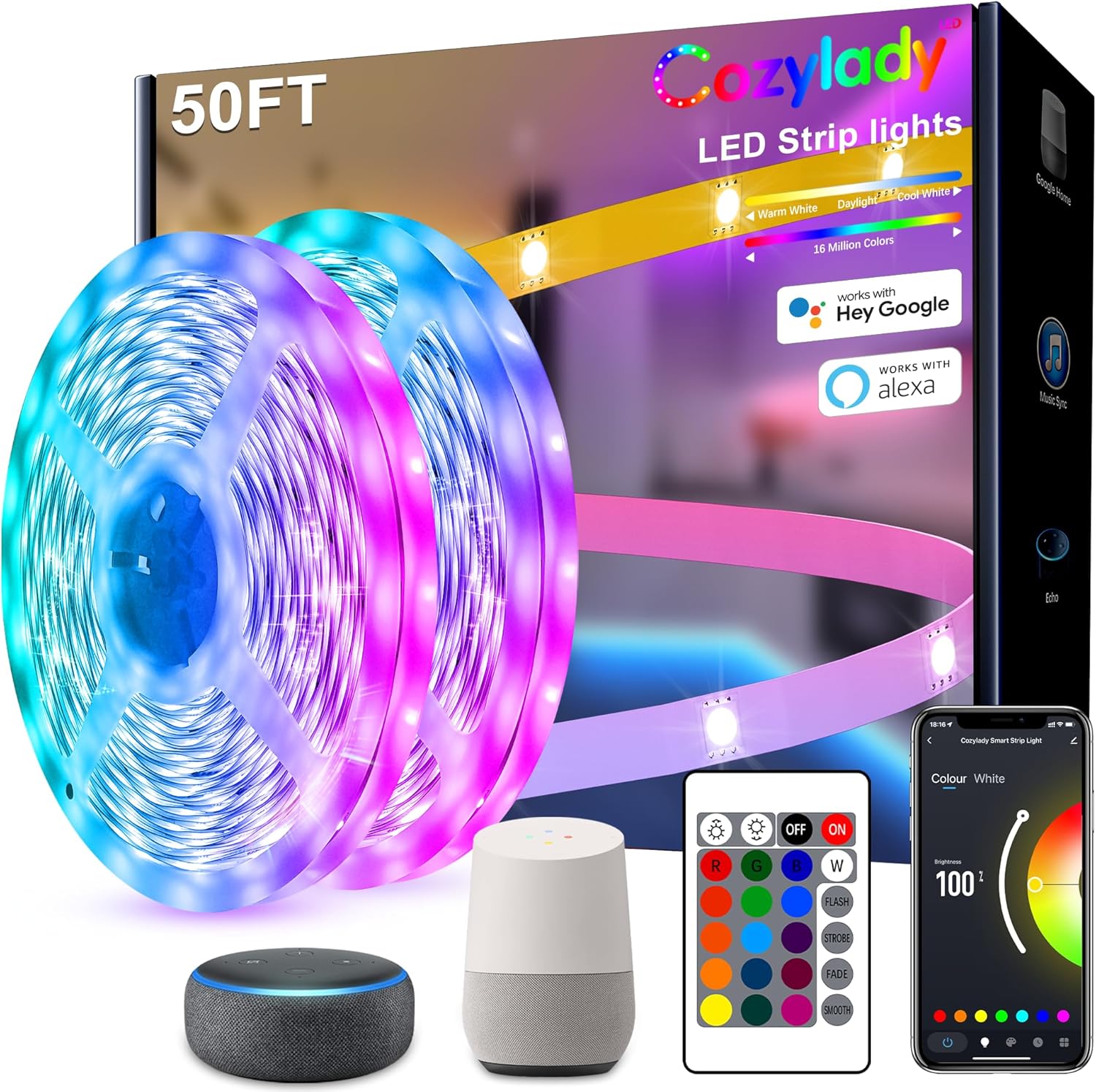
Figure 1: Complete Cozylady 50ft WiFi LED Strip Lights kit, including LED strips, remote control, WiFi controller, and compatibility with smart home devices.
Package Contents
Please verify that all items listed below are included in your package:
- 2 rolls of 25ft LED Strip Lights
- 1 x 24V Adapter for LED strip
- 1 x Remote for LED strip lighting (requires 1 CR2032 battery, not included)
- Securing buckles
- 1 x WiFi LED light strip controller

Figure 2: Rear view of the product packaging, detailing safety information and various model numbers, including HBW242150U.
Setup and Installation
Preparation: Ensure the installation surface is clean, dry, and smooth. Avoid rough surfaces. Unroll the LED strips completely before powering on to prevent overheating.
Adhesive Application: The LED strips feature an updated thermal conductive adhesive for strong adhesion. Slowly peel off the backing tape and firmly press the strip onto the desired surface. For added security, use the included securing buckles at regular intervals.
Connecting Strips: The 50ft length is provided as two 25ft rolls. Connect these rolls to the smart WiFi controller. If cutting the strips is necessary, cut only along the marked copper-colored trim lines. Ensure proper 4-pin LED connectors are used for reconnection (connectors may not be included).
Power Connection: Connect the 24V adapter to the WiFi controller, then plug the adapter into a power outlet.
App Download: Download the "Cozylady" app from your smartphone's app store. Follow the in-app instructions to connect the LED strip lights to your home WiFi network (2.4GHz network required).
Voice Assistant Integration: To enable voice control, activate the "Cozylady" skill within your Amazon Alexa or Google Home app. Follow the respective app's instructions to link your Cozylady account.
Operating Instructions
Using the Remote Control
The included remote control allows for basic functions:
- Power On/Off: Press the ON or OFF buttons.
- Color Selection: Choose from a variety of preset colors using the color buttons.
- Brightness Adjustment: Use the brightness up/down buttons to adjust light intensity.
- Mode Selection: Cycle through various lighting modes such as Flash, Strobe, Fade, and Smooth.
Using the Cozylady App
The Cozylady app unlocks the full potential of your LED strip lights:
- Color & Scenes DIY: Customize colors and create personalized lighting scenes.
- Music Sync Mode: Activate the built-in music sensor to synchronize light changes with sound.
- Timer Setting: Schedule lights to turn on or off at specific times.
- Brightness Adjustment: Fine-tune brightness levels.
- Group Control: Create groups for multiple Cozylady light sets to control them simultaneously.
- Control Share: Share control of your LED devices with other family members within the app.
Voice Control (Alexa/Google Home)
Once integrated with Amazon Alexa or Google Home, use voice commands for convenient control:
- "Alexa, turn on the [Light Name]."
- "Hey Google, set [Light Name] to blue."
- "Alexa, dim [Light Name] to 50%."
- "Hey Google, turn off the [Light Name]."
Maintenance and Care
- Cleaning: Gently wipe the LED strips with a dry, soft cloth. Do not use liquid cleaners or abrasive materials.
- Adhesive Longevity: The thermal conductive adhesive is designed for strong hold. If re-installation is required, ensure the surface is clean and dry. Use securing buckles for long-term stability.
- Storage: If storing the lights for an extended period, ensure they are clean, dry, and rolled loosely to prevent damage to the strip or LEDs.
- Indoor Use Only: These LED strip lights are designed for indoor use only. Avoid exposure to water, high humidity, or extreme temperatures.
Troubleshooting
| Problem | Possible Cause | Solution |
|---|---|---|
| Lights do not turn on. | Power adapter not connected, loose connection, power outlet issue. | Check all connections. Ensure the power adapter is securely plugged into the strip controller and the wall outlet. Test the outlet with another device. |
| Remote control not working. | Battery depleted or incorrectly inserted. Obstruction between remote and receiver. | Replace the CR2032 battery (ensure correct polarity). Ensure the remote is pointed directly at the IR receiver on the controller. |
| Lights not connecting to WiFi. | Incorrect WiFi password, 5GHz network, too far from router. | Verify WiFi password. Ensure you are connecting to a 2.4GHz network. Move the controller closer to your WiFi router. Restart the router and the LED strip controller. |
| Some LEDs are not lighting up ("dead lights"). | Manufacturing defect or damage. | Contact Cozylady customer support for assistance. Imported LED beads are used to greatly reduce this probability. |
| LED strip is falling off the surface. | Improper surface preparation, insufficient pressure during installation, or adhesive wear. | Clean the surface thoroughly. Reapply the strip with firm pressure. Utilize the included securing clips/buckles for reinforced attachment. |
Specifications
| Model Number | HBW242150U |
| Brand | Cozylady |
| Light Source Type | LED |
| Light Color | Multicolor (RGB-WiFi) |
| Length | 50 ft (2 x 25ft rolls) |
| Voltage | 24 Volts |
| Wattage | 12 watts |
| Connectivity | Wi-Fi (2.4GHz), Remote Control |
| Control Method | App (Cozylady), Voice (Amazon Alexa, Google Assistant), Remote |
| Indoor/Outdoor Usage | Indoor Use Only |
| Number of Light Sources | 270 |
| Remote Battery Type | 1 x CR2032 (not included) |
| Product Dimensions | 8.86 x 7.52 x 2.05 inches (packaging) |
For detailed energy efficiency information, please refer to the official EU EPREL database:
Note: The provided EPREL links correspond to model HBW242075E, which may be a variant or related product.
Warranty and Support
Warranty: The product specifications indicate "None" for warranty description. Please refer to your point of purchase or retailer's return policy for details regarding returns or exchanges.
Customer Support: For any issues, defects, or inquiries, please contact Cozylady customer service. The product packaging suggests contacting customer service via email for defects or issues. Please provide a screenshot of your Amazon order page when contacting support.
Manufacturer: Cozylady
Email: support@cozylady.cn
Related documentsHBW242150U


Ask a question about this manual
Ask about setup, troubleshooting, compatibility, parts, safety, or missing instructions. Manuals+ will review the question and use this page’s manual context to help answer it.