Introduction
This manual provides comprehensive instructions for the XVEFAT RMT-24 replacement remote control. This remote is designed to be compatible with various Westinghouse TV models, including WD32HB1120, WD32HT1360, WD40FX1170, and DWM55F1Y2. It functions as a direct replacement and requires no programming or pairing. Simply install the batteries, and the remote will be ready for use.
Setup: Battery Installation
To begin using your RMT-24 remote control, you must first install two AAA batteries (not included).
- Locate the battery compartment on the back of the remote control.
- Slide the battery compartment cover downwards or press the latch and lift to open.
- Insert two 1.5V AAA batteries, ensuring that the positive (+) and negative (-) terminals align correctly with the markings inside the compartment.
- Replace the battery compartment cover by sliding it back into place until it clicks securely.
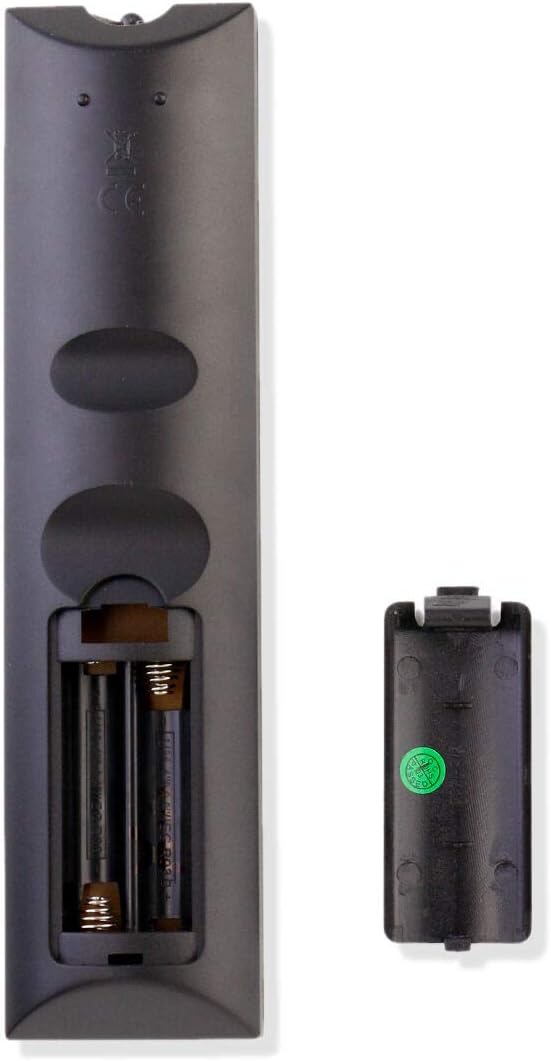
Image: Back view of the RMT-24 remote control with the battery compartment open, illustrating where to insert the two AAA batteries.
Operating Instructions
The RMT-24 remote control provides full functionality for your compatible Westinghouse TV. Ensure there is a clear line of sight between the remote and the TV's infrared sensor for optimal performance.

Image: Front view of the RMT-24 remote control, displaying the layout of all control buttons.
Button Functions:
- Power (●): Turns the TV on or off.
- Mute (☒): Mutes or unmutes the TV sound.
- Number Buttons (0-9): Directly select channels.
- P.MODE (Picture Mode): Cycles through preset picture modes (e.g., Standard, Dynamic, Movie).
- S.MODE (Sound Mode): Cycles through preset sound modes (e.g., Standard, Music, Movie).
- MTS (Multi-channel Television Sound): Selects audio tracks (e.g., Stereo, SAP).
- SLEEP: Sets the TV's sleep timer.
- SOURCE: Selects the input source (e.g., HDMI 1, AV, Component).
- CH+ / CH-: Changes the channel up or down.
- VOL+ / VOL-: Increases or decreases the volume.
- INFO: Displays current channel information.
- CC (Closed Caption): Toggles closed captions on or off.
- V-CHIP: Accesses V-Chip parental control settings.
- CH.LIST (Channel List): Displays the list of available channels.
- ASPECT: Changes the screen aspect ratio.
- MENU: Opens the TV's main menu.
- Navigation Arrows (Up, Down, Left, Right): Navigates through menus and options.
- OK: Confirms a selection in menus.
- EXIT: Exits the current menu or function.
- FAV (Favorite): Accesses favorite channels.
- ADD/ERASE: Adds or erases channels from the favorite list.
- FAV+ / FAV-: Navigates through favorite channels.
Maintenance
Proper care will extend the life of your remote control.
- Cleaning: Use a soft, dry cloth to clean the remote control. Do not use liquid cleaners or abrasive materials.
- Battery Replacement: Replace batteries when the remote's response becomes sluggish or stops working. Always replace both batteries at the same time with new ones of the same type.
- Storage: If the remote will not be used for an extended period, remove the batteries to prevent leakage and potential damage.
- Environment: Avoid exposing the remote to extreme temperatures, direct sunlight, or high humidity.
Troubleshooting
If you experience issues with your RMT-24 remote control, refer to the following common solutions:
- Remote not responding:
- Check if the batteries are inserted correctly with the correct polarity.
- Replace old batteries with new 1.5V AAA batteries.
- Ensure there are no obstructions between the remote control and the TV's infrared sensor.
- Make sure you are within the effective operating range of the TV.
- Buttons not working:
- Clean the remote control surface, especially around the buttons, to remove any dirt or debris that might be interfering with button presses.
- If only specific buttons are not working, the remote might be damaged.
- TV not responding to specific functions:
- Verify that your TV model is listed as compatible with the RMT-24 remote control.
- Some advanced TV functions might require the original TV remote or specific TV menu navigation.
Specifications
| Brand | XVEFAT |
| Model | RMT-24 |
| Compatible Devices | Westinghouse Televisions (Specific models: WD32HB1120, WD32HT1360, WD40FX1170, DWM55F1Y2) |
| Connectivity Technology | Infrared (IR) |
| Power Supply | 2 x 1.5V AAA Batteries (not included) |
| Color | Black |
| Special Feature | Ergonomic design |
Warranty and Support
For warranty information and customer support regarding your XVEFAT RMT-24 remote control, please refer to the purchase documentation or contact the seller directly. Specific warranty terms and support channels are typically provided at the point of sale.