1. Introduction
Thank you for choosing the BTF-LIGHTING WS2812B RGB ECO LED Strip. This product is designed for various lighting applications, offering individually addressable LEDs for dynamic and customizable lighting effects. Please read this manual thoroughly before installation and operation to ensure proper use and longevity of your LED strip.

Image 1.1: Key features of the WS2812B ECO LED Strip, highlighting its individually addressable LEDs and flexibility.
1.1 Product Overview
The BTF-LIGHTING WS2812B RGB ECO LED Strip features 5050SMD LEDs with integrated WS2812B ICs, allowing each LED to be controlled independently. This enables advanced lighting effects such as chasing, rainbow, and meteor patterns. The strip operates on DC5V and is available in various lengths and IP ratings. This specific model is IP65 rated, offering protection against dust and water jets.
1.2 What's in the Box
The package includes:
- BTF-LIGHTING WS2812B RGB ECO LED Strip (16.4FT / 5m, 300 LEDs)
- 3-PIN male connector
- User Manual
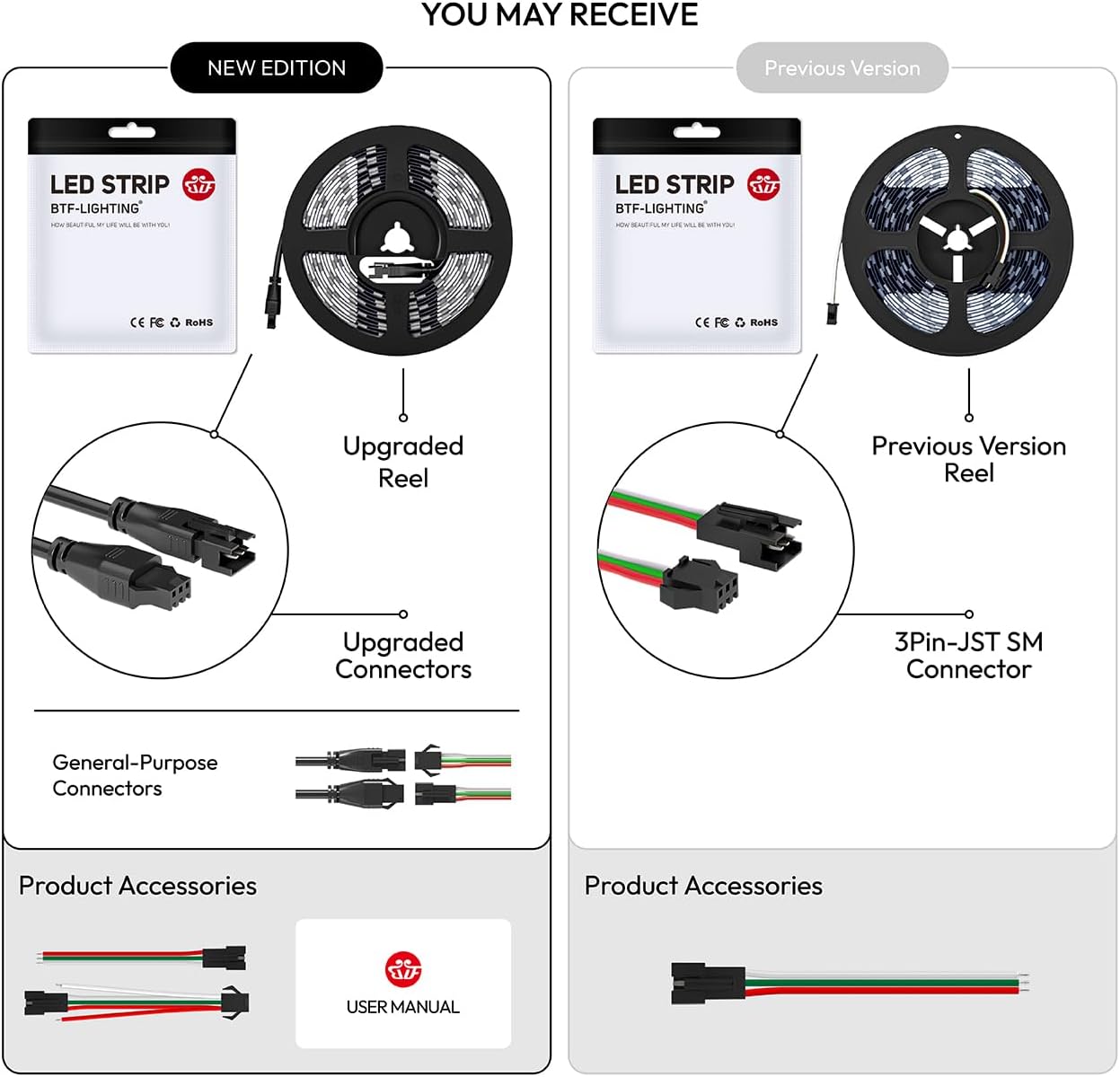
Image 1.2: Typical package contents, including the LED strip and connectors.
2. Safety Information
- Voltage Requirement: This LED strip operates exclusively on DC5V. Connecting it to a 12V or 24V power supply will cause irreversible damage.
- Power Supply: A suitable DC5V power supply (not included) is required. For a 300-LED strip, a 5V10A power supply is recommended to prevent voltage drop and ensure optimal performance.
- Heat Dissipation: Avoid operating the strip at maximum brightness (especially pure white) for extended periods without adequate heat dissipation, as this can reduce its lifespan.
- Cutting: The strip can be cut at designated solder points (every 50cm). Ensure the power is disconnected before cutting.
- Water Resistance: This model is IP65 rated, meaning it is protected against dust and low-pressure water jets. It is suitable for indoor use and some outdoor applications where direct submersion is not expected. IP67 versions offer higher water resistance.
- Installation Surface: Ensure the installation surface is clean, dry, and smooth for proper adhesion (for IP30/IP65 versions).
- Children and Pets: Keep the LED strip and all components out of reach of children and pets.
3. Setup and Installation
3.1 Components Required (Not Included)
- DC5V Power Supply (e.g., 5V10A for 300 LEDs)
- Compatible LED Controller (e.g., WLED, Raspberry Pi, ESP-8266, ESP-32, K-1000C, SP630E, SP530E, SP511E, DR03W)

Image 3.1: LED strip dimensions and reminder that power supply and controller are separate purchases.
3.2 Wiring Connections
The LED strip has 3-PIN JST-SM connectors. Ensure correct polarity when connecting to the controller and power supply.
- +5V: Connect to the positive (+) terminal of the DC5V power supply.
- GND: Connect to the negative (-) terminal of the DC5V power supply and the ground of your controller.
- DIN (Data Input): Connect to the data output pin of your LED controller.

Image 3.2: Male and female connectors with voltage-adding wires for power injection.
3.3 Power Injection (for longer strips)
For longer LED strips (e.g., 5 meters with 300 LEDs), voltage drop can occur, leading to dimmer lights at the end of the strip. To counteract this, it is recommended to inject power at multiple points along the strip using additional power wires.
3.4 Connection Diagrams
Refer to the following diagrams for typical series and parallel connection setups:

Image 3.3: Series Connection Wiring Diagram. Note that the output voltage of the power supply depends on the LED strip.

Image 3.4: Parallel Connection Diagram, showing the use of a signal amplifier for larger installations.
3.5 Cutting the LED Strip
The LED strip can be cut at designated solder points, typically every 50cm (1.6FT). These points are marked on the strip. Always cut with power disconnected.

Image 3.5: Detail of a solder point, indicating a safe cutting location.
3.6 Mounting the LED Strip
For IP65 strips, a 3M adhesive backing is provided for easy installation on clean, dry, and smooth surfaces. Peel off the protective layer and press the strip firmly into place. For IP67 strips, mounting clips (not included) are typically used as they lack adhesive.

Image 3.6: Peeling the adhesive backing for installation.
4. Operating Instructions
The BTF-LIGHTING WS2812B LED strip requires an external controller for operation. The functionality and available effects depend entirely on the chosen controller and its software.
4.1 Controller Compatibility
This LED strip is compatible with a wide range of controllers, including:
- Open-Source Platforms: WLED, Raspberry Pi, ESP-8266, ESP-32
- Commercial Controllers: K-1000C, SP630E, SP530E, SP511E, DR03W, and other Bluetooth/Wi-Fi enabled controllers.

Image 4.1: Examples of compatible controllers.
4.2 Basic Operation (Controller Dependent)
Once connected to a compatible controller and power supply, you can typically:
- Select Colors: Choose from a wide spectrum of colors.
- Adjust Brightness: Control the intensity of the light.
- Apply Dynamic Effects: Utilize pre-programmed or custom effects like chasing, fading, and pulsing.
- Music Synchronization: Some controllers offer music sync capabilities.

Image 4.2: Example of app control interface for LED strips.
4.3 DIY Projects and Advanced Control
For advanced users, the individually addressable nature of the WS2812B allows for complex custom lighting effects through programming with platforms like WLED, Arduino, or Raspberry Pi.

Image 4.3: Example of DIY lighting effects realization via controllers and open-source software like WLED.
5. Maintenance
- Cleaning: Gently wipe the LED strip with a dry, soft cloth to remove dust. Avoid using harsh chemicals or abrasive materials.
- Inspection: Periodically check connections for any signs of wear or damage.
- Environmental Conditions: Ensure the strip is used within its specified IP rating and temperature range. Avoid extreme heat or cold.
6. Troubleshooting
6.1 Common Issues and Solutions
| Problem | Possible Cause | Solution |
|---|---|---|
| LED strip does not light up. | Incorrect voltage (e.g., 12V/24V instead of 5V), loose connections, faulty power supply/controller. | Verify power supply is DC5V. Check all connections for secure fit. Test power supply and controller independently if possible. |
| Only part of the LED strip lights up or colors are incorrect. | Voltage drop, faulty data connection, damaged LED segment, incorrect controller settings. | Ensure adequate power injection for longer strips. Check data line connection. Verify controller settings (e.g., number of LEDs). Inspect the strip for physical damage. |
| Lights are dim at the end of the strip. | Voltage drop due to insufficient power injection or thin wires. | Implement power injection at multiple points along the strip. Use thicker gauge wires for power connections if necessary. Ensure power supply is sufficient (e.g., 5V10A for 300 LEDs). |
| Adhesive not sticking. | Surface is dirty, oily, or uneven. | Clean the installation surface thoroughly before applying. For difficult surfaces, use additional mounting clips or stronger adhesive. |
7. Specifications
| Feature | Detail |
|---|---|
| Model Number | WS2812B5M60LB65E |
| LED Type | 5050 SMD with integrated WS2812B IC |
| Voltage | DC5V |
| Wattage | 90 Watts (Max) |
| Number of LEDs | 300 LEDs (60 LEDs/meter) |
| Length | 16.4 FT (5 meters) |
| Color | Multicolor (RGB) |
| Water Resistance Level | IP65 (Silicone Coating Waterproof) |
| Cuttable | Yes, every 50cm (1.6FT) at designated solder points |
| Included Components | 3 PIN male connector |
| Material | FPCB (Flexible Printed Circuit Board) |
| Product Dimensions | 5.91 x 3.94 x 0.59 inches (packaged) |
| Item Weight | 1.76 ounces |

Image 7.1: Various LED strip densities and their physical characteristics.

Image 7.2: Comparison of IP65 (silicone coating) and IP67 (silicone sheathing) waterproofing methods.
8. Warranty and Support
Specific warranty details are not provided in the product information. For any product inquiries, technical support, or warranty claims, please contact BTF-LIGHTING customer service directly or visit their official brand store.
BTF-LIGHTING Brand Store: Visit Store


