
Introduction
This manual provides essential information for the safe and efficient operation, maintenance, and troubleshooting of your Samsung RF27T5501SR 27 cu. ft. 3-Door French Door Refrigerator. Please read it thoroughly before using your appliance.
Key Features
- 36 Inch Smart French Door Refrigerator
- 26.5 Cubic Feet Capacity
- Touch Screen Family Hub
- Filtered water/ice dispenser
- LED Illuminated Interior
- Door Alarm
- Energy Star Rated
Setup and Installation
Placement
Ensure the refrigerator is placed on a level, stable surface away from direct sunlight and heat sources. Allow adequate clearance around the unit for proper ventilation.

Image: Side view of the Samsung RF27T5501SR refrigerator, highlighting its dimensions: 35.75" W x 70" H x 35.4" D. This illustrates the space required for installation.
Electrical Requirements
The refrigerator requires a dedicated 115 Volt, 60 Hz, 15 Amp circuit. Do not use extension cords or adapter plugs.
Water Connection
For the filtered water and ice dispenser to function, connect the refrigerator to a potable water supply using the provided water line kit. Refer to the detailed installation guide for specific steps.

Image: The empty interior of the Samsung RF27T5501SR French Door Refrigerator, showcasing its adjustable glass shelves, door bins, and crisper drawers. This view helps visualize the internal layout before loading.
Operating Your Refrigerator
Temperature Control
The refrigerator and freezer temperatures can be adjusted via the Family Hub touchscreen or the internal control panel. Recommended settings are 37°F (3°C) for the refrigerator and 0°F (-18°C) for the freezer.

Image: A close-up view of the "All-Around Cooling" feature inside the refrigerator compartment, showing the LED lighting and air vents designed for even temperature distribution.
Ice and Water Dispenser
The external dispenser provides filtered water, cubed ice, and crushed ice. Select your desired option using the buttons above the dispenser. For safety, a lock feature is available.
Family Hub Smart Display
The integrated Family Hub touchscreen offers a variety of smart features, including a digital calendar, recipe suggestions, music streaming, and the ability to view the contents of your refrigerator remotely. Customize widgets and apps to suit your needs.
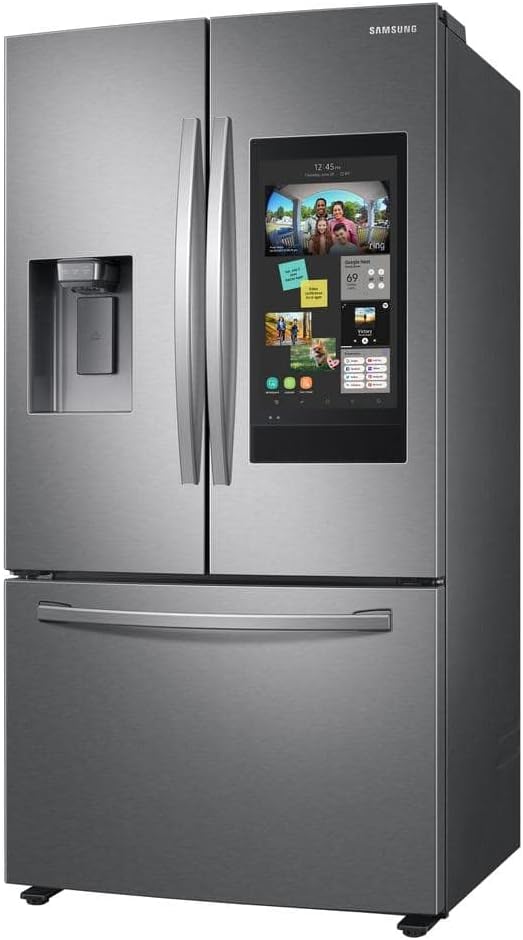
Image: Front view of the Samsung RF27T5501SR refrigerator, showcasing the Family Hub touchscreen display on the right door. The screen shows various widgets and applications, demonstrating its smart capabilities.
Storage Compartments
The 3-door French door design provides ample storage. The upper fresh food section features adjustable tempered glass shelves and multiple door bins. The bottom freezer drawer includes a sliding top drawer for easy access to smaller items and a larger bin below for bulk storage.

Image: The interior of the Samsung RF27T5501SR refrigerator, fully stocked with various food items, demonstrating its large capacity and organized storage options including shelves, door bins, and crisper drawers.

Image: The open bottom freezer drawer of the Samsung RF27T5501SR refrigerator, showing various frozen food items neatly organized in its two-tier storage system.
Maintenance
Cleaning
- Interior: Clean regularly with a mild detergent and warm water. Wipe dry thoroughly.
- Exterior: Use a soft cloth and a non-abrasive stainless steel cleaner for the doors. For the Family Hub screen, use a soft, lint-free cloth.
- Door Seals: Inspect and clean door gaskets regularly to ensure a tight seal and efficient operation.
Water Filter Replacement
Replace the water filter every 6 months or when the filter indicator light illuminates on the dispenser or Family Hub screen. This ensures optimal water quality and ice production.
Defrost System
This refrigerator features an automatic defrost system, eliminating the need for manual defrosting.
Troubleshooting
- Refrigerator not cooling: Check power supply, temperature settings, and ensure doors are fully closed.
- Ice maker not producing ice: Verify water supply is connected and turned on. Check if the ice maker is turned on and if the water filter needs replacement.
- Excessive noise: Ensure the refrigerator is level and not touching walls or cabinets. Normal operating noises include fan sounds and refrigerant circulation.
- Family Hub connectivity issues: Verify Wi-Fi connection. Ensure the refrigerator is within range of your router.
For more detailed troubleshooting or persistent issues, refer to the full user manual available on the Samsung support website or contact customer service.
Specifications
| Brand | Samsung |
| Model Info | RF27T5501SR |
| Capacity | 26.5 Cubic Feet (Refrigerator Fresh Food: 8.6 cu. ft., Freezer: 27 cu. ft.) |
| Product Dimensions | 72 x 37.5 x 37.5 inches (D x W x H) |
| Item Weight | 331 pounds |
| Installation Type | Freestanding |
| Form Factor | French Door |
| Color | Grey |
| Voltage | 115 Volts |
| Defrost System | Automatic |
| Number of Doors | 3 |
| Shelf Type | Tempered Glass |
| Door Material Type | Stainless Steel |
| Special Feature | External Water Dispenser, Touch Screen Family Hub |
| Certification | Energy Star |
Warranty and Support
Your Samsung RF27T5501SR refrigerator comes with a standard manufacturer's warranty. For specific warranty details, registration, and customer support, please visit the official Samsung website or contact their customer service department. Keep your proof of purchase for warranty claims.


