
Makita 198768-1
Makita EM404MP Scythe Attachment User Manual
Model: 198768-1
Brand: Makita
1. Product Overview
The Makita EM404MP Scythe Attachment (Model 198768-1) is designed for efficient cutting of grass, weeds, scrub, and low growth. It is an accessory for compatible Makita cordless multifunction drive units, providing a versatile solution for various landscaping tasks. This attachment features a thread head and knife for effective cutting performance.
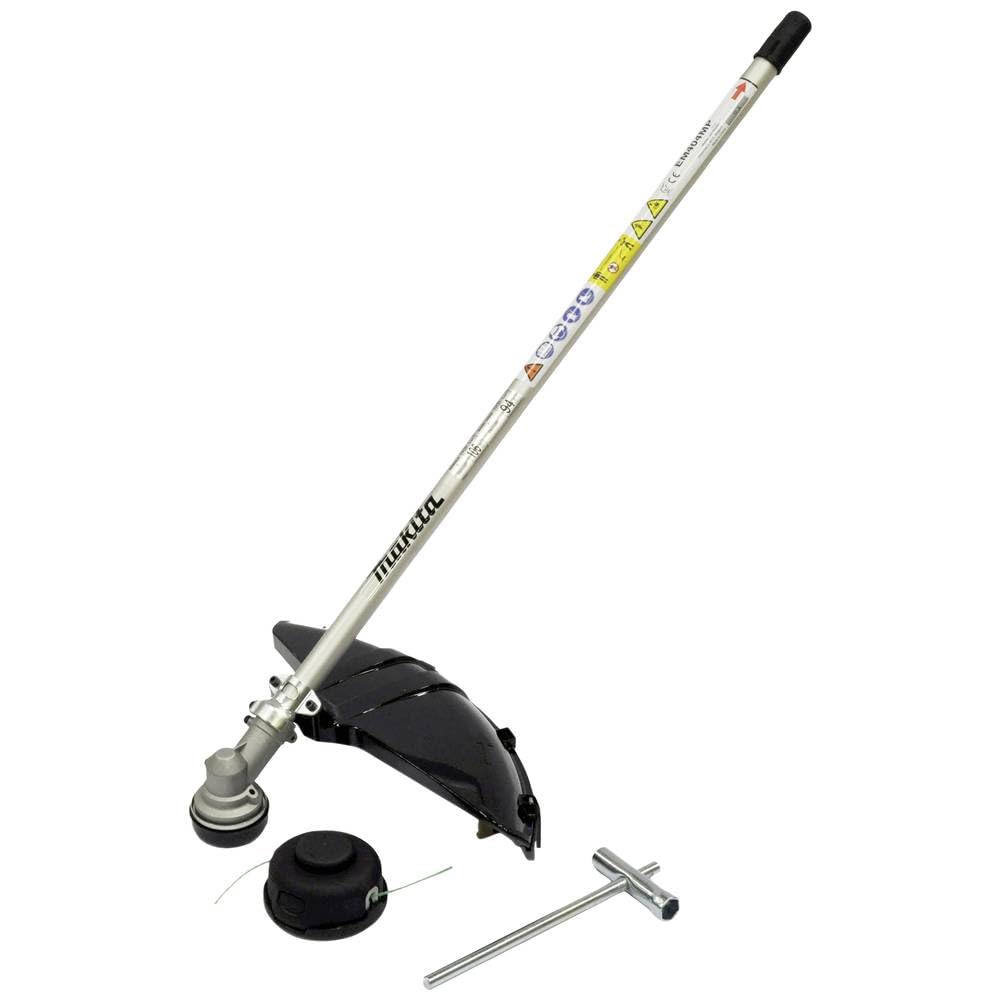
Image: The Makita EM404MP Scythe Attachment, showing the main shaft, cutting head with guard, and included wrench and spare thread head.
Key Features:
- Attaches to split shank power heads with quick and easy tool-free installation.
- Features a 230 mm cutting width for efficient coverage.
- Designed for use with Makita DUX60Z and UX000.1G multifunction drive units.
- Equipped with a thread head and knife for versatile cutting.
2. Safety Instructions
Always prioritize safety when operating power tools and attachments. Failure to follow safety instructions can result in serious injury or property damage. Refer to the main drive unit's instruction manual for comprehensive safety guidelines.
- Read the Manual: Before use, thoroughly read and understand this manual and the manual for your Makita multifunction drive unit.
- Personal Protective Equipment (PPE): Always wear appropriate PPE, including safety glasses or goggles, hearing protection, heavy-duty gloves, long pants, and sturdy footwear.
- Area Clearance: Ensure the work area is clear of bystanders, children, and pets. Check for hidden obstacles such as rocks, wires, or debris that could be thrown or damage the attachment.
- Inspect Before Use: Before each use, inspect the attachment for any damage, loose parts, or wear. Do not use if damaged.
- Secure Grip: Maintain a firm grip on the drive unit and attachment during operation.
- Proper Balance: Operate the tool with proper balance and footing. Do not overreach.
- Battery Safety: Use only recommended batteries and chargers. Ensure batteries are fully charged and properly inserted. It is recommended to use two identical 18V batteries for optimal performance with compatible drive units.
- Avoid Contact: Keep hands and feet away from the cutting head while the tool is running.
- Storage: Store the attachment in a dry, secure place, out of reach of children.
3. Setup and Installation
The EM404MP Scythe Attachment is designed for tool-free installation onto compatible Makita multifunction drive units. Ensure the drive unit is turned off and the battery is removed before installation or removal of the attachment.
Compatibility:
This attachment is suitable for use with the following Makita multifunction drive units:
- Makita DUX60Z
- Makita UX000.1G
Note: This attachment is NOT compatible with Makita DUX18 or EX2650LH models.
Installation Steps:
- Ensure the drive unit is powered off and the battery pack is removed for safety.
- Align the square shaft of the EM404MP attachment with the receiving port on the drive unit.
- Push the attachment firmly into the drive unit until it clicks into place.
- Secure the attachment by tightening the locking knob or lever on the drive unit, if applicable, as per your drive unit's manual.
- Verify that the attachment is securely fastened and does not wobble.
Removing the Attachment:
- Ensure the drive unit is powered off and the battery pack is removed.
- Loosen the locking knob or lever on the drive unit.
- Pull the attachment firmly away from the drive unit to detach it.
4. Operating Instructions
Once the EM404MP Scythe Attachment is securely installed on a compatible Makita multifunction drive unit, you are ready to begin operation. Always follow the operating instructions provided with your drive unit.
Before Starting:
- Ensure all safety precautions are observed (refer to Section 2).
- Confirm the cutting head (thread head or knife) is properly installed and secured.
- Check that the protective guard is correctly positioned.
- Insert fully charged 18V batteries into the drive unit. For optimal performance, use two identical batteries.
Operation:
- Hold the drive unit and attachment firmly with both hands, maintaining a balanced stance.
- Start the drive unit according to its specific instructions.
- Begin cutting by swinging the attachment in a controlled motion, typically from right to left, allowing the cutting head to do the work.
- For grass and light weeds, use the thread head. For thicker weeds, scrub, or low growth, the knife attachment may be more effective.
- Maintain a safe distance from objects and ensure the cutting path is clear.
- The drive unit's Active Feedback sensing technology will stop the device immediately if the cutting head becomes blocked, enhancing user safety.
- Do not force the attachment through dense material; allow the tool to work at its own pace.
After Use:
- Turn off the drive unit and remove the battery pack.
- Allow the cutting head to come to a complete stop before setting the tool down.
- Clean the attachment as described in the Maintenance section.
5. Maintenance
Regular maintenance ensures the longevity and optimal performance of your Makita EM404MP Scythe Attachment. Always ensure the drive unit is off and the battery is removed before performing any maintenance.
Cleaning:
- After each use, remove any grass, dirt, or debris from the cutting head, guard, and shaft.
- Use a dry cloth or soft brush for cleaning. Do not use water or harsh chemicals, as this can damage the tool.
- Pay special attention to the ventilation openings on the drive unit (refer to drive unit manual) to prevent overheating.
Inspection:
- Regularly inspect the cutting head (thread or knife) for wear, damage, or dullness. Replace worn or damaged parts immediately.
- Check all screws and fasteners for tightness. Tighten if necessary.
- Inspect the shaft for any bends or damage.
- Ensure the protective guard is intact and securely attached.
Storage:
- Store the attachment in a clean, dry place, away from direct sunlight and extreme temperatures.
- Keep it out of reach of children and unauthorized persons.
- If storing for an extended period, ensure it is clean and free of debris.
6. Troubleshooting
This section addresses common issues you might encounter with your EM404MP Scythe Attachment. For issues related to the drive unit itself, refer to its specific manual.
| Problem | Possible Cause | Solution |
|---|---|---|
| Attachment does not connect securely to drive unit. | Incorrect alignment; locking mechanism not engaged; incompatible drive unit. | Ensure proper alignment of the square shaft. Push firmly until it clicks. Verify compatibility with DUX60Z or UX000.1G. |
| Poor cutting performance. | Dull or damaged cutting line/knife; excessive debris on cutting head; attempting to cut material too thick. | Replace cutting line or knife. Clean cutting head. Do not force the tool; use appropriate attachment for material. |
| Drive unit stops unexpectedly during operation. | Cutting head is blocked (Active Feedback sensing activated); battery low; drive unit overheating. | Clear any obstruction from the cutting head. Recharge or replace batteries. Allow drive unit to cool down. Refer to drive unit manual. |
| Excessive vibration. | Damaged or unbalanced cutting head; loose attachment. | Inspect cutting head for damage and replace if necessary. Ensure attachment is securely fastened to the drive unit. |
7. Specifications
| Attribute | Value |
|---|---|
| Model Number | 198768-1 |
| Cutting Width | 230 mm |
| Item Weight | 3.3 pounds (1.5 Kilograms) |
| Product Dimensions | 0.39 x 0.39 x 0.39 inches (approximate for packaging, actual attachment dimensions vary) |
| Power Source | Battery powered (via compatible drive unit) |
| Voltage (via drive unit) | 36 Volts (2x 18V batteries) |
| Included Components | Scythe attachment, Socket wrench, two thread heads |
| Compatibility | Makita DUX60Z, UX000.1G (Not compatible with DUX18 or EX2650LH) |
8. Warranty and Support
For warranty information, technical support, or service inquiries regarding your Makita EM404MP Scythe Attachment, please refer to the warranty documentation included with your purchase or visit the official Makita website. You can also contact Makita customer service directly.
Always use genuine Makita replacement parts and accessories to ensure optimal performance and maintain warranty validity.
Makita Official Website: www.makitatools.com
Related documents198768-1

Ask a question about this manual
Ask about setup, troubleshooting, compatibility, parts, safety, or missing instructions. Manuals+ will review the question and use this page’s manual context to help answer it.