
1. Introduction
This manual provides instructions for the Yunir AKB69680403 Universal TV Remote Control. This remote is designed as a replacement and is compatible with most LG LCD, LED, and Plasma televisions. It offers stable performance and includes all essential functions of an original remote without requiring any programming or setup.

Image 1.1: The Yunir AKB69680403 remote control in hand, demonstrating its ergonomic design.
The remote control features a compact size and an easy-to-grip design, ensuring comfortable use. Its dedicated menu navigation keys and direct channel access simplify TV operation.
2. Setup
2.1 Battery Installation
The AKB69680403 remote control requires AAA batteries (not included) for operation. Follow these steps to install the batteries:
- Locate the battery compartment cover on the back of the remote control.
- Press down on the latch and slide the cover off.
- Insert two (2) AAA batteries, ensuring the positive (+) and negative (-) terminals align correctly with the markings inside the compartment.
- Slide the battery compartment cover back into place until it clicks securely.
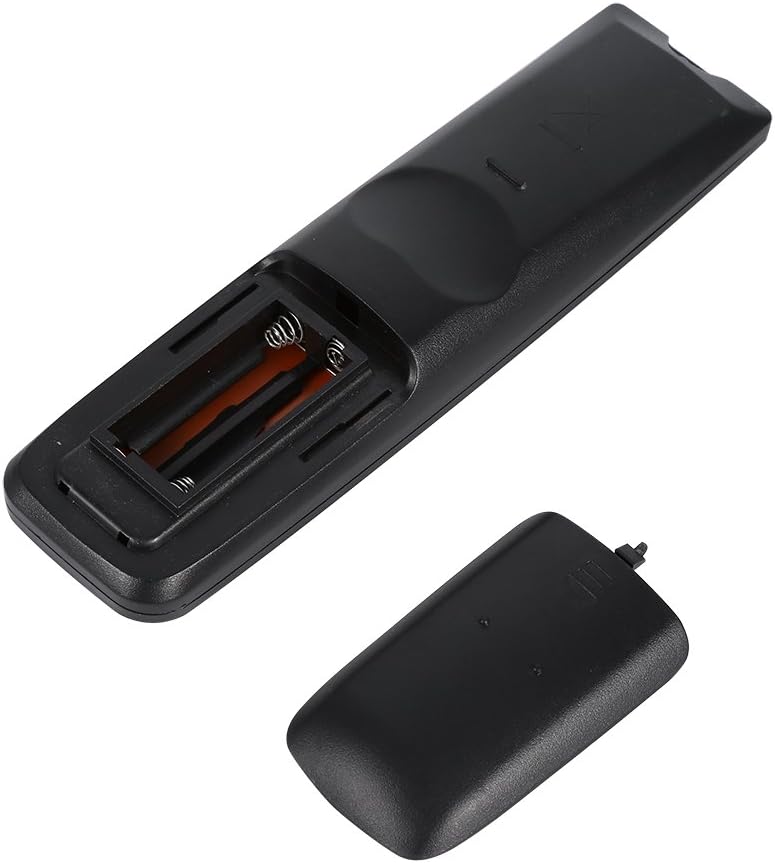
Image 2.1: View of the remote control's open battery compartment, ready for AAA battery insertion.
Note:
- Always use new batteries of the same type.
- Do not mix old and new batteries, or different types of batteries.
- Remove batteries if the remote control will not be used for an extended period to prevent leakage.
3. Operating Instructions
The Yunir AKB69680403 remote control is designed for immediate use with compatible LG TVs without any prior programming. Simply point the remote at your television and begin operation.

Image 3.1: Overview of the remote control's buttons and layout.
3.1 Button Functions
- POWER: Turns the TV on or off.
- INPUT: Selects the input source (HDMI, AV, etc.).
- ENERGY SAVING: Activates or deactivates energy-saving modes.
- TV/RAD: Switches between TV and Radio modes.
- AV MODE: Selects audio/video modes.
- Number Buttons (0-9): Directly selects channels.
- LIST: Displays the channel list.
- Q.VIEW: Returns to the previously viewed channel.
- VOL +/-: Adjusts the volume level.
- CH +/-: Changes channels up or down.
- MUTE: Mutes or unmutes the TV sound.
- PAGE ^/v: Navigates through pages in menus or lists.
- Directional Pad (Up, Down, Left, Right) & OK: Navigates menus and confirms selections.
- MENU: Opens the main TV menu.
- TEXT: Accesses teletext services.
- T.OPT: Teletext options.
- INFO: Displays information about the current program or input.
- GUIDE: Opens the electronic program guide.
- MARK/FAV: Marks content or accesses favorite channels.
- RETURN/EXIT: Returns to the previous screen or exits a menu.
- Colored Buttons (Red, Green, Yellow, Blue): Used for specific functions within menus or applications, as indicated on the TV screen.
Some buttons, such as the number buttons, are fluorescent to assist with operation in low-light conditions.
4. Maintenance
4.1 Cleaning
To maintain the remote control's appearance and functionality:
- Wipe the remote control with a soft, dry cloth.
- For stubborn dirt, slightly dampen the cloth with water or a mild cleaning solution, then wipe dry immediately.
- Do not use abrasive cleaners, alcohol, or solvents, as these can damage the surface or internal components.
4.2 Battery Care
- Replace batteries when the remote's response becomes sluggish or inconsistent.
- Dispose of used batteries responsibly according to local regulations.
5. Troubleshooting
If you encounter issues with your remote control, refer to the following common problems and solutions:
- Remote control is not responding:
- Check if the batteries are inserted correctly with the correct polarity.
- Replace the batteries with new ones.
- Ensure there are no obstructions between the remote control and the TV's infrared sensor.
- Make sure you are within the effective operating range and pointing the remote directly at the TV.
- Some functions do not work:
- While this remote is broadly compatible, some specific advanced functions of your original TV remote might not be supported.
- Verify that your TV model is an LG LCD, LED, or Plasma TV.
6. Specifications
| Feature | Detail |
|---|---|
| Product Name | TV Remote Controller |
| Model | AKB69680403 |
| Compatibility | Most LG LCD, LED, or Plasma TVs |
| Power Source | 2 x AAA Batteries (not included) |
| Material | ABS |
| Color | Black |
| Dimensions (L x W x H) | 17.9 x 4.7 x 2 cm (7.05 x 1.85 x 0.79 inches) |
| Item Weight | 2.46 ounces |
| Manufacturer | Tonysa |

Image 6.1: The remote control displaying its physical dimensions.
7. Warranty and Support
Specific warranty information for this product is not provided in the available data. For any product-related inquiries, technical support, or warranty claims, please contact the retailer or manufacturer directly. Keep your purchase receipt as proof of purchase.