
1. Introduction
Thank you for choosing the Craftmade Lighting PB5004-FB Surface Mount Lighted Push Button. This manual provides essential information for the safe installation, operation, and maintenance of your new lighted doorbell button. Please read these instructions thoroughly before beginning installation and retain them for future reference.
The PB5004-FB is a modern, flat black push button designed for surface mounting, featuring an illuminated LED for enhanced visibility. It is suitable for use with standard doorbell chime systems.
2. Safety Information
- WARNING: To avoid electric shock, always turn off power at the main fuse or circuit breaker box before installing or servicing any electrical fixture.
- All electrical connections must be in accordance with local codes, ordinances, or the National Electric Code (NEC). Consult a qualified electrician if you are unfamiliar with installing electrical wiring.
- Do not install this product in wet locations or where it may be exposed to direct water spray.
- Ensure the voltage supply to the doorbell system is compatible with the push button's requirements (typically low voltage, 8-24V AC).
- Handle the product with care to prevent damage.
3. Package Contents
Verify that all components are present before beginning installation:
- Craftmade PB5004-FB Surface Mount Lighted Push Button (1 unit)
- Mounting Screws (quantity may vary, typically 2)
4. Setup and Installation
The Craftmade PB5004-FB is designed for surface mounting. Follow these steps for proper installation:
- Turn off Power: Before starting, ensure the power to your doorbell system at the circuit breaker or fuse box is completely off.
- Prepare Mounting Surface: Choose a suitable, flat surface near your door for mounting. The push button requires a 2.36-inch hole pattern for secure attachment.
- Connect Wiring: Connect the existing low-voltage doorbell wires to the terminals on the back of the push button. Typically, there are two wires: one from the transformer and one leading to the chime unit. Ensure connections are secure. The integrated LED requires a low voltage AC supply (e.g., 8-24V AC) to illuminate.
- Mount the Push Button: Align the push button with the prepared mounting holes. Use the provided mounting screws to securely fasten the push button to the surface. Do not overtighten.
- Restore Power: Once the push button is securely mounted and wired, turn the power back on at the circuit breaker or fuse box.
- Test Operation: Press the push button to ensure it activates your doorbell chime and that the integrated LED illuminates.
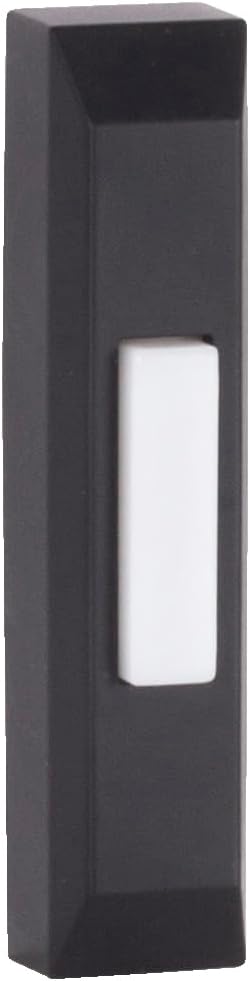
Image 1: The Craftmade PB5004-FB Surface Mount Lighted Push Button. This image shows the rectangular, flat black housing with a prominent white rectangular push button in the center. The button is designed for surface mounting and features an internal LED for illumination.
5. Operating Instructions
Operating the Craftmade PB5004-FB Lighted Push Button is straightforward:
- Simply press the white rectangular button firmly. This action completes the electrical circuit, sending a signal to your doorbell chime unit.
- The integrated LED light within the button will illuminate when power is supplied to the unit, providing visibility in low-light conditions.
6. Maintenance
The Craftmade PB5004-FB requires minimal maintenance to ensure long-lasting performance:
- Cleaning: Periodically wipe the surface of the push button with a soft, damp cloth to remove dust and dirt. Avoid using abrasive cleaners, solvents, or harsh chemicals, as these can damage the finish.
- Inspection: Occasionally check the wiring connections to ensure they remain secure. If any wires appear loose or damaged, turn off power at the circuit breaker and re-secure or replace them as necessary.
- No user-serviceable parts are inside the sealed unit. Do not attempt to disassemble the push button.
7. Troubleshooting
If you experience issues with your Craftmade PB5004-FB push button, refer to the following common problems and solutions:
| Problem | Possible Cause | Solution |
|---|---|---|
| Button does not light up. |
|
|
| Doorbell chime does not ring when button is pressed. |
|
|
If troubleshooting steps do not resolve the issue, please contact Craftmade customer support for assistance.
8. Specifications
| Feature | Detail |
|---|---|
| Brand | Craftmade |
| Model Number | PB5004-FB |
| Product Dimensions | 3.5 x 0.75 x 0.75 inches (Length x Width x Depth) |
| Item Weight | 1.58 ounces |
| Color | Flat Black |
| Style | Modern |
| Shape | Rectangular |
| Mounting Type | Surface Mount |
| Hole Pattern | 2.36 inches |
| Illumination | 0.2 Watt LED |
| Batteries Required? | No |
| Included Components | Push Button-Surface Mount |
9. Warranty and Support
For warranty information or technical support regarding your Craftmade Lighting PB5004-FB Surface Mount Lighted Push Button, please contact Craftmade customer service directly. Refer to the official Craftmade website or your purchase documentation for the most current contact details and warranty terms.
You can visit the official Craftmade Store on Amazon for more products and information: Craftmade Store
