
Earphone Connection EP1334
Earphone Connection EP1334 Hawk Lapel Microphone User Manual
Model: EP1334
Introduction
Thank you for choosing the Earphone Connection EP1334 Hawk Lapel Microphone. This professional-grade 1-wire surveillance earpiece is designed for reliable communication in demanding environments, commonly used by law enforcement and security personnel. This manual provides detailed instructions for proper setup, operation, and maintenance to ensure optimal performance and longevity of your device.
Product Overview
The EP1334 Hawk Lapel Microphone offers a robust and discreet communication solution. Its key features include:
- Whisper Sensitive Push-to-Talk (PTT): Enables clear transmission without needing to turn or tilt your head.
- Directional Microphone: Ensures excellent audio quality for your transmissions.
- Durable Construction: Features polyurethane-jacketed, Kevlar-coated cabling for extended field life.
- Concealable Design: Lightweight and discreet, equipped with two clothing clips for secure wire management.
- Versatile Earpiece Options: Includes multiple acoustic tubes, eartips, and earmolds for personalized comfort and situational awareness.
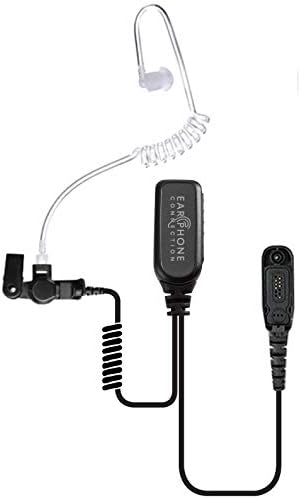
Figure 1: EP1334 Hawk Lapel Microphone components.

Figure 2: Detail of the Push-to-Talk (PTT) unit.
Package Contents
Please verify that all items are present in your package:
- EP1334 Hardwired 1-Wire Hawk Lapel Microphone
- Clear Acoustic Audio Tube
- Black Acoustic Audio Tube
- Clear Mushroom Eartip
- Black Mushroom Eartip
- Clear Torpedo Eartip
- Black Torpedo Eartip
- Flesh Left Earmold
- Flesh Right Earmold
- Clear FIN Ultra Ambi Earpiece Insert
- Warranty Card
Setup
- Choose Your Earpiece: Select the acoustic tube, eartip, or earmold that provides the most comfortable and secure fit for your ear. The FIN Ultra Ambi Earpiece Insert offers an ambidextrous fit and enhanced situational awareness.
- Connect to Radio: Securely plug the multi-pin connector of the EP1334 into the corresponding port on your compatible Motorola two-way radio. Ensure a firm connection to prevent audio interruptions.
- Position the Microphone: The lapel microphone unit should be clipped to your uniform or clothing in a location that allows for clear voice pickup, typically near your collar or lapel. The directional microphone is designed to pick up your voice effectively without needing to turn your head.
- Secure Cabling: Utilize the two integrated clothing clips to route and secure the cable discreetly along your uniform. This prevents snagging and reduces cable noise.

Figure 3: Proper wearing and positioning of the Hawk Lapel Mic.
Operating Instructions
Using the EP1334 Hawk Lapel Microphone is straightforward:
- Receiving Audio: Audio from your radio will be transmitted directly through the acoustic tube to your ear. Adjust your radio's volume for comfortable listening.
- Transmitting (Push-to-Talk - PTT): To transmit, firmly press and hold the PTT button located on the microphone unit. Speak clearly into the microphone. Release the PTT button when you have finished speaking to return to receive mode.
Maintenance
Regular maintenance ensures the longevity and hygiene of your EP1334:
- Cleaning Eartips/Earmolds: Periodically remove and clean the eartips or earmolds with mild soap and water. Rinse thoroughly and allow them to air dry completely before reattaching.
- Acoustic Tube Care: Inspect the acoustic tube for any blockages or condensation. If needed, detach and clear the tube. Replacement acoustic tubes are available if the original becomes discolored or damaged.
- Cable Inspection: Regularly check the polyurethane-jacketed, Kevlar-coated cable for any signs of wear, cuts, or damage. Avoid sharp bends or excessive pulling on the cable.
- Storage: When not in use, store the earpiece in a clean, dry place, away from extreme temperatures and direct sunlight.
Troubleshooting
If you encounter issues with your EP1334, try the following:
- No Audio or Intermittent Audio:
- Ensure the earpiece connector is fully and securely plugged into the radio.
- Check the radio's volume level.
- Inspect the acoustic tube for blockages or kinks.
- Test the earpiece with another compatible radio if possible, to rule out a radio issue.
- PTT Not Transmitting:
- Ensure the PTT button is fully depressed when attempting to transmit.
- Verify the earpiece is correctly connected to the radio.
- Check the radio's settings to ensure external accessories are enabled, if applicable.
- Poor Audio Quality (Transmit):
- Ensure the microphone is positioned correctly and not obstructed by clothing.
- Speak clearly and at a normal volume into the microphone.
Specifications
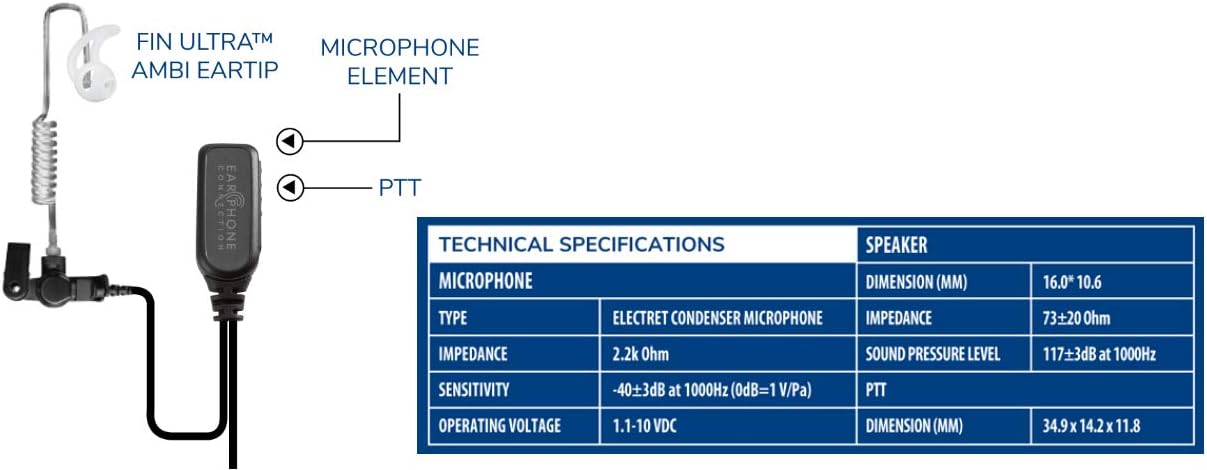
Figure 4: Technical Specifications and Component Diagram.
| Feature | Detail |
|---|---|
| Brand | Earphone Connection |
| Connectivity Technology | Wired |
| Connector Type | Auxiliary (Multi-pin specific to Motorola) |
| Special Feature | Lightweight, Concealable, Discreet, Durable |
| Color | Black |
| Microphone Form Factor | Lavalier |
| Polar Pattern | Unidirectional |
| Power Source | Corded Electric (via radio) |
| Component | Specification |
|---|---|
| Microphone | |
| Type | Electret Condenser Microphone |
| Impedance | 2.2k Ohm |
| Sensitivity | -40±3dB at 1000Hz (0dB=1 V/Pa) |
| Operating Voltage | 1.1-10 VDC |
| Speaker | |
| Dimension (MM) | 16.0 x 10.6 |
| Impedance | 73±20 Ohm |
| Sound Pressure Level | 117±3dB at 1000Hz |
| PTT | |
| Dimension (MM) | 34.9 x 14.2 x 11.8 |
Compatibility
The EP1334 Hawk Lapel Microphone is compatible with a wide range of Motorola two-way radios, including but not limited to:
- Motorola APX Series: APX 900, APX 1000, APX 3000, APX 4000, APX 6000, APX 6000XE, APX 7000, APX 7000XE, APX 8000
- Motorola DP Series: DP3400, DP3401, DP3600, DP3601, DP4000, DP4400, DP4401, DP4600, DP4601, DP4800, DP4801
- Motorola XPR Series: XPR 6350, XPR 6380, XPR 6550, XPR 6580, XPR 7350, XPR 7550
- Motorola SRX Series: SRX 2200
Warranty and Support
The Earphone Connection EP1334 Hawk Lapel Microphone comes with a 1-Year Manufacturer Warranty. This warranty covers defects in materials and workmanship under normal use. For warranty claims or technical support, please contact Earphone Connection directly.
Related documentsEP1334

Ask a question about this manual
Ask about setup, troubleshooting, compatibility, parts, safety, or missing instructions. Manuals+ will review the question and use this page’s manual context to help answer it.