
1. Introduction
This manual provides instructions for the assembly, operation, and maintenance of your Weehom 47.24-inch Home Office Desk. This versatile desk is designed for various uses, including as a computer desk, writing desk, study table, gaming desk, or dining table. Please read these instructions carefully before assembly and use to ensure proper function and longevity of your product.

Image 1.1: Weehom desks configured for a multi-person office setup.
2. Safety Information
Always assemble the desk according to the provided instructions. Ensure the desk is stable and secure before use. Do not exceed the maximum weight recommendation of 400 pounds to prevent injuries or damage.
- Keep all small parts away from children during assembly.
- Use the desk on a flat, stable surface.
- Regularly check all connections to ensure they remain tight.
- Avoid placing hot items directly on the desktop surface without protection.
3. Setup and Assembly
The Weehom desk is designed for quick and easy assembly. The desktop comes pre-installed, requiring only the attachment of the four legs.
3.1. Unpacking
Carefully remove all components from the packaging. Inspect all parts for any damage. If any parts are missing or damaged, please contact customer support before proceeding.
3.2. Assembly Steps
- Place the desktop upside down on a soft, clean surface to prevent scratches.
- Align each leg with the pre-drilled holes on the underside of the desktop.
- Secure each leg using the provided screws and Allen wrench. Ensure all screws are tightened firmly.
- Once all four legs are attached, carefully turn the desk upright.
- Adjust the leg pads at the bottom of each leg to ensure the desk is stable and level on uneven floors.
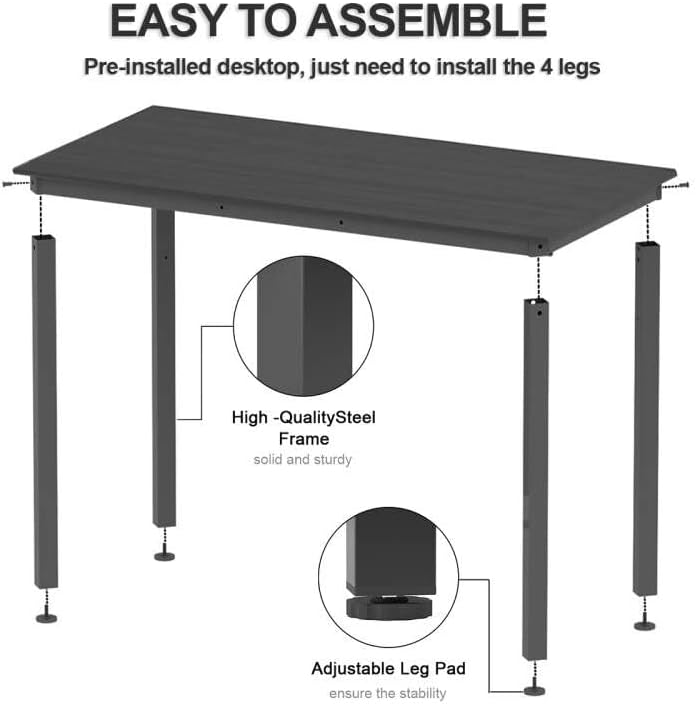
Image 3.1: Visual guide for attaching the desk legs.
Video 3.2: Official Weehom video demonstrating the assembly process for the computer desk.
4. Operating Instructions
The Weehom desk is designed for versatility and can be used in various settings:
- Home Office/Study Desk: Provides ample surface space for computers, monitors, and study materials.
- Writing Desk: A stable and comfortable surface for writing and creative tasks.
- Gaming Desk: Accommodates gaming setups with sufficient space for peripherals.
- Dining Table: Can serve as a compact dining solution for small spaces.
- Sewing/Craft Table: Offers a sturdy platform for sewing machines and craft projects.

Image 4.1: Desk used in a home office environment.

Image 4.2: Desk functioning as a modern sewing table.

Image 4.3: Desk configured for dining use.
5. Maintenance and Care
To ensure the longevity and appearance of your Weehom desk, follow these maintenance guidelines:
- Cleaning: The desktop surface is waterproof and anti-scratch, making it easy to clean. Use a soft, damp cloth with mild soap and water to wipe down the surface. Avoid abrasive cleaners or harsh chemicals.
- Spills: Wipe up spills immediately to prevent any potential damage, although the surface is designed to resist water.
- Protection: While the surface is anti-scratch, using a desk mat or coasters for hot beverages and heavy items is recommended to further protect the finish.
- Structural Check: Periodically check all screws and connections to ensure they are tight. Re-tighten if necessary to maintain stability.

Image 5.1: Features of the desk surface: easy to clean, anti-scratch, and waterproof.
6. Troubleshooting
6.1. Desk Wobbles
- Check Leg Pads: Ensure all adjustable leg pads are making firm contact with the floor. Adjust them individually to compensate for uneven surfaces.
- Tighten Screws: Verify that all screws connecting the legs to the desktop are securely tightened. Loose connections can cause instability.
- Level Surface: Confirm the desk is placed on a level floor.
6.2. Difficulty Assembling
- Review Instructions: Double-check the assembly steps in Section 3.2.
- Align Holes: Ensure the legs are correctly aligned with the pre-drilled holes before tightening screws. Do not force parts together.
- Contact Support: If you encounter persistent issues, contact Weehom customer support for assistance.
7. Specifications
| Feature | Detail |
|---|---|
| Brand | Weehom |
| Model | B0881QXFD3 |
| Product Dimensions (D x W x H) | 23.62" x 47.24" x 29.52" |
| Item Weight | 30.4 pounds |
| Color | Black |
| Top Material Type | Engineered Wood (P2 class particle board) |
| Base Material | Metal (Heavy duty powder coated steel) |
| Special Feature | Adjustable Leg Pads |
| Maximum Weight Recommendation | 400 pounds |
| Assembly Required | Minimal (install 4 legs) |
| Included Components | Assembly Tools |

Image 7.1: Key dimensions of the Weehom desk.
8. Warranty and Support
8.1. Warranty Information
This Weehom desk comes with a Limited Warranty for a period of 60 Days from the date of purchase. This warranty covers manufacturing defects in materials and workmanship under normal use. It does not cover damage resulting from misuse, accidents, unauthorized modifications, or normal wear and tear.
8.2. Customer Support
For any questions, concerns, or warranty claims, please contact Weehom customer support. Have your purchase receipt and product model number (B0881QXFD3) ready when contacting support.
You can typically find contact information on the retailer's website or within your purchase documentation.