
1. Product Overview
The JJC LB-T01 Lens Cap is designed to provide protection for the lens of compatible Olympus Tough series cameras. This innovative lens cap can remain attached to the camera at all times, offering instant protection against dust, moisture, and scratches by simply rotating its outer ring to open or close the built-in blades. It is constructed from durable ABS material.
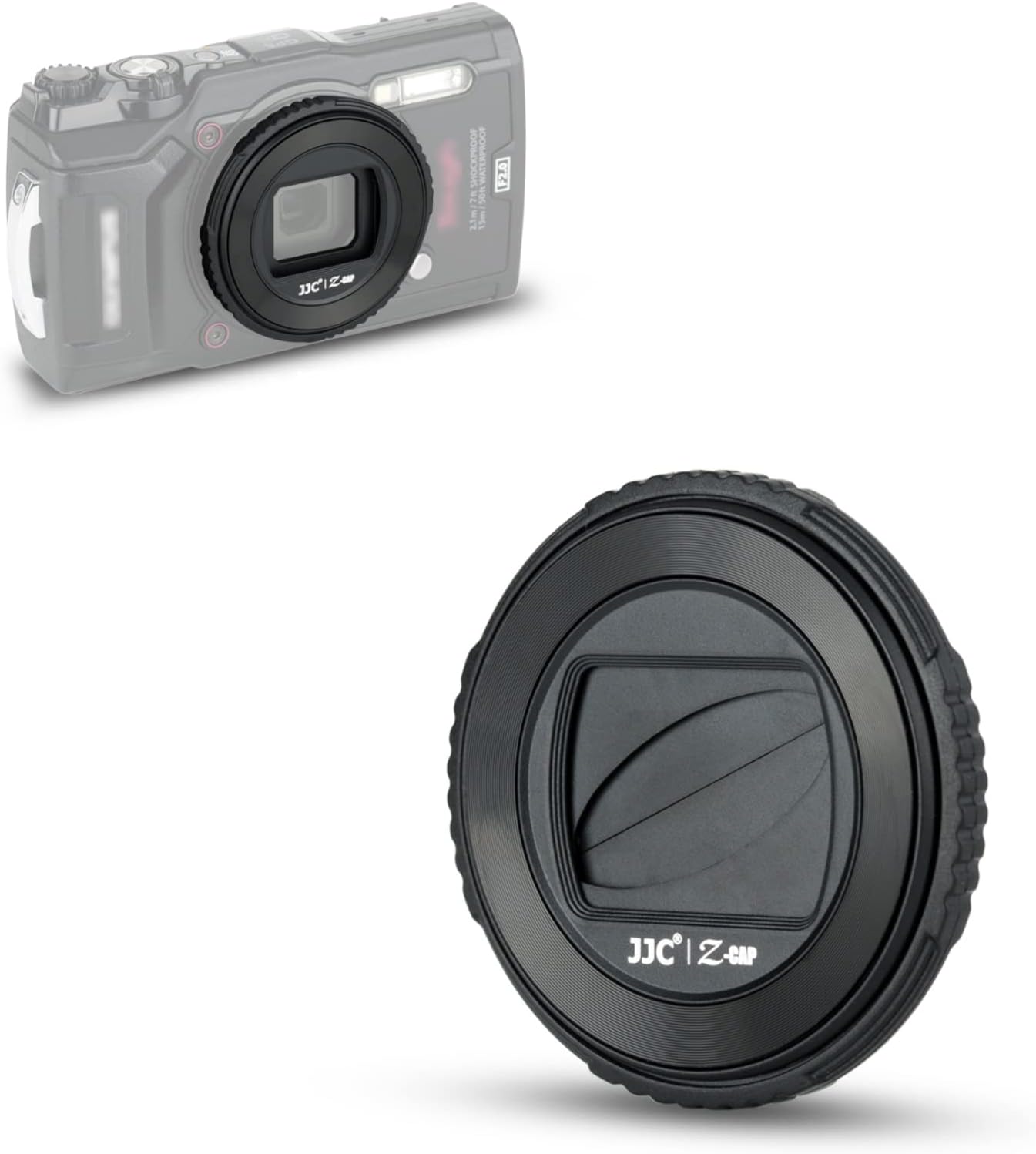
Image 1.1: The JJC LB-T01 Lens Cap, demonstrating its design and how it appears when mounted on a compatible Olympus Tough camera.
2. Compatibility
This lens cap is specifically designed for the following Olympus Tough camera models:
- Olympus Tough TG-7
- Olympus Tough TG-6
- Olympus Tough TG-5
- Olympus Tough TG-4
- Olympus Tough TG-3
- Olympus Tough TG-2
- Olympus Tough TG-1
It serves as a direct replacement for the Olympus LB-T01 Lens Barrier.

Image 2.1: Visual representation of compatible Olympus Tough camera models and the dimensions of the lens cap.
3. Features
- Integrated Design: Designed to remain attached to the camera, eliminating the need to remove and reattach a separate lens cap.
- Rotating Mechanism: Features an outer ring that, when rotated, automatically opens or closes the built-in lens blades.
- Protection: Provides effective protection against dust, moisture, and scratches for the camera lens.
- No Vignetting: Engineered to ensure no vignetting occurs during shooting, preserving image quality.
- Durable Material: Constructed from high-quality ABS material for sturdiness and longevity.

Image 3.1: The lens cap installed on an Olympus Tough camera, highlighting its protective qualities against dust, scratches, and moisture.
4. Setup
To install the JJC LB-T01 Lens Cap on your Olympus Tough camera, follow these steps:
- Remove the Front Ring: Gently twist and remove the decorative front ring from your camera's lens barrel.
- Attach the Lens Cap: Align the JJC LB-T01 Lens Cap with the camera's lens barrel and twist it clockwise until it is securely attached.

Image 4.1: Step-by-step guide for attaching the lens cap and operating its open/close mechanism.
Important Notes:
- The lens cap cannot be used when a silicone jacket is on the camera.
- It is not recommended to use the macro LED illumination when the lens cap is attached.

Image 4.2: The lens cap attached to the camera, with important usage tips highlighted.
5. Operating Instructions
Once the lens cap is installed, operating it is straightforward:
- To Open: Rotate the outer ring of the lens cap counterclockwise. The built-in blades will automatically open, allowing the camera lens to be exposed for shooting.
- To Close: Rotate the outer ring of the lens cap clockwise. The blades will close, providing instant protection to the lens.
Video 5.1: Demonstration of installing the JJC LB-T01 Lens Cap and operating its open and close mechanism on an Olympus Tough camera.
6. Maintenance
To ensure the longevity and proper functioning of your JJC LB-T01 Lens Cap, regular maintenance is recommended:
- Cleaning: After use, especially in environments like beaches or saltwater, it is important to clean the lens cap promptly to prevent residue buildup that could affect its mechanism. Use a soft, clean cloth and, if necessary, a small amount of fresh water.
- Dust Removal: For general dust, use a blower brush to gently remove particles from the cap's surface and blades.
- Avoid Force: Do not force the opening or closing mechanism if it feels stiff. This could indicate a need for cleaning or inspection.

Image 6.1: Demonstrating the cleaning process for the lens cap using a blower.
7. Troubleshooting
If you encounter issues with your JJC LB-T01 Lens Cap, consider the following:
- Stiffness in Opening/Closing:
- Cause: Accumulation of dirt, sand, or salt residue, especially after use in harsh environments.
- Solution: Thoroughly clean the lens cap as described in the Maintenance section. Pay close attention to the rotating mechanism and the blades. Ensure no foreign objects are lodged within the cap.
- Cap Not Opening/Closing Fully:
- Cause: Obstruction or internal mechanism issue.
- Solution: Inspect for any visible obstructions. If cleaning does not resolve the issue, the internal mechanism may be compromised. In such cases, contact customer support for further assistance.
- Vignetting During Shooting:
- Cause: Incorrect installation or a manufacturing defect.
- Solution: Re-attach the lens cap ensuring it is fully seated and aligned. If the issue persists, contact customer support.
8. Specifications
| Attribute | Detail |
|---|---|
| Model Number | Z-TGS BLACK |
| Material | ABS |
| Product Dimensions | 2.76 x 4.25 x 0.71 inches (70 x 108 x 18 mm) |
| Item Weight | 0.704 ounces (20 grams) |
| Compatibility | Olympus Tough TG-7, TG-6, TG-5, TG-4, TG-3, TG-2, TG-1 |
9. Warranty and Support
JJC products are manufactured with high standards of quality. For information regarding warranty coverage, returns, or technical support, please refer to the warranty card included with your purchase or visit the official JJC website. You may also contact JJC customer service directly for assistance.
JJC Official Website: www.jjc.cc