
1. Introduction
Thank you for purchasing the MOTPK 55-inch Gaming Desk. This desk is designed to provide a stable, durable, and ergonomic workspace for gaming, office tasks, and general computer use. It features a carbon fiber textured desktop, an integrated monitor stand, a convenient cup holder, and a headphone hook. Please read this manual carefully before assembly and use to ensure proper setup and long-lasting enjoyment of your new desk.
2. Safety Information
- Always assemble the desk on a soft, clean surface to prevent scratches.
- Ensure all screws and bolts are tightened securely before use. Periodically check and re-tighten as necessary.
- Do not overload the desk or shelves beyond the recommended weight capacity.
- Keep small parts away from children during assembly.
- Avoid using power tools for assembly, as they may overtighten screws and damage the desk. Use the provided Allen wrench.
- Place the desk on a level surface to prevent wobbling. Use the adjustable feet to stabilize if needed.
3. Package Contents
Please verify that all components are present before beginning assembly. If any parts are missing or damaged, please contact customer support.
- Desktop panels (main desk, monitor stand)
- Steel frame components (legs, support bars)
- 2-tier side storage rack components
- Cup holder
- Headphone hook
- Adjustable feet
- Assembly hardware (screws, bolts, Allen wrench)
- Instruction Manual
4. Setup and Assembly
Assembly is required for this product. We recommend two people for easier and safer assembly. Please follow the steps below:
- Prepare the Workspace: Clear a spacious area and lay down a blanket or cardboard to protect the desk components and your floor.
- Assemble the Main Frame: Attach the steel legs and support bars to form the main desk frame. Ensure all connections are finger-tightened first, then fully tighten with the Allen wrench once the frame is stable.
- Attach Desktop Panels: Carefully place the main desktop panel onto the assembled frame. Secure it using the provided screws.
- Assemble Side Storage Rack: Construct the 2-tier side storage rack according to the diagrams. Attach it to the main desk frame. This rack provides convenient storage for your PC tower, books, or other accessories.
- Install Monitor Stand: Position the monitor stand on the main desktop. It can be secured with screws or left unfastened for mobility, allowing you to adjust its position as needed to maximize your workspace.
- Attach Accessories: Install the cup holder and headphone hook to your preferred locations on the desk frame. These are designed to be easily movable for optimal convenience.
- Adjust Leveling Feet: Once the desk is fully assembled and in its desired location, adjust the leveling feet at the bottom of the legs to ensure stability and prevent wobbling on uneven floors.

Figure 1: Desk Dimensions (55 inches wide, 24 inches deep, 29.9 inches high)

Figure 2: Sturdy Metal Frame Construction
5. Operating Instructions
Your MOTPK Gaming Desk is designed for versatility and convenience. Here's how to make the most of its features:
- Monitor Stand: Use the integrated monitor stand to elevate your screen to an ergonomic height, reducing neck and eye strain. The space beneath can be used for soundbars, game consoles, or other peripherals.
- Cup Holder: The movable cup holder can be attached to either side of the desk, keeping your beverages secure and preventing spills on your equipment.
- Headphone Hook: The headphone hook provides a convenient storage solution for your headset, keeping it off the desktop and easily accessible.
- Side Storage Rack: Utilize the two-tier side rack for your PC tower, books, or other items, helping to keep your main desktop clear and organized.
- Cable Management: The desk design allows for easy cable routing to maintain a tidy setup.
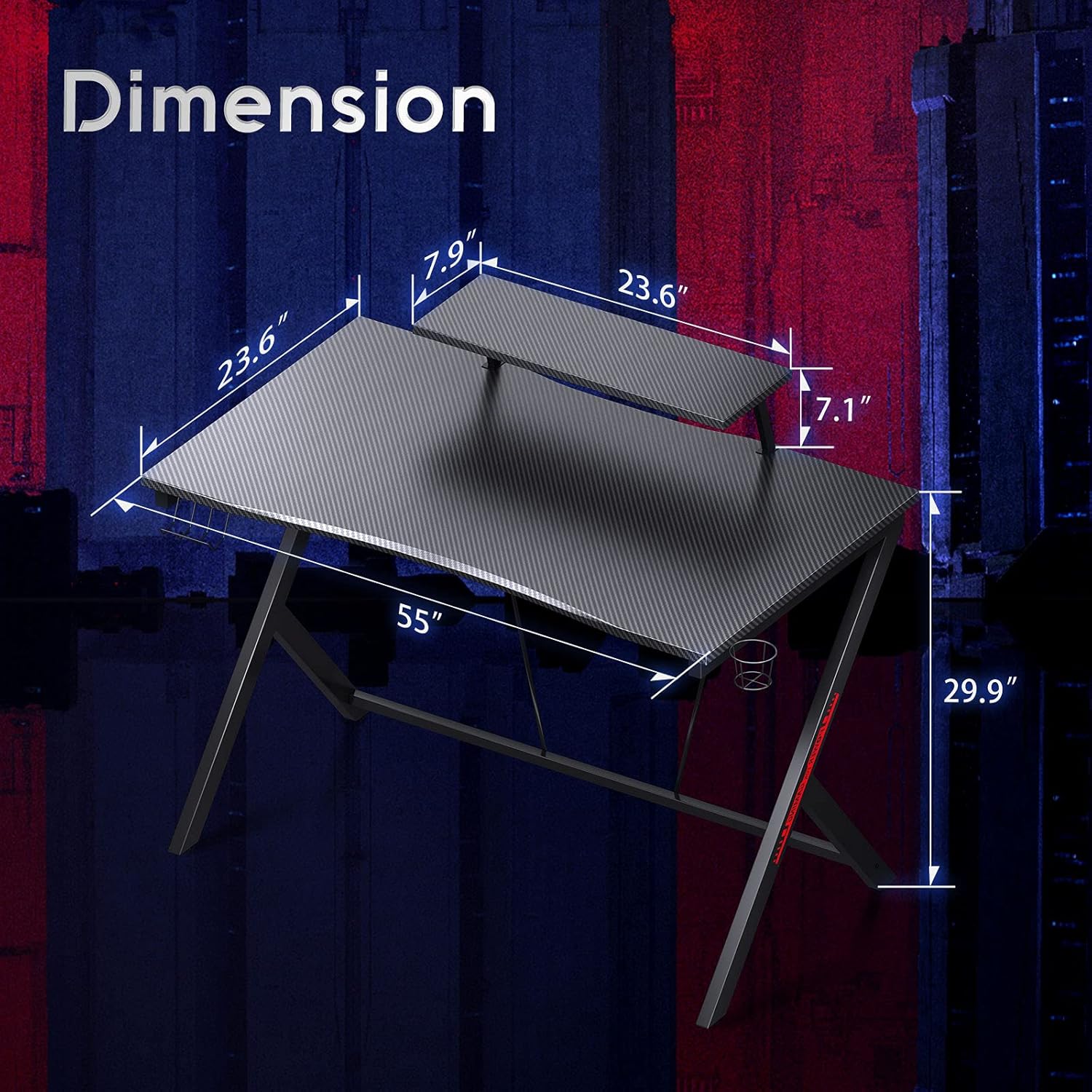
Figure 3: Key Features - Cup Holder, Headphone Hook, Monitor Stand, and Adjustable Feet

Figure 4: Large Desktop Space for an Ergonomic Setup
6. Maintenance
To keep your MOTPK Gaming Desk in excellent condition, follow these simple maintenance guidelines:
- Cleaning: Wipe the carbon fiber textured desktop and steel frame with a soft, damp cloth. Avoid abrasive cleaners or harsh chemicals that could damage the finish.
- Spills: Immediately wipe up any spills to prevent staining or damage to the desktop material.
- Hardware: Periodically check all screws and bolts to ensure they remain tight. Re-tighten if necessary to maintain stability.
- Avoid Direct Sunlight: Prolonged exposure to direct sunlight may cause fading or damage to the desktop finish.
7. Troubleshooting
If you encounter any issues with your desk, please refer to the following common solutions:
- Wobbling: Ensure the desk is on a level surface. Adjust the leveling feet at the bottom of each leg until the desk is stable. Check that all assembly screws are securely tightened.
- Missing Parts: If any parts were missing upon arrival, please contact customer support immediately for assistance.
- Difficulty Assembling: Review the assembly instructions carefully. Ensure all components are oriented correctly. Do not force parts together. If issues persist, contact customer support.
8. Specifications
| Feature | Detail |
|---|---|
| Brand | MOTPK |
| Model Number | MKB0101940JP-1 |
| Dimensions (W x D x H) | 140 cm x 60 cm x 76 cm (55 in x 24 in x 29.9 in) |
| Color | Black |
| Desktop Material | Engineered Wood with Carbon Fiber Texture |
| Frame Material | Alloy Steel |
| Weight Capacity | Approx. 30 kg (66 lbs) |
| Special Features | Integrated Monitor Stand, Cup Holder, Headphone Hook, 2-Tier Side Storage Rack, Adjustable Feet |
| Assembly Required | Yes (Recommended 2 people) |
9. Warranty and Support
MOTPK is committed to customer satisfaction. If you experience any issues with the product's quality or during its use, please do not hesitate to contact our customer service team. We offer prompt assistance and guarantee easy and quick exchanges for eligible concerns.
For support, please refer to the contact information provided with your purchase or visit the official MOTPK store on Amazon: MOTPK Amazon Store


