
ARREGUI Arregui AL012
ARREGUI AL012 Alarm System User Manual
Model: Arregui AL012 | Brand: ARREGUI
Introduction
This manual provides comprehensive instructions for the installation, operation, and maintenance of your ARREGUI AL012 Alarm System. This acoustic alarm system is designed to enhance the security of doors or windows by detecting intrusions early. It activates an alarm upon opening of the door/window or detection of knocking/vibration during attempted burglaries.

Image: The main alarm unit and the magnetic sensor of the ARREGUI AL012 Alarm System.
Box Contents
Upon unboxing, please verify that all components listed below are present:
- Alarm system unit
- Sensor unit
- Instruction manual (this document)
- Two (2) remote controls
- All necessary batteries (2 x 1.5V AAA alkaline batteries for alarm system, 1 x CR2032 lithium button battery for each remote control)
- Double-sided adhesive tape for installation

Image: All components of the ARREGUI AL012 Alarm System, including the main alarm unit, the magnetic sensor, and the two remote controls.
Specifications
| Feature | Detail |
|---|---|
| Alarm System Dimensions (H x W x D) | 9 x 4.3 x 1.3 cm |
| Sensor Dimensions (H x W x D) | 4.5 x 1.3 x 1.3 cm |
| Item Weight | 190 g |
| Siren Volume | 130 dB |
| Vibration Sensor Sensitivity | 3 adjustable levels |
| Power Source (Alarm) | 2 x 1.5V AAA alkaline batteries |
| Power Source (Remote Control) | 1 x CR2032 lithium button battery per remote |
| Installation Method | Self-Adhesive |
| Material | Steel |
| Color | Silver |
Setup and Installation
The ARREGUI AL012 alarm system is designed for easy installation without the need for drilling or screws. Follow these steps for proper setup:
- Choose Location: Select a clean, flat surface on the door/window frame and the corresponding door/window itself where the alarm unit and sensor will be placed. Ensure the surfaces are free of dust and grease.
- Battery Insertion:
- For the main alarm unit: Open the battery compartment and insert two (2) 1.5V AAA alkaline batteries, observing the correct polarity.
- For each remote control: Open the battery compartment and insert one (1) CR2032 lithium button battery, observing the correct polarity.
- Positioning: The alarm system unit and the sensor unit must be aligned at the same height. When the door or window is closed, the distance between the alarm unit and the sensor unit must be less than 1.5 cm (approximately 0.6 inches).
- Adhesion: Apply the provided double-sided adhesive tape to the back of both the alarm system unit and the sensor unit. Firmly press them onto the chosen surfaces on the door/window and its frame, ensuring the correct alignment and proximity.

Image: Example of the alarm unit and sensor installed on a door frame, demonstrating the required alignment and close proximity.
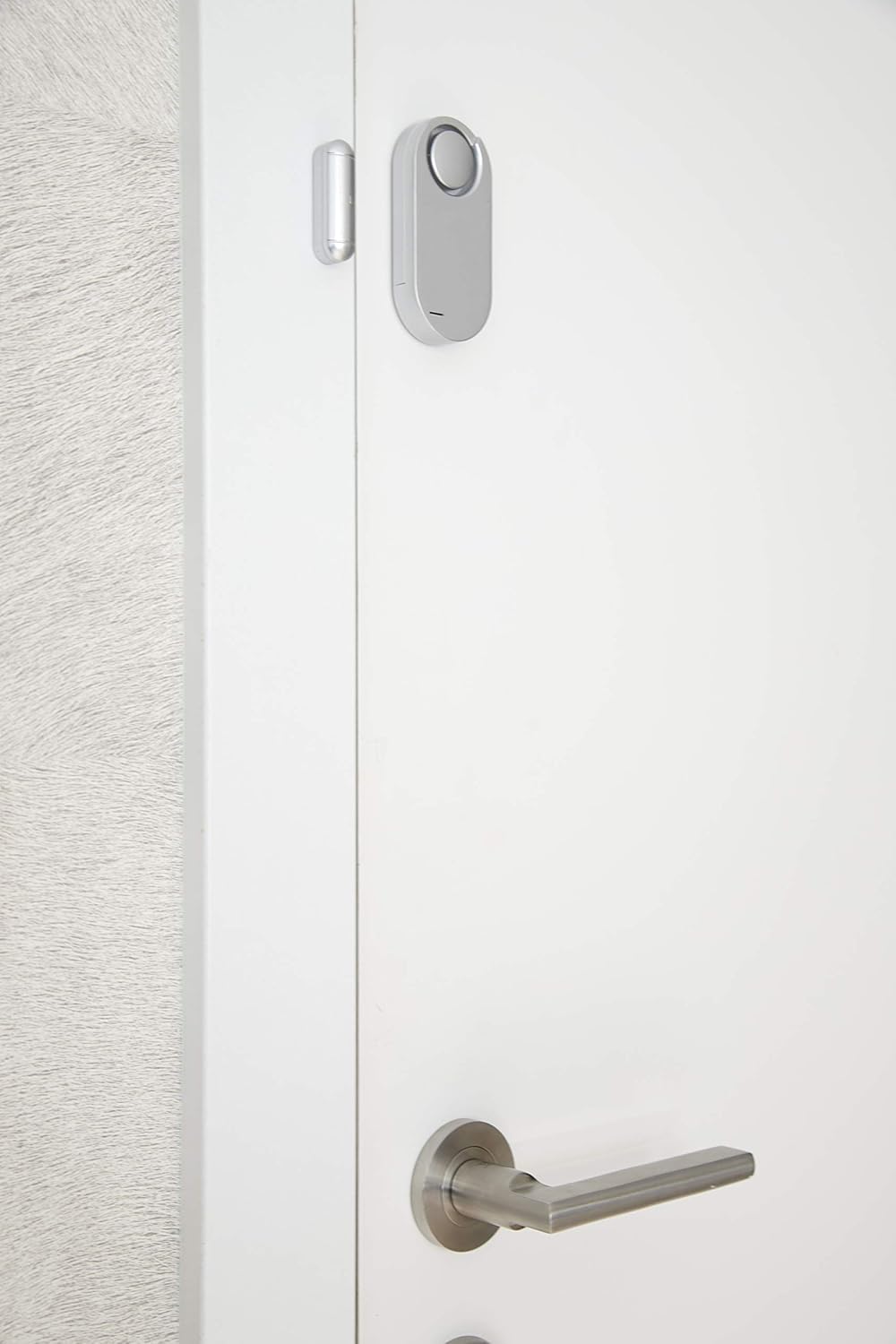
Image: A closer view of the alarm unit and sensor installed on a door, highlighting the small gap between the two components when the door is closed.
Operating Instructions
The ARREGUI AL012 alarm system is operated using the provided remote controls.
- Arming the Alarm: To activate the alarm system, press the ON button on the remote control. The system will emit a confirmation sound, indicating it is armed. It is recommended to arm the system from outside the premises when leaving.
- Disarming the Alarm: To deactivate the alarm system, press the OFF button on the remote control. The system will emit a confirmation sound, indicating it is disarmed. It is recommended to disarm the system before opening the protected door or window upon entering the premises.
- Alarm Trigger: Once armed, the alarm will sound at 130 dB if:
- The door or window is opened, causing the alarm unit and sensor to separate.
- Significant knocking or vibration is detected by the alarm unit, indicating an attempted forced entry.
- Vibration Sensor Sensitivity Adjustment: The vibration sensor has 3 adjustable sensitivity levels. To adjust, locate the sensitivity switch on the alarm unit (refer to the diagram in the included printed manual for exact location). Move the switch to select lower or higher sensitivity based on your environment and desired detection threshold.

Image: The two remote controls provided with the ARREGUI AL012 alarm system, showing the 'ON' and 'OFF' buttons for arming and disarming.

Image: A hand demonstrating how to hold and operate one of the remote controls for the alarm system.
Maintenance
Regular maintenance ensures the optimal performance and longevity of your ARREGUI AL012 Alarm System.
- Battery Replacement:
- Alarm Unit: When the alarm unit's performance degrades or it fails to respond, replace the two (2) 1.5V AAA alkaline batteries.
- Remote Controls: If a remote control becomes unresponsive, replace its CR2032 lithium button battery.
Always dispose of used batteries responsibly according to local regulations.
- Cleaning: Use a soft, dry cloth to clean the alarm unit and sensor. Do not use abrasive cleaners or solvents, as these can damage the device's surface or internal components.
- Adhesive Check: Periodically check the double-sided adhesive tape securing the units. If they become loose, re-secure them with new strong double-sided adhesive tape to maintain proper alignment and function.
Troubleshooting
This section addresses common issues you might encounter with your ARREGUI AL012 Alarm System.
| Problem | Possible Cause | Solution |
|---|---|---|
| Alarm does not arm/disarm with remote control. | Dead or low battery in remote control. Remote control out of range. Remote control needs reprogramming. | Replace the CR2032 battery in the remote control. Ensure you are within effective range of the alarm unit. Refer to the "Remote Control Reprogramming" section below. |
| Alarm does not sound when door/window is opened. | Alarm not armed. Alarm unit batteries are dead or low. Sensor and alarm unit are not aligned or too far apart. | Ensure the alarm is armed (press ON on remote). Replace the AAA batteries in the alarm unit. Re-align the alarm unit and sensor to ensure they are less than 1.5 cm apart when closed. |
| Alarm triggers too easily (false alarms). | Vibration sensor sensitivity is too high. | Adjust the vibration sensor sensitivity to a lower level (refer to "Operating Instructions"). |
| Alarm does not trigger on vibration/knocking. | Vibration sensor sensitivity is too low. | Adjust the vibration sensor sensitivity to a higher level (refer to "Operating Instructions"). |
Remote Control Reprogramming
If a remote control is lost, stolen, or needs to be re-paired, it can be reprogrammed. This process will render any lost or stolen remote controls unusable, enhancing security. Additional remote controls can also be purchased and added to the system.
(Specific reprogramming steps are typically detailed in the physical instruction manual. Please refer to the included printed manual for precise instructions on how to reprogram or add new remote controls.)
Warranty and Support
For warranty information, technical support, or to purchase additional accessories (such as remote controls), please contact ARREGUI customer service or visit their official website. Keep your purchase receipt as proof of purchase for warranty claims.
Manufacturer: ARREGUI
Model: Arregui AL012
Date First Available: 25 June 2024
Ask a question about this manual
Ask about setup, troubleshooting, compatibility, parts, safety, or missing instructions. Manuals+ will review the question and use this page’s manual context to help answer it.