
1. Introduction
This manual provides detailed instructions for the installation, operation, and maintenance of your MekedeTech Android 11 Car Radio. This unit is designed to upgrade the in-car entertainment and navigation experience for specific BMW models. Please read this manual thoroughly before installation and use to ensure proper functionality and safety.
2. Product Overview
The MekedeTech Android 11 Car Radio features an 8-core processor, 4GB RAM, 64GB ROM, and a 10.25-inch IPS touch screen. It integrates seamlessly with your vehicle's original system while offering modern functionalities like built-in CarPlay and Android Auto.
Key Features:
- Android 11 System: Latest operating system for enhanced performance and app compatibility.
- 10.25-inch IPS Touch Screen: 1280x480 resolution with 178° viewing angle for clear visuals.
- Built-in CarPlay & Android Auto: Seamless smartphone integration.
- Original Car Information Display: Retains and displays vehicle data like speed, fuel, oil pressure.
- iDrive System Control Retention: Maintains full functionality of the original iDrive system.
- Steering Wheel Control Support: Easy access to audio and call functions.
- Split-Screen Mode: Multitask with two applications simultaneously.
- Dual Wi-Fi Band: Supports both 2.4GHz and 5GHz networks.
- GPS Navigation: Integrated navigation capabilities.
- Amplifier System Retention: Preserves original fiber optical sound systems (e.g., Harman Kardon).
3. Compatibility
This unit is specifically designed for the following BMW models with the CCC system:
- BMW X5 E70: 2007 - 2010 models
- BMW X6 E71: 2007 - 2010 models
Important Note:
- Ensure your vehicle has an AUX-IN port. If not, an FM transmitter may be required for audio output.
- The 4G function is not supported in the Americas (US, Canada, etc.), despite the presence of a SIM slot.
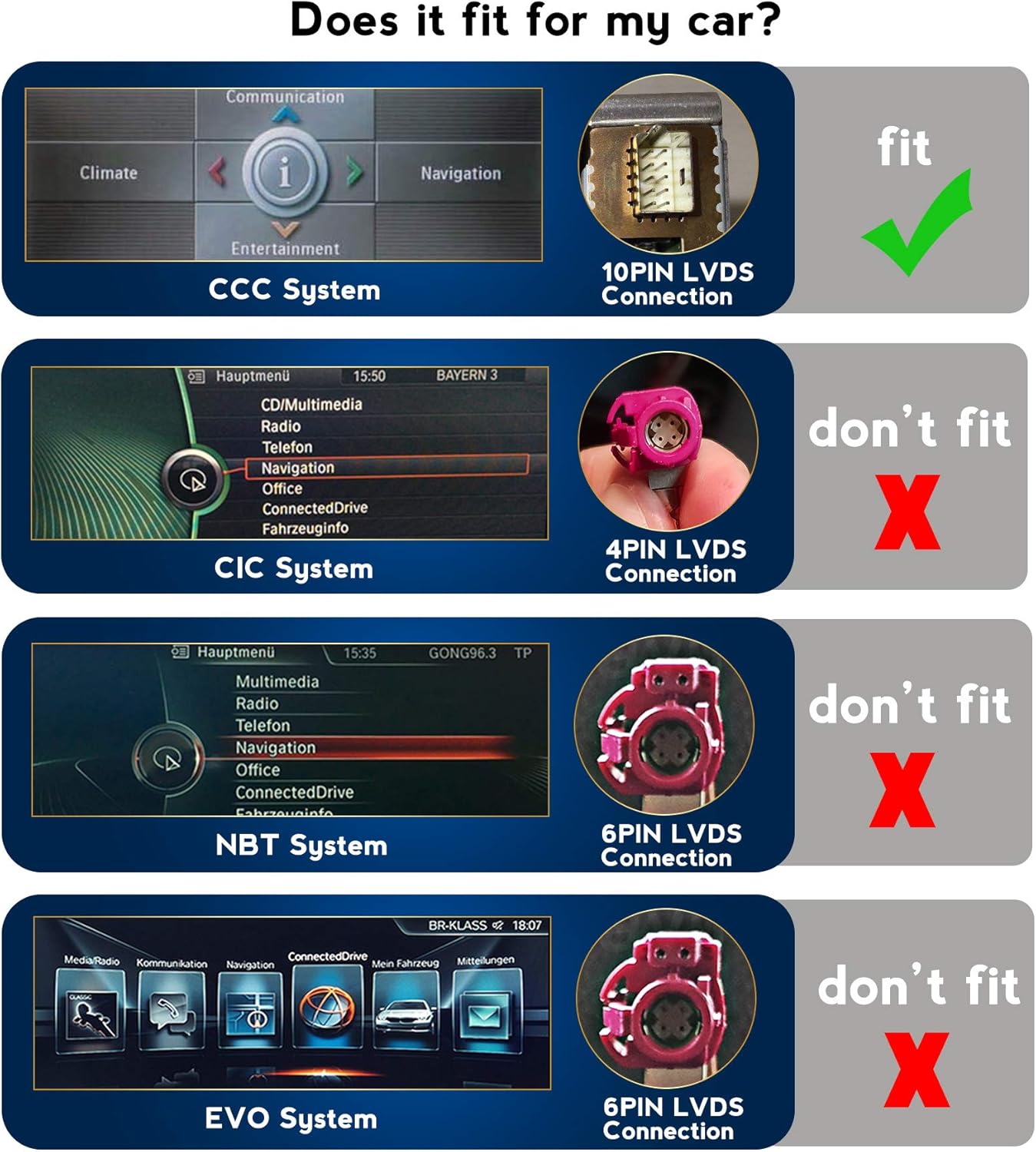
Image: Compatibility chart illustrating the correct 10PIN LVDS connection for CCC systems and incompatible connections for CIC, NBT, and EVO systems.
4. Setup and Installation
Professional installation is recommended for this product. Incorrect installation may damage the unit or vehicle components. Refer to the included wiring diagrams and consult a qualified technician if unsure.
4.1 Pre-Installation Check
- Verify vehicle compatibility (BMW X5 E70 / X6 E71, 2007-2010, CCC system).
- Confirm the presence of an AUX-IN port in your vehicle.
- Gather all included accessories and cables.

Image: Included accessories such as power cable, RCA cable, USB cable, and GPS antenna.
4.2 Wiring Connections
Connect the provided cables to the corresponding ports on the car radio and your vehicle's wiring harness. Ensure all connections are secure.
- Power Cable: Connect to the vehicle's power supply.
- RCA Cable: For audio/video input/output connections.
- USB Cable: For connecting USB devices.
- GPS Antenna: Mount in a location with clear sky view for optimal signal reception.
- LVDS Cable: Connect the 10PIN LVDS cable to the original CCC head unit.
4.3 SIM Card Installation (Optional)
If using a SIM card for data, insert it into the designated SIM card slot on the unit. Note that 4G functionality is region-dependent.

Image: Location of the SIM card slot on the back of the unit.
5. Operating Instructions
5.1 Initial Power On
After installation, turn on your vehicle's ignition. The unit should power on automatically. Follow any on-screen prompts for initial setup.
5.2 Touch Screen Operation
The 10.25-inch capacitive touch screen allows for intuitive control. Tap, swipe, and pinch gestures are supported for navigation and interaction with applications.

Image: Main display interface showing 'Car Info' and 'Dash Board' sections.

Image: Detailed 'Dash Board' display showing vehicle speed and RPM.
5.3 CarPlay and Android Auto
Connect your compatible smartphone via USB or wirelessly (if supported by your phone and the unit) to activate CarPlay or Android Auto. This allows access to phone features like navigation, music, and calls directly on the car radio screen.
5.4 GPS Navigation
Utilize the built-in GPS module for navigation. Access navigation applications through the main menu. Ensure the GPS antenna is properly installed for accurate positioning.

Image: Navigation interface displaying a map with a destination pin.
5.5 Split-Screen Mode
To use split-screen mode, open an application, then drag another compatible application from the app drawer to the side of the screen. This allows simultaneous use of two apps, such as navigation and music playback.
5.6 Steering Wheel Controls
The unit supports your vehicle's original steering wheel controls. This allows you to adjust volume, change tracks/channels, and manage calls without taking your hands off the wheel.
5.7 Screen Mirroring
The screen mirroring function allows you to display your smartphone's screen content directly onto the car radio. Refer to the unit's settings for connection instructions (usually via Wi-Fi or USB).
6. Maintenance
To ensure the longevity and optimal performance of your car radio, follow these maintenance guidelines:
- Cleaning: Use a soft, dry cloth to clean the screen and unit exterior. Avoid abrasive cleaners or solvents.
- Software Updates: Periodically check for and install software updates to improve performance and add new features.
- Temperature: Avoid exposing the unit to extreme temperatures.
7. Troubleshooting
If you encounter issues, refer to the following common solutions:
- No Sound After Installation:
- Ensure your vehicle has an active AUX-IN port. If not, an FM transmitter is required. Verify that the AUX input is selected on your original car radio system.
- 4G Function Not Working:
- The 4G function is not supported in the Americas (US, Canada, etc.). This is a hardware limitation for these regions.
- Unit Does Not Power On:
- Check all power connections and fuses. Ensure the vehicle's ignition is on.
- Touch Screen Unresponsive:
- Try restarting the unit. Ensure the screen is clean and free from debris.
- GPS Signal Issues:
- Ensure the GPS antenna is mounted in a location with a clear view of the sky and is securely connected.
8. Specifications
| Feature | Specification |
|---|---|
| Operating System | Android 11 |
| Processor | 8 Cores |
| RAM | 4GB |
| ROM | 64GB |
| Screen Size | 10.25 inches |
| Resolution | 1280x480 |
| Panel Type | IPS (178° Viewing Angle) |
| Touch Screen | G+G Capacitive |
| Connectivity | Wireless (Wi-Fi 2.4GHz/5GHz), Bluetooth, USB |
| Special Features | CarPlay, Android Auto, Split-Screen, GPS Navigation, Screen Mirroring |
| Compatible Devices | Smartphone |
| Audio Output Mode | Stereo |
| Item Weight | 4.49 pounds |
| Package Dimensions | 16.18 x 8.58 x 6.18 inches |

Image: Unit dimensions (275mm width, 125mm height, 300mm total width with mounting brackets).
9. Warranty and Support
For warranty information and technical support, please refer to the contact details provided with your purchase or visit the official MekedeTech website. Keep your purchase receipt as proof of purchase.
