Product Overview
The CIPU 1.5HP Variable Speed Inground Pool Pump (Model CSPPV711) is designed for efficient and intelligent control of swimming pool water filtration. This high-performance pump features a variable speed motor, allowing for optimized energy consumption and quiet operation. It is suitable for various inground pool systems, providing reliable and consistent water circulation and cleaning.

Image: The CIPU 1.5HP Variable Speed Inground Pool Pump, showcasing its compact design and durable construction.

Image: The 1.5 HP Variable Speed Pool Pump positioned next to an inground pool, highlighting its intended use for water cleaning and intelligent control.
Setup and Installation
Proper installation is crucial for the pump's performance and longevity. Ensure all local electrical and plumbing codes are followed. It is recommended that installation be performed by a qualified professional.
Pre-Installation Checklist:
- Verify power supply (230V) matches pump requirements.
- Ensure adequate space for installation and future maintenance.
- Confirm all necessary plumbing fittings (1.5" or 2" PVC pipe) are available.
Installation Steps:
- Position the pump on a level, stable surface near the pool equipment pad.
- Connect the suction and discharge plumbing using the provided 1.5" or 2" adapters. Ensure all connections are watertight.
- Perform electrical wiring according to the wiring guide below.
- Fill the pump's strainer basket with water to prime the pump before initial startup.

Image: Diagram illustrating the connection of 1.5" or 2" hard PVC pipe to the pump, showing the included adapters.
Wiring Guide:
Always disconnect power before performing any electrical work. Refer to the diagram for correct wiring connections.

Image: Step-by-step wiring guide for the pump's control panel, detailing how to loosen screws, access junctions, and connect L1 (Live), L2 (Neutral), and Ground wires.
Easy Connection:
The pump comes with 2pcs 1.5" adapters and 2pcs 2" adapters for flexible pipe connection.
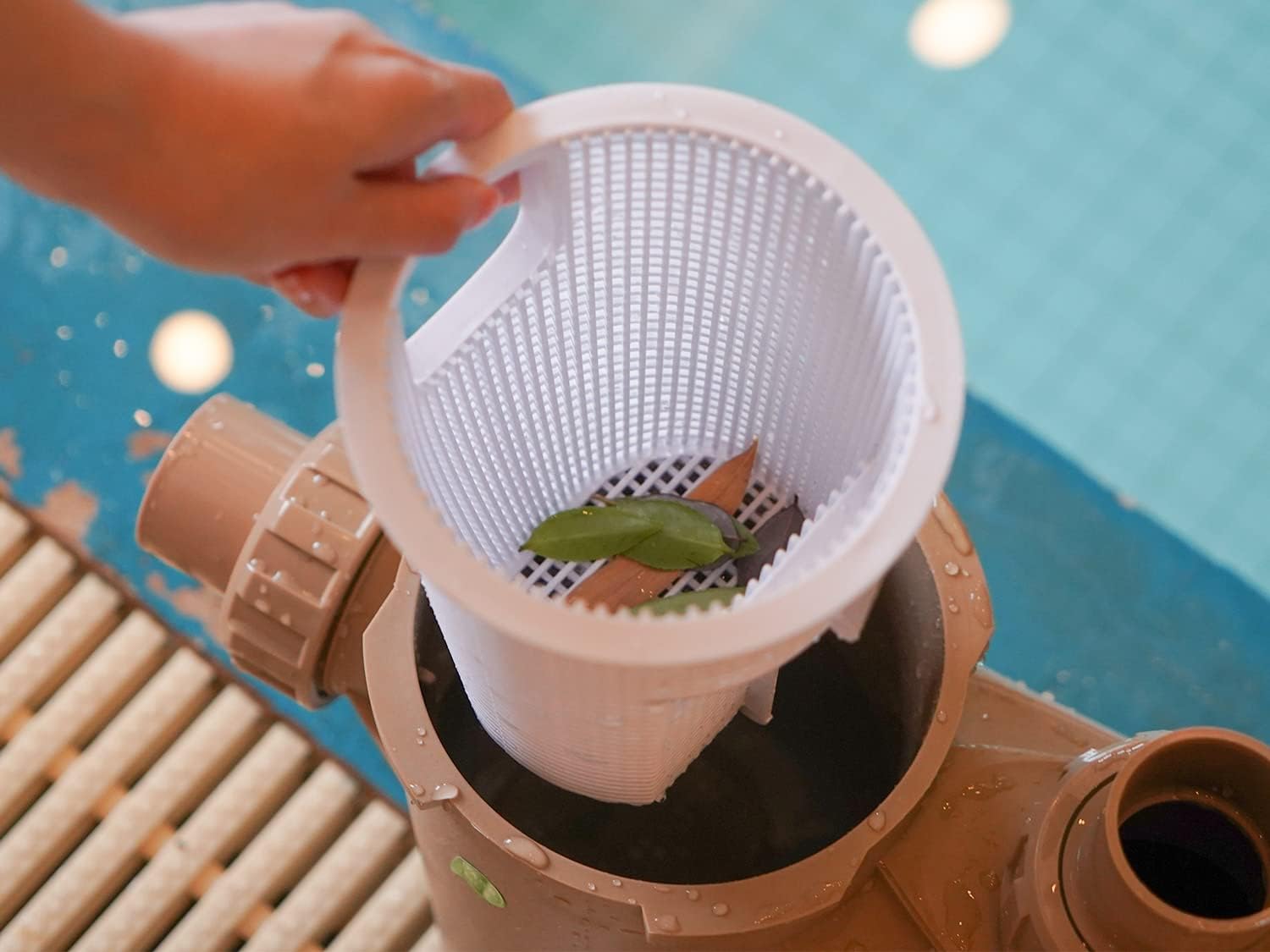
Image: A hand connecting a flexible hose to the pump, demonstrating the ease of connection with the included adapters for 1.5" or 2" PVC pipes.
Operating Instructions
The intelligent control panel allows for easy programming and monitoring of the pump's operation.
Control Panel Overview:
The digital display shows current speed, time, and other operational parameters. Buttons allow for speed adjustment, program setting, and quick start/stop.

Image: Close-up of the pump's intelligent control panel, showing the digital display, speed settings (1-4), and control buttons for programming and operation.
Programming and Speed Settings:
The pump can be programmed for up to four different speeds and operating times throughout the day. This allows for energy optimization based on your pool's needs.
| The program | Speed 1 | Speed 2 | Speed 3 | Speed 4 |
|---|---|---|---|---|
| Start up time | 8:00AM (Adjustable) | 10:00AM (Adjustable) | 8:00PM (Adjustable) | 10:00PM (Adjustable) |
| Time of operation | 2H (Adjustable) | 10H (Adjustable) | 2H (Adjustable) | 10H (Adjustable) |
| Default speed | 2850 RPM (Adjustable) | 1730 RPM (Adjustable) | 2300 RPM (Adjustable) | 1150 RPM (Adjustable) |
Note: The default cycle is 22 hours a day.
Daily Operation:
Once programmed, the pump will operate automatically according to the set schedule. You can manually override the program using the 'Quick Start' and 'Stop' buttons.
Maintenance
Regular maintenance ensures efficient operation and extends the life of your pool pump.
Cleaning the Detachable Basket:
The pump features a detachable basket to collect debris. Check and clean the basket regularly, especially if you notice reduced flow or increased noise.
- Turn off the pump and disconnect power.
- Unscrew the transparent lid of the strainer basket.
- Remove the basket and empty any collected debris (leaves, hair, grit, etc.).
- Rinse the basket thoroughly with water.
- Replace the basket and securely fasten the lid. Ensure the O-ring is properly seated for a watertight seal.

Image: A hand removing the detachable basket from the pump's strainer housing, showing collected leaves and debris, emphasizing the ease of cleaning.
General Cleaning:
Keep the exterior of the pump clean and free from dirt and debris. Do not spray water directly onto the motor or electrical components.
Winterization:
In colder climates, proper winterization is essential to prevent damage from freezing. Consult a pool professional for specific winterization procedures for your system.
Troubleshooting
This section provides solutions to common issues you might encounter with your pool pump. For problems not listed here, contact customer support.
| Problem | Possible Cause & Solution |
|---|---|
| Pump does not start |
|
| Low water flow / Poor suction |
|
| Pump is noisy |
|
| Water intrusion in control panel |
|
The control panel also has LED indicators for alarm messages such as under/over voltage, high temperature, over current, and freeze protection. Refer to the specific error code in the full instruction manual (PDF) for detailed solutions.
Specifications
Detailed technical specifications for the CIPU 1.5HP Variable Speed Inground Pool Pump.
| Feature | Specification |
|---|---|
| Brand | CIPU |
| Model Number | CSPPV711 |
| Horsepower | 1.5 HP |
| Voltage | 230V |
| Power Source | AC/DC |
| Material | Copper (motor) |
| Style | Inground Pool Pump |
| Maximum Lifting Height | 5 Feet |
| Product Dimensions (L x W x H) | 24.46 x 10.36 x 13.49 inches |
| Item Weight | 44.6 pounds |
| Manufacturer | SIPU POOL APPLIANCE INC |
Image: Dimensional drawing of the CIPU pool pump, indicating key measurements in inches for installation planning.
Warranty and Support
For warranty information and customer support, please refer to the documentation included with your product or contact CIPU customer service directly. Keep your purchase receipt as proof of purchase.
Additional resources, including a detailed User Manual in PDF format, may be available online. You can often find this by searching for your product model number on the manufacturer's website or by using the following link:


