
K&F Concept K&F-CONCEPT_LENS
Contents
K&F Concept Lens Mount Adapter User Manual
Model: K&F-CONCEPT_LENS
Introduction
This manual provides detailed instructions for the proper use, installation, and maintenance of your K&F Concept Lens Mount Adapter. This adapter allows you to mount Canon EF/EF-S series D/SLR lenses onto Sony Alpha E-mount mirrorless cameras.
Important Note: This is a manual adapter without electronic contacts. It does not support auto-focus or aperture control. Users must manually adjust focus and exposure settings. Canon STM series lenses are not compatible with this adapter.
Product Features
- Functionality: Mounts Canon EOS (EF / EF-S) D/SLR Lenses to Sony NEX Alpha E-mount mirrorless cameras.
- Material: All-metal design with hardened anodized aluminum construction.
- Optical Design: Features matting varnish inside to avoid light reflection and reduce glare.
- Manual Operation: Requires manual adjustment of focus and exposure. Infinity focus is allowed.
- Compatibility: Compatible with various Sony Alpha E-mount cameras including α7, α7R, α7S, α7 II, α7R II, α7S II, α3000, α5000, α6000, α6300, α6500, α3500, α5100, αQX1, PXW-FS7, NEX-3, NEX-5, NEX-C3, NEX-5N, NEX-7, NEX-F3, NEX-5R, NEX-5T, NEX-6, NEX-F3, NEX-3N, NEX-VG10, NEX-VG20, NEX-VG30, NEX-VG900, NEX-FS100, NEX-FS700, NEX-EA50 etc.
Setup and Installation
Follow these steps to properly attach the lens mount adapter to your camera and lens.
Attaching the Adapter to the Lens
Hold your Canon EF/EF-S lens firmly. Align the red dot on the K&F Concept adapter with the red dot on your lens. Rotate the adapter clockwise until it clicks into place, indicating a secure lock.

Image: The K&F Concept EF-E Pro adapter shown from an angle, highlighting the lens mounting side with screw points and the red alignment dot. This side connects to the Canon EF/EF-S lens.
Attaching the Adapter and Lens to the Camera Body
With the adapter now attached to your lens, align the red dot on the adapter with the white dot on your Sony E-mount camera body. Rotate the lens and adapter assembly clockwise until it clicks into place. Ensure it is securely fastened before use.
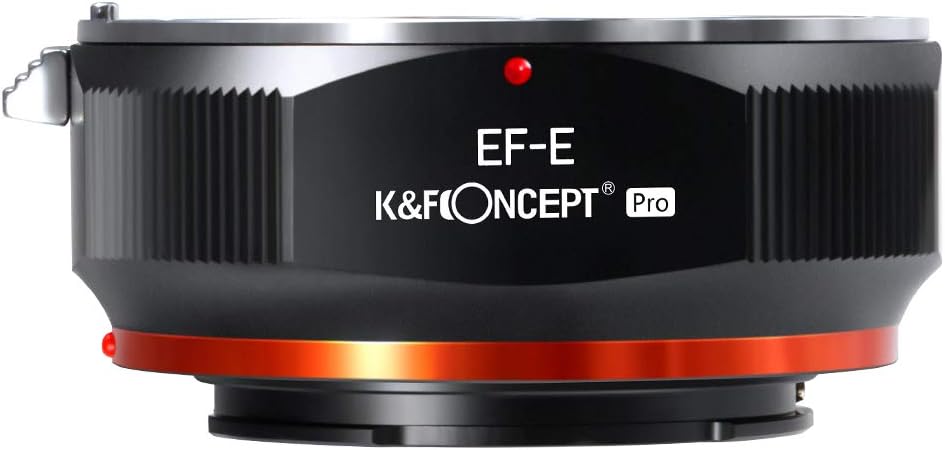
Image: Front view of the K&F Concept EF-E Pro lens mount adapter, displaying the "EF-E" and "K&F CONCEPT Pro" branding. This side connects to the camera body.
Removing the Adapter from the Camera Body
To remove the adapter and lens from the camera, press and hold the lens release button on your camera body. Rotate the lens and adapter assembly counter-clockwise until it detaches.
Removing the Lens from the Adapter
Once the adapter and lens are off the camera, press and hold the release tab on the adapter. Rotate the lens counter-clockwise to detach it from the adapter.
Operating Instructions
Since this is a manual adapter, specific camera settings are required for optimal performance.
- Manual Focus: All focusing must be done manually using the focus ring on your Canon lens.
- Exposure Control: Set your camera to Manual (M) or Aperture Priority (A) mode. Adjust the shutter speed and ISO manually to achieve correct exposure.
- Aperture Control: This adapter does not transmit electronic aperture control. If your Canon lens has a manual aperture ring, you can adjust it directly. For lenses without a manual aperture ring, the lens will operate at its widest aperture. To change the aperture on such lenses, you may need to remove the lens from the adapter, adjust the aperture on the lens (if possible), and then reattach it.
- "Shoot Without Lens" Setting: Ensure your Sony camera's "Shoot Without Lens" or "Release without lens" setting is enabled. This setting is typically found in the camera's menu under "Setup" or "Custom Settings." Refer to your camera's user manual for exact location.
- Infinity Focus: The adapter supports infinity focus, allowing you to focus on distant subjects.

Image: A close-up view of the K&F Concept EF-E Pro adapter's interior, illustrating the matting varnish design. This design helps to minimize internal reflections and glare, improving image quality.
Maintenance and Care
Proper care will extend the life and performance of your lens mount adapter.
- Cleaning: Use a clean, dry microfiber cloth to wipe the exterior of the adapter. Do not use liquid cleaners or solvents.
- Dust Prevention: Always keep the front and rear caps on the adapter when not in use to prevent dust and debris from entering.
- Storage: Store the adapter in a cool, dry place away from direct sunlight and extreme temperatures.
- Handling: Avoid dropping or subjecting the adapter to strong impacts, as this can damage its precision components.

Image: The K&F Concept EF-E Pro lens mount adapter displayed next to its black protective carrying case. This case helps protect the adapter from dust and physical damage during storage and transport.
Troubleshooting
| Problem | Possible Cause | Solution |
|---|---|---|
| Camera does not recognize lens / Cannot take photos. | "Shoot Without Lens" setting is disabled. | Enable "Shoot Without Lens" in your camera's menu. |
| Cannot adjust aperture. | Adapter lacks electronic contacts; lens does not have a manual aperture ring. | This is expected behavior for this manual adapter. The lens will operate at its widest aperture. For some lenses, you may need to adjust aperture before mounting. |
| Difficulty focusing. | Incorrect manual focus adjustment. | Practice manual focusing. Use focus peaking or magnification assist features on your camera if available. |
| Lens or adapter feels loose. | Improper mounting or manufacturing tolerance. | Ensure the adapter and lens are clicked securely into place. If looseness persists and affects performance, contact customer support. |
Specifications
- Model: K&F-CONCEPT_LENS
- Lens Mount: Canon EF / EF-S
- Camera Mount: Sony E-mount (NEX, Alpha series)
- Material: Copper + Aluminum Alloy
- Dimensions: 3.07 x 3.07 x 1.77 inches (approx.)
- Weight: 5.3 ounces (approx.)
- Features: Manual focus, manual exposure, infinity focus support, anti-reflective matting varnish.

Image: Side view of the K&F Concept EF-E Pro lens mount adapter, highlighting the release lever and the robust metal construction. This view shows the overall form factor of the adapter.
Warranty and Support
K&F Concept products typically come with a manufacturer's warranty. Please refer to the warranty card included with your product or visit the official K&F Concept website for detailed warranty information and terms.
For technical support, product inquiries, or warranty claims, please contact K&F Concept customer service through their official website or the retailer where you purchased the product.
K&F Concept Official Website: www.kentfaith.com
Ask a question about this manual
Ask about setup, troubleshooting, compatibility, parts, safety, or missing instructions. Manuals+ will review the question and use this page’s manual context to help answer it.