
Introduction
This manual provides detailed instructions for the assembly, operation, maintenance, and troubleshooting of your CubiCubi Computer Desk TS-HD-47W. Designed for home and office use, this 47-inch desk features integrated storage shelves to enhance your workspace organization.

Image: The CubiCubi Computer Desk TS-HD-47W in a typical office setup, showcasing its design and functionality.
Setup and Assembly
The CubiCubi Computer Desk is designed for straightforward assembly. All necessary accessories and tools are included and organized for quick identification. Please follow the steps below for proper setup.
Package Contents
- Desk components (desktop, frame, shelves)
- Assembly hardware (screws, bolts, Allen wrench)
- Instruction manual
Assembly Steps
- Unpack Components: Carefully remove all parts from the packaging and verify against the parts list in the included manual.
- Assemble Frame: Attach the metal frame components using the provided hardware. Ensure all connections are secure but do not overtighten initially.
- Install Shelves: Position and secure the storage shelves to the frame. Note the reversible design allows for shelf placement on either the left or right side of the desk to suit your room layout.
- Attach Desktop: Place the desktop onto the assembled frame and secure it with the designated screws.
- Final Tightening: Once all components are in place, fully tighten all screws and bolts to ensure stability.

Image: Illustration of the desk's reversible design, allowing the storage shelves to be installed on either the left or right side.

Image: Detailed dimensions of the CubiCubi Computer Desk, including the desktop and shelf unit measurements.
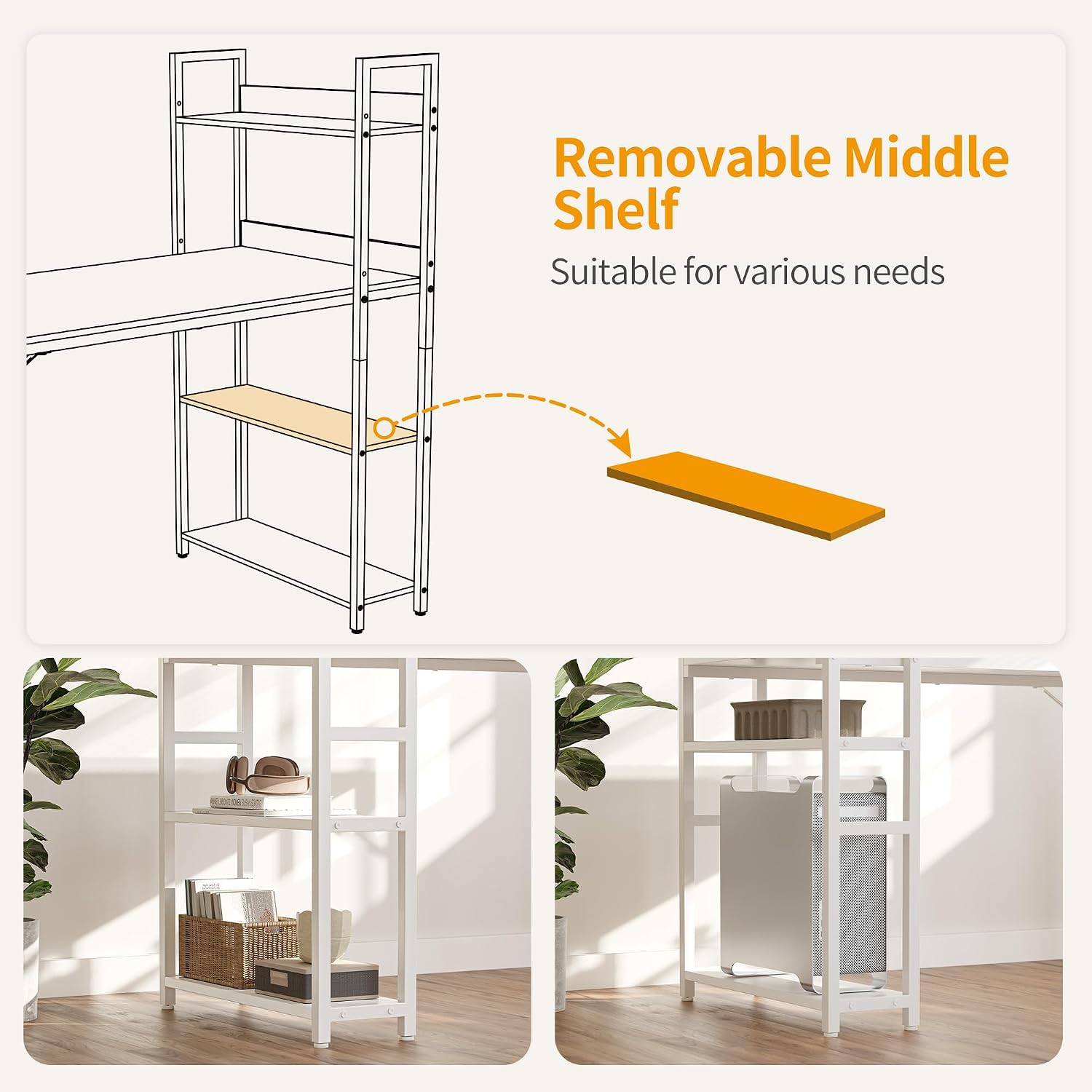
Image: A diagram demonstrating the removable middle shelf, which can be adjusted or removed to accommodate larger items like a computer tower.
Operating and Usage
The CubiCubi Computer Desk provides a spacious and functional workspace. Its 47-inch by 23.6-inch surface offers ample room for various activities, while the integrated 4-tier storage shelves help keep your essentials organized and within reach.
Key Features
- Spacious Desktop: Accommodates monitors, keyboards, mice, and other work accessories.
- Integrated Storage: Four tiers of shelves provide efficient storage for books, documents, office supplies, or decorative items.
- Sturdy Construction: Built with a metal frame and MDF board for stability and durability.
- Modern Aesthetic: The simple style and white finish complement various interior designs.

Image: The desk in use, demonstrating its capacity for a computer setup and organized storage.

Image: A detailed view of the storage shelves, highlighting their capacity for organizing various items.
Care and Maintenance
To ensure the longevity and appearance of your CubiCubi Computer Desk, follow these simple care and maintenance guidelines.
Cleaning Instructions
- Regular Cleaning: Wipe the desktop and frame regularly with a soft, damp cloth to remove dust and spills.
- Avoid Harsh Chemicals: Do not use abrasive cleaners, strong detergents, or solvents, as these can damage the finish.
- Spill Management: Immediately wipe up any liquid spills to prevent staining or damage to the engineered wood surface.
General Care
- Protect Surface: Use coasters for drinks and desk pads for writing or heavy objects to prevent scratches and marks.
- Avoid Extreme Conditions: Keep the desk away from direct sunlight, excessive heat, or high humidity to prevent warping or discoloration.
- Check Connections: Periodically inspect and tighten all screws and bolts to maintain the desk's stability.

Image: Visual representation of the desktop's easy-to-clean, scratch-resistant, and waterproof properties.
Troubleshooting
This section addresses common issues you might encounter with your CubiCubi Computer Desk.
Desk Wobbles After Assembly
- Check All Connections: Ensure all screws and bolts are fully tightened. Loose connections are a common cause of instability.
- Level Surface: Verify that the desk is placed on a flat, level surface. Uneven flooring can cause wobbling.
- Adjust Leveling Feet: If your desk includes adjustable leveling feet, use them to compensate for uneven floors.
Missing Parts or Damaged Components
- Review Parts List: Double-check the package contents against the parts list in the manual.
- Contact Customer Service: If parts are genuinely missing or damaged, refer to the Customer Support section for contact information.
Difficulty During Assembly
- Re-read Instructions: Carefully review the assembly manual, paying close attention to diagrams and step-by-step instructions.
- Do Not Force Parts: If parts do not fit easily, re-check the orientation and ensure you are using the correct components for that step.
Product Specifications
| Feature | Detail |
|---|---|
| Brand | CubiCubi |
| Model Number | TS-HD-47W |
| Shape | Rectangular |
| Desk Design | Computer Desk |
| Colour | White |
| Style | Modern |
| Base Material | Engineered Wood, Metal |
| Top Material Type | Engineered Wood |
| Finish Type | Matte, Powder Coated |
| Item Dimensions (L x W x H) | 120 x 60 x 117 Centimeters (approx. 47 x 23.6 x 46.4 inches) |
| Item Weight | 19.14 Pounds |
| Number Of Shelves | 4 |
| Assembly Required | Yes |
| Maximum Weight Recommendation | 110 Kilograms |
| UPC | 723849624052 |
Warranty Information
The CubiCubi Computer Desk TS-HD-47W comes with a limited warranty. Additionally, every order includes a 30-day risk-free guarantee.
For specific details regarding the terms and conditions of the limited warranty, please refer to the documentation included with your product or contact CubiCubi customer service.
Customer Support
For any inquiries, assistance with assembly, or to report missing/damaged parts, please contact CubiCubi customer service. Our team is committed to providing efficient and professional support.
Please have your model number (TS-HD-47W) and purchase information ready when contacting support to facilitate a quicker resolution.
Contact information can typically be found on the product packaging or the official CubiCubi website.