
1. Overview
The Autel Robotics EVO 2 Series Propeller Guards are designed to enhance flight safety by protecting the drone's propellers from accidental contact with obstacles, people, or objects. Constructed from strong and flexible materials, these guards are built to last and provide reliable protection during flight, especially in confined spaces or for new pilots.

Image: Autel Robotics EVO 2 Series Propeller Guards and their retail packaging.
2. Compatibility
These propeller guards are specifically designed for the Autel EVO II series drones. They are compatible with the following models:
- EVO 2 Pro V2 & V3
- EVO 2 Pro RTK
- EVO 2 Dual 640T
- EVO 2 Dual 640T RTK
Note: These propeller guards are NOT compatible with Autel Enterprise Drone models.
3. Package Contents
The package for the Autel Robotics EVO 2 Series Propeller Guards includes the following components:
- 4 x Propeller Guards (one for each motor arm)

Image: All four propeller guards included in the package.
4. Installation Guide
Installing the Autel EVO 2 Series Propeller Guards is a straightforward process. Follow these steps for secure attachment:
- Step 1: Install through Landing Legs
Carefully slide each propeller guard through the corresponding landing leg of the drone. Ensure the guard is oriented correctly for its respective motor arm (front-left, front-right, rear-left, rear-right). - Step 2: Secure the Locking Lever
Once the guard is positioned, engage the simple yet secure locking mechanism. Ensure it clicks into place firmly to prevent accidental detachment during flight. - Step 3: Connect the Prop Guards
Some propeller guard designs may require connecting two halves or securing additional points. Ensure all connection points are properly aligned and fastened.

Image: Detailed view of the secure locking mechanism for propeller guard attachment.
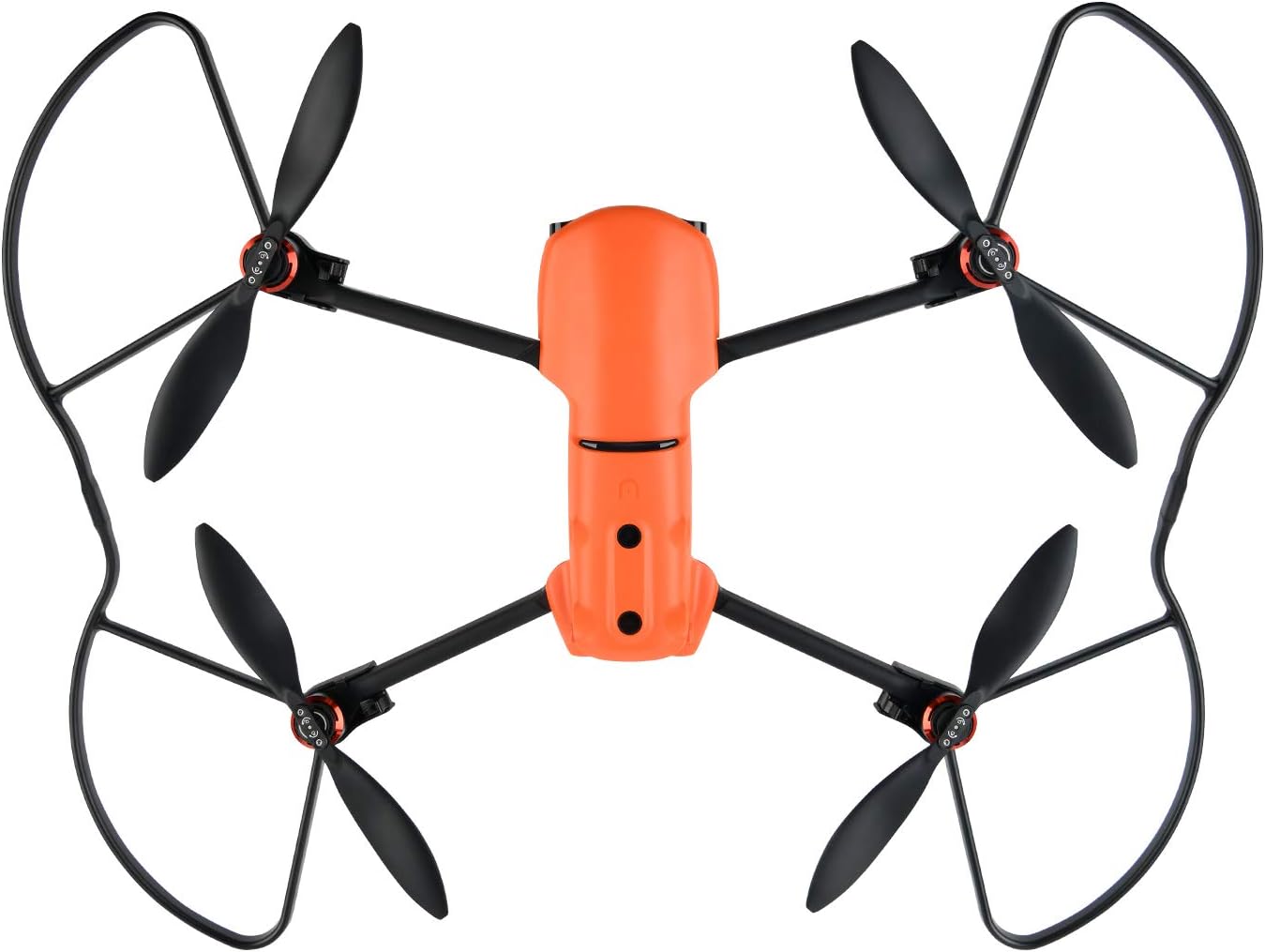
Image: Autel EVO 2 drone with all four propeller guards correctly installed, viewed from above.
5. Usage and Safety
The primary purpose of the Autel Robotics EVO 2 Series Propeller Guards is to improve flight safety. They act as a protective barrier, reducing the risk of propeller damage from minor collisions and preventing propellers from coming into contact with people or objects. While they offer significant protection, always exercise caution and maintain safe flying practices.
- Always ensure guards are securely attached before flight.
- Do not rely solely on propeller guards for safety; maintain visual line of sight and avoid flying in overly confined or hazardous environments.
- Propeller guards may slightly affect flight performance or battery life due to added weight and air resistance.

Image: Autel EVO 2 drone with propeller guards installed, showcasing their protective coverage.
6. Maintenance
To ensure the longevity and effectiveness of your propeller guards, follow these simple maintenance guidelines:
- Cleaning: Wipe the guards with a soft, damp cloth to remove dust or debris. Avoid harsh chemicals that could damage the material.
- Inspection: Regularly inspect the guards for any signs of cracks, bends, or damage, especially after any impact. Damaged guards should be replaced immediately to ensure continued protection.
- Storage: Store the propeller guards in a cool, dry place away from direct sunlight when not in use.
7. Troubleshooting
If you encounter any issues with your propeller guards, refer to the following common problems and solutions:
| Problem | Possible Cause | Solution |
|---|---|---|
| Guards are difficult to install or remove. | Tight fit; incorrect alignment. | Ensure correct orientation for each leg. Apply gentle, even pressure. Do not force. Practice may improve ease of installation/removal. |
| Guards feel loose after installation. | Locking mechanism not fully engaged. | Ensure the locking lever clicks firmly into place. Re-install if necessary. |
| Drone performance seems affected. | Added weight/air resistance. | This is normal. The effect is usually minor. Ensure guards are clean and not obstructing propellers. |
8. Specifications
| Feature | Detail |
|---|---|
| Brand | Autel |
| Model Name | EVO 2 Drones Propeller Guards |
| Special Feature | Durable |
| Color | Black |
| Connectivity Technology | Screw in (locking mechanism) |
| Included Components | Prop Guards (4 units) |
| Item Weight | 7 ounces |
| Product Dimensions | 2"L x 4"W x 8"H (approximate, per guard) |
9. Warranty and Support
Autel Robotics stands behind the quality of its products. For specific warranty information, please refer to the warranty card included with your purchase or visit the official Autel Robotics website.
For any questions, technical support, or issues regarding your Autel Robotics EVO 2 Series Propeller Guards, please contact Autel Robotics directly:
Email: autelofficial@outlook.com
When contacting support, please provide your product model and a detailed description of your issue to facilitate a quicker resolution.