1. Introduction
This manual provides essential instructions for the safe and effective use of your ORDRO AZ50 4K Camcorder. Please read this manual thoroughly before operating the device and retain it for future reference.
The ORDRO AZ50 is a high-performance 4K camcorder designed for capturing high-quality video and photos. It features a 1/2.3 inch image CMOS sensor, 3.1-inch IPS touch screen, night vision capabilities, and supports external accessories like a stereo microphone and LED light.
2. Package Contents
Verify that all items listed below are included in your package:
- ORDRO AZ50 camera x1
- Battery x2
- HDMI/USB cable x1
- Charger x1
- User Manual x1
- 64GB SD card x1
- Remote control x1
- Microphone x1
- Wide Angle Lens x1
- LED light x1
- Lens hood x1
- Holder x1
- Carrying case x1
- Telescope x1
3. Product Overview
Familiarize yourself with the components and controls of your ORDRO AZ50 camcorder.

Figure 3.1: Front view of the ORDRO AZ50 camcorder, highlighting its aluminum alloy lens and brushed panel design.
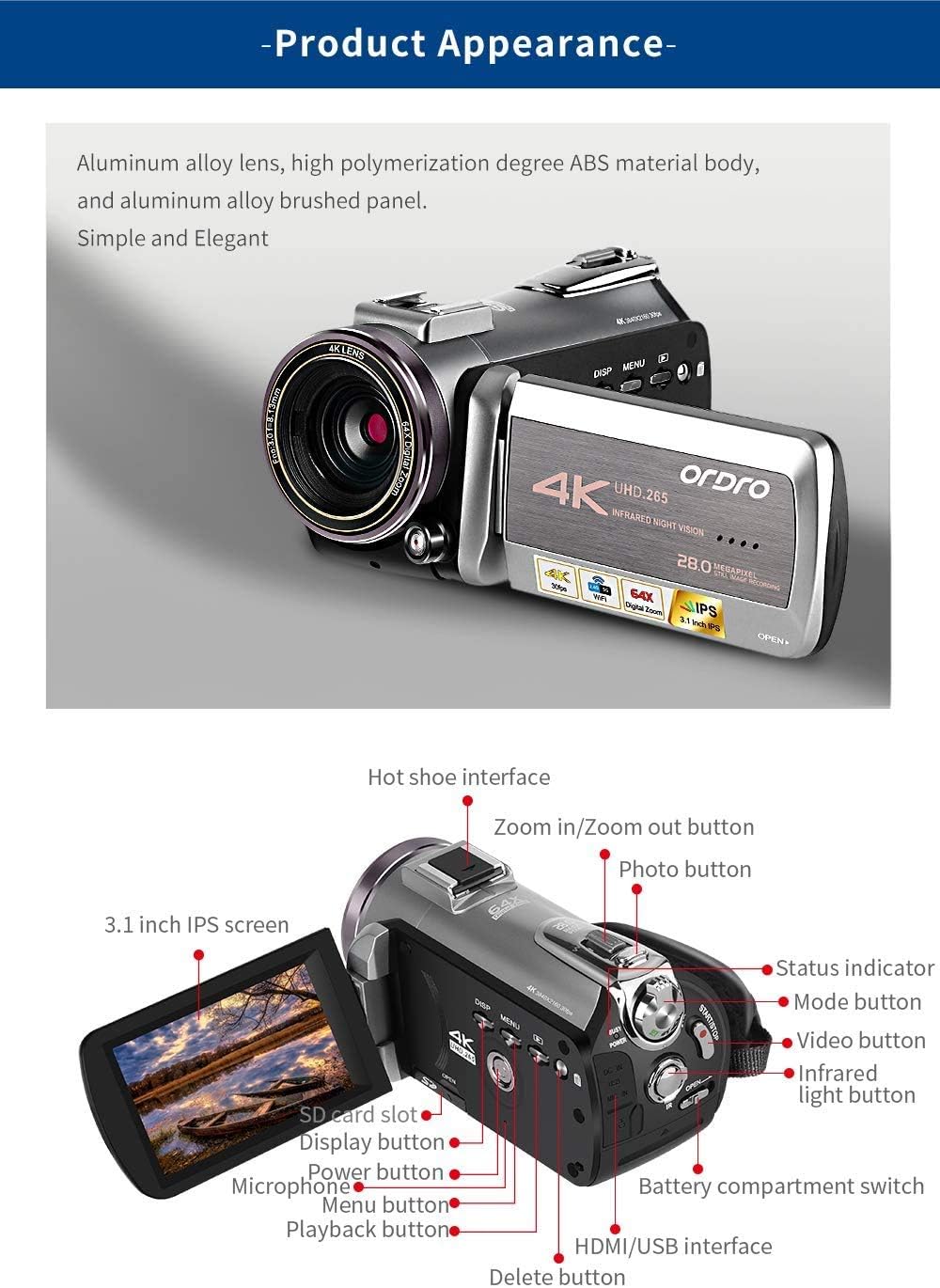
Figure 3.2: Detailed view of the ORDRO AZ50 camcorder, showing the 3.1-inch IPS screen, hot shoe interface, zoom buttons, photo button, mode button, video button, infrared light button, SD card slot, display button, power button, microphone port, menu button, playback button, delete button, HDMI/USB interface, and battery compartment switch.
Key Features:
- 4K Video Recording: Supports resolutions up to 3840x2160 at 30 frames per second (fps), 1080P at 60fps, and 720P at 120fps.
- High-Resolution Photos: Captures still images with a maximum of 28 megapixels.
- Advanced Sensor: Equipped with a 1/2.3 inch image CMOS sensor from Sony.
- Intuitive Touch Screen: Features a 3.1-inch IPS touch screen that can be flipped for versatile viewing.
- Night Vision: Utilizes 850nm infrared flash technology for clear recording in low-light or dark conditions.
- External Audio Support: Includes a high-performance stereo microphone with a built-in 200mAh polymer lithium battery for extended use.
- Adjustable LED Light: Comes with a High Power Panel Video Light featuring a 3000mAh battery and adjustable color temperature from 2700K to 6500K.
- App Control: Supports Wi-Fi connectivity for app control, enabling video editing and sharing functionalities.
- Expandable Storage: Compatible with SD cards up to 256GB (U3 class recommended).
4. Setup
4.1. Battery Installation and Charging
- Open the battery compartment switch on the camcorder.
- Insert the provided Lithium Polymer battery, ensuring correct polarity.
- Close the battery compartment switch securely.
- Connect the camcorder to the charger using the HDMI/USB cable.
- Plug the charger into a power outlet. The charging indicator will illuminate.
- Charge the battery fully before first use (approximately 2-3 hours).
4.2. SD Card Installation
The camcorder supports up to a 256GB U3 SD card.
- Locate the SD card slot on the camcorder.
- Insert the 64GB SD card (or another compatible SD card) into the slot until it clicks into place.
- To remove, gently push the card inward until it springs out.
4.3. Attaching Accessories (Microphone, LED Light, Wide Angle Lens, Lens Hood, Telescope)
The ORDRO AZ50 features a hot shoe interface for external accessories.
- Microphone: Slide the stereo microphone onto the hot shoe mount. Connect the microphone's audio output cable to the camcorder's 3.5mm audio input port. Ensure the microphone is powered on.
- LED Light: Slide the LED light onto the hot shoe mount. Power on the LED light as needed.
- Wide Angle Lens/Telescope: Attach the wide-angle lens or telescope to the front of the camcorder's main lens by screwing it into place.
- Lens Hood: Attach the lens hood to the front of the lens to reduce glare.
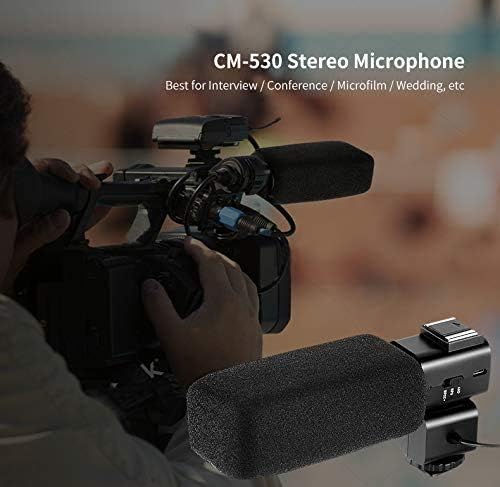
Figure 4.1: The CM-530 Stereo Microphone attached to the camcorder's hot shoe, ideal for interviews and conferences.
Video 4.1: This video demonstrates the setup and use of the ORDRO HDR-AC3, which shares similar accessory attachment mechanisms with the AZ50, including the external microphone and LED light. It shows how to connect the microphone and use the camcorder for classroom recording.
5. Operating Instructions
5.1. Powering On/Off
- To power on, press and hold the Power button until the screen illuminates.
- To power off, press and hold the Power button until the screen turns off.
5.2. Recording Video
- Ensure an SD card is inserted and the battery is charged.
- Turn on the camcorder.
- Press the Mode button to select video recording mode.
- Press the Video button (Start/Stop) to begin recording. A red indicator will typically appear on the screen.
- Press the Video button again to stop recording.
5.3. Taking Photos
- Turn on the camcorder.
- Press the Mode button to select photo mode.
- Press the Photo button to capture an image.
5.4. Using the Touch Screen
The 3.1-inch IPS touch screen allows for intuitive navigation and settings adjustments. Tap icons to select options, and swipe to navigate menus or review media.
5.5. Night Vision Operation
- In low-light conditions, activate the infrared light button.
- The camcorder will switch to IR night vision mode, displaying images in monochrome for enhanced visibility.
Video 5.1: This video showcases the ORDRO AZ50's capabilities, including its night vision feature. It demonstrates the camcorder being used in various settings, such as classroom recording and outdoor vlogging, and highlights the IR night vision mode.
5.6. App Control and Wi-Fi
Connect your ORDRO AZ50 to a smartphone or tablet via Wi-Fi to access additional features like remote control, video editing, and sharing. Refer to the specific app instructions for detailed usage.
5.7. Using the LED Light

Figure 5.1: The external LED light showing three light modes and adjustable color temperatures (2700K, 4800K, 6500K) to suit different lighting conditions.
The High Power Panel Video Light offers adjustable color temperature from 2700K (warm) to 6500K (cold). Use the controls on the LED light to select the desired brightness and color temperature for optimal illumination.
6. Maintenance
- Cleaning: Use a soft, dry cloth to clean the camcorder body. For the lens and screen, use a specialized lens cleaning cloth and solution. Avoid abrasive materials or harsh chemicals.
- Storage: Store the camcorder in a cool, dry place away from direct sunlight and extreme temperatures. Remove the battery if storing for extended periods.
- Battery Care: Charge batteries regularly, even if not in use, to maintain their lifespan. Avoid fully discharging batteries.
- SD Card: Format the SD card periodically to ensure optimal performance and prevent data corruption. Back up important data before formatting.
7. Troubleshooting
| Problem | Possible Cause | Solution |
|---|---|---|
| Camcorder does not power on. | Battery is depleted or incorrectly installed. | Charge the battery fully. Ensure the battery is inserted correctly. |
| Cannot record video/take photos. | SD card is full, not inserted, or corrupted. Incorrect mode selected. | Insert a compatible SD card. Check available storage. Format the SD card if necessary (after backing up data). Ensure video/photo mode is selected. |
| Poor video/photo quality. | Lens is dirty. Insufficient lighting. Incorrect settings. | Clean the lens. Use the LED light in low light. Adjust exposure or white balance settings. |
| Wi-Fi connection issues. | Incorrect Wi-Fi settings. Distance from device. | Ensure Wi-Fi is enabled on both camcorder and device. Re-enter Wi-Fi password. Move closer to the camcorder. |
| External microphone not working. | Microphone not powered on. Incorrectly connected. | Ensure the microphone is powered on and fully charged. Verify the 3.5mm audio cable is securely connected to both the microphone and the camcorder. |
8. Specifications
- Brand: ORDRO
- Model: AZ50
- Video Capture Resolution: 4K (3840x2160/30fps), 1080P/60fps, 720P/120fps
- Photo Sensor Technology: CMOS (1/2.3 inch Sony sensor)
- Max Pixel: 28MP
- Screen Size: 3.1 Inches (IPS Touch Screen)
- Flash Memory Type: SD (supports up to 256GB U3)
- Connectivity Technology: Wi-Fi
- Special Features: Digital Camera, Infrared Night Vision
- Batteries: 2 Lithium Polymer batteries (included)
- Item Weight: 5.28 pounds
- Package Dimensions: 14.8 x 11.26 x 3.82 inches
- External LED Light: 3000mAh 3.7V Battery, 2700K-6500K Color Temperature
- External Microphone: 200mAh Polymer lithium battery, 50-60 hours continuous use
9. Warranty and Support
For warranty information and technical support, please refer to the contact details provided with your product packaging or visit the official ORDRO website. Keep your purchase receipt as proof of purchase for warranty claims.