
ANCHEER 3D Vibration Fitness Platform (B087TLP5CY)
ANCHEER 3D Vibration Fitness Platform
User Manual
1. Introduction
Thank you for choosing the ANCHEER 3D Vibration Fitness Platform. This manual provides essential information for the safe and effective use of your new fitness equipment. Please read it thoroughly before operation and keep it for future reference.
This vibration platform features a single motor for up-and-down vibration, designed to assist with weight loss, muscle building, and core strengthening. It includes 5 automatic programs, 1 manual mode, and adjustable speed levels, all controllable via an intuitive LCD touchscreen and a convenient wrist remote.
Important Safety Information
- Consult your physician before starting any new exercise program.
- Ensure the platform is placed on a stable, level surface.
- Keep children and pets away from the device during operation.
- Do not use if you are pregnant, have a pacemaker, or any other medical condition that may be affected by vibration.
- Unplug the device when not in use or before cleaning.
- Do not exceed the maximum weight recommendation of 250 lbs (113 kg).
2. Product Components and Setup
Your ANCHEER 3D Vibration Fitness Platform comes largely pre-assembled. Please verify all components are present and undamaged upon unboxing.
2.1 Package Contents
- ANCHEER 3D Vibration Fitness Platform
- Wrist Remote Control
- Power Cord
- Resistance Bands (2)
- User Manual (this document)

Image: The ANCHEER 3D Vibration Fitness Platform shown with its main components: the orange and grey platform, a white wrist remote control, a black power cord, and two black resistance bands with handles.
2.2 Placement and Connection
- Choose a flat, stable, and non-slip surface for the platform. Ensure there is enough clear space around the unit for safe exercise.
- Plug the power cord into the power inlet on the side of the platform and then into a suitable wall outlet.
- Ensure the main power switch (usually located near the power inlet) is in the 'ON' position.
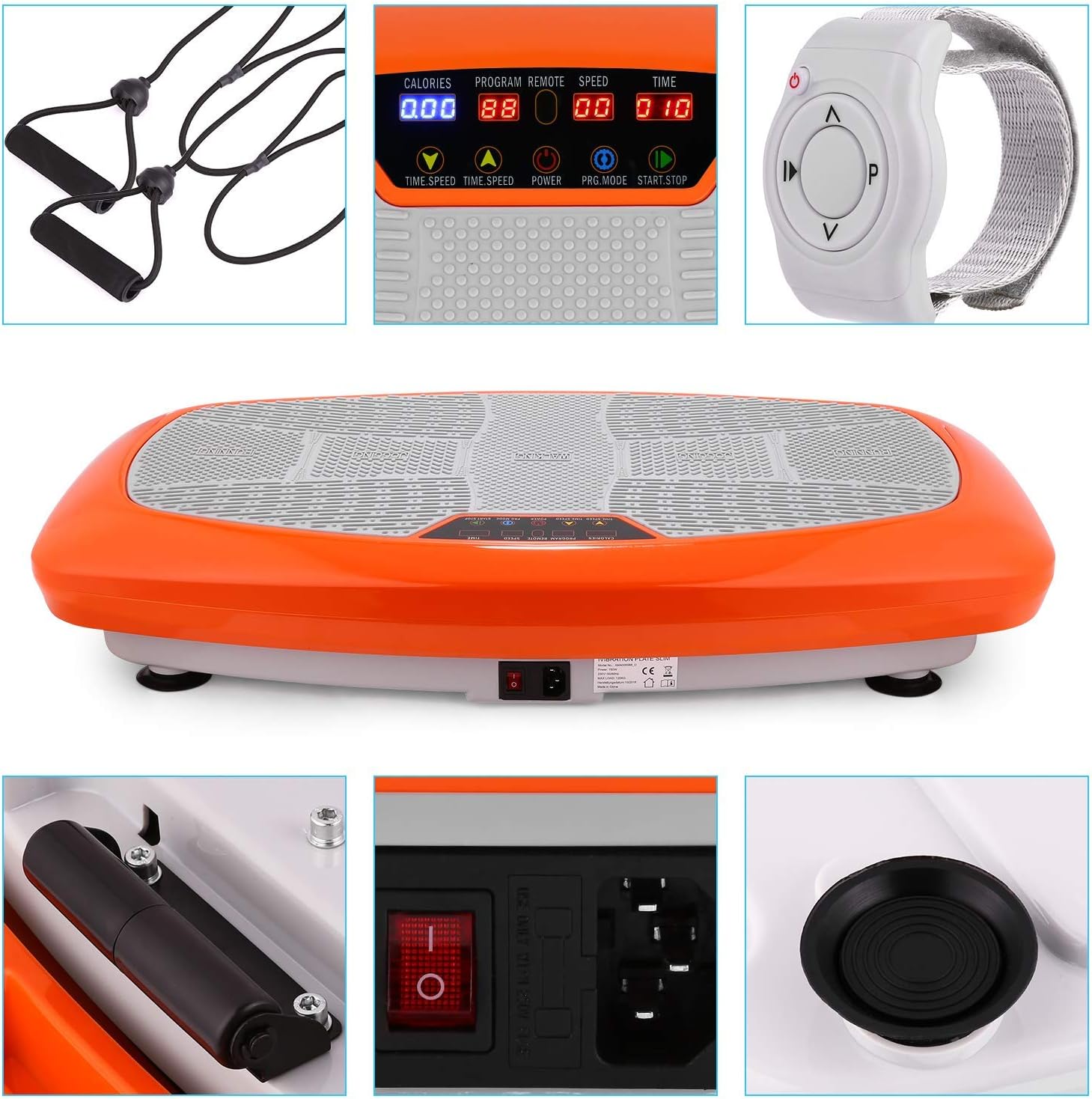
Image: A detailed view of the platform's side, highlighting the red power switch, the power cord input, and one of the stabilizing foot pads.
3. Operating Instructions
The ANCHEER 3D Vibration Fitness Platform offers multiple ways to control your workout, including an integrated touchscreen display and a wrist remote control.
3.1 Control Panel Overview
The acrylic glass touchscreen panel displays key workout data and allows for program selection and adjustments.

Image: A close-up of the platform's digital display, showing readouts for calories, program number, remote connection status, speed level, and time. Buttons for time/speed adjustment, power, program mode, and start/stop are visible.
- CALORIES: Displays estimated calories burned.
- PROGRAM: Shows the current program (P1-P5 for automatic, '00' for manual).
- REMOTE: Indicates remote control connection status.
- SPEED: Displays the current vibration speed level (0-20).
- TIME: Shows the remaining workout time.
- TIME/SPEED Buttons (Up/Down Arrows): Adjusts time in manual mode or speed level.
- POWER Button: Turns the platform on/off.
- PRG.MODE Button: Cycles through automatic programs (P1-P5) and manual mode.
- START.STOP Button: Starts or stops the vibration.
3.2 Wrist Remote Control
The included wrist remote allows for convenient control during your workout without needing to bend down.
Image: A white wrist-worn remote control with buttons for power, program selection, and speed/time adjustment.
- Power Button: Turns the platform on/off.
- P Button (Program): Cycles through automatic programs and manual mode.
- Up/Down Arrows: Adjusts speed level or time.
3.3 Workout Modes and Intensity
The platform offers a manual program and 5 automatic programs, each with varying intensities and durations.

Image: A graphic illustrating the available workout options: 1 Manual Program, 5 Automatic Programs, and 20 Speed Levels.
- Manual Mode: Allows you to set your desired time and speed level manually. Use the TIME/SPEED buttons on the panel or remote.
- Automatic Programs (P1-P5): Pre-set programs with varying speed and intensity changes. Select using the PRG.MODE button on the panel or 'P' button on the remote.
3.4 Foot Placement for Varying Intensity
The platform's surface is designed with three distinct areas to simulate different exercise intensities based on foot placement.

Image: The top surface of the vibration platform, clearly marked with three zones: 'Running' (outer edges for higher intensity), 'Jogging' (middle area for medium intensity), and 'Walking' (center for lower intensity).
- Walking (Center): For lower intensity vibration, place your feet closer together in the center of the platform.
- Jogging (Middle): For medium intensity, place your feet slightly wider apart in the middle section.
- Running (Outer Edges): For higher intensity, place your feet wider apart towards the outer edges of the platform.
3.5 Using Resistance Bands
Attach the resistance bands to the designated anchor points on the platform to incorporate upper body exercises into your vibration workout.

Image: A collage showing a woman performing various exercises on the vibration platform, including squats and standing exercises with the attached resistance bands.
4. Maintenance and Care
Proper maintenance ensures the longevity and optimal performance of your ANCHEER 3D Vibration Fitness Platform.
- Cleaning: Wipe the surface with a soft, damp cloth. Do not use abrasive cleaners or solvents. Ensure the device is unplugged before cleaning.
- Storage: Store the platform in a cool, dry place away from direct sunlight and moisture. Its compact design and side wheels make it easy to move and store.
- Inspection: Periodically check the power cord, resistance bands, and all connections for any signs of wear or damage.

Image: The vibration platform with overlaid measurements indicating its dimensions: approximately 79 cm (31.1 inches) in length, 45 cm (17.71 inches) in width, and 14 cm (5.51 inches) in height.
5. Troubleshooting
If you encounter any issues with your ANCHEER 3D Vibration Fitness Platform, please refer to the following common problems and solutions.
| Problem | Possible Cause | Solution |
|---|---|---|
| Platform does not power on. | Power cord not properly connected; Main power switch is off; Power outlet issue. | Ensure power cord is securely plugged into both the platform and the wall outlet. Check if the main power switch on the platform is in the 'ON' position. Test the outlet with another device. |
| Remote control is not working. | Remote battery is low or dead; Remote is out of range; Interference. | Replace the remote control battery. Ensure you are within close proximity to the platform. Remove any potential obstructions or sources of interference. |
| Vibration is weak or inconsistent. | Incorrect program/speed setting; Overload; Uneven surface. | Increase the speed level or select a different automatic program. Ensure the user's weight does not exceed the maximum capacity. Place the platform on a completely flat and stable surface. |
| Unusual noise during operation. | Loose components; Object under the platform. | Stop the machine and unplug it. Check for any loose screws or components. Ensure there are no objects trapped underneath the platform. If the noise persists, contact customer support. |
6. Specifications
Detailed technical specifications for the ANCHEER 3D Vibration Fitness Platform.
| Feature | Detail |
|---|---|
| Model | B087TLP5CY |
| Brand | ANCHEER |
| Dimensions (L x W x H) | 81.8 x 48.8 x 18 cm (approx. 32.2 x 19.2 x 7.1 inches) |
| Weight | 16.88 kg (approx. 37.2 lbs) |
| Maximum User Weight | 250 lbs (approx. 113 kg) |
| Material | Aluminum |
| Color | Orange |
| Control Type | Touchscreen Panel, Wrist Remote Control |
| Vibration Type | Single Motor (Up/Down Vibration) |
| Programs | 1 Manual Mode, 5 Automatic Programs |
| Speed Levels | Up to 20 |
7. Warranty and Support
ANCHEER products are manufactured to high-quality standards. For warranty information, technical support, or any questions not covered in this manual, please contact ANCHEER customer service.
Please have your product model number (B087TLP5CY) and purchase date ready when contacting support.
For the most up-to-date contact information, please visit the official ANCHEER website or refer to your purchase documentation.
Ask a question about this manual
Ask about setup, troubleshooting, compatibility, parts, safety, or missing instructions. Manuals+ will review the question and use this page’s manual context to help answer it.