1. Introduction
This manual provides essential information for the proper use and care of your EasyKeys Replacement Doosan Daewoo Ignition Key, model D100. This key is designed to function with compatible Doosan Daewoo equipment requiring part number 2172-6017. For optimal performance and longevity of your equipment's ignition system, a packet of Super Lube Multi-Purpose Synthetic Grease with Syncolon is included with your purchase.
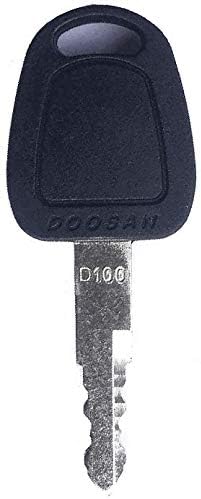
Image 1.1: The EasyKeys Replacement Doosan Daewoo Ignition Key, model D100. This key is specifically designed for Doosan Daewoo equipment that uses the 2172-6017 key type.
2. Setup and Installation
Before using your new ignition key, it is recommended to lubricate the ignition cylinder of your equipment. This helps ensure smooth operation and can extend the life of both the key and the ignition.
- Locate the Ignition Cylinder: Identify the ignition keyhole on your Doosan Daewoo equipment.
- Apply Lubricant: Carefully open the included 1 cc packet of Super Lube Multi-Purpose Synthetic Grease with Syncolon. Apply a small amount of the lubricant directly into the ignition keyhole. Alternatively, you can apply a thin layer to the key blade itself before insertion.
- Insert the Key: Gently insert the D100 ignition key into the lubricated ignition cylinder. Do not force the key. It should slide in smoothly.

Image 2.1: The included 1 cc packet of Super Lube Multi-Purpose Synthetic Grease with Syncolon. This lubricant is essential for maintaining the smooth function of your ignition lock.
3. Operating Instructions
Once the key is properly inserted, you can operate your Doosan Daewoo equipment.
- Starting the Equipment: With the key fully inserted, turn the key clockwise to the "ON" or "START" position, following the specific starting procedure for your equipment. Release the key once the engine starts; it will typically return to the "ON" position.
- Turning Off the Equipment: To turn off the equipment, turn the key counter-clockwise to the "OFF" position. Remove the key when the equipment is not in use to prevent unauthorized operation.
Note: Always refer to your specific Doosan Daewoo equipment's operator manual for detailed starting and stopping procedures, as these may vary by model.
4. Maintenance
Proper maintenance of your ignition key and cylinder ensures reliable operation.
- Keep Key Clean: Avoid exposing the key to dirt, debris, or corrosive substances. Clean the key periodically with a dry cloth.
- Lubrication: Reapply Super Lube or a similar high-quality synthetic lubricant to the ignition cylinder every 6-12 months, or if you notice the key becoming difficult to turn.
- Avoid Bending: Do not use excessive force when inserting or turning the key, as this can bend or break the key blade.
- Storage: Store spare keys in a safe, dry place away from extreme temperatures.
5. Troubleshooting
If you encounter issues with your ignition key, consider the following common problems and solutions:
| Problem | Possible Cause | Solution |
|---|---|---|
| Key does not insert smoothly. | Ignition cylinder is dry or obstructed. | Apply lubricant (e.g., Super Lube) to the keyhole. Check for debris in the keyhole and carefully remove if present. |
| Key turns but equipment does not start. | Issue with equipment's electrical system or engine. | This indicates a problem beyond the key itself. Consult your equipment's service manual or a qualified technician. |
| Key is difficult to turn. | Lack of lubrication in the ignition cylinder. | Apply lubricant to the keyhole and work the key gently back and forth. |
6. Specifications
- Product Name: Replacement Doosan Daewoo Ignition Key
- Brand: EasyKeys
- Model Number: D100
- Part Number: 2172-6017
- Manufacturer (Original Equipment): Doosan Daewoo
- Item Weight: Approximately 1 ounce
- Included Accessory: 1 cc packet of Super Lube Multi-Purpose Synthetic Grease with Syncolon
7. Support and Contact Information
For further assistance or inquiries regarding your EasyKeys Replacement Doosan Daewoo Ignition Key, please contact EasyKeys customer support.
You can find more information and contact details by visiting the official EasyKeys store:
Visit the EasyKeys Store on Amazon
EasyKeys is dedicated to providing prompt and helpful support for all your key and lock needs.


