
BLACK+DECKER BXMZ900E
BLACK+DECKER BXMZ900E 23L Microwave with Grill Function User Manual
Model: BXMZ900E (ES9700050B)
1. Introduction
Thank you for choosing the BLACK+DECKER BXMZ900E 23L Microwave with Grill Function. This appliance is designed to provide efficient and convenient cooking, reheating, grilling, and defrosting for a variety of foods. To ensure safe and optimal performance, please read this instruction manual thoroughly before operating the microwave and retain it for future reference.
Key features of your BLACK+DECKER BXMZ900E microwave include:
- 23 Liters Capacity
- 900W Microwave Power
- 1000W Grill Power
- 5 Power Levels
- Defrost Function (by weight or time)
- 9 Auto-Menu Programs
- 95-Minute Digital Timer
- Digital Clock Display
- Child Lock Function
2. Important Safety Instructions
When using electrical appliances, basic safety precautions should always be followed to reduce the risk of fire, electric shock, and injury to persons, including the following:
- Read all instructions before using the appliance.
- Ensure the appliance is properly grounded. Connect only to a properly installed and grounded outlet.
- Do not operate the microwave empty. This can damage the appliance.
- Do not attempt to operate this oven with the door open as this can result in harmful exposure to microwave energy.
- Do not place any object between the oven front face and the door or allow soil or cleaner residue to accumulate on sealing surfaces.
- Do not insert any metal objects into the microwave, including aluminum foil, metal utensils, or dishes with metallic trim, unless specifically designed for microwave use and approved by the manufacturer.
- Close supervision is necessary when the appliance is used by or near children. The child lock function should be activated to prevent unsupervised use.
- Ensure adequate ventilation around the appliance. Do not block any ventilation openings.
- Do not store or use flammable materials near the oven.
- Clean the oven regularly and remove any food deposits. Failure to maintain the oven in a clean condition could lead to deterioration of the surface that could adversely affect the life of the appliance and possibly result in a hazardous situation.
- Do not heat liquids or other foods in sealed containers since they are liable to explode.
- Always use oven mitts when removing items from the microwave, especially after using the grill function, as surfaces will be hot.
3. Product Overview
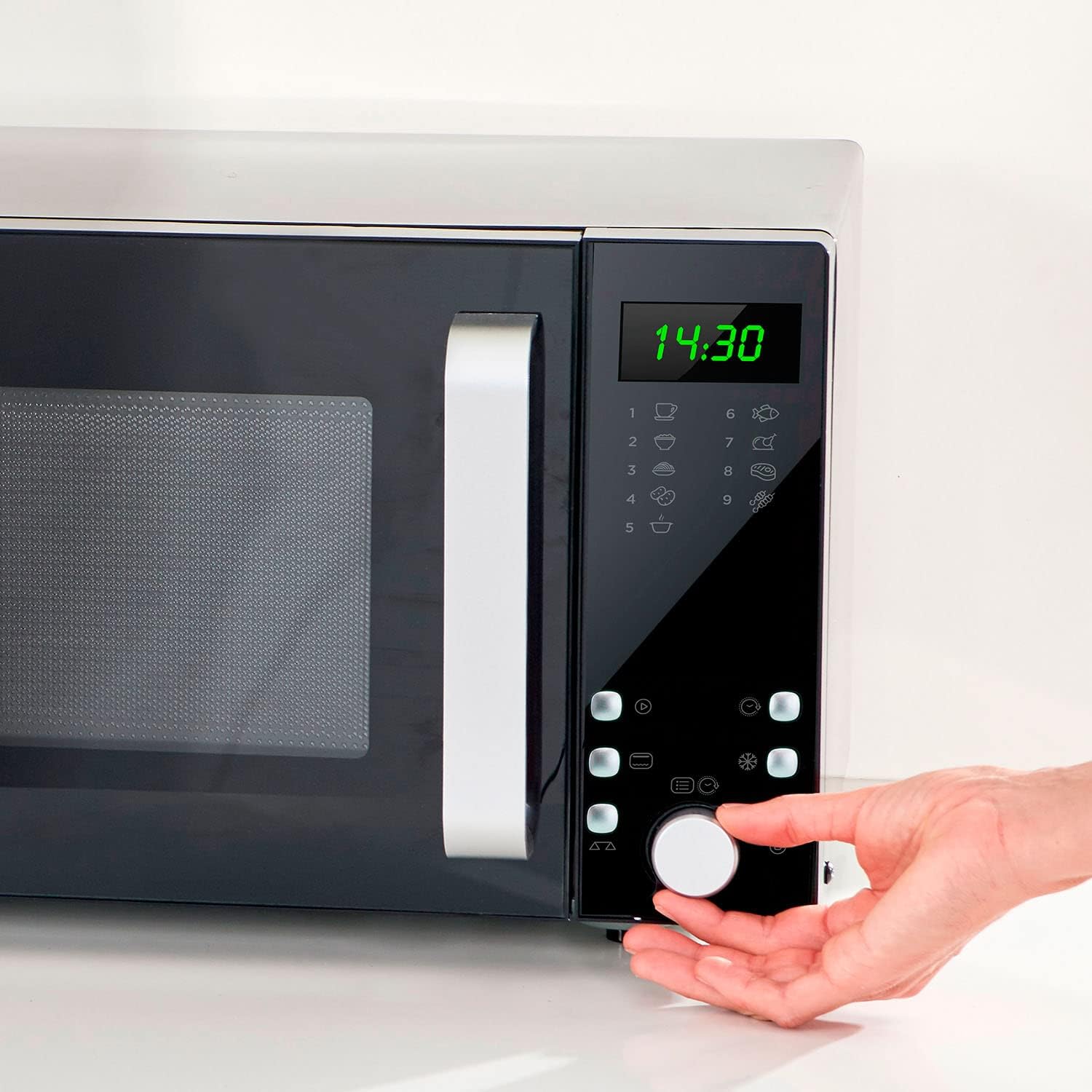
The BLACK+DECKER BXMZ900E microwave features a sleek black and silver design with a user-friendly control panel and a convenient handle for opening the door.


Components:
- Control Panel: Digital display, function buttons, and a rotary knob for setting time and selecting programs.
- Door with Handle: For easy opening and closing.
- Turntable: A 270mm diameter glass plate that rotates to ensure even cooking.
- Turntable Ring: Supports the glass turntable.
- Grill Rack: A metal rack provided for use with the grill function.
- Interior Light: Illuminates the oven cavity during operation.
- Ventilation Openings: Located on the back and sides for proper airflow.
4. Setup
Follow these steps to set up your microwave oven:
- Unpacking: Carefully remove the microwave oven and all packing materials. Check for any damage. Do not operate if damaged.
- Placement: Place the microwave on a flat, stable, heat-resistant surface. Ensure there is at least 20 cm (8 inches) of space above the oven, 10 cm (4 inches) at the rear, and 5 cm (2 inches) on both sides for proper ventilation. Do not place it near heat sources or in a damp environment.
- Turntable Installation: Place the turntable ring in the center of the oven cavity. Then, place the glass turntable securely on top of the turntable ring. Ensure it sits correctly in the center drive.
- Power Connection: Plug the power cord into a grounded electrical outlet. Ensure the voltage matches the specifications of your appliance (240V AC).
- Initial Cleaning: Before first use, wipe the interior and exterior of the microwave with a damp cloth.

5. Operating Instructions
5.1. Setting the Clock
Upon plugging in the microwave, the display will show '0:00'. To set the clock:
- Press the 'Clock' button (usually represented by a clock icon).
- Turn the rotary knob to set the hour. Press 'Clock' again to confirm.
- Turn the rotary knob to set the minutes. Press 'Clock' again to confirm. The clock is now set.
5.2. Microwave Cooking
This function is used for standard heating and cooking.
- Place food in a microwave-safe container on the glass turntable. Close the door securely.
- Press the 'Microwave' button (often represented by a microwave icon or 'Power Level').
- Turn the rotary knob to select the desired power level (P100 for 100% power, P80 for 80%, etc. - there are 5 levels).
- Press 'Microwave' again to confirm the power level.
- Turn the rotary knob to set the cooking time (up to 95 minutes).
- Press the 'Start' button (often represented by a play/start icon) to begin cooking.
Quick Start: For quick heating at full power, simply press the 'Start' button. Each press will add 30 seconds of cooking time at 100% power.

5.3. Grill Function
The grill function is ideal for browning and crisping food. Use the provided grill rack.
- Place food on the grill rack, then place the rack on the turntable. Close the door.
- Press the 'Grill' button (often represented by a grill icon).
- Turn the rotary knob to set the grilling time.
- Press 'Start' to begin grilling.
Combined Cooking: The microwave offers 2 combined functions (microwave + grill) for versatile cooking. Refer to the full manual for specific settings for these combined modes.

5.4. Defrost Function
The defrost function allows you to thaw frozen foods efficiently.
- Place the frozen food in a microwave-safe container on the turntable. Close the door.
- Press the 'Defrost' button (often represented by a snowflake icon).
- You can choose to defrost by weight or by time. Turn the rotary knob to select the desired weight or time.
- Press 'Start' to begin defrosting.
5.5. Auto-Menu Programs
The microwave features 9 pre-set auto-menu programs for common food items. These programs automatically set the optimal cooking time and power level.
- Press the 'Auto-Menu' button (often represented by a chef hat or food icons).
- Turn the rotary knob to select the desired program (e.g., A-1 for Milk, A-2 for Coffee, etc.). The display will show the program number.
- Press 'Auto-Menu' again to confirm the program.
- Turn the rotary knob to select the quantity or weight as indicated by the program.
- Press 'Start' to begin the auto-menu program.
Available Auto-Menu Programs:
- Milk
- Coffee
- Liquid (200ml)
- Rice (150-600g)
- Pasta (100-300g)
- Potatoes (1-3 portions)
- Reheat (200-800g)
- Fish (200-600g)
- Chicken (800-1400g)
- Meat (200-600g)
- Skewers (100-500g)
5.6. Child Lock
The child lock function prevents unsupervised operation of the microwave, enhancing safety.
- To Activate: Press and hold the 'Stop/Cancel' button (often represented by a stop icon or 'X') for 3 seconds. A lock icon will appear on the display, indicating the child lock is active.
- To Deactivate: Press and hold the 'Stop/Cancel' button again for 3 seconds. The lock icon will disappear, and the microwave can be operated normally.
6. Maintenance and Cleaning
Regular cleaning and maintenance will ensure the longevity and efficient operation of your microwave oven.
- Before Cleaning: Always unplug the microwave from the power outlet.
- Oven Interior: Wipe the interior cavity, including the stainless steel lining, with a damp cloth after each use. For stubborn food splatters, use a mild detergent and water, then wipe clean with a damp cloth. Do not use abrasive cleaners or scouring pads.
- Oven Door: Clean the door, door seals, and control panel with a soft, damp cloth. Ensure no water seeps into the ventilation openings.
- Glass Turntable and Turntable Ring: These can be washed in warm soapy water or in a dishwasher. Ensure they are completely dry before placing them back in the oven.
- Grill Rack: Wash the metal grill rack in warm soapy water and dry thoroughly.
- Exterior: Wipe the exterior surfaces with a soft, damp cloth. Avoid using harsh chemicals or abrasive materials that could damage the finish.
- Odour Removal: To remove odors, combine a cup of water with the juice of one lemon in a microwave-safe bowl. Microwave on high for 5 minutes, then let it sit in the oven for another 5 minutes before wiping the interior clean.
7. Troubleshooting
If you encounter any issues with your microwave, refer to the following common problems and solutions:
| Problem | Possible Cause | Solution |
|---|---|---|
| Microwave does not start. | Power cord not plugged in; Door not closed properly; Child lock activated; Fuse blown or circuit breaker tripped. | Ensure power cord is securely plugged in; Close the door firmly; Deactivate child lock (see Section 5.6); Check household fuse or reset circuit breaker. |
| Food not heating. | Incorrect cooking time or power level set; Door not closed properly. | Adjust cooking time and power level; Ensure the door is fully closed. |
| Turntable does not rotate. | Turntable not correctly placed; Turntable ring obstructed. | Ensure the turntable is correctly seated on the drive; Check for any food debris or obstructions under the turntable ring. |
| Excessive steam inside the oven. | High moisture content in food. | This is normal for foods with high moisture. Wipe the interior after use. |
| Sparking or arcing during operation. | Metal objects inside; Food splatters on cavity walls. | Remove all metal objects; Clean the interior thoroughly. If sparking persists, discontinue use and contact customer support. |
If the problem persists after attempting these solutions, please contact customer support or a qualified service technician.
8. Specifications
| Brand | BLACK+DECKER |
| Model Number | BXMZ900E (ES9700050B) |
| Capacity | 23 Litres |
| Microwave Power | 900 Watts |
| Grill Power | 1000 Watts |
| Power Levels | 5 |
| Timer | 95 minutes |
| Turntable Diameter | 270 mm |
| Dimensions (L x W x H) | 40.3 x 49 x 28 cm |
| Weight | 15.44 kg |
| Material (Interior) | Stainless Steel |
| Color | Black |
| Voltage | 240 Volts (AC) |
| Installation Type | Freestanding |
9. Warranty and Support
Information regarding the product warranty and customer support details is typically provided in a separate warranty card included with your purchase or can be found on the official BLACK+DECKER website. Please refer to these resources for specific warranty terms, conditions, and contact information for technical assistance or service inquiries.
Related documentsBXMZ900E

Ask a question about this manual
Ask about setup, troubleshooting, compatibility, parts, safety, or missing instructions. Manuals+ will review the question and use this page’s manual context to help answer it.