
Introduction
This manual provides instructions for the setup, operation, and maintenance of your uehba AKB74475401 replacement remote control. This remote is designed to be compatible with various LG Smart TV models, offering a direct replacement experience without the need for complex programming.
Setup
1. Battery Installation
The remote control requires two AAA batteries (not included) for operation. Follow these steps to install them:
- Locate the battery compartment cover on the back of the remote control.
- Press down on the tab and slide the cover off.
- Insert two AAA batteries, ensuring the positive (+) and negative (-) terminals align correctly with the markings inside the compartment.
- Slide the battery compartment cover back into place until it clicks securely.

2. Initial Use
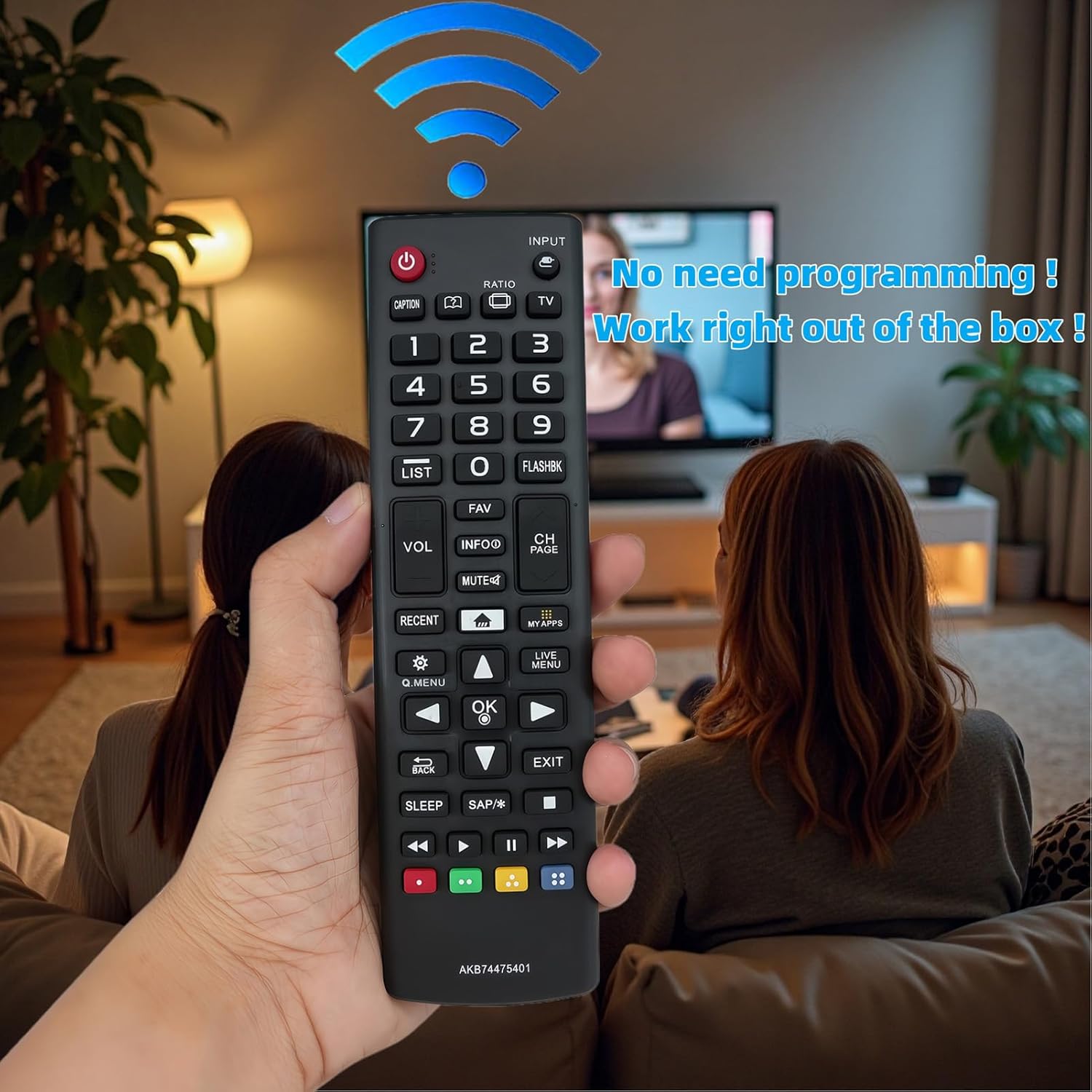
This replacement remote control is pre-programmed and does not require any additional setup or coding. Once batteries are installed, it is ready for immediate use with compatible LG Smart TV models.
Operating Instructions
Familiarize yourself with the buttons and their functions on your remote control. A visual guide to the button layout is provided below.

Button Functions Overview:
- Power (⏻): Turns the TV on or off.
- Input: Selects the input source (HDMI, AV, etc.).
- TV: Switches to TV mode.
- Caption: Toggles closed captions.
- Ratio: Adjusts the screen aspect ratio.
- Number Buttons (0-9): Directly enter channel numbers.
- LIST: Displays a list of channels or programs.
- FLASHBK: Returns to the previously viewed channel.
- VOL (+/-): Adjusts the volume level.
- MUTE (🔇): Mutes or unmutes the TV audio.
- CH PAGE (▲/▼): Changes channels up or down.
- INFO: Displays program information.
- FAV: Accesses favorite channels.
- RECENT: Shows recently viewed content or apps.
- MY APPS: Opens the Smart TV applications menu.
- Q.MENU: Accesses the Quick Menu for common settings.
- LIVE MENU: Opens the Live TV menu.
- Navigation Buttons (◄, ►, ▲, ▼): Navigate through menus and options.
- OK: Confirms selections.
- BACK: Returns to the previous screen or menu.
- EXIT: Exits the current menu or application.
- SLEEP: Sets the sleep timer.
- SAP/*: Toggles Secondary Audio Program (SAP) or other special functions.
- Color Buttons (Red, Green, Yellow, Blue): Access specific functions within certain applications or menus.
- Playback Controls (◀◀, ▶, ⏸, ▶▶): Control media playback (rewind, play, pause, fast forward).
Maintenance
Cleaning the Remote Control
To maintain the remote control's appearance and functionality:
- Wipe the surface with a soft, dry cloth.
- For stubborn dirt, lightly dampen the cloth with water or a mild, non-abrasive cleaner.
- Avoid using harsh chemicals, solvents, or abrasive materials, as these can damage the remote's finish or internal components.
Battery Replacement
Replace batteries when the remote control becomes unresponsive or its range decreases. Always replace both batteries at the same time with new AAA batteries. Do not mix old and new batteries, or different types of batteries.
Storage
If the remote control will not be used for an extended period, remove the batteries to prevent leakage and potential damage to the device.
Troubleshooting
If you encounter issues with your remote control, refer to the following common problems and solutions:
| Problem | Solution |
|---|---|
| Remote control is not working. |
|
| Buttons are unresponsive or sticky. |
|
| Remote range is reduced. |
|
Specifications
- Model Number: AKB74475401
- Brand: uehba
- Compatible Devices: LG Smart Televisions (various models including 24LF4820, 32LF595B, 43LF5900, 43UF6400, 43UF6430, 43UF6800, 43UF6900, 43UF7590, 43UF7600, 49LF5900, 49UF6400, 49UF6430, 49UF6490, 49UF6800, 49UF6900, 49UF7590, etc.)
- Power Source: 2 x AAA Batteries (not included)
- Product Dimensions: 6.3 x 1.69 x 0.59 inches
- Item Weight: 1.62 ounces
- Special Feature: No Programming Required
Warranty and Support
For information regarding warranty coverage or technical support, please refer to the documentation provided with your purchase or contact the seller directly. As a replacement remote, specific warranty terms may vary.