
1. Introduction
The HomeSpot Pro Switch Bluetooth Adapter is designed to enhance your gaming and communication experience on the Nintendo Switch family of consoles. It is the world's first Bluetooth adapter for the Nintendo Switch that allows simultaneous connection of Bluetooth headphones to both the Switch and a smartphone. This innovative device enables users to mix game audio from the Switch with audio from a smartphone, such as voice chat from Discord or the Nintendo Switch Online app, or music from streaming services like Spotify.
Equipped with Bluetooth 5.0 chipsets and advanced DSP algorithms, the Adapter Pro digitally combines audio streams and transmits the mixed audio wirelessly to your Bluetooth headphones or speakers. It also features a built-in digital microphone, providing a comprehensive voice chat solution for all Nintendo Switch games, regardless of their native voice chat support.

Image 1.1: The HomeSpot Pro Switch Bluetooth Adapter connected to a Nintendo Switch console, demonstrating its compact design and integration. Wireless earbuds and a smartphone are visible in the foreground, illustrating the multi-device connectivity.
2. Package Contents
Please verify that all items are present in the package:
- HomeSpot Bluetooth 5.0 Audio Adapter Pro for Nintendo Switch x 1
- USB-C Female to USB-A Male Converter x 1
- Pouch x 1
- Thank You Card x 1
- User Manual x 1 (This document)
3. Key Features
The HomeSpot Pro Switch Bluetooth Adapter offers a range of features designed for an optimized audio experience:
- 2-in-1 Audio Mixer: Connects Bluetooth headphones to both your Nintendo Switch and a smartphone simultaneously, allowing you to mix game audio with smartphone audio (e.g., voice chat, music).
- User Friendly Design: Simple two-button operation with intuitive indicators for easy control and status monitoring.
- Universal Voice Chat: Built-in microphone enables voice chat for all Nintendo Switch games, supporting native in-game chat, the Nintendo Switch Online app, and third-party communication apps like Discord.
- Enhanced Game Play: Seamlessly answer phone calls, chat with friends, and listen to music from your smartphone while gaming.
- Low Profile Design: At only 8mm thick, it integrates seamlessly with the Nintendo Switch and Switch Lite, matching button colors for a cohesive look.
- No Battery Needed: Powered directly by the Nintendo Switch console via the USB-C port.
- aptX Low Latency Support: Provides high-quality audio with minimal delay for a synchronized gaming experience.
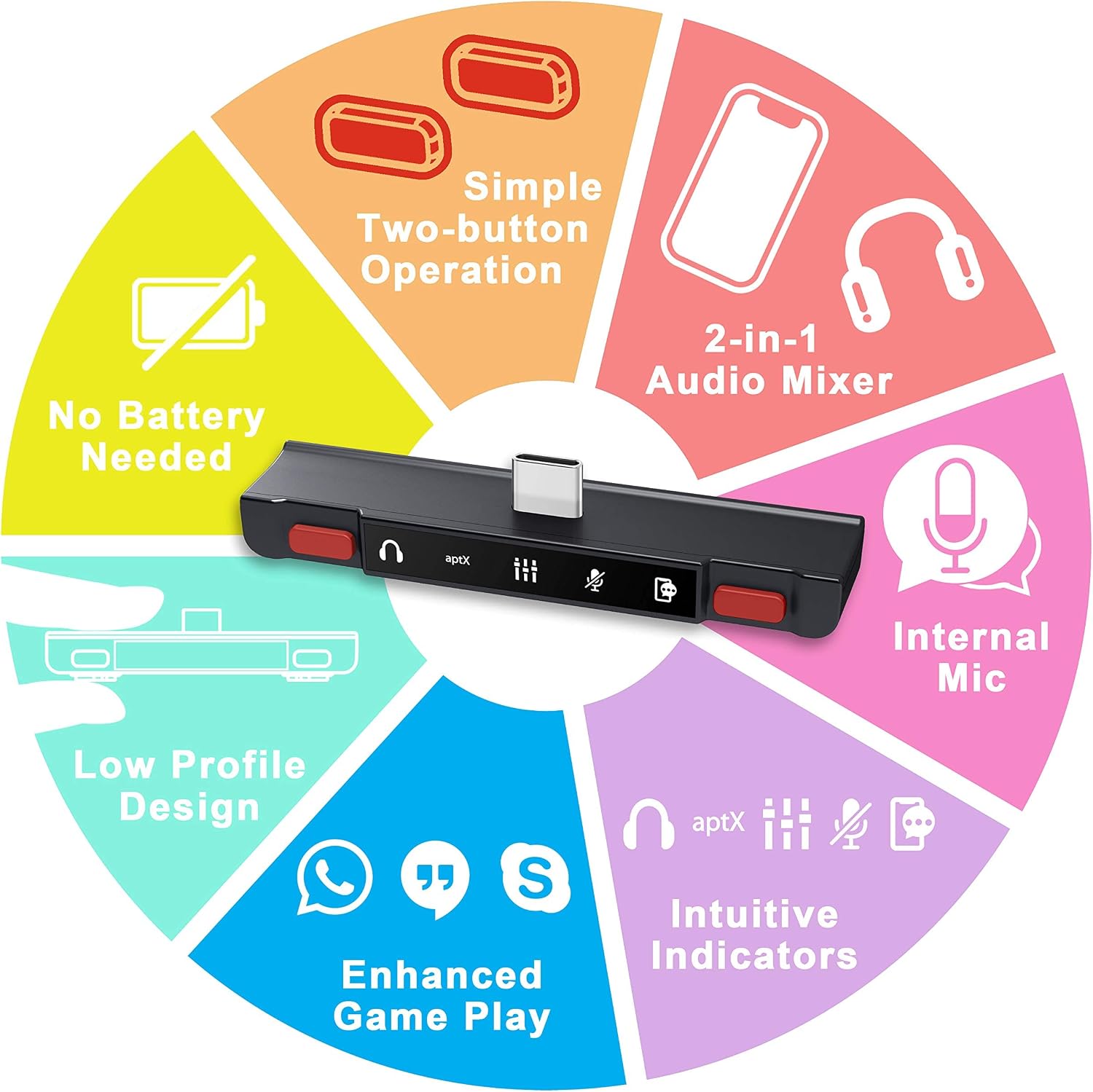
Image 3.1: Visual representation of the HomeSpot Pro Switch Bluetooth Adapter's core features, highlighting its capabilities and design elements.
3.1. Why Choose the HomeSpot Adapter Pro?
The HomeSpot Pro Switch Bluetooth Adapter offers significant advantages over the Nintendo Switch's native Bluetooth and other adapters, particularly in terms of audio quality, latency, and multi-device connectivity.
| Feature | HomeSpot Bluetooth Adapter Pro | HomeSpot Bluetooth Adapter (Previous Model) | Nintendo Switch Native Bluetooth |
|---|---|---|---|
| Audio Codec Support | SBC, aptX, aptX LL | SBC, aptX, aptX LL | SBC ONLY |
| Audio Latency | < 70ms (HFP or aptX LL) | < 70ms (HFP or aptX LL) | > 220ms |
| Dual Headphones Connection | X | ✓ | X |
| Auto Reconnect | ✓ | ✓ | X |
| Number of Controllers | 8 | 8 | 2 |
| Built-in Mic | ✓ | ✓ | X |
| Headphones Mic Support (HFP) | ✓ | ✓ | X |
| In-game Voice Chat | ✓ | ✓ | X |
| Smartphone Audio Mixing | ✓ | X | X |
| Wireless Distance | 10m | 10m | < 10m |
Image 3.2: A comparison table highlighting the advantages of the HomeSpot Bluetooth Adapter Pro over the previous HomeSpot model and the Nintendo Switch's native Bluetooth capabilities.
4. Setup and Installation
Follow these steps to set up your HomeSpot Pro Switch Bluetooth Adapter:
- Insert the Adapter: Carefully insert the USB-C connector of the HomeSpot Pro Switch Bluetooth Adapter into the USB-C port at the bottom of your Nintendo Switch or Switch Lite console. Ensure it is fully seated.
- Compatibility Note: The low-profile design of the adapter means it may not be compatible with most protective casings on your Switch or Switch Lite. A protective casing might prevent the adapter from being fully inserted into the USB-C port. Remove any incompatible casing before use.
- Power On: The adapter will power on automatically once connected to the Switch. No external power source or battery is required.
- Pairing Headphones:
- Put your Bluetooth headphones into pairing mode.
- On the HomeSpot Adapter Pro, press and hold the TX Button (left button with headphone icon) for 3 seconds until the Headphones LED starts blinking rapidly.
- The adapter will search for and connect to your headphones. Once connected, the Headphones LED will turn solid.
- Pairing Smartphone:
- Enable Bluetooth on your smartphone and make it discoverable.
- On the HomeSpot Adapter Pro, press and hold the RX Button (right button with smartphone icon) for 3 seconds until the Smartphone LED starts blinking rapidly.
- On your smartphone, search for Bluetooth devices and select "HomeSpot Adapter Pro" to connect. Once connected, the Smartphone LED will turn solid.

Image 4.1: Illustration demonstrating that the HomeSpot Pro Switch Bluetooth Adapter may not fit when a protective casing is installed on the Nintendo Switch.
5. Operation
Understanding the buttons and indicators on your HomeSpot Pro Switch Bluetooth Adapter is key to its effective use.
5.1. Controls and Buttons

Image 5.1: Detailed view of the HomeSpot Pro Switch Bluetooth Adapter's controls, indicating the function of each button and dial.
- TX Button (Left, Headphone Icon):
- Short Press: Re-connect headphones.
- Double Press: Toggle internal mic On/Off.
- Hold (3 seconds): Enter pairing mode for new headphones.
- RX Button (Right, Smartphone Icon):
- Short Press: Re-connect smartphone.
- Double Press: Play/Pause music, Accept/End call (when connected to smartphone).
- Hold (3 seconds): Enter pairing mode for new smartphone.
- Master Volume Controls (Left Dial):
- Rotate Up: Increase overall headphones volume.
- Rotate Down: Decrease overall headphones volume.
- Mixer Level Controls (Right Dial):
- Rotate Up: Hear more game audio.
- Rotate Down: Hear more smartphone audio.
- Internal Mic: Used for in-game voice chat on Switch and mobile voice calls/chat on smartphone.
5.2. Indicators Dashboard

Image 5.2: A detailed guide to the LED indicators on the HomeSpot Pro Switch Bluetooth Adapter, explaining what each light signifies.
- aptX LED:
- White: Headphones support aptX.
- Amber: Headphones support aptX Low Latency.
- Off: Headphones support SBC (Standard Bluetooth Codec).
- Headphones LED:
- On: Connected to headphones.
- Slow Blinking: Re-connecting to headphones.
- Fast Blinking: Searching for headphones (pairing mode).
- Off: No headphones connected.
- EQ LED:
- On: Audio EQ enabled.
- Off: Audio EQ disabled.
- Internal Mic Mute LED:
- On: Internal mic muted.
- Off: Internal mic active.
- Smartphone LED:
- On: Connected to smartphone.
- Slow Blinking: Re-connecting to smartphone.
- Fast Blinking: Ready for pairing with smartphone.
- Off: No smartphone connected.
5.3. Audio Mixing Functionality
The core functionality of the Adapter Pro is its ability to mix audio from two sources: your Nintendo Switch and your smartphone. This allows for simultaneous game audio and voice chat/music from your phone.

Image 5.3: A visual representation of how the HomeSpot Adapter Pro mixes game audio from the Nintendo Switch with voice chat audio from a smartphone, delivering a combined audio stream to Bluetooth headphones.
Use the Mixer Level Controls (right dial) to adjust the balance between game audio and smartphone audio. Rotate towards the "game" side to prioritize game sounds, or towards the "smartphone" side to prioritize smartphone audio (e.g., voice chat volume).
6. Troubleshooting
If you encounter issues with your HomeSpot Pro Switch Bluetooth Adapter, please refer to the following common problems and solutions:
- No Audio from Headphones:
- Ensure the adapter is fully inserted into the Switch's USB-C port.
- Check if your headphones are properly paired and connected (Headphones LED should be solid). If not, re-pair them.
- Verify the Master Volume Controls are not set to minimum.
- Ensure the Switch's internal volume is not muted or too low.
- Cannot Connect to Headphones/Smartphone:
- Ensure your headphones/smartphone are in pairing mode.
- Make sure no other devices are actively connected to your headphones/smartphone.
- Try resetting the pairing on both the adapter (hold TX/RX button) and your headphones/smartphone.
- Move closer to the adapter to rule out range issues.
- Voice Chat Not Working:
- Check if the Internal Mic Mute LED is off (indicating the mic is active). If it's on, double-press the TX button to unmute.
- Ensure your headphones support HFP (Hands-Free Profile) for microphone functionality.
- Verify microphone settings within your game or smartphone app (e.g., Discord, Nintendo Switch Online app).
- Audio Latency (Delay):
- Ensure your Bluetooth headphones support aptX Low Latency (aptX LED will be Amber). If not, consider using aptX LL compatible headphones for best results.
- Minimize interference from other wireless devices.
- Adapter Does Not Fit with Case:
- As noted in the setup section, the adapter's design may not accommodate all protective casings. Remove the casing for proper insertion and functionality.
7. Specifications
| Attribute | Detail |
|---|---|
| Brand | HomeSpot |
| Model Name | Pro Switch Bluetooth Adapter |
| ASIN | B087RHSFRT |
| Connectivity Technology | Bluetooth 5.0, USB Type C |
| Compatible Devices | Nintendo Switch, Nintendo Switch Lite, Bluetooth Headphones, Smartphones (iOS/Android), PC (via USB-A converter) |
| Specific Uses | Video Game Console Audio, Cell Phone Audio, Audio Mixing, Voice Chat |
| Audio Codecs Supported | SBC, aptX, aptX Low Latency (aptX LL) |
| Built-in Microphone | Yes |
| Power Source | Powered by console USB-C port |
| Color | Mario Red & Mario Red |
| Item Weight | 2.39 ounces (approx. 67.7 grams) |
| Package Dimensions | 6.57 x 4.49 x 0.75 inches |
| Manufacturer | HomeSpot |
| Date First Available | July 3, 2020 |

Image 7.1: The HomeSpot Pro Switch Bluetooth Adapter's compact dimensions, highlighting its low-profile design suitable for the Nintendo Switch.
8. Warranty and Support
HomeSpot products are designed for reliability and performance. For warranty information and technical support, please refer to the official HomeSpot website or contact their customer service directly.
For further assistance, you may visit the HomeSpot Store on Amazon.