
ANDELI TIG-250PLS
ANDELI TIG 200 A Welding Machine User Manual
Model: TIG-250PLS | Brand: ANDELI
1. Introduction
This user manual provides comprehensive instructions for the safe and effective operation, maintenance, and troubleshooting of the ANDELI TIG-250PLS Welding Machine. This versatile machine supports TIG welding, Pulse welding, Cold welding, Clean function, Auto, and Au-Ag welding, designed for precision and efficiency. Please read this manual thoroughly before operating the machine to ensure proper usage and to prevent injury or damage.

Figure 1: ANDELI TIG-250PLS Welding Machine Overview
This image shows the overall view of the ANDELI TIG-250PLS welding machine, highlighting its compact design and main components.
2. Safety Instructions
Always prioritize safety when operating welding equipment. Failure to follow these safety guidelines can result in serious injury or death.
- Personal Protective Equipment (PPE): Always wear a welding helmet with appropriate shade, flame-resistant clothing, welding gloves, and safety shoes.
- Ventilation: Ensure adequate ventilation to remove welding fumes and gases from the work area.
- Fire Prevention: Keep a fire extinguisher nearby. Remove all flammable materials from the welding area.
- Electrical Safety: Ensure the machine is properly grounded. Do not operate in wet conditions. Inspect cables and connections for damage before each use.
- Gas Cylinders: Secure gas cylinders to prevent them from falling. Use the correct gas for the welding process (e.g., pure argon for Cold welding).
- Eye and Skin Protection: Welding arcs emit intense UV and IR radiation that can cause severe burns to eyes and skin.
- Children and Bystanders: Keep children and unauthorized personnel away from the welding area.
3. Product Features
The ANDELI TIG-250PLS welding machine offers a range of advanced features for various welding applications:
- Multi-Functionality: Supports TIG welding, Pulse welding, Cold welding, Clean function, Auto, and Au-Ag welding modes.
- Cold Welding Mode: Specifically designed to reduce deformation and minimize discoloration, resulting in a silver-white weld bead on stainless steel. Requires pure argon gas.
- Wide Material Compatibility: Suitable for ordinary thin steel, iron, stainless steel, cast iron, and processing of gold and silver jewelry. Note: Not suitable for aluminum welding.
- Cleaning Function: Cleans the weld surface to restore the original bright appearance of the weld bead. A cleaning solution (e.g., HCl with 0.175% to 0.035% concentration) must be purchased locally.
- Safety Certified: CE certified for safety and quality assurance.
4. Components and Controls
Familiarize yourself with the main components and controls of the TIG-250PLS welding machine.

Figure 2: Front Panel Controls and Connectors
This image illustrates the front panel of the welding machine, showing the screen, adjustment knobs, function selection, gas-power connector, two-core connector, positive pole, and negative pole.
- Screen: Digital display for settings and parameters.
- Adjustment Knobs: Used to set welding parameters such as current and frequency.
- Function Selector: Dial to choose between TIG, Pulse, Cold, Clean, Auto, and Au-Ag modes.
- Gas-power Connector: Connects the gas hose and power cable for the TIG torch.
- Two-core Connector: For specific torch connections.
- Positive Pole (+): Output terminal for the welding cable.
- Negative Pole (-): Output terminal for the ground clamp.

Figure 3: Rear Panel Controls and Connections
This image displays the rear panel of the welding machine, indicating the ON/OFF switch, power cable input, and M10 gas tube connector.
- ON/OFF Switch: Main power switch for the machine.
- Power Cable: Input for connecting the machine to a 220V power supply (Europlug).
- M10 Gas Tube Connector: Connects to the gas regulator and cylinder.
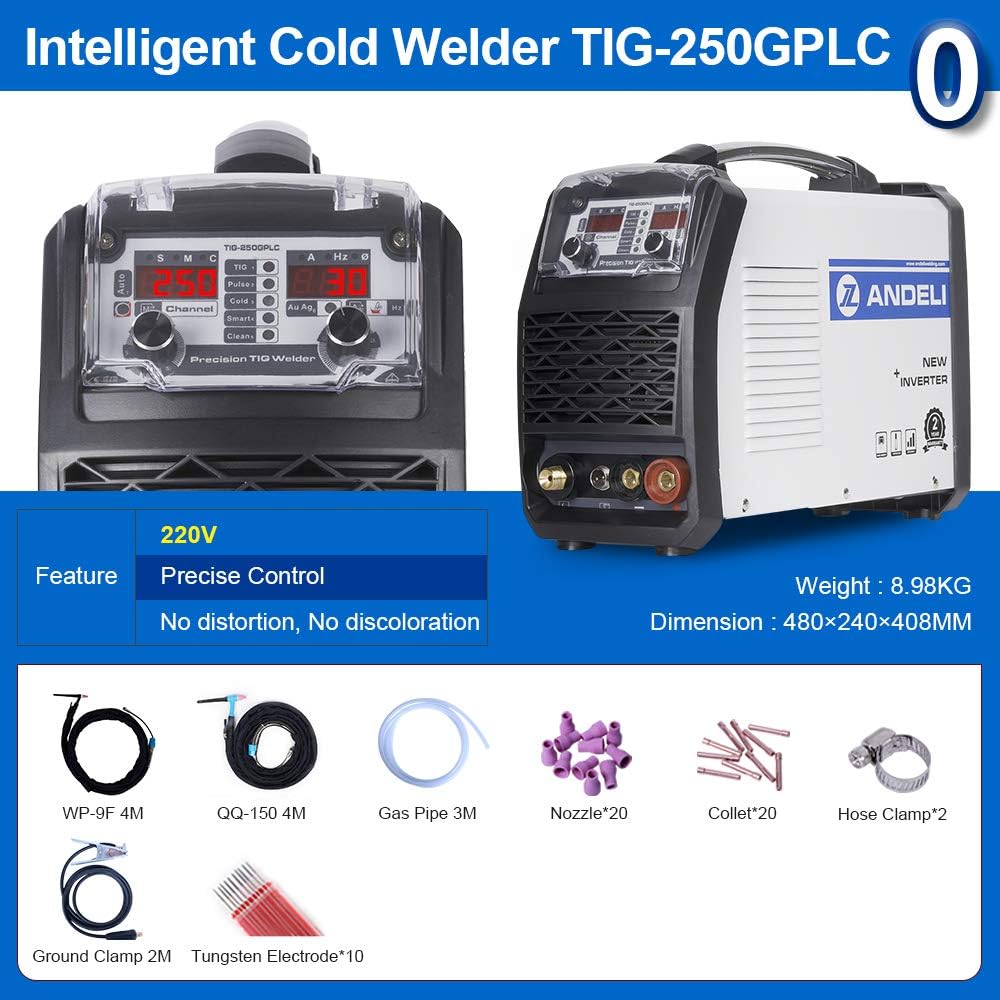
Figure 4: Included Accessories
This image shows the welding machine along with its standard accessories, including the WP-9F 4M torch, QQ-150 4M torch, gas pipe, nozzles, collets, hose clamps, ground clamp, and tungsten electrodes.
5. Setup
- Unpacking: Carefully remove the welding machine and all accessories from the packaging. Inspect for any shipping damage.
- Placement: Place the machine on a stable, level surface in a well-ventilated area, away from flammable materials.
- Power Connection: Ensure the ON/OFF switch is in the "OFF" position. Connect the power cable to a suitable 220V Europlug outlet.
- Gas Connection:
- Connect the gas regulator to your argon gas cylinder.
- Attach one end of the gas pipe to the gas regulator and the other end to the M10 Gas Tube Connector on the rear of the welding machine.
- Ensure all gas connections are tight to prevent leaks.
- Torch and Ground Clamp Connection:
- Connect the TIG torch (WP-9F 4M or QQ-150 4M) to the Gas-power Connector and Two-core Connector on the front panel.
- Connect the ground clamp cable to the Negative Pole (-) terminal.
- Attach the ground clamp securely to the workpiece or welding table to ensure a good electrical connection.
- Tungsten Electrode Installation: Install the appropriate tungsten electrode into the TIG torch collet, ensuring it is properly sharpened and extends the correct length.
6. Operating Instructions
After completing the setup, you can begin operating the machine. Always refer to the specific parameters for your welding task.

Figure 5: Visual Examples of Welding Functions
This image provides visual examples of the different welding functions: TIG (HF), Pulse, Cold, Clean, and Au/Ag, demonstrating their application.
General Operation Steps:
- Power On: Turn the ON/OFF switch to the "ON" position. The display screen will illuminate.
- Select Function: Use the Function Selector knob on the front panel to choose your desired welding mode (TIG, Pulse, Cold, Clean, Auto, Au-Ag).
- Adjust Parameters: Use the Adjustment Knobs to set the current (A), frequency (Hz), and other relevant parameters according to the material thickness and welding requirements. Refer to the Specifications table for typical ranges.
- Gas Flow: Open the valve on the argon gas cylinder and adjust the flow rate on the regulator.
- Begin Welding: With proper PPE, initiate the arc and begin welding.
- Power Off: After welding, turn off the machine and close the gas cylinder valve.
Specific Function Notes:
- TIG Welding: Standard TIG process for precise welds.
- Pulse Welding: Provides better control over heat input, useful for thin materials or out-of-position welding. Adjust pulse frequency as needed.
- Cold Welding: Ideal for minimizing heat deformation and discoloration, especially on stainless steel. Ensure pure argon gas is used.
- Clean Function: Use with the appropriate cleaning solution to prepare or finish weld surfaces.
- Au-Ag Welding: Specialized mode for gold and silver jewelry processing.
7. Maintenance
Regular maintenance ensures the longevity and optimal performance of your ANDELI TIG-250PLS welding machine.
- Cleaning: Regularly clean the exterior of the machine with a dry, soft cloth. Ensure ventilation openings are free from dust and debris.
- Internal Cleaning: Periodically (e.g., every 6 months or as needed based on usage) open the machine casing and use compressed air to blow out dust from internal components. Ensure the machine is unplugged before performing internal cleaning.
- Cable Inspection: Inspect all welding cables, power cords, and gas hoses for cuts, abrasions, or damage before each use. Replace damaged components immediately.
- Torch Maintenance: Clean the TIG torch regularly. Replace worn-out nozzles, collets, and collet bodies. Sharpen or replace tungsten electrodes as needed.
- Gas Connections: Check gas connections for leaks using a leak detection spray.
- Storage: Store the machine in a dry, clean environment when not in use.
8. Troubleshooting
This section provides solutions to common issues you might encounter. For problems not listed here, contact ANDELI customer support.
| Problem | Possible Cause | Solution |
|---|---|---|
| Machine does not power on. | No power supply; ON/OFF switch off; Faulty power cable. | Check power outlet; Ensure switch is ON; Inspect and replace power cable if damaged. |
| No welding arc. | Poor ground connection; Incorrect settings; Torch issue; No gas flow (for TIG). | Ensure ground clamp is secure; Verify current/voltage settings; Check torch connections; Confirm gas flow. |
| Poor weld quality (porosity, weak weld). | Insufficient gas shielding; Contaminated workpiece; Incorrect parameters; Worn torch consumables. | Check gas flow and purity; Clean workpiece thoroughly; Adjust current/speed; Replace nozzle/collet. |
| Overheating protection activates. | Exceeding duty cycle; Poor ventilation; Blocked air vents. | Allow machine to cool down; Ensure adequate ventilation; Clear any obstructions from air vents. |
9. Specifications
Detailed technical specifications for the ANDELI TIG-250PLS welding machine:
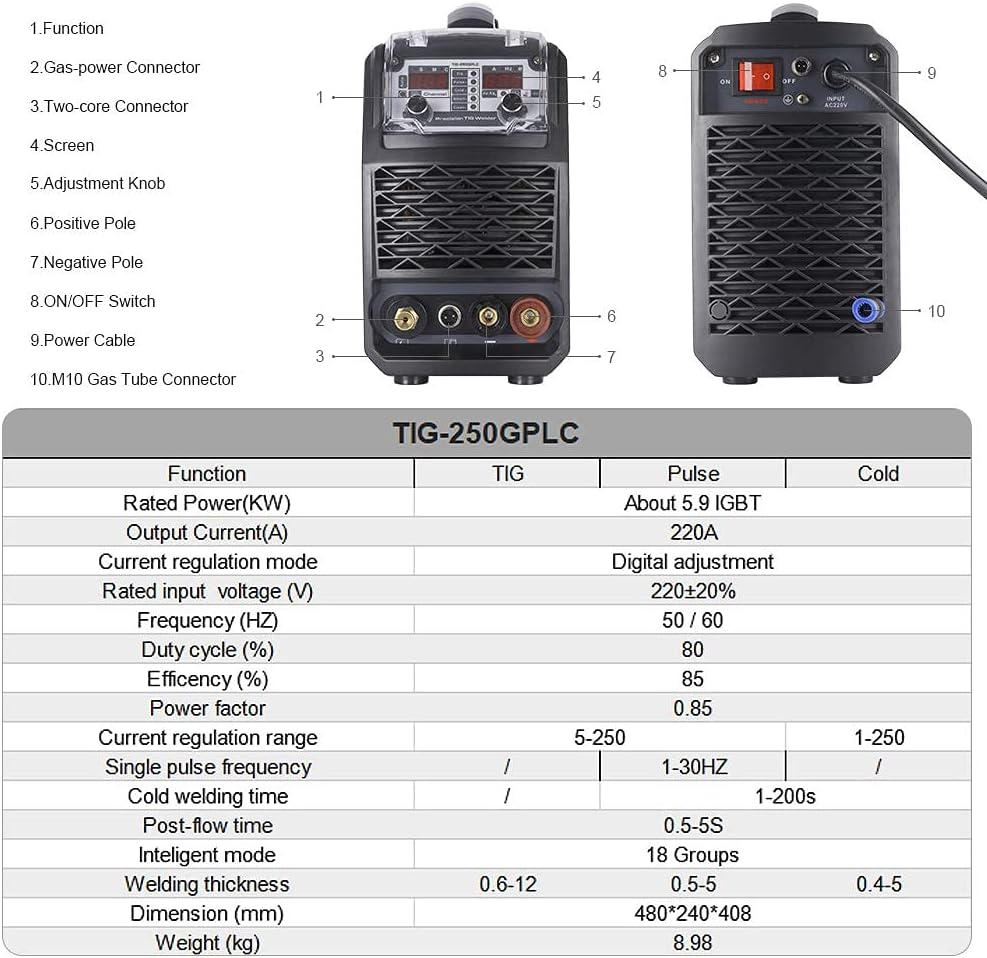
Figure 6: Detailed Diagram and Specifications Table
This image provides a detailed diagram of the machine's components with numerical labels and a comprehensive table of technical specifications for TIG, Pulse, and Cold welding modes.
| Parameter | TIG | Pulse | Cold |
|---|---|---|---|
| Rated Power (KW) | About 5.9 IGBT | About 5.9 IGBT | About 5.9 IGBT |
| Output Current (A) | 220A | 220A | 220A |
| Current Regulation Mode | Digital adjustment | Digital adjustment | Digital adjustment |
| Rated Input Voltage (V) | 220±20% | 220±20% | 220±20% |
| Frequency (HZ) | 50 / 60 | 50 / 60 | 50 / 60 |
| Duty Cycle (%) | 80 | 80 | 80 |
| Efficiency (%) | 85 | 85 | 85 |
| Power Factor | 0.85 | 0.85 | 0.85 |
| Current Regulation Range | 5-250 | 1-30HZ | 1-250 |
| Single Pulse Frequency | / | 1-30HZ | / |
| Cold Welding Time | / | / | 1-200s |
| Post-flow Time | 0.5-5S | 0.5-5S | 0.5-5S |
| Intelligent Mode | 18 Groups | 18 Groups | 18 Groups |
| Welding Thickness (mm) | 0.6-12 | 0.5-5 | 0.4-5 |
| Dimension (mm) | 480*240*408 | 480*240*408 | 480*240*408 |
| Weight (kg) | 8.98 | 8.98 | 8.98 |
General Product Information:
- Manufacturer: ANDELI
- Product Dimensions (L x W x H): 48 x 24 x 40.8 cm
- Weight: 20 kilograms (Note: The specification table indicates 8.98 kg, this might be shipping weight vs unit weight.)
- Model Number: TIG-250PLS
- Style: 220 V European Plug
- ASIN: B087R5FZS3
- Date First Available: April 16, 2022

Figure 7: Examples of Welding Results
This image showcases various welding results, emphasizing "No Deformation, No Discoloration, No Polishing" for different applications like cold welding spot welding, low temperature pulse, mold repair, spot welding, color plate pull welding, and aluminum plate welding.
10. Warranty and Support
ANDELI is committed to providing high-quality products and excellent customer service.
- Warranty: The ANDELI TIG-250PLS welding machine comes with a two-year warranty from the date of purchase. Free spare parts are provided during the warranty period.
- Returns and Exchanges: Returns and exchanges are accepted within 30 days of receiving the goods.
- Customer Support: For any issues, questions, or guidance, please contact the ANDELI customer service team. They are available to provide free assistance.
Ask a question about this manual
Ask about setup, troubleshooting, compatibility, parts, safety, or missing instructions. Manuals+ will review the question and use this page’s manual context to help answer it.