
1. Introduction
This manual provides essential instructions for the safe installation, operation, and maintenance of your ALEKO AC2700ACC Automatic Sliding Gate Opener. Please read this manual thoroughly before beginning installation or operation to ensure proper function and to prevent injury or damage. Keep this manual for future reference.
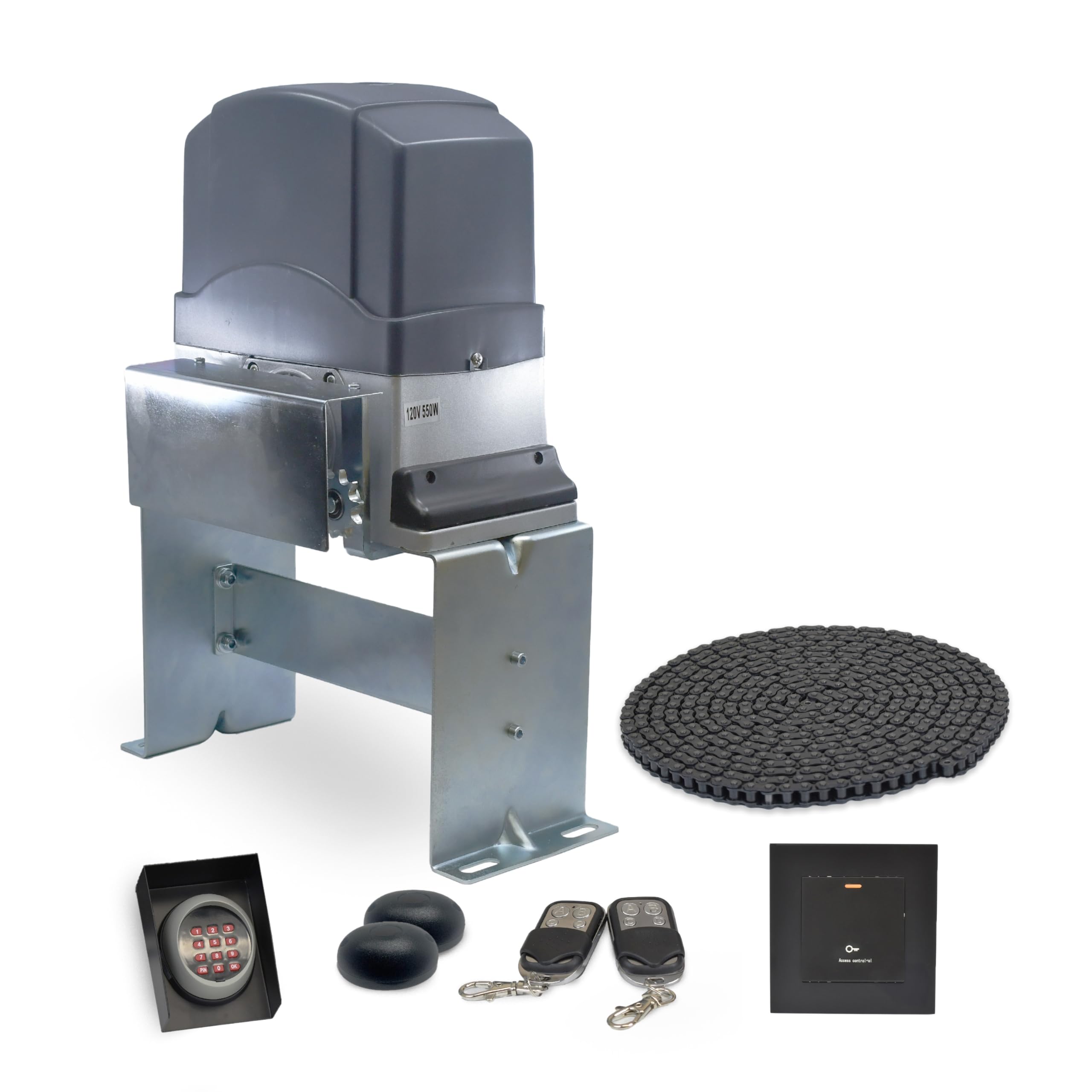
Image 1.1: The ALEKO AC2700ACC Automatic Sliding Gate Opener main unit.
2. Safety Information
WARNING: Improper installation or use can lead to serious injury or death. Always follow all safety instructions.
- Ensure the gate area is clear of people and obstructions before operating.
- Do not allow children to play near the gate or with the gate opener controls.
- Keep remote controls out of reach of children.
- Regularly inspect the gate and opener for signs of wear, damage, or misalignment.
- Disconnect power before performing any maintenance or repairs.
- In case of power failure, use the emergency release key to manually operate the gate.
- Install photocell sensors to detect obstacles and prevent the gate from closing on them.

Image 2.1: Emergency release key and remote controls for secure access and manual operation during power outages.

Image 2.2: Photocell sensors designed to stop the motor when an obstacle is detected in the gate's path.
3. Package Contents
The ALEKO AC2700ACC Automatic Sliding Gate Opener kit includes the following components:
- AC2700NOR Gate Operator Unit
- 20-foot Drive Chain
- Two 433 MHz Remote Controls
- Keypad with Cover
- Wireless Keypad
- Photocell Sensors (Pair)
- Emergency Release Key
- Mounting Hardware and Brackets

Image 3.1: The AC2700NOR Gate Operator unit, the core component of the system.

Image 3.2: The included 20-foot drive chain, essential for gate movement.

Image 3.3: One of the two 433 MHz remote controls for convenient gate operation.

Image 3.4: Keypad and protective cover for secure gate access.

Image 3.5: Wireless keypad for flexible gate control.
4. Setup and Installation
Installation of the ALEKO AC2700ACC gate opener requires careful attention to detail and adherence to local electrical codes. Professional installation is recommended for optimal safety and performance.
4.1 Site Preparation
- Ensure the sliding gate moves freely and smoothly without binding.
- Clear any debris or obstacles from the gate's path.
- Prepare a stable, level concrete pad for mounting the gate opener unit.
4.2 Mounting the Opener
- Position the opener unit on the concrete pad, ensuring proper alignment with the gate's chain attachment points.
- Secure the opener to the pad using the provided mounting hardware.

Image 4.1: Side view of the gate opener, illustrating its mounting position.
4.3 Chain Installation
- Attach the drive chain securely to both ends of the sliding gate.
- Route the chain through the opener's sprocket, ensuring it is taut but not overly tight. Adjust tension as needed.

Image 4.2: The gate opener with the drive chain properly installed and engaged with the sprocket.
4.4 Electrical Connections
- Connect the power supply to the opener unit according to the wiring diagram in the full product manual.
- Connect all accessories, including photocell sensors, keypads, and any other safety devices.
- Ensure all connections are secure and properly insulated.
5. Operating Instructions
The ALEKO AC2700ACC gate opener offers various features for convenient and safe operation.
5.1 Remote Control Operation
- Press the designated button on your remote control to open or close the gate.
- The remote has a maximum range of 100 feet.
5.2 Keypad Operation
- Enter your programmed access code on the keypad to operate the gate.
5.3 Key Features
- Soft Start/Stop: The gate opener features a soft start and stop function to reduce wear on the motor and gate hardware, ensuring smoother operation.
- Midway Mode: Allows the gate to open partially for pedestrian access without fully opening the gate.
- Adjustable Auto-Close: The gate can be programmed to automatically close after a set period. Adjust the delay time as needed.
- Obstacle Detection: Integrated safety features, including photocell sensors, detect obstructions in the gate's path and stop or reverse the gate to prevent damage or injury.

Image 5.1: Diagram highlighting key operational features such as obstacle detection, soft start/stop, midway mode, and adjustable auto-close.
6. Maintenance
Regular maintenance ensures the longevity and reliable operation of your gate opener.
- Monthly: Inspect the drive chain for proper tension and lubrication. Apply a suitable lubricant if necessary.
- Quarterly: Check all mounting hardware for tightness. Inspect the gate's movement for any binding or resistance.
- Annually: Test all safety features, including obstacle detection and emergency release. Clean the photocell sensor lenses.
- Keep the area around the gate opener clear of debris, leaves, and snow.
7. Troubleshooting
Refer to the following table for common issues and their potential solutions.
| Problem | Possible Cause | Solution |
|---|---|---|
| Gate does not respond to remote/keypad. | No power; remote battery dead; remote not programmed; safety sensors obstructed. | Check power supply; replace remote battery; reprogram remote; clear sensor path. |
| Gate stops or reverses unexpectedly. | Obstacle detected by safety sensors; gate binding; limit switch issue. | Clear obstacles; check gate for smooth movement; inspect and adjust limit switches. |
| Gate operates slowly or with difficulty. | Low voltage; motor wear; insufficient lubrication; gate friction. | Check power supply; lubricate chain and gate rollers; inspect motor; ensure gate moves freely. |
| Magnetic limit switch not working properly. | Magnets misaligned or loose; sensor dirty. | Adjust magnet positions; clean sensor area. |
If issues persist after attempting these solutions, please contact ALEKO customer support.
8. Specifications
Technical specifications for the ALEKO AC2700ACC Automatic Sliding Gate Opener:
- Model Number: AC2700ACC
- Manufacturer: ALEKO
- Motor Type: AC Motor (120V, 550W)
- Item Weight: 58 pounds
- Product Dimensions: 19 x 19 x 12 inches
- Operating Temperature: -4°F to +122°F (-20°C to +50°C)
- Max Gate Weight: Up to 3400 lbs (when paired with an appropriate gate)
- Max Gate Length: Up to 40 feet (when paired with an appropriate gate)
- Remote Frequency: 433 MHz
- Safety Features: Obstacle detection, soft start/stop, adjustable auto-close, emergency release.
- Construction: Waterproof, Anti-Rust Design

Image 8.1: The gate opener's heavy-duty construction, featuring waterproof and anti-rust design, and specified working temperature range.
9. Warranty and Support
Your ALEKO AC2700ACC Automatic Sliding Gate Opener is designed for durability and performance.
9.1 Warranty Information
This product includes a 1-Year Insured warranty, covering manufacturing defects and ensuring peace of mind. For specific warranty terms and conditions, please refer to the official ALEKO warranty documentation or contact customer support.

Image 9.1: Visual representation of the 1-year insured coverage and integrated safety features.
9.2 Customer Support
For technical assistance, troubleshooting, or warranty claims, please contact ALEKO Products customer support. You can find contact information and additional resources on the official ALEKO website or through your purchase platform.
Visit the ALEKO Store on Amazon for more information and products.


