
Yakry Y24 (WX5311D)
Yakry Wireless Backup Camera HD 1080P 5 Inch Monitor Y24 Instruction Manual
Model: Y24 (WX5311D) | Brand: Yakry
Introduction
The Yakry Y24 Wireless Backup Camera System is designed to enhance vehicle safety and convenience by providing a clear, real-time view of your vehicle's rear surroundings. Featuring a 5-inch HD 1080P monitor and a waterproof camera, this system offers stable digital signal transmission and easy installation, making it suitable for various vehicles including trucks, cars, campers, RVs, and minivans. This manual provides detailed instructions for setting up, operating, and maintaining your new backup camera system.

Figure 1: Yakry Y24 Wireless Backup Camera System components.
Safety Information
- Always ensure the system is installed securely to prevent obstruction of driver's view or interference with vehicle controls.
- Do not attempt to disassemble or modify the product. Unauthorized modifications may cause damage and void the warranty.
- Ensure all wiring connections are properly insulated and secured to prevent short circuits or electrical hazards.
- While the system provides a clear rear view, it should not replace careful driving and direct observation of surroundings. Always check mirrors and physically look before backing up.
- The camera is IP69K waterproof, but avoid high-pressure water jets directly on the lens for prolonged periods.
Package Contents
Verify that all items are present in your package:
- 5-inch HD 1080P Wireless Monitor
- Wireless Backup Camera (License Plate Mount)
- Monitor Power Cable (with cigarette lighter adapter)
- Camera Power Cable (for vehicle wiring)
- Windshield Suction Cup Mount for Monitor
- Dashboard Adhesive Mount for Monitor
- Installation Screws and Connectors (T-taps)
- User Manual

Figure 2: Yakry brand logo.
Setup and Installation
The Yakry Y24 system is designed for easy plug-and-play installation. Follow these steps for a successful setup.
1. Monitor Installation
The monitor can be mounted on your dashboard or windshield using the provided mounts.
- Attach the desired mount (suction cup for windshield or adhesive for dashboard) to the back of the monitor. The magnetic connection allows for easy attachment and removal.
- Secure the mount to your chosen location, ensuring it does not obstruct your view or interfere with airbags.
- Connect the monitor's power cable to the monitor and plug the cigarette lighter adapter into your vehicle's 12V power outlet.
- Press the power button on the cigarette lighter adapter to turn on the monitor.

Figure 3: Monitor placement options.

Figure 4: Monitor power connection and camera wiring overview.
Video 1: Official installation guide for the Yakry monitor, demonstrating how to attach the monitor to the mount and connect it to the cigarette lighter adapter for power.
2. Camera Installation
The camera is typically mounted near your vehicle's license plate. It requires connection to your vehicle's power system.
- Mount the camera securely near your license plate using the provided screws.
- Connect the camera's red wire to the positive (+) wire of your vehicle's reverse light (for activation when reversing) or a constant 12V power source (for continuous view).
- Connect the camera's black wire to a ground (-) point on your vehicle's chassis.
- Use the provided T-tap connectors for secure and easy wiring.
- Ensure the camera's antenna is positioned for optimal signal transmission.

Figure 5: Camera wiring diagram for stable transmission.

Figure 6: The camera is IP69 waterproof, ensuring durability in various weather conditions.
Operating Instructions
Once installed, the Yakry Y24 system is ready for use. The monitor will automatically display the camera feed when powered on and receiving a signal.
1. Basic Operation
- Power On/Off: Press the button on the cigarette lighter adapter to power the monitor on or off.
- Automatic Activation: If wired to the reverse lights, the monitor will automatically display the rear view when the vehicle is put into reverse.
2. Guide Lines (DIY Gridlines)
The system features adjustable guide lines to assist with parking and backing up.
- Toggle On/Off: Press the 'M' key on the monitor to enter the guide line mode. Use the up/down keys to toggle the guide lines on or off.
- Adjusting Guide Lines: In guide line mode, you can adjust the position and width of the lines to match your vehicle's dimensions and preferences.

Figure 7: Guide lines can be toggled on or off for parking assistance.
3. Multiple Video Channels (CAM1/CAM2)
The monitor supports two video channels, allowing for an optional second camera (not included) for different views.
- Switching Channels: Use the 'Up' key on the monitor to switch between CAM1 and CAM2 views.
- Split Screen: The monitor can display both camera feeds simultaneously in a split-screen view.

Figure 8: The monitor supports two channels and split-screen viewing.
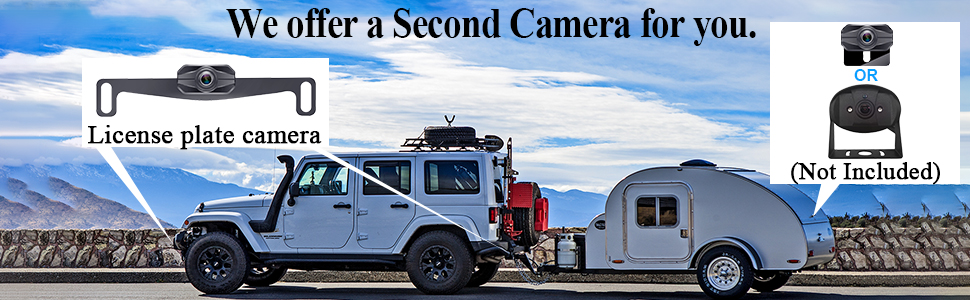
Figure 9: The system can accommodate a second camera for additional viewing angles, such as on an RV.
4. Image Flip
The camera image can be flipped to suit different mounting orientations or preferences.
- Consult the detailed instructions in the full user manual for specific steps on how to flip the image (mirror or normal view).

Figure 10: The camera image can be set to mirror or normal view.
5. Applications
The Yakry Y24 system is versatile and can be used for various purposes:
- Reversing: Provides a clear view behind your vehicle for safe backing up.
- Trailer Hitching: Precisely align your vehicle with a trailer hitch.
- Continuous Monitoring: If wired to a constant power source, it can provide a continuous rear view while driving.
- RV/Camper Use: Ideal for larger vehicles where rear visibility is limited.
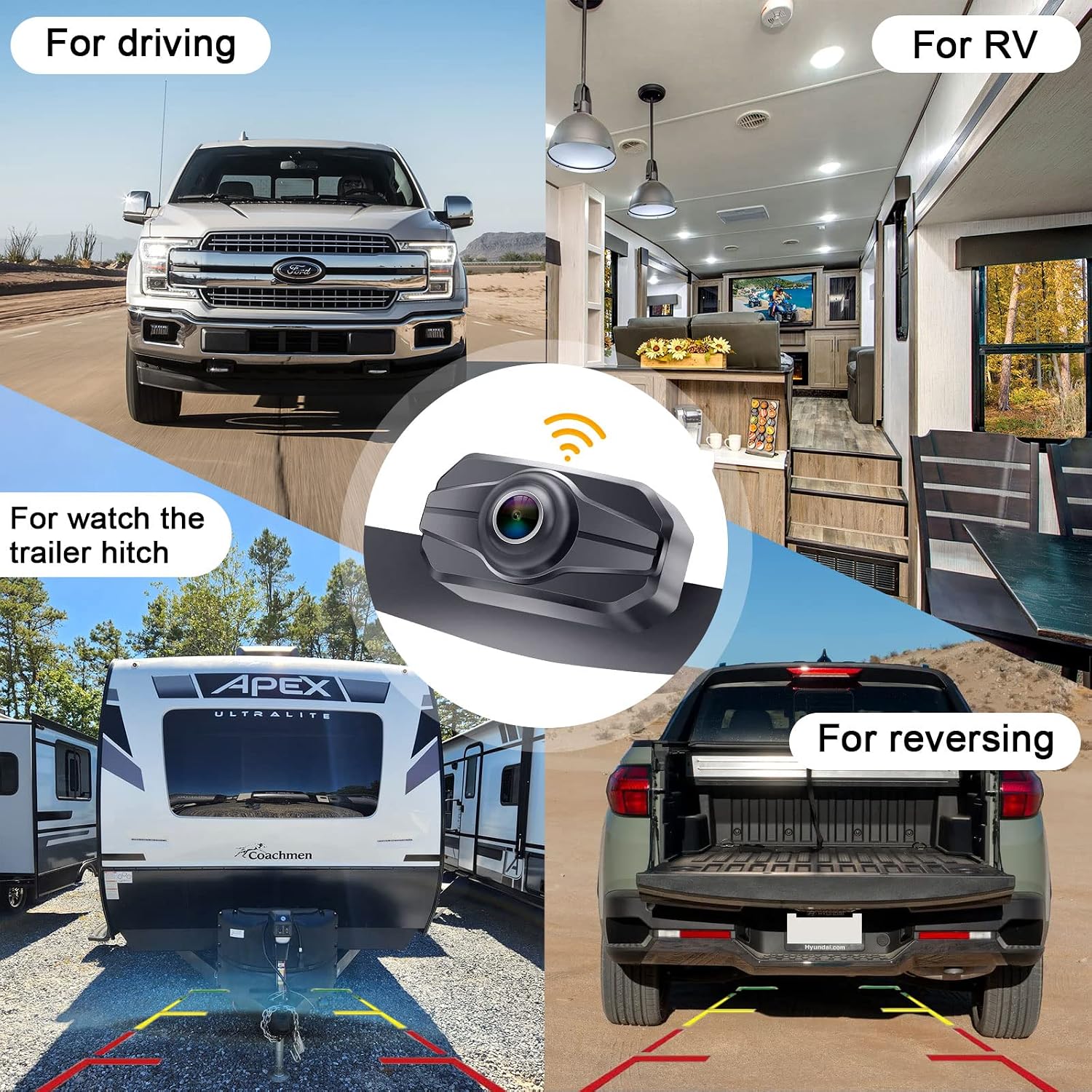
Figure 11: Versatile applications for the Yakry Y24 system.
Maintenance
- Regularly clean the camera lens with a soft, damp cloth to ensure a clear view. Avoid abrasive cleaners.
- Check all cable connections periodically to ensure they are secure and free from damage.
- Keep the monitor screen clean using a microfiber cloth.
- If the system is not in use for an extended period, consider unplugging the monitor from the power outlet.
Troubleshooting
If you encounter issues with your Yakry Y24 system, refer to the following common problems and solutions:
| Problem | Possible Cause | Solution |
|---|---|---|
| No image on monitor / "No Signal" message | Loose power connection, camera not powered, signal interference, camera/monitor malfunction. | Check all power connections to both monitor and camera. Ensure the vehicle is in reverse if wired to reverse lights. Verify antenna is securely attached. Move away from strong electromagnetic interference sources. |
| Flickering or unstable image | Weak signal, interference, low power. | Ensure camera and monitor antennas are clear and unobstructed. Check power supply for stable voltage. Avoid placing the monitor near other wireless devices. |
| Image is upside down or reversed | Incorrect image flip setting. | Access the monitor settings to adjust the image flip option (mirror/normal). Refer to the full manual for specific menu navigation. |
| Guide lines not appearing or incorrect | Guide lines disabled or miscalibrated. | Press the 'M' key to enter guide line mode and ensure they are enabled. Adjust their position and width as needed. |
For further assistance, please contact Yakry customer support.
Specifications
- Model Number: WX5311D
- Screen Size: 5 Inches
- Display Technology: LED
- Video Capture Resolution: 1080p
- Real Angle of View: 150 Degrees
- Lens Type: Wide Angle
- Waterproof Rating: IP69K
- Voltage: 12 Volts - 35 Volts (Wide Voltage Support)
- Special Features: Image Flip, Backup Lines On/Off, Plug and Play
- Item Weight: 1.37 pounds
- Package Dimensions: 7.4 x 5.16 x 4.29 inches

Figure 12: Features like upgraded IPS screen and wide voltage compatibility.

Figure 13: Digital signal transmission with up to 36ft range and broad vehicle compatibility.
Warranty and Support
Yakry is committed to providing high-quality products and excellent customer service.
- Lifetime Technical Support: Contact Yakry for any technical assistance you may need throughout the product's lifespan.
- 2-Year Replacement Service: Your product is covered by a 2-year replacement warranty from the date of purchase.
- 30-Day Money Back Guarantee: If you are not satisfied with your purchase, you may return it within 30 days for a full refund.
For support inquiries, please refer to the contact information provided in your product packaging or visit the official Yakry website.
Ask a question about this manual
Ask about setup, troubleshooting, compatibility, parts, safety, or missing instructions. Manuals+ will review the question and use this page’s manual context to help answer it.