
HomeSpot HS3-NS003P-RB
Contents
HomeSpot Pro Switch Bluetooth Adapter User Manual
Model: HS3-NS003P-RB
Introduction
The HomeSpot Pro Switch Bluetooth Adapter is an innovative 2-in-1 audio mixer designed to enhance your gaming experience on the Nintendo Switch family of consoles. This adapter allows you to simultaneously connect your favorite Bluetooth headphones to both your Nintendo Switch and a smartphone or PC, enabling mixed audio from both sources. This means you can enjoy game audio while also listening to music, taking calls, or engaging in voice chat through applications like Discord, Spotify, or FaceTime.
Equipped with Bluetooth 5.0 and aptX Low Latency technology, the adapter ensures high-quality audio with minimal delay. Its built-in microphone provides a convenient solution for in-game voice chat or mobile communication, making it a versatile accessory for any Nintendo Switch user.
Product Features
- 2-in-1 Audio Mixer: Connects Bluetooth headphones to Nintendo Switch and a smartphone simultaneously, mixing audio from both sources.
- User Friendly Design: Simple two-button operation with intuitive indicators for easy use.
- Voice Chat Support: Built-in microphone enables voice chat for all Nintendo Switch games, including those using Nintendo Online App or third-party apps like Discord.
- Enhanced Game Play: Allows for simultaneous game audio, phone calls, and music streaming from your smartphone.
- Low Profile Design: Compact and designed to seamlessly integrate with the Nintendo Switch and Switch Lite.
- No Battery Needed: Powered directly by the Nintendo Switch via its USB-C port.
- aptX Low Latency: Supports aptX Low Latency codec for synchronized audio and video.

Figure 1: Key Features Overview
Setup
- Connect the Adapter: Insert the HomeSpot Pro Switch Bluetooth Adapter into the USB-C port of your Nintendo Switch. Ensure it is fully inserted.
Note: The adapter is not compatible with most protective casings that prevent full insertion into the USB-C port.

Figure 2: Adapter Connected to Nintendo Switch

Figure 3: Compatibility Note for Protective Casings
- Pair Bluetooth Headphones:
- Put your Bluetooth headphones into pairing mode.
- On the HomeSpot adapter, press and hold the TX Button (blue button on the left) for 3 seconds until the Headphones LED starts fast blinking.
- Once paired, the Headphones LED will turn solid ON.
- Pair Smartphone/PC:
- Enable Bluetooth on your smartphone or PC and search for new devices.
- On the HomeSpot adapter, press and hold the RX Button (red button on the right) for 3 seconds until the Smartphone LED starts fast blinking.
- Select "HomeSpot Adapter Pro" from your device's Bluetooth list.
- Once paired, the Smartphone LED will turn solid ON.

Figure 4: Audio Mixing Diagram
Operating Instructions
Button Functions:

Figure 5: Ease of Use - Button Layout
- TX Button (Blue, Left Side):
- Short press: Re-connect headphones.
- Double press: Toggle internal mic On/Off.
- Hold for 3 seconds: Pair new headphones.
- RX Button (Red, Right Side):
- Short press: Re-connect smartphone.
- Double press: Play/Pause music, Accept/End call (when connected to smartphone).
- Hold for 3 seconds: Pair new smartphone.
- Master Volume Controls (Left Side, under TX button):
- +: Increase headphones volume.
- -: Decrease headphones volume.
- Mixer Level Controls (Right Side, under RX button):
- +: Hear more game audio.
- -: Hear more smartphone audio.
- Internal Mic: Used for in-game voice chat or mobile voice calls.
Indicator Lights (LEDs):

Figure 6: Indicators Dashboard
- aptX LED:
- White: Headphones support aptX.
- Amber: Headphones support aptX Low Latency.
- Off: Headphones support SBC (Standard Bluetooth Codec).
- Headphones LED:
- On: Connected to headphones.
- Slow blinking: Re-connecting to headphones.
- Fast blinking: Searching for headphones (pairing mode).
- Off: No headphones connected.
- EQ LED:
- On: Audio EQ enabled.
- Off: Audio EQ disabled.
- Internal Mic Mute LED:
- On: Internal mic muted.
- Off: Internal mic active.
- Smartphone LED:
- On: Connected to smartphone.
- Slow blinking: Re-connecting to smartphone.
- Fast blinking: Ready for pairing with smartphone.
- Off: No smartphone connected.
Maintenance
- Cleaning: Use a soft, dry cloth to clean the adapter. Do not use liquid cleaners or aerosols.
- Storage: Store the adapter in a cool, dry place when not in use. The included pouch can be used for protection.
- Handling: Avoid dropping the adapter or subjecting it to strong impacts. Ensure careful insertion and removal from the USB-C port to prevent damage to the adapter or the console.
Troubleshooting
| Problem | Possible Cause / Solution |
|---|---|
| No audio from headphones. |
|
| Audio lag or delay. |
|
| Cannot pair headphones/smartphone. |
|
| Voice chat not working. |
|
| Adapter does not fit or is loose. |
|
Specifications
- Model Number: HS3-NS003P-RB
- Product Dimensions: 2.76 x 0.39 x 0.59 inches (70 x 10 x 15 mm)
- Item Weight: 0.247 ounces (7 grams)
- Connectivity: USB Type-C (for Nintendo Switch), Bluetooth 5.0 (for headphones/smartphone)
- Supported Bluetooth Profiles: A2DP, HFP, HSP, AVRCP
- Supported Audio Codecs: aptX Low Latency, aptX, SBC
- Microphone: Built-in digital mic
- Power Source: Powered by Nintendo Switch (no external battery required)
- Color: Blue & Red accents
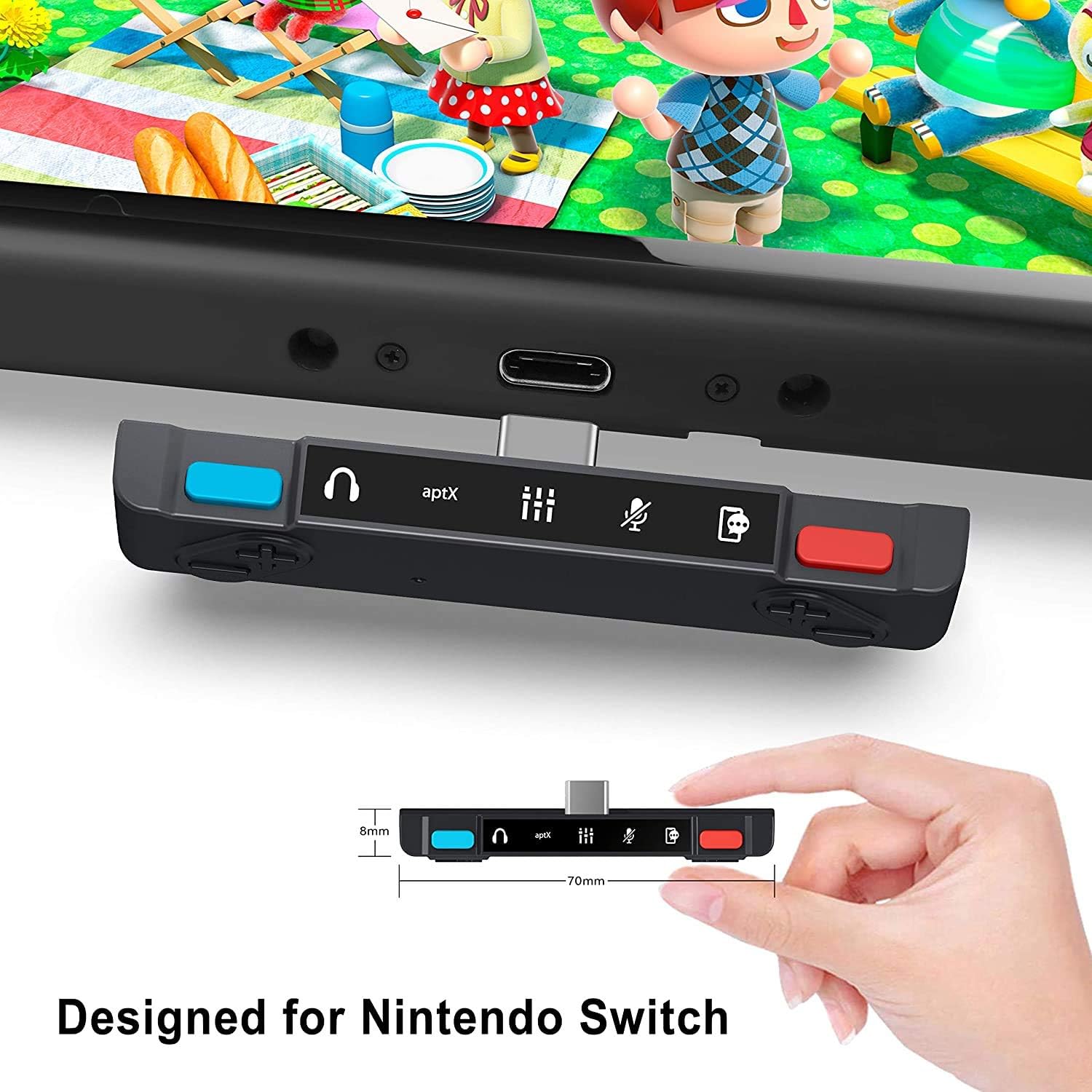
Figure 7: Adapter Dimensions and Design
Warranty and Support
HomeSpot products are designed for reliability and performance. For warranty information and technical support, please refer to the official HomeSpot website or contact their customer service directly. Keep your purchase receipt as proof of purchase for warranty claims.
For additional assistance, you may also refer to the official user manual PDF available online:
Documents and downloads
Ask a question about this manual
Ask about setup, troubleshooting, compatibility, parts, safety, or missing instructions. Manuals+ will review the question and use this page’s manual context to help answer it.