
PETNF B087M6Z3N1
Contents
PETNF Replacement Pump for Cat Water Fountain
Model: B087M6Z3N1
Brand: PETNF
Introduction
This manual provides essential information for the proper installation, operation, and maintenance of your PETNF Replacement Pump for Cat Water Fountains. Please read these instructions carefully before use to ensure optimal performance and longevity of your product.
Safety Instructions
- Always unplug the pump from the power outlet before handling, cleaning, or performing any maintenance.
- Ensure the power cord is not damaged or pinched. Do not operate the pump with a damaged cord or plug.
- This pump is designed for indoor use with pet water fountains only. Do not use it for any other purpose.
- Keep the pump and power cord away from pets to prevent chewing or damage.
- Do not allow the pump to run dry, as this can cause damage.
- Use only with a compatible PETNF 3L/101OZ Transparency Cat Water Fountain.
Product Overview
The PETNF Replacement Pump is designed to provide continuous, fresh water for your pet. It features an adjustable water flow, a smart LED indicator for water levels, and an ultra-quiet operation.

The PETNF Replacement Pump, showing its compact design and USB power connection.
Key Features:
- Compatibility: Specifically designed for PETNF 101 ounce (3 Liters) Transparency Cat Water Fountains.
- Adjustable Water Flow: Offers low, medium, and high flow options to customize water output for your pet.
- Smart Water Shortage Reminder: A blue light indicates sufficient water, while a red light and automatic power-off activate when water levels are low, protecting the pump from dry burning.
- Ultra Quiet Operation: Operates at less than 38 decibels, ensuring minimal disturbance to you and your pets.
- Integrated Filter Sponge: Helps capture hair and debris, extending the pump's lifespan.

The pump is compatible with PETNF 3L/101OZ Transparency Cat Water Fountains.
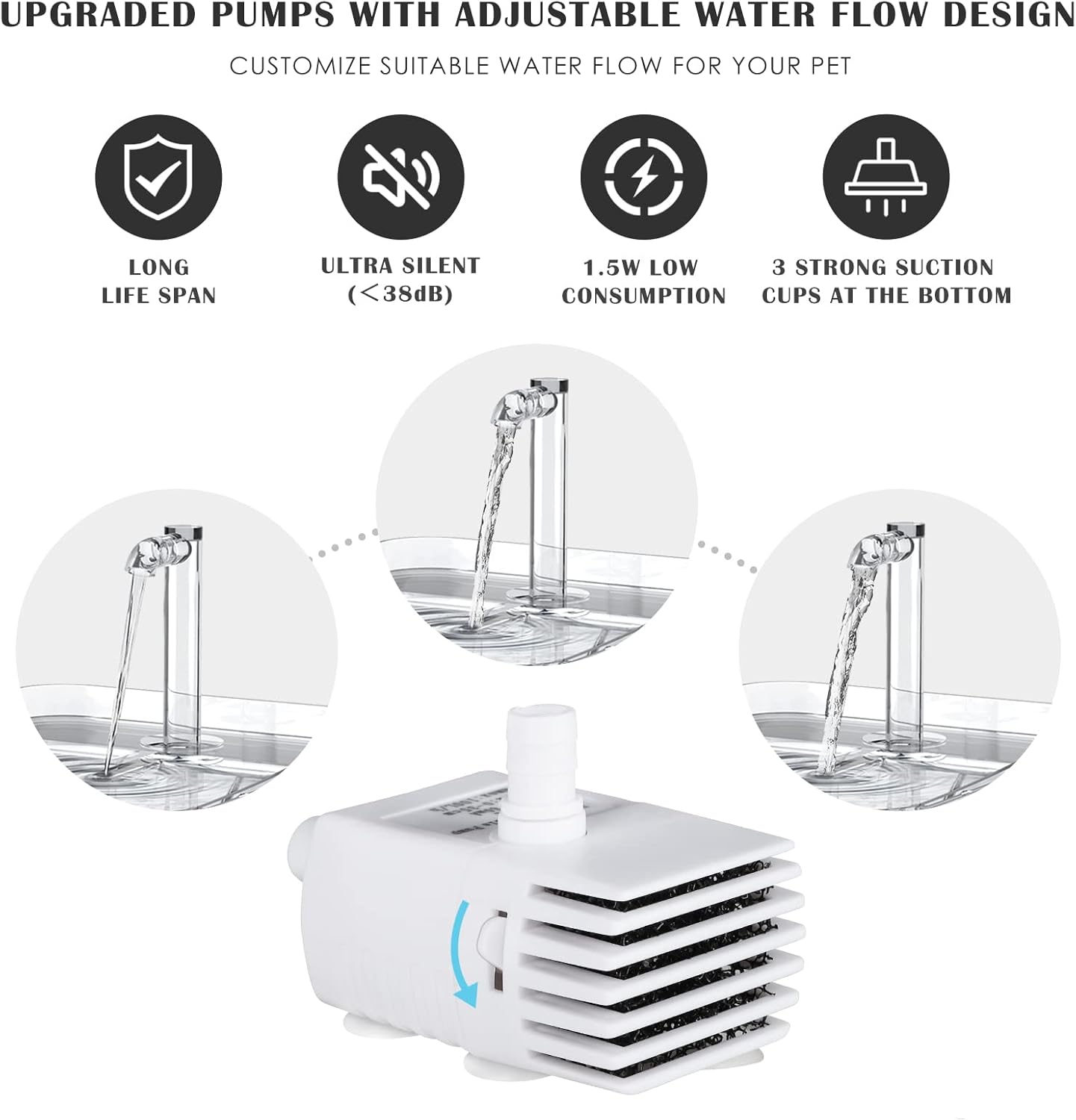
Adjustable water flow settings allow customization for your pet's preference.
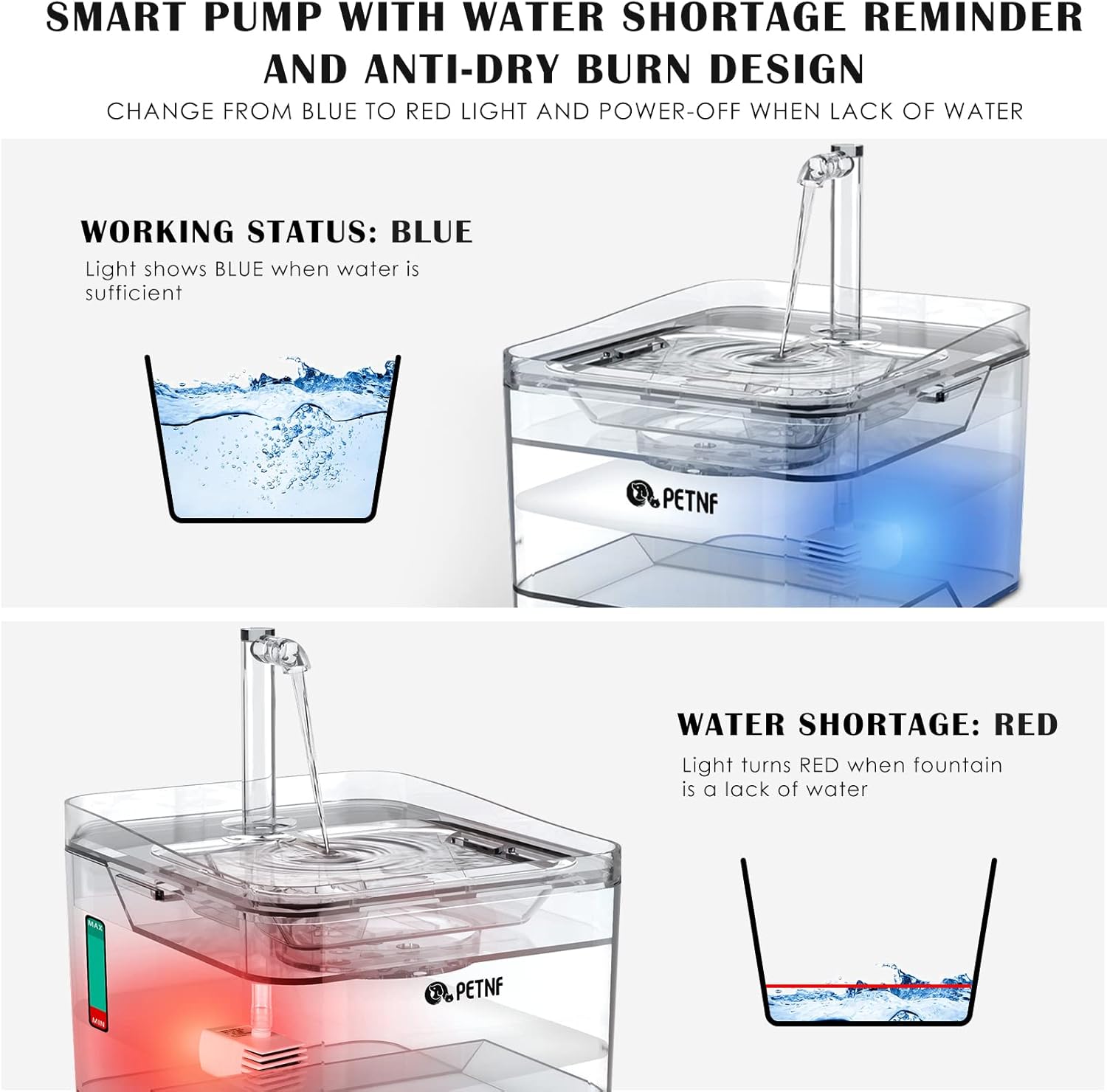
The smart pump features LED indicators for water level status.
The integrated filter sponge helps keep the pump clean by capturing impurities.
Please Note: The power adapter is not included with the replacement pump.
Setup
Follow these steps to install your new PETNF Replacement Pump into your compatible cat water fountain:
- Ensure your cat water fountain is unplugged and completely empty of water.
- Remove the top cover and any internal components of your fountain to access the pump compartment.
- Carefully remove the old pump, if present, and disconnect its tubing.
- Connect the tubing from your fountain to the outlet nozzle of the new PETNF pump.
- Place the new pump securely in the designated pump compartment at the bottom of the fountain. Ensure the suction cups on the pump base adhere firmly to the fountain's surface.
- Route the power cord through the designated opening in the fountain base, ensuring it is not pinched.
- Reassemble the fountain components and fill the reservoir with clean water up to the maximum fill line.
- Plug the pump's USB connector into a compatible power adapter (not included) and then into a power outlet.
Ensure your fountain is compatible with the replacement pump before installation.
Operating Instructions
Once the pump is installed and the fountain is filled with water, plug in the power adapter. The pump will begin operating automatically.
Adjusting Water Flow:
The pump features an adjustable switch to control the water flow rate. Locate the small lever on the side of the pump and slide it to select your desired flow: low, medium, or high. Experiment to find the ideal flow for your pet.
Use the switch on the pump to adjust the water flow.
LED Water Level Indicator:
- Blue Light: Indicates that the water level in the fountain is sufficient for operation.
- Red Light & Power-Off: Indicates that the water level is too low. The pump will automatically shut off to prevent dry burning and damage. Refill the fountain immediately when the red light appears.
Monitor the LED light to ensure adequate water levels.
Maintenance
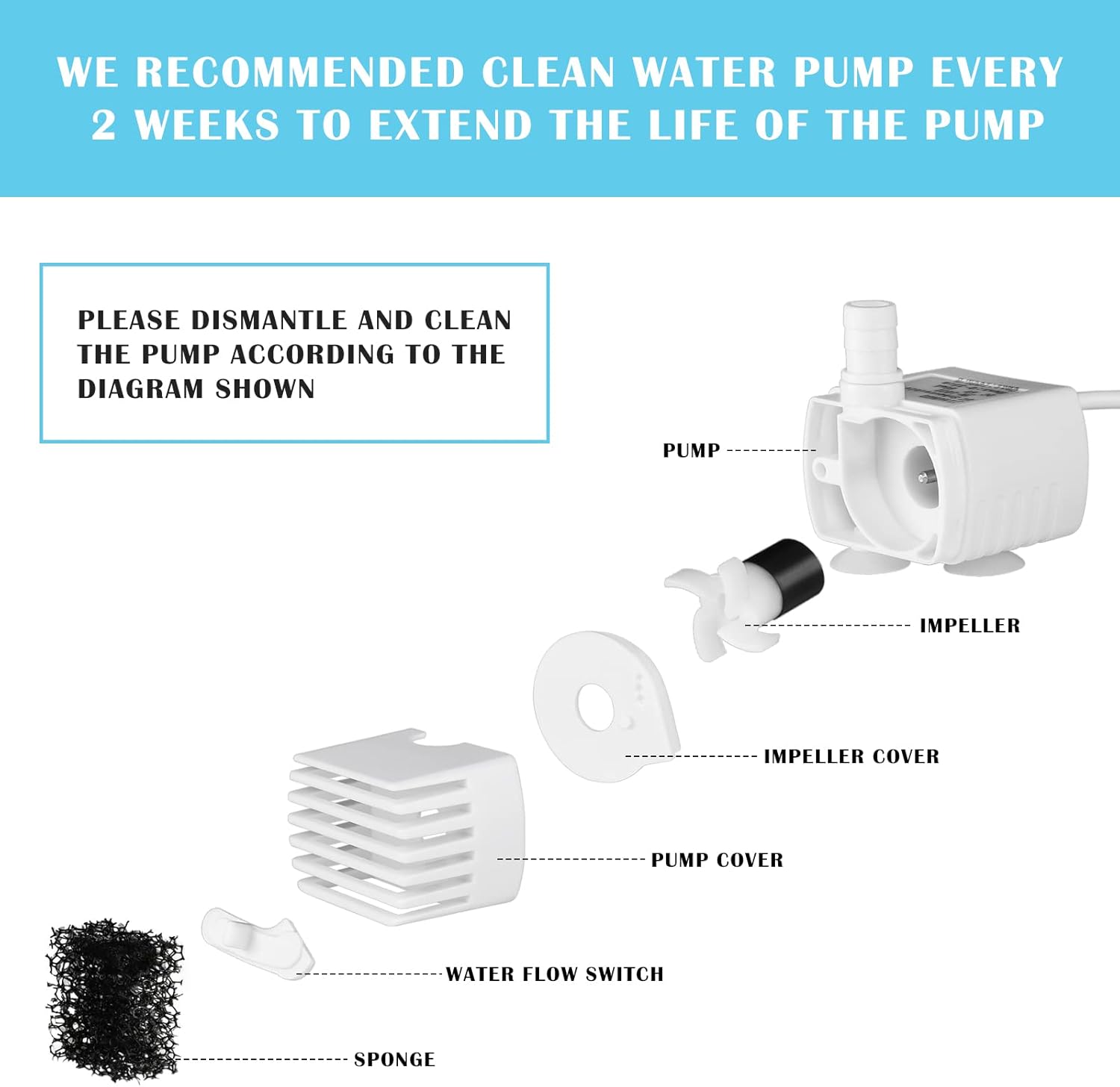
Regular cleaning of the pump is crucial for its longevity and the health of your pet. It is recommended to clean the water pump at least every 2 weeks.
Cleaning the Pump:
- Unplug the fountain from the power outlet.
- Remove the pump from the fountain.
- Disassemble the pump:
- Remove the pump cover.
- Remove the impeller cover.
- Gently pull out the impeller.
- Clean all parts: Use a small brush (often included with the fountain), soap, and warm water to thoroughly clean the pump, especially the impeller and the filter sponge. Remove any hair or debris.
- Rinse all components thoroughly with clean water.
- Reassemble the pump: Install the impeller, then the impeller cover, and finally the pump cover. Ensure the filter sponge is properly placed inside the pump cover.
- Place the cleaned pump back into the fountain.

Disassemble the pump as shown for thorough cleaning.

Watch this video for a step-by-step guide on how to clean your PETNF water pump.
Filter Sponge Maintenance:
The integrated filter sponge helps prevent debris from entering the pump. Clean this sponge regularly during pump cleaning. While the pump comes with a sponge, replacement sponges may be needed over time. Refer to your fountain's manual or PETNF's official website for compatible replacement filters.
Troubleshooting
If you encounter issues with your PETNF Replacement Pump, please refer to the following common problems and solutions:
| Problem | Possible Cause | Solution |
|---|---|---|
| Pump not working | No power; Clogged pump; Impeller stuck; Low water level. | Check power connection. Clean the pump thoroughly (see Maintenance section). Ensure water level is sufficient (blue LED). |
| Weak or no water flow | Clogged pump/filter; Low water level; Incorrect flow setting. | Clean the pump and filter sponge. Refill water. Adjust flow switch to a higher setting. |
| Pump is noisy | Low water level; Debris in impeller; Pump not seated correctly. | Refill water. Clean the impeller and pump housing. Ensure the pump is firmly seated with suction cups. |
| Red LED light is on | Water level is too low. | Immediately refill the fountain with clean water. The pump will resume operation once water is sufficient. |
Specifications
| Feature | Specification |
|---|---|
| Model | B087M6Z3N1 |
| Brand | PETNF |
| Item Weight | 2.89 ounces |
| Dimensions (L x W x H) | 2.83 x 2.76 x 1.65 inches |
| Color | White |
| Material | Plastic (Acrylonitrile Butadiene Styrene) |
| Power Source | Corded Electric (USB) |
| Noise Level | Less than 38 dB |
| Compatible Fountain Capacity | 3 Liters (101 Ounces) |
Warranty and Support
For warranty information or technical support, please refer to the warranty card included with your original PETNF Cat Water Fountain or visit the official PETNF website. You may also contact PETNF customer service directly for assistance with your replacement pump.
For further inquiries or to purchase replacement parts, please visit the PETNF Store on Amazon.
Documents and downloads
Ask a question about this manual
Ask about setup, troubleshooting, compatibility, parts, safety, or missing instructions. Manuals+ will review the question and use this page’s manual context to help answer it.