
1. Introduction
The FLIPSKY FSESC 4.12 is a highly adaptable electronic speed controller (ESC) designed for various DIY electric vehicle applications, such as electric longboards and E-robots. This manual provides essential information for the proper setup, operation, and maintenance of your FSESC 4.12 to ensure optimal performance and longevity.
Package Contents
Upon opening the package, verify that all the following components are present:
- 1x FSESC 4.12 with Aluminum Case
- 1x Mini USB Cable
- 1x VESC Sensor Wire
- 1x User Manual (this document)

Image 1.1: The FLIPSKY FSESC 4.12 50A Electric Speed Controller shown with its aluminum case, a Mini USB cable, and a VESC sensor wire.
2. Specifications
The following table details the technical specifications of the FSESC 4.12:
| Feature | Specification |
|---|---|
| Hardware Version | V4.12 |
| Firmware Version | V3.38 (Recommended to keep factory firmware 5.2) |
| PCB Layers | 4 layers * 3oz copper = 12oz copper |
| Continuous Current | 50A |
| Instantaneous Peak Current | 240A |
| Voltage Range | 8V - 60V (3-13S LiPo, safe for 3S to 12S LiPo) |
| Recommended Battery | 10S LiPo |
| BEC Output | 5V @ 1.5A |
| BEC Type | Internal driver support |
| Timing | Software calibration |
| Cutoff Voltage | Programmable |
| Frequency | PWM input |
| Governor | No |
| Weight | 80g |
| Dimensions (L x W x H) | 120mm x 56mm x 20mm |
| Programming Card | No (Software configurable) |
| Reverse Function | Yes |
| Motor Support | Sensor & Sensorless brushless motors |
| Motor Wire Gauge | 12AWG |
| Power Cable Gauge | 12AWG |
| Application | Electric longboard, RC Car |
Important Note: Voltage spikes must not exceed 60V. Exceeding this limit can cause permanent damage to the ESC.
3. Setup and Installation
Proper installation is crucial for the safe and reliable operation of your FSESC 4.12. Follow these steps carefully:
3.1 Physical Installation
- Mounting: Securely mount the FSESC 4.12 in a location that provides adequate airflow for cooling and protects it from physical impact, moisture, and debris. The aluminum case aids in heat dissipation.
- Motor Connection: Connect the three motor phase wires (typically 12AWG) from the ESC to your brushless motor. Ensure connections are secure and insulated.
- Power Connection: Connect the main power cables (typically 12AWG) from the ESC to your battery pack. Ensure correct polarity (red to positive, black to negative). Incorrect polarity will cause immediate and irreversible damage.
- Sensor Wire Connection (Optional): If using a sensored brushless motor, connect the VESC sensor wire from the motor to the corresponding port on the FSESC. This enables smoother low-speed operation and start-up.
- Receiver Connection: Connect the PWM input cable from the ESC to your RC receiver's throttle channel.

Image 3.1: Top view of the FSESC 4.12, illustrating the various connection ports for motor, power, and sensor wires.
3.2 Initial Configuration (Software)
The FSESC 4.12 is compatible with VESC software. To configure the ESC for your specific motor and battery setup, you will need to connect it to a computer:
- Software Download: Download the appropriate VESC BLDC Tool software for your operating system from the official VESC project website or FLIPSKY support resources.
- Connect to PC: Use the provided Mini USB cable to connect the FSESC 4.12 to your computer.
- Configuration: Launch the VESC BLDC Tool. Follow the software's instructions to perform motor detection, calibrate throttle ranges, set battery cutoff voltages, and configure other parameters specific to your application. The ESC will provide optimum performance when configured correctly.
Warning: It is recommended to keep the firmware version 5.2 as shipped from the factory. Upgrading to newer firmware versions may potentially damage the ESC if not done correctly or if the new firmware is incompatible.
4. Operation
Once properly installed and configured, the FSESC 4.12 is ready for operation. It is designed to provide precise control for your electric vehicle.
- Smooth Start-up: The FSESC 4.12 supports sensorless motors, enabling a smooth start-up from a complete stop, unlike traditional RC ESCs that may struggle with initial acceleration.
- Braking: It provides strong, reliable, and progressive electric braking, offering enhanced control and safety during operation.
- Reverse Function: The ESC supports a reverse function, which can be configured via the VESC BLDC Tool software.
Safety Precaution: Always operate your electric vehicle responsibly and in accordance with local laws and regulations. Ensure all connections are secure before each use.
5. Maintenance
Regular maintenance helps prolong the life and performance of your FSESC 4.12.
- Keep Clean and Dry: Periodically inspect the ESC for dirt, dust, or moisture. Clean with a soft, dry brush or compressed air. Avoid exposing the ESC to water or excessive humidity.
- Inspect Connections: Regularly check all wire connections (motor, battery, sensor, receiver) for looseness, corrosion, or damage. Secure any loose connections.
- Thermal Management: Ensure the aluminum case is free from obstructions to allow for proper heat dissipation. Avoid operating the ESC in excessively hot environments.
- Protective Shrink Wrap: Do not remove the shrink wrap protecting the PCB electronic components. Removing it can expose the components to impurities or metals, potentially leading to short circuits or ESC damage.
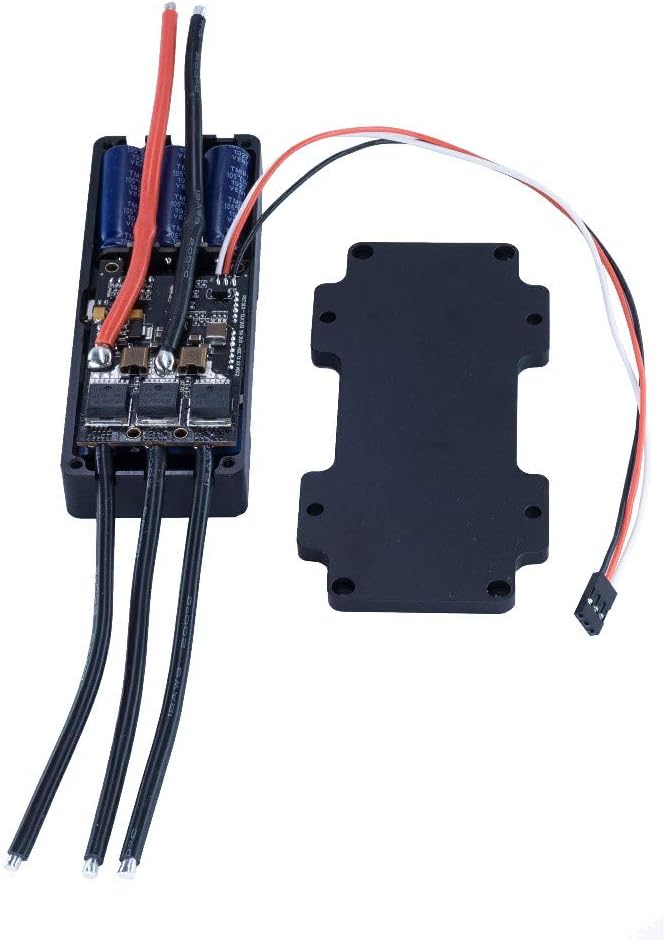
Image 5.1: Internal view of the FSESC 4.12 with the aluminum case removed, illustrating the printed circuit board (PCB) and electronic components. The protective shrink wrap should remain intact.
6. Troubleshooting
If you encounter issues with your FSESC 4.12, consider the following common troubleshooting steps:
- No Power: Check battery connections, ensure the battery is charged, and verify the main power switch (if applicable) is on.
- Motor Not Spinning/Erratic Behavior:
- Verify all motor phase wire connections are secure.
- If using a sensored motor, check the sensor wire connection.
- Reconnect the ESC to the VESC BLDC Tool and re-run motor detection.
- Check for any error codes or warnings in the VESC BLDC Tool.
- No Response from Controller: Ensure your RC receiver is properly bound to your transmitter and the PWM signal cable from the ESC is correctly connected to the receiver's throttle channel.
- Overheating: Check for proper airflow around the ESC. Reduce load or consider a larger heatsink if persistent. Ensure the aluminum case is clean.
- Sudden Shutdown: This could indicate a battery low-voltage cutoff. Check your battery voltage and the cutoff settings in the VESC BLDC Tool.
If these steps do not resolve the issue, please contact FLIPSKY customer support for further assistance.
7. Warranty and Support
The FLIPSKY FSESC 4.12 comes with a limited warranty against manufacturing defects.
- Warranty Period: This product is covered by a 2-month warranty from the date of purchase.
- Warranty Exclusions: The warranty does not cover damage caused by improper installation, incorrect wiring, exceeding specified voltage limits, physical abuse, unauthorized modifications (including firmware upgrades not explicitly recommended by FLIPSKY), or removal of the protective shrink wrap.
- Customer Support: For technical assistance, warranty claims, or further inquiries, please contact FLIPSKY customer support through their official website or your point of purchase.