
1. Introduction
Thank you for purchasing the COOAU A4300 Portable Outdoor Movie Projector. This manual provides essential information for the safe and efficient operation of your device. Please read it thoroughly before use and retain it for future reference. The COOAU A4300 is designed to deliver a high-quality home theater experience with its advanced features and versatile connectivity.
2. Product Overview
2.1 Key Features
- High Brightness & Quality Image: Equipped with a high light transmission glass lens, offering 5500 lumens brightness and a 4000:1 contrast ratio for sharper images and vibrant colors. Supports 1080P resolution.
- Large Display Screen: Features a 4.3-inch LCD display screen, providing a larger projection area (45-200 inches) compared to standard 4-inch displays at the same distance.
- Screen Mirroring: Supports wired and wireless projection for iOS and Android devices using MHL/Lightning-HDMI cables or an Anycast WiFi dongle (not included).
- Excellent Sound: Integrated Hi-Fi speakers provide clear, loud, and adjustable audio for an immersive experience.
- Advanced Cooling System: Features an innovative cooling system with two fans, increasing heat dissipation efficiency by 20% and extending the LED lamp lifespan up to 70,000 hours.
- Multimedia Connectivity: Comprehensive ports including HDMI, USB, VGA, and AV for connecting various devices such as TV sticks, TV boxes, PCs, smartphones, DVD players, USB sticks, laptops, PS4, and Xbox.
- Zoom Function: Supports 25% zoom function adjustment to easily achieve a suitable image size without moving the projector.
2.2 Product Components
The COOAU A4300 projector comes with the main unit and a remote control. Ensure all components are present upon unboxing.

Image: The COOAU A4300 projector shown with its included remote control, highlighting its compact design and connectivity ports.

Image: A top-down view of the COOAU A4300 projector, illustrating its extensive connectivity options including AV, headphone, HDMI, USB, and VGA ports.
3. Setup
3.1 Placement
Place the projector on a stable, flat surface or mount it according to your preference. Ensure there is adequate ventilation around the projector to prevent overheating. The optimal projection distance ranges from 4.6ft to 18.7ft, yielding a screen size of 45 to 200 inches.
3.2 Power Connection
- Connect the power cable to the projector's power input.
- Plug the other end of the power cable into a suitable electrical outlet (240 Volts AC).
- Press the power button on the projector or remote control to turn on the device.
3.3 Focus and Keystone Correction
Adjust the focus ring on the projector lens until the image appears sharp and clear. Use the keystone correction feature to correct trapezoidal distortion if the projector is not perfectly perpendicular to the screen.
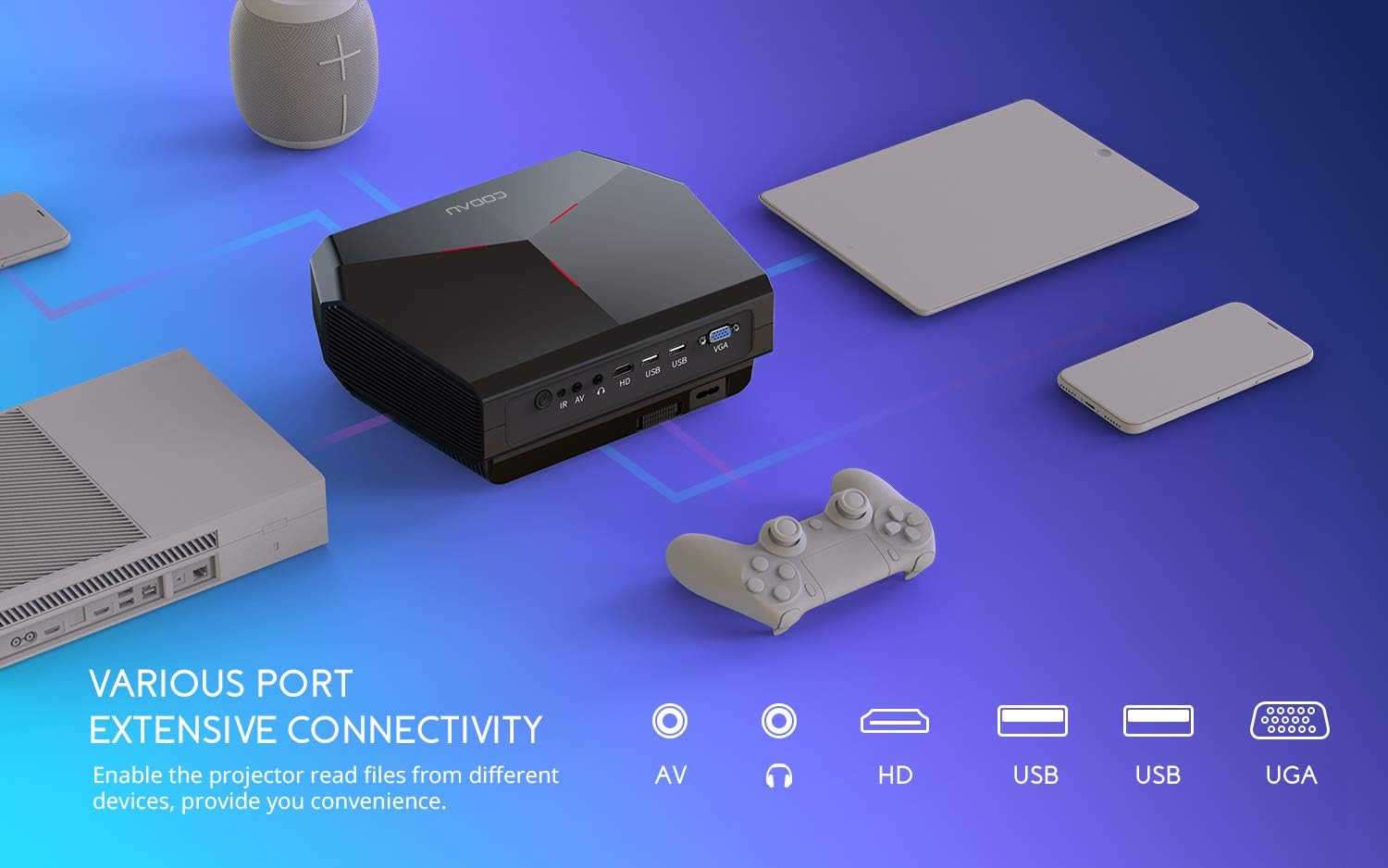
Image: The COOAU A4300 projector demonstrating the focus adjustment and keystone correction features, showing how to achieve a clear and properly shaped image.
4. Operating Instructions
4.1 Connecting External Devices
The COOAU A4300 projector offers multiple input options for various devices:
- PC: Connect via the VGA input.
- USB Stick / HDD: Insert into the USB input port.
- DVD / Multimedia Playback: Connect via the AV output.
- Earphone / Speaker: Connect external audio devices via the Audio Output.
- TV Box / Fire Stick TV / Roku Stick / Chromecast / Laptop / iPad / iPhone / Android Phone / PS3 / PS4 / Xbox: Connect via the HDMI input.
4.2 Screen Mirroring (Smartphone/Tablet)
The projector supports screen mirroring for both iOS and Android devices:
- For Android Phones: A Micro USB to HDMI MHL cable (not included) is required. Ensure your mobile phone supports the MHL function.
- For iPhone/iPad: A Lightning/USB Type-C to HDMI cable (not included) is required.
- For MacBook Air: A Mini Display to HDMI cable (not included) is required.
- Wireless Connectivity: The projector also supports wireless connectivity via a WiFi Dongle (not included). Ensure the stability of the WiFi Dongle for reliable wireless projection.

Image: A visual representation of connecting a smartphone to the COOAU A4300 projector for screen mirroring, illustrating the necessary cable connections for iOS and Android devices.
5. Maintenance
Regular maintenance ensures optimal performance and extends the lifespan of your projector.
- Lens Cleaning: Gently clean the projector lens with a soft, lint-free cloth designed for optical surfaces. Avoid abrasive materials or harsh chemicals.
- Ventilation: Ensure the ventilation vents are clear of dust and obstructions. The advanced cooling system helps maintain optimal operating temperature, but proper airflow is crucial.
- Storage: When not in use for extended periods, store the projector in a cool, dry place, protected from dust and direct sunlight.
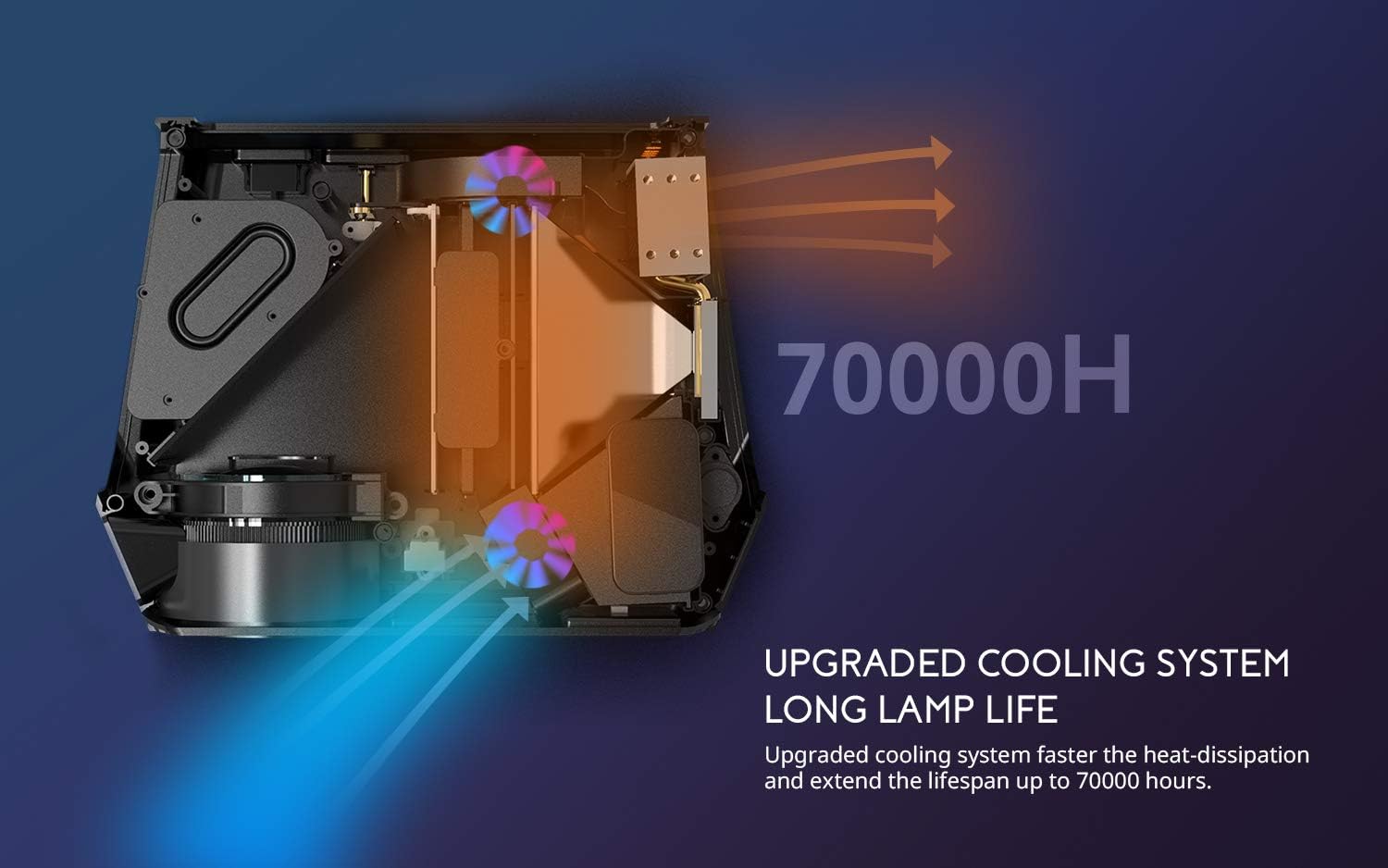
Image: An internal view of the COOAU A4300 projector, highlighting its upgraded cooling system with dual fans designed to dissipate heat efficiently and extend lamp life up to 70,000 hours.
6. Troubleshooting
If you encounter issues with your COOAU A4300 projector, refer to the following common problems and solutions:
| Problem | Possible Cause | Solution |
|---|---|---|
| No image displayed | Loose cable connection, incorrect input source, projector off. | Check all cable connections. Select the correct input source using the remote or projector buttons. Ensure the projector is powered on. |
| Image is blurry | Out of focus, incorrect projection distance, keystone not adjusted. | Adjust the focus ring on the lens. Ensure the projector is within the recommended projection distance. Use keystone correction to square the image. |
| No sound | Volume too low, external speaker not connected, audio format not supported. | Increase the volume on the projector or connected device. Ensure external speakers are properly connected. Verify the audio format is supported. |
| Remote control not working | Dead batteries, obstruction, too far from projector. | Replace batteries. Remove any obstructions between the remote and projector. Ensure you are within effective range. |
7. Specifications
| Feature | Specification |
|---|---|
| Brand | COOAU |
| Model | A4300 |
| Brightness | 5500 Lumens |
| Contrast Ratio | 4000:1 |
| Native Resolution | 1280 x 720P |
| Maximum Resolution Supported | 1920 x 1080P |
| Projection Size | 45-200 Inches |
| Projection Distance | 4.6ft - 18.7ft |
| Display Technology | LCD (4.3 Inch Display Screen) |
| Aspect Ratio | 16:9 / 4:3 |
| Lamp Lifespan | Up to 70,000 hours |
| Connectivity | HDMI, USB, VGA, AV, Audio Out |
| Power Source | AC (240 Volts) |
| Wattage | 150 watts |
| Form Factor | Portable |
| Mounting Type | Tabletop Mount |
| Item Dimensions | 33.4 x 22.91 x 13 cm; 2.08 kg |
8. Warranty and Support
COOAU provides comprehensive support for your A4300 projector:
- Return Policy: 60-day money-back guarantee.
- Repair Warranty: 3-year repair service.
- Technical Support: Lifetime professional technical support.
For any problems or inquiries, please contact COOAU customer service via email. We are committed to providing prompt assistance to resolve any issues you may encounter.