
Karcher 1.513-305.0
Kärcher SC 3 EasyFix Steam Cleaner Steam Mop Instruction Manual
Model: 1.513-305.0
1. Product Overview
The Kärcher SC 3 Upright EasyFix steam mop is designed for cleaning sealed hard floors, including wood. It features a 3-step steam flow control, rapid 30-second heat-up time, and a permanently refillable, removable fresh water tank. The EasyFix floor nozzle with hook-and-loop fastener and high-quality microfiber cloths ensure effective cleaning. A Carpet Glider attachment is included for refreshing carpeted floors and rugs.
Key Features:
- Naturally Deep Clean: Utilizes steam heated to over 200°F to eliminate grease and stains from various surfaces.
- Multi-Functional Cleaning: Suitable for stone, LVT, vinyl, tile, and laminate floors. Includes a Carpet Glider for rugs and carpets.
- Maximized Cleaning Surface: Lamella technology distributes steam edge-to-edge for efficient cleaning.
- Edge to Edge Cleaning: Flexible hinge on the cleaning head allows access under furniture and into corners.
- Non-Stop Steam and Integrated Descaling Cartridge: Removable tank for continuous steam. Automatic descaling extends product life.

Figure 1: Kärcher SC 3 EasyFix Steam Cleaner Steam Mop.

Figure 2: Diagram highlighting key features of the SC 3 Upright EasyFix, including Steam Flow Control, Cable Hooks, LED operating indicator, Power & Descaling Controls, Descaling Cartridge, Washable Steam Cloths, and Carpet Glider.
2. Important Safety Information
Please read all instructions carefully before using the Kärcher SC 3 EasyFix Steam Cleaner. Failure to follow these instructions may result in electric shock, fire, or serious injury.
- Electrical Safety: Always ensure the power cord is undamaged and connected to a grounded outlet. Do not operate the appliance with a damaged cord or plug.
- Hot Steam Hazard: Steam is extremely hot and can cause severe burns. Keep hands, face, and body away from the steam nozzle. Do not direct steam at people, pets, or electrical appliances.
- Water Tank: Only use clean tap water. Do not add detergents, perfumes, or other chemicals to the water tank, as this can damage the appliance or create hazardous fumes.
- Surface Compatibility: Do not use the steam cleaner on unsealed wooden floors, delicate fabrics, or surfaces that are sensitive to heat or moisture. Test on an inconspicuous area first.
- Children and Pets: Keep the appliance out of reach of children and pets. Supervise children to ensure they do not play with the appliance.
- Storage: Always unplug the appliance and allow it to cool completely before storing. Store in a dry, safe place.
3. Setup and Assembly
Follow these steps to prepare your Kärcher SC 3 EasyFix Steam Cleaner for first use.
3.1 Unpacking
- Carefully remove all components from the packaging.
- Check that all parts listed in the packing contents are present and undamaged.
3.2 Filling the Water Tank and Inserting Descaling Cartridge
The removable water tank allows for easy refilling. The integrated descaling cartridge helps maintain the appliance.
- Remove the water tank from the appliance.
- Open the cap and fill the tank with clean tap water up to the "MAX" mark (500 ml).
- Ensure the descaling cartridge is properly inserted into the tank before closing the cap.
- Reinsert the filled water tank into the appliance.

Figure 3: Steps for filling the water tank with tap water and inserting the descaling cartridge.
3.3 Attaching the Microfiber Floor Cloth
The EasyFix floor nozzle allows for effortless cloth changing.
- Place a microfiber floor cloth on the floor.
- Press the floor nozzle onto the cloth, ensuring the hook-and-loop fasteners secure it firmly.

Figure 4: Attaching the microfiber cloth to the steam mop head using the hook-and-loop system.
3.4 Powering On and Heating Up
- Plug the power cord into a suitable electrical outlet.
- Press the power button. The LED indicator will illuminate, typically red, indicating the appliance is heating up.
- Wait approximately 30 seconds for the appliance to heat up. The LED indicator will turn green when ready for use.
Video 1: Demonstrates the setup process, including filling the water tank, attaching the cloth, and the 30-second heat-up time of the Kärcher SC 3 Upright Steam Mop.
4. Operating Instructions
Once the steam cleaner is ready, follow these steps for effective cleaning.
4.1 Selecting Steam Level
The SC 3 EasyFix offers three steam levels for different floor types:
- Level 1 (Low): For delicate surfaces like sealed wood.
- Level 2 (Medium): For general cleaning of hard floors.
- Level 3 (High): For heavily soiled areas or robust surfaces like tile.
Press the steam level button on the handle to cycle through the settings. The corresponding indicator light will illuminate.

Figure 5: Close-up of the steam level controls on the handle, showing options for different floor types.
4.2 Cleaning Hard Floors
- Select the appropriate steam level for your floor type.
- Hold the steam trigger on the handle to release steam.
- Move the steam mop slowly and steadily across the floor surface. For stubborn dirt, hold the mop over the area for a few seconds to allow the steam to penetrate.
- The flexible hinge allows cleaning under furniture and around obstacles.
Figure 6: A user cleaning a hard floor with the Kärcher SC 3 EasyFix steam mop.

Figure 7: The flexible head design allows for easy cleaning under furniture.
4.3 Using the Carpet Glider
To refresh carpets and rugs, attach the included Carpet Glider.
- Place the floor nozzle (with microfiber cloth attached) into the Carpet Glider.
- Select a suitable steam level (usually medium or high).
- Move the steam mop over the carpet or rug in overlapping passes. Do not hold the mop in one spot for too long to avoid excessive moisture.
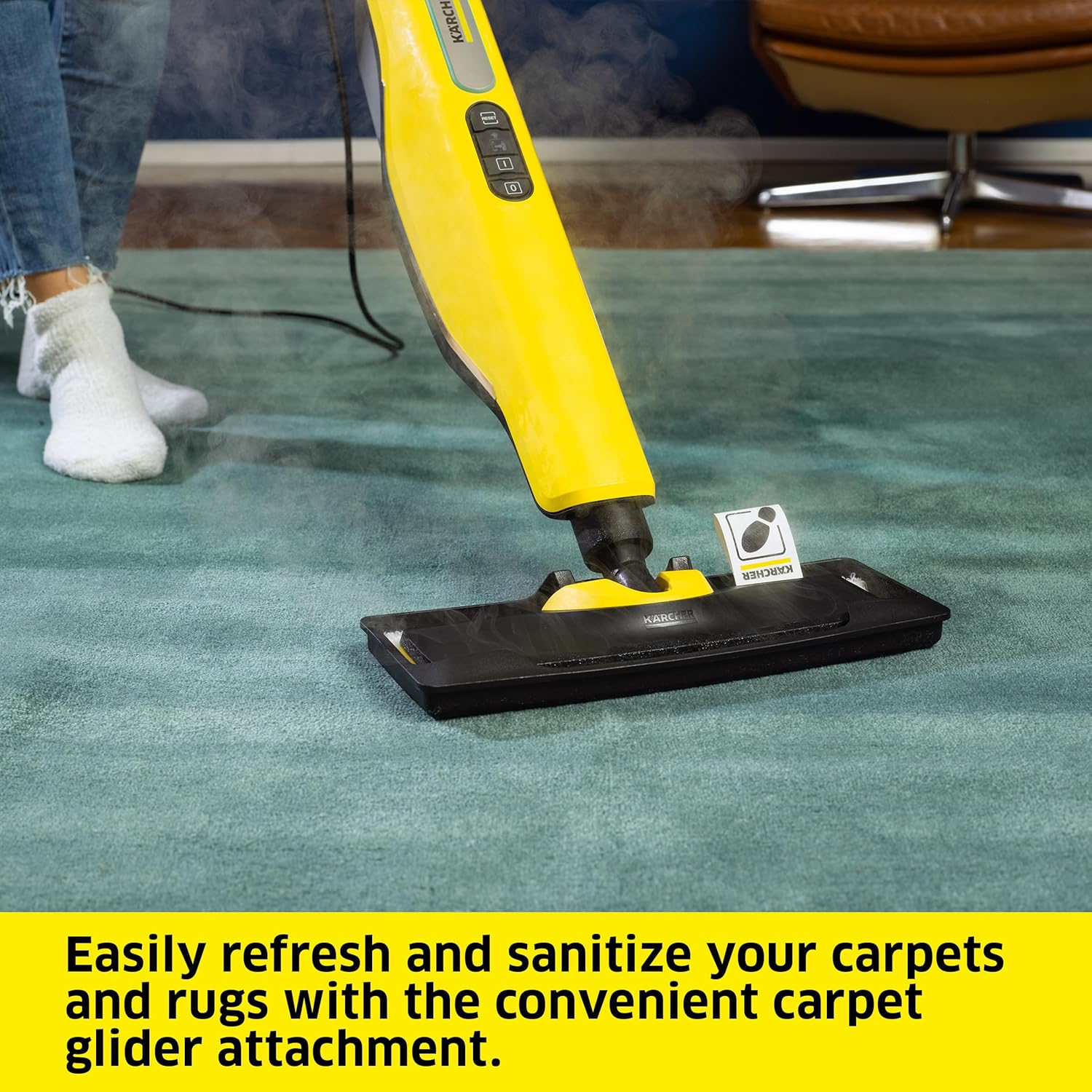
Figure 8: The Kärcher SC 3 EasyFix steam mop with the carpet glider attachment in use on a rug.
Video 2: Illustrates the effectiveness of steam cleaning in killing bacteria and viruses, showcasing various applications including floor cleaning.
5. Maintenance and Care
Regular maintenance ensures optimal performance and extends the lifespan of your steam cleaner.
5.1 Cleaning Microfiber Cloths
The microfiber floor cloths are washable and reusable.
- Remove the dirty microfiber cloth from the floor nozzle by stepping on the tab and lifting the mop.
- Wash the cloth in a washing machine at a maximum temperature of 60°C (140°F). Do not use fabric softener, as it can reduce the cleaning effectiveness of the microfiber.
- Allow the cloth to air dry completely before reuse or storage.

Figure 9: Removing the microfiber cloth from the steam mop head for cleaning.
5.2 Replacing the Descaling Cartridge
The integrated descaling cartridge automatically removes limescale. Replace it when indicated by the appliance or after prolonged use to ensure optimal performance and longevity.
- Ensure the appliance is unplugged and cooled down.
- Remove the water tank.
- Carefully remove the old descaling cartridge.
- Insert a new Kärcher descaling cartridge into the water tank.
- Refill the water tank and reinsert it into the appliance.
5.3 Storage
After use, unplug the steam cleaner and allow it to cool. Wrap the power cord around the integrated cable hooks. Store the appliance upright in a dry, safe place.

Figure 10: The Kärcher SC 3 EasyFix steam mop stored upright, showcasing its compact design.
6. Troubleshooting
If you encounter issues with your Kärcher SC 3 EasyFix, refer to the following common problems and solutions:
| Problem | Possible Cause | Solution |
|---|---|---|
| No steam or very little steam. | Water tank empty; appliance not heated up; descaling cartridge needs replacement. | Refill water tank; wait for LED to turn green; replace descaling cartridge. |
| Appliance not turning on. | Not plugged in; power outlet fault; power button not pressed. | Check power connection; try a different outlet; press power button firmly. |
| Streaks on floor after cleaning. | Microfiber cloth is dirty or worn; too much steam used; floor not suitable for steam cleaning. | Wash or replace microfiber cloth; reduce steam level; ensure floor is sealed and suitable. |
| Water leaking from floor nozzle. | Appliance not fully heated; microfiber cloth not properly attached. | Wait for LED to turn green; reattach microfiber cloth securely. |
If the problem persists after trying these solutions, please contact Kärcher customer support.
7. Technical Specifications
| Specification | Detail |
|---|---|
| Brand | Karcher |
| Model Name | SC 3 Upright |
| Item Model Number | 1.513-305.0 |
| Power Source | AC/DC |
| Voltage | 120 V |
| Wattage | 1600 watts |
| Heat Time | 30 Seconds |
| Maximum Temperature | 212 Degrees Fahrenheit |
| Tank Volume | 17 Fluid Ounces (approx. 500 ml) |
| Item Weight | 10.18 pounds (4.63 Kilograms) |
| Product Dimensions (L x W x H) | 12.4 x 8.2 x 46.7 inches |
| Included Components | SC 3 Upright, 2 Microfiber Floor Cloths, Carpet Glider Attachment |
| Surface Recommendation | Hard Floors, Carpet |
8. Warranty Information
The Kärcher SC 3 EasyFix Steam Cleaner comes with a 3 Year Limited Warranty. This warranty covers defects in materials and workmanship under normal use. Please retain your proof of purchase for warranty claims.
For full terms and conditions of the warranty, please refer to the official Kärcher website or contact customer support.
9. Customer Support
For further assistance, technical support, or to order replacement parts, please contact Kärcher customer service:
- Website: www.karcher.com
- Phone: Refer to your regional Kärcher website for local contact numbers.
- Email: Refer to your regional Kärcher website for contact forms or email addresses.
When contacting support, please have your product model number (1.513-305.0) and serial number ready.
Related documents1.513-305.0

Ask a question about this manual
Ask about setup, troubleshooting, compatibility, parts, safety, or missing instructions. Manuals+ will review the question and use this page’s manual context to help answer it.