
1. Introduction
The Miroir M189 is a compact and portable HD DLP projector designed for versatile entertainment and presentation needs. Featuring native 720p resolution, a powerful LED lamp, and a built-in speaker, it delivers clear images and audio. Its battery-powered design allows for up to 3 hours of use, making it ideal for on-the-go projection. This manual provides essential information for setting up, operating, and maintaining your Miroir M189 projector.
2. What's in the Box
Please check the contents of your Miroir M189 package. If any items are missing or damaged, please contact customer support.
- Miroir M189 Projector
- Power Cord
- AC Adapter
- User Manual (this document)
3. Product Overview
3.1 Key Features
- Native 720p (1280 x 720) Resolution for clear, detailed images.
- DLP Image Technology for vibrant colors and sharp contrast.
- LED Lamp with 200 lumens of brightness for vivid projection.
- Up to 3 Hours Battery Life for portable use.
- Built-In 5W Speaker for integrated audio.
- HDMI Input for connecting various devices.
- Compact and Portable Design.
3.2 Projector Components

Figure 3.2.1: Front View
This image shows the front of the Miroir M189 projector, highlighting the projection lens and the integrated speaker grille. The lens emits the light for the projected image, while the grille covers the internal speaker.

Figure 3.2.2: Side View with Stand
This image displays the side of the Miroir M189 projector, showing the integrated stand extended from the bottom. This stand allows for easy adjustment of the projection angle.
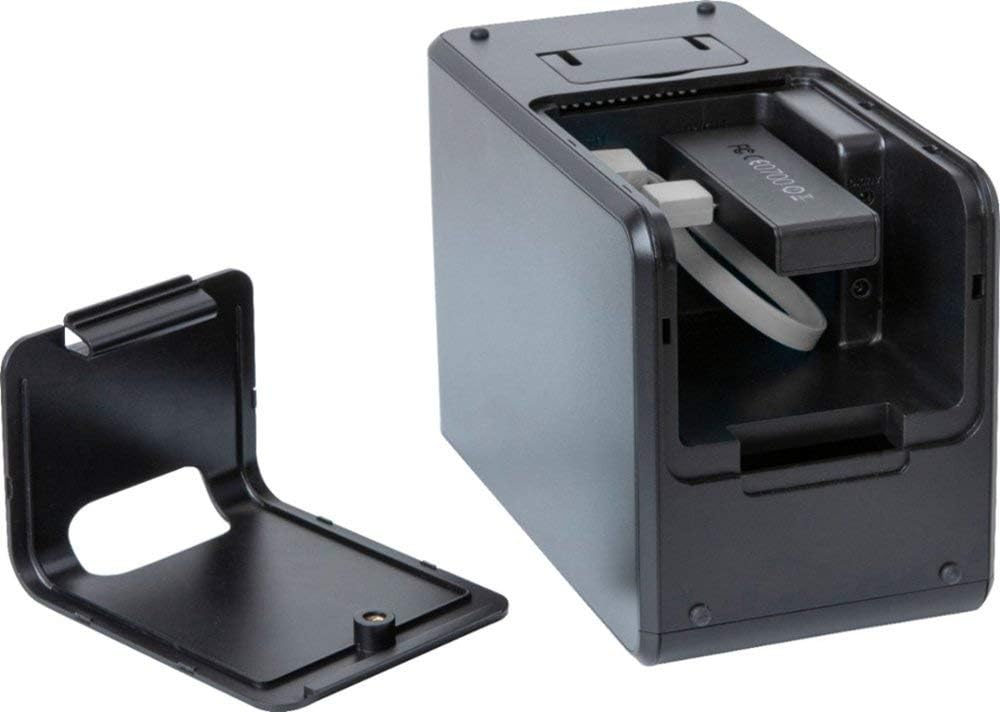
Figure 3.2.3: Rear View with Ports
This image illustrates the rear of the Miroir M189 projector with its port cover opened. This reveals the various connectivity options, including the HDMI input and power port.

Figure 3.2.4: Top View with Controls
This image shows the top surface of the Miroir M189 projector, where the main control buttons are located. These buttons allow for power on/off, volume adjustment, and menu navigation.
4. Setup
4.1 Powering On/Off
- Charging: Before first use, fully charge the projector using the provided AC adapter and power cord. The charging indicator light will show the charging status.
- Power On: Press and hold the Power button on the top of the projector for a few seconds until the LED lamp illuminates.
- Power Off: Press and hold the Power button again until the projector shuts down.
4.2 Connecting Devices
The Miroir M189 projector supports HDMI input for connecting various devices.
- Locate the HDMI port on the rear of the projector (under the cover).
- Connect one end of an HDMI cable (not included) to the projector's HDMI input.
- Connect the other end of the HDMI cable to the HDMI output port of your source device (e.g., laptop, streaming stick, game console).
- Ensure both devices are powered on. The projector should automatically detect the input, or you may need to select the HDMI source from the projector's menu.
4.3 Focus Adjustment
To achieve a clear image, adjust the focus wheel located on the side of the projector.
- Turn the focus wheel slowly until the projected image appears sharp and clear on your screen or wall.
4.4 Projector Placement
Place the projector on a stable, flat surface. For optimal viewing, position the projector directly in front of your projection surface. Use the integrated stand to adjust the vertical angle if needed.
5. Operating
5.1 Basic Operation
- Source Selection: If the projector does not automatically switch to the correct input, use the menu buttons on the top of the projector to navigate and select the desired input source (e.g., HDMI).
- Volume Control: Use the volume buttons on the projector's top panel to increase or decrease the audio output.
- Menu Navigation: Use the navigation buttons to access and adjust settings such as picture mode, aspect ratio, and keystone correction (if available).
5.2 Battery Life and Charging
- The projector provides up to 3 hours of battery life on a full charge. Actual battery life may vary based on usage and settings.
- When the battery is low, the projector may display a low battery indicator. Connect the AC adapter to continue use or recharge.
- The projector can be used while charging.
6. Maintenance
6.1 Cleaning the Lens
- Use a soft, lint-free cloth specifically designed for optical lenses to gently wipe the projector lens.
- Do not use abrasive cleaners or solvents, as they can damage the lens coating.
- For stubborn dust, use a can of compressed air (held upright) to blow away particles.
6.2 General Cleaning
- Wipe the exterior of the projector with a soft, dry cloth.
- Avoid getting liquids inside the projector.
6.3 Storage
- When not in use for extended periods, store the projector in a cool, dry place, away from direct sunlight and extreme temperatures.
- It is recommended to store the projector in its original packaging or a protective case to prevent dust accumulation and damage.
7. Troubleshooting
If you encounter issues with your Miroir M189 projector, please refer to the following common problems and solutions:
| Problem | Possible Cause | Solution |
|---|---|---|
| No image projected | Projector not powered on; Input source not selected; Cable not connected properly; Source device not outputting signal. | Ensure projector is on; Select correct input source; Check HDMI cable connection; Verify source device is on and outputting video. |
| Image is blurry | Focus not adjusted; Projector too close/far from screen. | Adjust the focus wheel; Reposition the projector to an appropriate distance. |
| No sound | Volume too low; Source device volume low; Audio format not supported. | Increase projector volume; Increase source device volume; Check if the audio format from the source is compatible. |
| Projector shuts off unexpectedly | Low battery; Overheating. | Recharge the battery; Ensure proper ventilation around the projector. |
8. Specifications
| Feature | Specification |
|---|---|
| Brand | Miroir |
| Model Number | M189 |
| Display Technology | DLP |
| Native Resolution | 1280 x 720 (720p) |
| Brightness | 200 lumens |
| Contrast Ratio | 300:1 |
| Lamp Type | LED |
| Battery Life | Up to 3 hours |
| Speaker | Built-In 5W Speaker |
| Connectivity | HDMI Input |
| Throw Ratio Range | 1.2:1 |
| Item Weight | 3.58 pounds |
| Package Dimensions | 10.94 x 5.83 x 4.09 inches |
| Batteries Required | 1 Lithium Ion (included) |
9. Warranty and Support
For warranty information and customer support, please refer to the documentation included with your purchase or visit the official Miroir website. You may also contact the seller directly for assistance.
Miroir USA Seller: View Seller Information


