
Iproda T1045A
iProda T1045A 10.1 inch Android Tablet User Manual
Comprehensive instructions for your iProda T1045A Android Tablet.
1. Introduction
This manual provides detailed instructions for the setup, operation, maintenance, and troubleshooting of your iProda T1045A 10.1 inch Android Tablet. Please read this manual thoroughly before using your device to ensure proper functionality and to maximize your user experience.
The iProda T1045A is a 10.1-inch tablet featuring an HD IPS display with 1280x800 resolution, powered by a 64-bit Quad-core processor running Android 9 Pie. It includes 3GB RAM, 64GB internal storage expandable up to 128GB via TF card, dual-band Wi-Fi, HDMI output, and a 5000mAh battery for extended use.
2. Product Overview
2.1 Package Contents
Upon opening the package, verify that all items are present:
- iProda T1045A 10.1 inch Android Tablet
- USB Cable
- Power Adapter
- User Manual (this document)

Image: Contents of the iProda T1045A tablet package.
2.2 Device Layout
Familiarize yourself with the physical components and ports of your tablet:
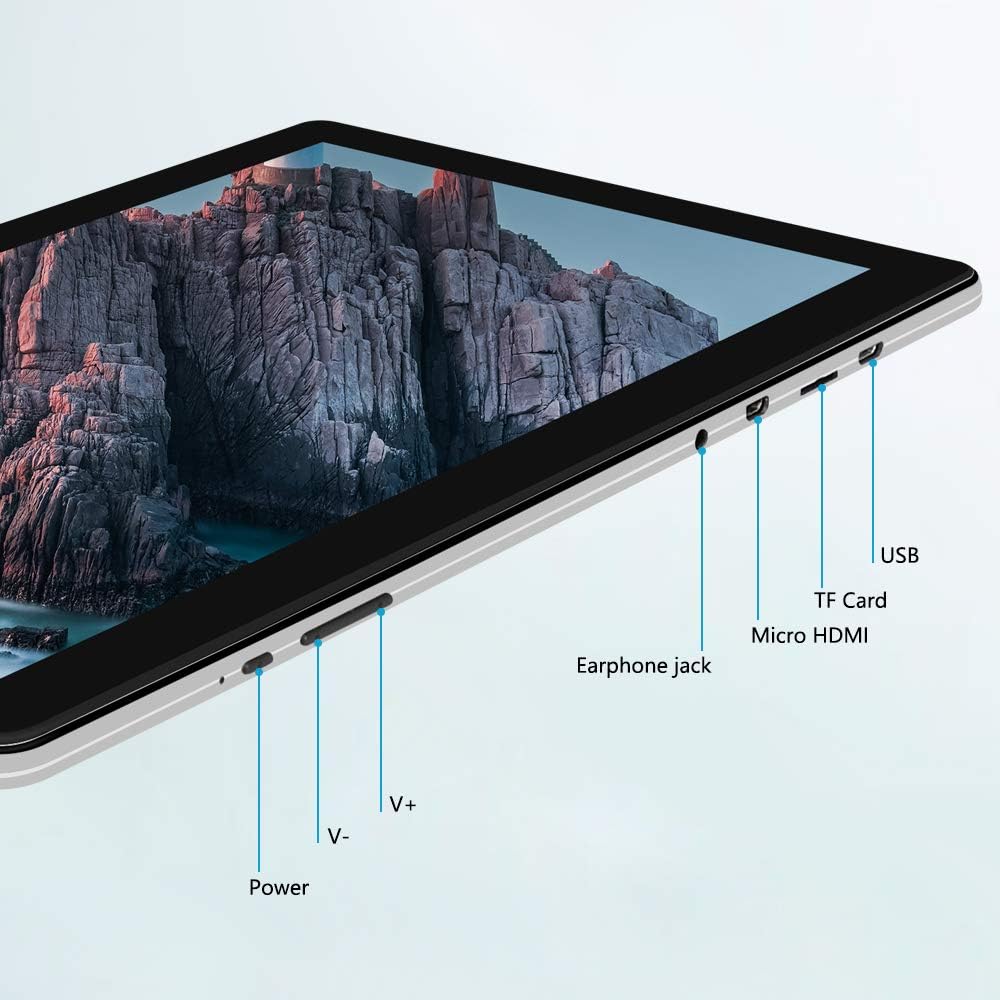
Image: Side view of the iProda T1045A tablet highlighting port locations.
- Power Button: Press and hold to power on/off or restart the tablet. Short press to turn the screen on/off.
- Volume Buttons (V+, V-): Adjust the audio volume.
- Earphone Jack: Connect 3.5mm headphones.
- TF Card Slot: Insert a microSD card for expandable storage (up to 128GB).
- Micro HDMI Port: Connect to an external display using a Micro HDMI to HDMI cable.
- USB Port: Connect to a computer for data transfer or for charging the device.
3. Setup
3.1 Initial Charging
Before first use, fully charge the tablet. Connect the provided USB cable to the tablet's USB port and the power adapter, then plug the adapter into a wall outlet. The charging indicator will typically illuminate. A full charge may take several hours.
3.2 Powering On/Off
- To Power On: Press and hold the Power button until the screen lights up.
- To Power Off: Press and hold the Power button until a power menu appears on the screen. Select "Power off" and confirm.
- To Restart: From the power menu, select "Restart".
- Screen On/Off: Briefly press the Power button to turn the screen off (sleep mode) or wake it up.
3.3 Initial Setup Wizard
The first time you power on the tablet, you will be guided through an initial setup process. Follow the on-screen prompts to:
- Select your preferred language.
- Connect to a Wi-Fi network.
- Set up your Google account (optional, but recommended for app downloads).
- Configure date and time settings.
3.4 Inserting a TF Card (MicroSD)
To expand the tablet's storage:
- Locate the TF card slot on the side of the tablet.
- Carefully insert a microSD card (up to 128GB) into the slot with the gold contacts facing down until it clicks into place.
- To remove, gently push the card inward until it springs out.
4. Operating Instructions
4.1 Basic Navigation
The iProda T1045A uses a touch-sensitive screen for navigation:
- Tap: Select an item or open an application.
- Tap and Hold: Access contextual menus or move icons.
- Swipe: Scroll through lists or switch between home screens.
- Pinch: Zoom in or out on images and web pages.
4.2 Wi-Fi Connection
To connect to a wireless network:
- Go to Settings > Network & Internet > Wi-Fi.
- Toggle Wi-Fi On.
- Select your desired network from the list.
- Enter the password if prompted, then tap Connect.
The tablet supports both 2.4G and 5G dual-band Wi-Fi for faster and more stable connections.
4.3 Bluetooth Pairing
To pair with Bluetooth devices (e.g., headphones, speakers):
- Go to Settings > Connected devices > Bluetooth.
- Toggle Bluetooth On.
- Ensure your Bluetooth device is in pairing mode.
- Select your device from the list of available devices and follow any on-screen prompts to complete pairing.
4.4 Using the Cameras
The tablet is equipped with a 2MP front camera and a 5MP rear camera.
- Open the Camera application from the app drawer.
- Tap the camera icon to switch between front and rear cameras.
- Tap the shutter button to take photos or start/stop video recording.

Image: Tablet in use, showcasing its camera capabilities.
4.5 Connecting to an External Display (HDMI)
To display your tablet's screen on a larger monitor or TV:
- Connect one end of a Micro HDMI cable to the tablet's Micro HDMI port.
- Connect the other end of the cable to an HDMI input on your external display.
- Select the correct HDMI input source on your external display.
- The tablet's screen content should now be mirrored on the external display.
4.6 App Management
The tablet runs Android 9 Pie and supports applications from the Google Play Store.
- Installing Apps: Open the Play Store app, search for your desired application, and tap Install.
- Uninstalling Apps: Tap and hold an app icon on the home screen or in the app drawer, then drag it to "Uninstall" or select "App info" and choose "Uninstall". Alternatively, go to Settings > Apps & notifications, select the app, and tap Uninstall.
5. Maintenance
5.1 Cleaning the Device
To clean your tablet:
- Power off the tablet before cleaning.
- Use a soft, lint-free cloth, slightly dampened with water or a screen cleaner, to wipe the screen and body.
- Avoid using harsh chemicals, abrasive cleaners, or excessive moisture.
5.2 Software Updates
Periodically check for software updates to ensure optimal performance and security:
- Go to Settings > System > Advanced > System update.
- Follow the on-screen instructions to download and install any available updates. Ensure your tablet is sufficiently charged or connected to power during updates.
5.3 Storage Management
To manage internal storage and the TF card:
- Go to Settings > Storage.
- Here you can view storage usage, free up space, and manage files on both internal storage and the inserted TF card.
6. Troubleshooting
This section addresses common issues you might encounter with your iProda T1045A tablet.
6.1 Device Not Powering On
- Ensure the tablet is sufficiently charged. Connect it to the power adapter and allow it to charge for at least 30 minutes before attempting to power on again.
- Try holding the Power button for 10-15 seconds to force a restart.
6.2 Wi-Fi Connection Issues
- Verify that Wi-Fi is enabled in Settings.
- Ensure you are entering the correct Wi-Fi password.
- Restart your Wi-Fi router and the tablet.
- Try connecting to a different Wi-Fi network to determine if the issue is with the tablet or the network.
6.3 Slow Performance
- Close unnecessary background applications.
- Clear cached data for apps in Settings > Apps & notifications > [App Name] > Storage & cache > Clear cache.
- Ensure sufficient free storage space. Uninstall unused apps or move large files to a TF card.
- Restart the tablet.
6.4 Battery Draining Quickly
- Reduce screen brightness.
- Disable Wi-Fi, Bluetooth, and GPS when not in use.
- Close background apps that consume significant power.
- Check battery usage in Settings > Battery to identify power-hungry apps.
- Ensure the tablet is not allowed to run below 15% charge frequently, as this can impact battery longevity.
6.5 Factory Reset
If persistent issues occur, a factory reset may resolve them. Warning: This will erase all data on your tablet. Back up important data before proceeding.
- Go to Settings > System > Advanced > Reset options.
- Select Erase all data (factory reset).
- Confirm your decision and follow the on-screen prompts.
7. Specifications
Below are the technical specifications for the iProda T1045A tablet:
| Model Name | T1045A |
| Operating System | Android 9 Pie |
| Display Size | 10.1 Inches |
| Display Resolution | 1280 x 800 pixels (HD IPS) |
| Processor | MediaTek Quad-core 1.5Ghz |
| RAM | 3 GB |
| Internal Storage | 64 GB SSD |
| Expandable Storage | Up to 128 GB via TF Card (MicroSD) |
| Graphics Coprocessor | ARM Mali-T720 MP2 |
| Rear Camera | 5 MP |
| Front Camera | 2 MP |
| Battery Capacity | 5000 mAh Lithium Polymer |
| Average Battery Life | Up to 8 hours |
| Wireless Connectivity | Dual-Band Wi-Fi (802.11a/b/g/n), Bluetooth 4.0 |
| Ports | 1x USB 2.0, 1x Micro HDMI, 3.5mm Earphone Jack, TF Card Slot |
| Dimensions | 34.5 x 19.7 x 5.5 cm |
| Weight | 550 g |

Image: Key performance specifications of the tablet.

Image: Tablet portability and battery details.
8. Warranty and Support
8.1 Product Warranty
The iProda T1045A tablet comes with a 12-month warranty from the date of purchase. This warranty covers manufacturing defects and malfunctions under normal use. It does not cover damage caused by misuse, accidents, unauthorized repairs, or normal wear and tear.
8.2 Customer Support
If you encounter any issues not covered in the troubleshooting section or require further assistance, please contact iProda customer support. Refer to your purchase documentation or the iProda official website for contact information.
When contacting support, please have your tablet's model number (T1045A) and purchase details readily available.
Ask a question about this manual
Ask about setup, troubleshooting, compatibility, parts, safety, or missing instructions. Manuals+ will review the question and use this page’s manual context to help answer it.